> ## Documentation Index
> Fetch the complete documentation index at: https://docs.quickblox.com/llms.txt
> Use this file to discover all available pages before exploring further.
# Workflow nodes
> Reference of every workflow node type and when to use it
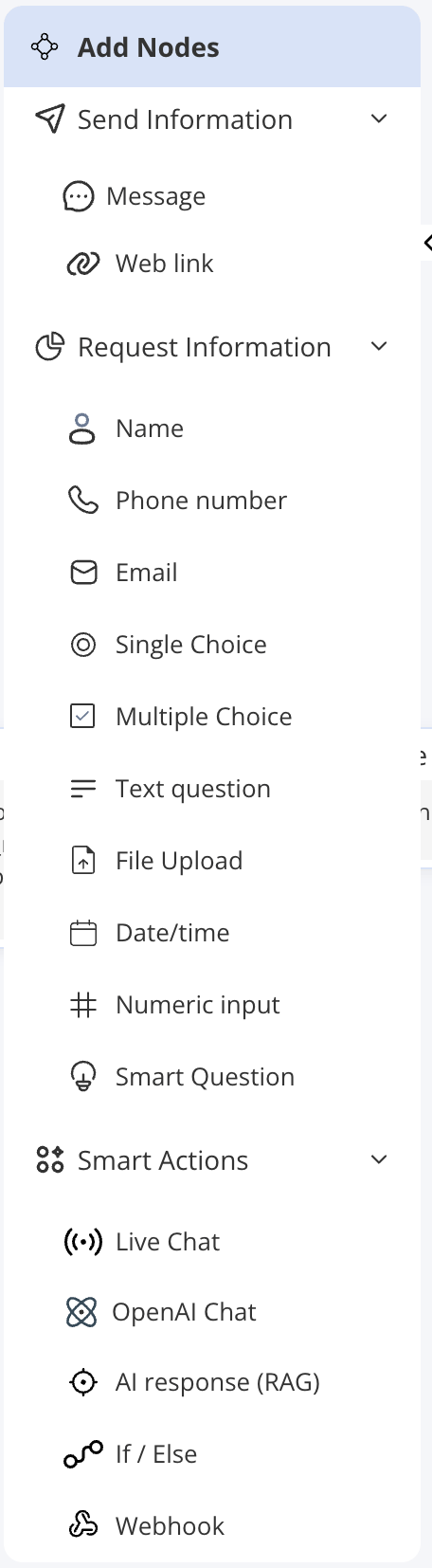
Nodes are the building blocks of a workflow. Each node represents one step in the conversation. You add nodes by dragging them from the node palette onto the canvas, then configure them in the Node Settings panel.
Nodes are organised into four groups in the UI: **Send**, **Request**, **Smart Actions**, and the fixed **Start / End** pair.
 ***
## Send nodes
Send nodes deliver content to the user without expecting a reply.
| Node | Description | When to use |
| ------------ | ---------------------------------------------------------------------------------------------------------------------------------------------- | ----------------------------------------------------------------------------------------- |
| **Message** | Sends a predefined text message to the user. Supports variable substitution so you can personalise the text with previously collected answers. | Greetings, instructions, confirmations, or any static text you want the agent to display. |
| **Web link** | Sends a clickable link with optional label text. | Directing users to a webpage, documentation, or an external resource. |
***
## Request nodes
Request nodes ask the user for information and wait for a response. Each answer can be saved as a named variable for use later in the flow.
| Node | Description | When to use |
| ------------------- | ----------------------------------------------------------------------------------------------------------------------------------------------------------------------------------------------------------------- | ------------------------------------------------------------------------------------------------------------------------------------------------- |
| **Name** | Asks for the user's name. | Personalising the rest of the conversation. |
| **Phone number** | Asks for a phone number, with optional format validation. | Collecting contact details. |
| **Email** | Asks for an email address, with optional format validation. | Collecting contact details or account lookup. |
| **Text question** | Asks a free-text question and accepts any reply. | Open-ended responses where the exact format does not matter. |
| **Numeric input** | Asks for a number. | Order quantities, reference numbers, ages, or any numeric value. |
| **Date/time** | Asks for a date and/or time. | Scheduling, booking, or filtering by date. |
| **File Upload** | Prompts the user to upload a file. | Support tickets, document submissions, or photo evidence. |
| **Single Choice** | Presents a set of options and accepts exactly one selection. | Menus, categories, or yes/no questions. |
| **Multiple Choice** | Presents a set of options and accepts one or more selections. | Preferences, multi-select filters, or feature requests. |
| **Smart Question** | Matches the user's free-text reply against keywords you define for each intent (using **Contain** or **Exact** matching) and routes to that intent's path. A fallback path handles replies that match no keyword. | Routing users based on what they type rather than a button tap — for example, detecting "billing", "technical issue", or "account" from keywords. |
***
## Smart Actions nodes
Smart Actions perform logic, AI operations, or integrations.
| Node | Description | When to use |
| --------------------- | ----------------------------------------------------------------------------------------------------------------------------------------------------------------------------------------------------------------------------------------------- | --------------------------------------------------------------------------------------------------------------------------------------------------------------- |
| **OpenAI Chat** | Starts a multi-turn AI conversation within the workflow using the instructions you set on the node. The user can chat back and forth with the AI; the flow moves on to the next node once the configured turn limit (**Max Turns**) is reached. | Conversational sub-flows where you want flexible AI interaction at a specific point in an otherwise structured flow. |
| **AI response (RAG)** | Answers the user's question using the agent's knowledge base. You can optionally enable a fallback — a "don't know" message and/or a fallback node — for when no relevant answer is found. | Knowledge base look-ups at a specific step in the flow; especially useful when you want AI answers only after collecting required context. |
| **If / Else** | Evaluates one or more conditions based on variable values or the previous node's output, then routes the conversation to the matching branch. | Branching the flow based on what the user has already answered — for example, routing VIP customers differently, or skipping steps based on earlier selections. |
| **Webhook** | Sends an HTTP request to an external URL with a method, headers, and body you define (any of which can include collected variables). You must define a **fallback path** for when the webhook call fails. | CRM updates, booking confirmations, look-ups in external systems, or any integration requiring a server-side call. |
| **Live Chat** | Transfers the conversation to a human agent. The workflow pauses while the human handles the conversation. | Escalation scenarios where the issue requires human attention — for example, after a complaint or when the AI cannot resolve the request. |
***
## Start and End nodes
These nodes are fixed anchor points in every workflow.
| Node | Description |
| --------- | -------------------------------------------------------------------------------------------------------------------------------------------------------------------------------------------------------- |
| **Start** | The single entry point of every workflow. Every conversation begins here. It cannot be deleted or duplicated. |
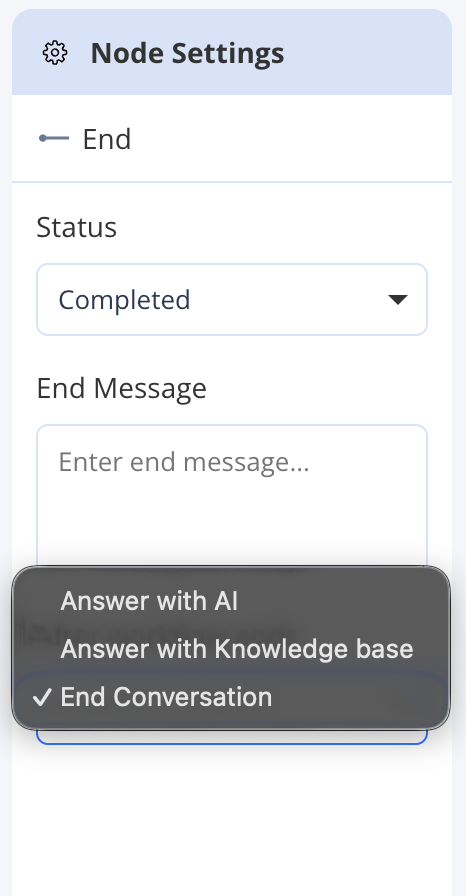
| **End** | Marks the terminal point of a conversation path. You can have multiple End nodes for different paths. Each End node has an **After workflow ends** setting (see below) and an optional farewell message. |
### After workflow ends
Each **End** node has an **After workflow ends** setting that controls what the AI Agent does once a conversation path reaches that End node.
| Setting | Behaviour |
| ------------------------------ | ------------------------------------------------------------------------------------------------------------------------ |
| **Answer with AI** | The agent continues the conversation using its OpenAI instructions — free-form AI answering, as a Knowledge Agent would. |
| **Answer with Knowledge base** | The agent switches to knowledge base (RAG) answering, responding only from uploaded content. |
| **End Conversation** | The conversation is closed. No further AI responses are sent. |
You can set different behaviours on different End nodes within the same workflow — for example, ending the conversation after a successful booking but falling back to AI answering after an informational path.
***
## Send nodes
Send nodes deliver content to the user without expecting a reply.
| Node | Description | When to use |
| ------------ | ---------------------------------------------------------------------------------------------------------------------------------------------- | ----------------------------------------------------------------------------------------- |
| **Message** | Sends a predefined text message to the user. Supports variable substitution so you can personalise the text with previously collected answers. | Greetings, instructions, confirmations, or any static text you want the agent to display. |
| **Web link** | Sends a clickable link with optional label text. | Directing users to a webpage, documentation, or an external resource. |
***
## Request nodes
Request nodes ask the user for information and wait for a response. Each answer can be saved as a named variable for use later in the flow.
| Node | Description | When to use |
| ------------------- | ----------------------------------------------------------------------------------------------------------------------------------------------------------------------------------------------------------------- | ------------------------------------------------------------------------------------------------------------------------------------------------- |
| **Name** | Asks for the user's name. | Personalising the rest of the conversation. |
| **Phone number** | Asks for a phone number, with optional format validation. | Collecting contact details. |
| **Email** | Asks for an email address, with optional format validation. | Collecting contact details or account lookup. |
| **Text question** | Asks a free-text question and accepts any reply. | Open-ended responses where the exact format does not matter. |
| **Numeric input** | Asks for a number. | Order quantities, reference numbers, ages, or any numeric value. |
| **Date/time** | Asks for a date and/or time. | Scheduling, booking, or filtering by date. |
| **File Upload** | Prompts the user to upload a file. | Support tickets, document submissions, or photo evidence. |
| **Single Choice** | Presents a set of options and accepts exactly one selection. | Menus, categories, or yes/no questions. |
| **Multiple Choice** | Presents a set of options and accepts one or more selections. | Preferences, multi-select filters, or feature requests. |
| **Smart Question** | Matches the user's free-text reply against keywords you define for each intent (using **Contain** or **Exact** matching) and routes to that intent's path. A fallback path handles replies that match no keyword. | Routing users based on what they type rather than a button tap — for example, detecting "billing", "technical issue", or "account" from keywords. |
***
## Smart Actions nodes
Smart Actions perform logic, AI operations, or integrations.
| Node | Description | When to use |
| --------------------- | ----------------------------------------------------------------------------------------------------------------------------------------------------------------------------------------------------------------------------------------------- | --------------------------------------------------------------------------------------------------------------------------------------------------------------- |
| **OpenAI Chat** | Starts a multi-turn AI conversation within the workflow using the instructions you set on the node. The user can chat back and forth with the AI; the flow moves on to the next node once the configured turn limit (**Max Turns**) is reached. | Conversational sub-flows where you want flexible AI interaction at a specific point in an otherwise structured flow. |
| **AI response (RAG)** | Answers the user's question using the agent's knowledge base. You can optionally enable a fallback — a "don't know" message and/or a fallback node — for when no relevant answer is found. | Knowledge base look-ups at a specific step in the flow; especially useful when you want AI answers only after collecting required context. |
| **If / Else** | Evaluates one or more conditions based on variable values or the previous node's output, then routes the conversation to the matching branch. | Branching the flow based on what the user has already answered — for example, routing VIP customers differently, or skipping steps based on earlier selections. |
| **Webhook** | Sends an HTTP request to an external URL with a method, headers, and body you define (any of which can include collected variables). You must define a **fallback path** for when the webhook call fails. | CRM updates, booking confirmations, look-ups in external systems, or any integration requiring a server-side call. |
| **Live Chat** | Transfers the conversation to a human agent. The workflow pauses while the human handles the conversation. | Escalation scenarios where the issue requires human attention — for example, after a complaint or when the AI cannot resolve the request. |
***
## Start and End nodes
These nodes are fixed anchor points in every workflow.
| Node | Description |
| --------- | -------------------------------------------------------------------------------------------------------------------------------------------------------------------------------------------------------- |
| **Start** | The single entry point of every workflow. Every conversation begins here. It cannot be deleted or duplicated. |
| **End** | Marks the terminal point of a conversation path. You can have multiple End nodes for different paths. Each End node has an **After workflow ends** setting (see below) and an optional farewell message. |
### After workflow ends
Each **End** node has an **After workflow ends** setting that controls what the AI Agent does once a conversation path reaches that End node.
| Setting | Behaviour |
| ------------------------------ | ------------------------------------------------------------------------------------------------------------------------ |
| **Answer with AI** | The agent continues the conversation using its OpenAI instructions — free-form AI answering, as a Knowledge Agent would. |
| **Answer with Knowledge base** | The agent switches to knowledge base (RAG) answering, responding only from uploaded content. |
| **End Conversation** | The conversation is closed. No further AI responses are sent. |
You can set different behaviours on different End nodes within the same workflow — for example, ending the conversation after a successful booking but falling back to AI answering after an informational path.