> ## Documentation Index
> Fetch the complete documentation index at: https://docs.quickblox.com/llms.txt
> Use this file to discover all available pages before exploring further.
# Address Book
> Learn how to store and sync the phone contact list with QuickBlox.
Address Book API provides an interface to work with the phone address book. Upload it to the server and retrieve already registered QuickBlox users from your address book.
Visit [Key Concepts](/docs/key-concepts) page to learn the most important QuickBlox concepts.
## Before you begin
1. Register a [QuickBlox account](https://admin.quickblox.com/signin). This is a matter of a few minutes and you will be able to use this account to build your apps.
2. Configure QuickBlox SDK for your app. Check out [Setup](/sdks/android-setup) page for more details.
3. Create a user session to be able to use QuickBlox functionality. See [Authentication](/sdks/android-authentication) page to learn how to do it.
## Upload address book
First of all, you need to upload your address book to the backend. It's a normal practice to do a full upload for the first time and then upload new contacts on future app logins.
```Java theme={null}
ArrayList contacts = new ArrayList<>();
QBAddressBookContact contact1 = new QBAddressBookContact();
contact1.setName("QuickBlox United States");
contact1.setPhone("14157558221");
contacts.add(contact1);
QBAddressBookContact contact2 = new QBAddressBookContact();
contact2.setName("QuickBlox United Kingdom");
contact2.setPhone("442081337343");
contacts.add(contact2);
QBAddressBookContact contact3 = new QBAddressBookContact();
contact3.setName("QuickBlox Ukraine");
contact3.setPhone("380955868675");
contacts.add(contact3);
QBAddressBookContact contact4 = new QBAddressBookContact();
contact4.setName("QuickBlox India");
contact4.setPhone("916363113628");
contacts.add(contact4);
String udid = null;
boolean force = false;
QBUsers.uploadAddressBook(contacts, udid, force).performAsync(new QBEntityCallback() {
@Override
public void onSuccess(QBAddressBookResponse addressBookResponse, Bundle bundle) {
int created = addressBookResponse.getCreatedCount();
int deleted = addressBookResponse.getDeletedCount();
int updated = addressBookResponse.getUpdatedCount();
Map rejected = addressBookResponse.getRejectedErrors();
}
@Override
public void onError(QBResponseException exception) {
}
});
```
```Kotlin theme={null}
val contacts = ArrayList()
val contact1 = QBAddressBookContact()
contact1.name = "QuickBlox United States"
contact1.phone = "14157558221"
contacts.add(contact1)
val contact2 = QBAddressBookContact()
contact2.name = "QuickBlox United Kingdom"
contact2.phone = "442081337343"
contacts.add(contact2)
val contact3 = QBAddressBookContact()
contact3.name = "QuickBlox Ukraine"
contact3.phone = "380955868675"
contacts.add(contact3)
val contact4 = QBAddressBookContact()
contact4.name = "QuickBlox India"
contact4.phone = "916363113628"
contacts.add(contact4)
val udid: String? = null
val force = false
QBUsers.uploadAddressBook(contacts, udid, force).performAsync(object : QBEntityCallback{
override fun onSuccess(addressBookResponse: QBAddressBookResponse?, bundle: Bundle?) {
val created = addressBookResponse?.createdCount
val deleted = addressBookResponse?.deletedCount
val updated = addressBookResponse?.updatedCount
val rejected = addressBookResponse?.rejectedErrors
}
override fun onError(exception: QBResponseException?) {
}
})
```
* You also can edit an existing contact by providing a new name for it.
* You also can upload more contacts, not just all in one request. They will be added to your address book on the backend. If you want to override the whole address book on the backend just provide `force = true` option.
* A device `UDID` is a unique device identifier. The `UDID` is used in cases where a user has two or more devices and contacts sync is off. Otherwise, a user has a single global address book. The `UDID` maximum length is 64 symbols.
- Add a phone number without the **+** sign to be able to receive a push notification when the user having this phone number becomes available in your application.
- Phone number length should be from 10 to 15 digits.
## Retrieve address book
You can retrieve your uploaded address book using the code snippet below.
```Java theme={null}
String udid = null;
QBUsers.getAddressBook(udid).performAsync(new QBEntityCallback>() {
@Override
public void onSuccess(ArrayList addressBookContacts, Bundle bundle) {
}
@Override
public void onError(QBResponseException exception) {
}
});
```
```Kotlin theme={null}
val udid: String? = null
QBUsers.getAddressBook(null).performAsync(object : QBEntityCallback>{
override fun onSuccess(addressBookContacts: ArrayList?, b: Bundle?) {
}
override fun onError(exception: QBResponseException?) {
}
})
```
## Update contacts
If you need to update the name or phone number in your address book contacts, you should use the code sample below.
```Java theme={null}
ArrayList contactsToUpdate = new ArrayList<>();
QBAddressBookContact contactToUpdate = new QBAddressBookContact();
contactToUpdate.setPhone("380955868675"); // existing phone number
contactToUpdate.setName("QuickBlox in Ukraine"); // name to replace in the Server
contactsToUpdate.add(contactToUpdate);
String udid = null;
QBUsers.uploadAddressBook(contactsToUpdate, udid, false).performAsync(new QBEntityCallback() {
@Override
public void onSuccess(QBAddressBookResponse addressBookResponse, Bundle bundle) {
}
@Override
public void onError(QBResponseException exception) {
}
});
```
```Kotlin theme={null}
val contactsToUpdate = ArrayList()
val contactToUpdate = QBAddressBookContact()
contactToUpdate.phone = "380955868675" // existing phone number
contactToUpdate.name = "QuickBlox in Ukraine" // name to replace in the Server
contactsToUpdate.add(contactToUpdate)
val udid: String? = null
QBUsers.uploadAddressBook(contactsToUpdate, udid, false).performAsync(object : QBEntityCallback{
override fun onSuccess(addressBookResponse: QBAddressBookResponse?, bundle: Bundle?) {
}
override fun onError(exception: QBResponseException?) {
}
})
```
## Delete contacts
You can delete contacts by using the code snippet below.
```Java theme={null}
ArrayList contactsToDelete = new ArrayList<>();
QBAddressBookContact contactToDelete = new QBAddressBookContact();
contactToDelete.setPhone("380950906090"); // existing phone number
contactToDelete.setIsDestroy(true); // to mark as Deleted
contactsToDelete.add(contactToDelete);
String udid = null;
QBUsers.uploadAddressBook(contactsToDelete, udid, false).performAsync(new QBEntityCallback() {
@Override
public void onSuccess(QBAddressBookResponse addressBookResponse, Bundle bundle) {
}
@Override
public void onError(QBResponseException exception) {
}
});
```
```Kotlin theme={null}
val contactsToDelete = ArrayList()
val contactToDelete = QBAddressBookContact()
contactToDelete.phone = "380950906090" // existing phone number
contactToDelete.isDestroy = true // to mark as Deleted
contactsToDelete.add(contactToDelete)
val udid: String? = null
QBUsers.uploadAddressBook(contactsToDelete, udid, false).performAsync(object : QBEntityCallback{
override fun onSuccess(addressBookResponse: QBAddressBookResponse?, bundle: Bundle?) {
}
override fun onError(exception: QBResponseException?) {
}
})
```
## Retrieve registered users
Using this request, you can easily retrieve the QuickBlox users - your address book contacts that are already registered in your app. Users are matched with address book contacts by phone number, so user and address book contact must have the same phone number to be included in response.
```Java theme={null}
String udid = null;
boolean isCompact = false;
QBUsers.getRegisteredUsersFromAddressBook(udid, isCompact).performAsync(new QBEntityCallback>() {
@Override
public void onSuccess(ArrayList users, Bundle bundle) {
// successfully Loaded registered contacts
}
@Override
public void onError(QBResponseException exception) {
// loading Error
}
});
```
```Kotlin theme={null}
val udid: String? = null
val isCompact = false
QBUsers.getRegisteredUsersFromAddressBook(udid, isCompact).performAsync(object : QBEntityCallback>{
override fun onSuccess(users: ArrayList?, bundle: Bundle?) {
// successfully Loaded registered contacts
}
override fun onError(exception: QBResponseException?) {
// loading Error
}
})
```
If the `isCompact ` parameter is `true`, the server will return **only** the `userId` and `phone` fields of the `QBUser` model. Otherwise, all fields of the `QBUser` model will be returned.
## Push notification on new contact joined
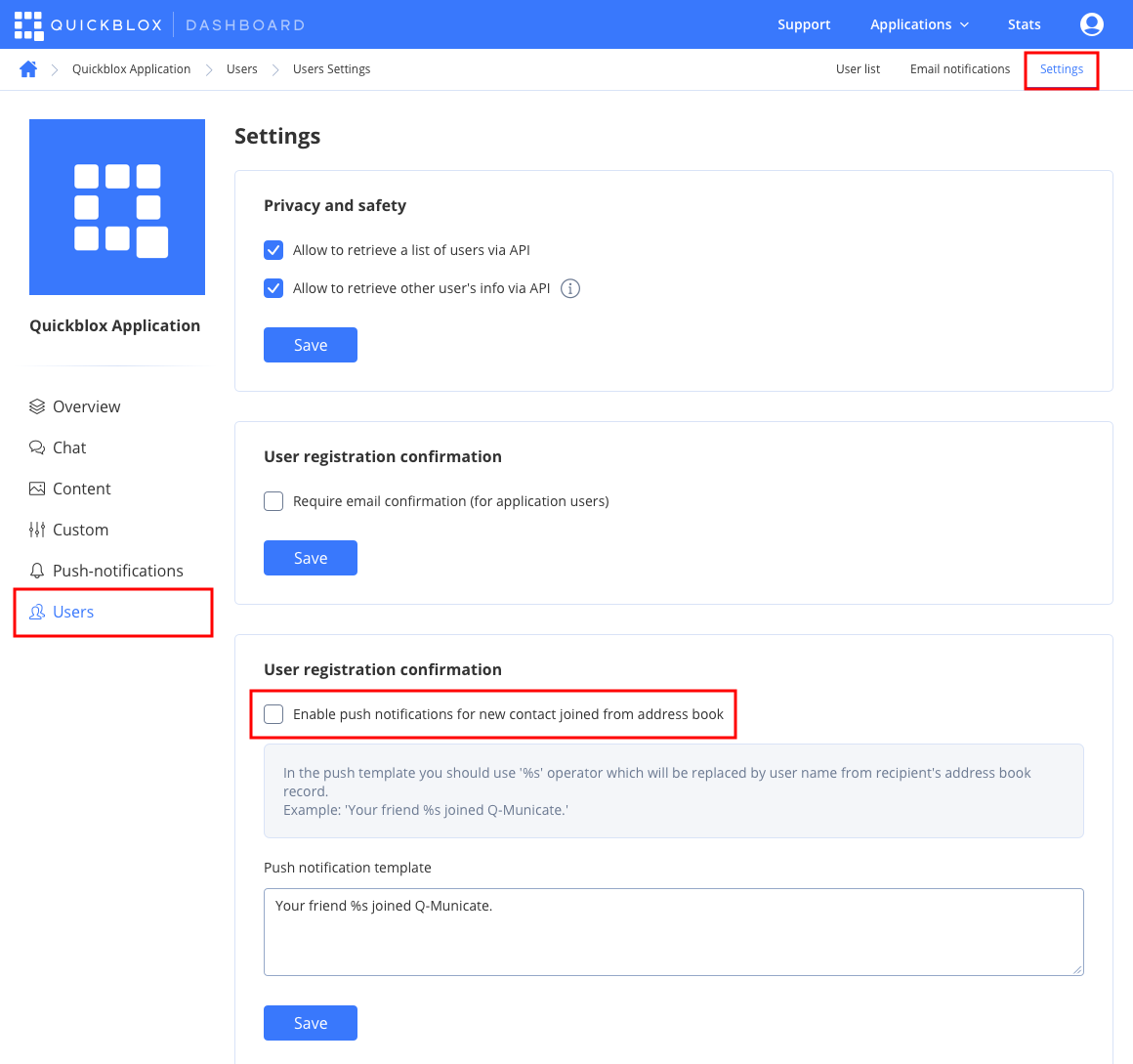
There is a way to get a push notification when some contact from your Address Book has been registered in the app. You can enable this feature at QuickBlox Dashboard. Just follow **Dashboard => *YOUR\_APP* => Users => Settings** direction and enable push notifications for new contacts.