> ## Documentation Index
> Fetch the complete documentation index at: https://docs.quickblox.com/llms.txt
> Use this file to discover all available pages before exploring further.
# Dialogs
> Learn how to create and manage dialogs.
## Before you begin
1. Register a [QuickBlox account](https://admin.quickblox.com/signin). This is a matter of a few minutes and you will be able to use this account to build your apps.
2. Configure QuickBlox SDK for your app. Check out [Setup](/sdks/android-setup) page for more details.
3. Create a user session to be able to use QuickBlox functionality. See [Authentication](/sdks/android-authentication) page to learn how to do it.
4. Connect to the Chat server. See [Connection](/sdks/android-chat-connection) page to learn how to do it.
Visit [Key Concepts](/docs/key-concepts) page to learn the most important QuickBlox concepts.
## Dialog types
All chats between users are organized in dialogs. There are 3 types of dialogs:
* **private dialog** - a dialog between 2 users.
* **group dialog** - a dialog between the specified list of users.
* **public dialog** - an open dialog. Any user from your app can be joined to it.
You need to create a new dialog and then use it to chat with other users. You also can obtain a list of your existing dialogs.
## Create dialog
To create a **private** dialog, you need to set the dialog type to `QBDialogType.PRIVATE` and ID of an opponent you want to create a chat with.
```Java theme={null}
ArrayList occupantIdsList = new ArrayList();
occupantIdsList.add(123);
QBChatDialog dialog = new QBChatDialog();
dialog.setType(QBDialogType.PRIVATE);
dialog.setOccupantsIds(occupantIdsList);
// or just use DialogUtils
//QBChatDialog dialog = DialogUtils.buildPrivateDialog(recipientId);
QBRestChatService.createChatDialog(dialog).performAsync(new QBEntityCallback() {
@Override
public void onSuccess(QBChatDialog result, Bundle bundle) {
}
@Override
public void onError(QBResponseException exception) {
}
});
```
```Kotlin theme={null}
val occupantIdsList = ArrayList()
occupantIdsList.add(123)
val dialog = QBChatDialog()
dialog.type = QBDialogType.PRIVATE
dialog.setOccupantsIds(occupantIdsList)
// or just use DialogUtils
//QBChatDialog dialog = DialogUtils.buildPrivateDialog(recipientId);
QBRestChatService.createChatDialog(dialog).performAsync(object : QBEntityCallback {
override fun onSuccess(result: QBChatDialog?, bundle: Bundle?) {
}
override fun onError(exception: QBResponseException?) {
}
})
```
To create a **group** dialog for a predefined number of occupants, you need to set the dialog type to `QBDialogType.GROUP` and IDs of opponents you want to create a chat with using the `QBChatDialog` value.
```Java theme={null}
ArrayList occupantIdsList = new ArrayList();
occupantIdsList.add(123);
occupantIdsList.add(234);
occupantIdsList.add(345);
occupantIdsList.add(456);
QBChatDialog dialog = new QBChatDialog();
dialog.setName("Group chat");
dialog.setType(QBDialogType.GROUP);
dialog.setOccupantsIds(occupantIdsList);
// Photo can be a link to a file in Content module, Custom Objects module or just a web link.
// dialog.setPhoto("");
// or just use DialogUtils
// QBChatDialog dialog = DialogUtils.buildDialog("Chat with Friends", QBDialogType.GROUP, occupantIdsList);
QBRestChatService.createChatDialog(dialog).performAsync(new QBEntityCallback() {
@Override
public void onSuccess(QBChatDialog result, Bundle bundle) {
}
@Override
public void onError(QBResponseException exception) {
}
});
```
```Kotlin theme={null}
val occupantIdsList = ArrayList()
occupantIdsList.add(123)
occupantIdsList.add(234)
occupantIdsList.add(345)
occupantIdsList.add(456)
val dialog = QBChatDialog()
dialog.name = "Group chat"
dialog.type = QBDialogType.GROUP
dialog.setOccupantsIds(occupantIdsList)
// Photo can be a link to a file in Content module, Custom Objects module or just a web link.
// dialog.photo = "";
// or just use DialogUtils
// QBChatDialog dialog = DialogUtils.buildDialog("Chat with Friends", QBDialogType.GROUP, occupantIdsList);
QBRestChatService.createChatDialog(dialog).performAsync(object : QBEntityCallback {
override fun onSuccess(result: QBChatDialog?, bundle: Bundle?) {
}
override fun onError(exception: QBResponseException?) {
}
})
```
It's possible to create a **public** dialog, so any user from your application can be joined to it. There is no list of occupants. This dialog is open for everybody. You just need to set `QBDialogType.PUBLIC_GROUP` as a dialog type.
```Java theme={null}
QBChatDialog dialog = new QBChatDialog();
dialog.setName("Public group chat");
dialog.setType(QBDialogType.PUBLIC_GROUP);
// Photo can be a link to a file in Content module, Custom Objects module or just a web link.
// dialog.setPhoto("");
QBRestChatService.createChatDialog(dialog).performAsync(new QBEntityCallback() {
@Override
public void onSuccess(QBChatDialog result, Bundle bundle) {
}
@Override
public void onError(QBResponseException exception) {
}
});
```
```Kotlin theme={null}
val dialog = QBChatDialog()
dialog.name = "Public group chat"
dialog.type = QBDialogType.PUBLIC_GROUP
// Photo can be a link to a file in Content module, Custom Objects module or just a web link.
// dialog.photo = "";
QBRestChatService.createChatDialog(dialog).performAsync(object : QBEntityCallback {
override fun onSuccess(result: QBChatDialog?, bundle: Bundle?) {
}
override fun onError(exception: QBResponseException?) {
}
})
```
## Create dialog with custom parameters
Any dialog can be extended with additional parameters whether it is a **private**, **group**, or **public**. These parameters can be used to store additional data. Also, these parameters can be used in dialogs retrieval requests.
To start using additional parameters, create an additional schema of your parameters. This is a Custom Objects class. Just create an empty class with all fields that you need. These fields will be additional parameters in your dialog. See [this section](/sdks/android-custom-objects) to learn how to create a schema using Custom Objects.
Then, specify the parameters defined in the schema in a new dialog.
```Java theme={null}
private void createDialogWithCurtomParameters() {
QBDialogCustomData customData = new QBDialogCustomData();
customData.putBoolean("customBoolean", true);
customData.putInteger("customInteger", 327);
customData.putString("customString", "Value");
customData.putDate("customDate", new Date());
customData.putFloat("customFloat", 327.2f);
List paramsList = new ArrayList<>();
paramsList.add("param1");
customData.putArray("nameOfCustomArray", paramsList);
QBChatDialog chatDialog = new QBChatDialog();
chatDialog.setCustomData(customData);
QBRestChatService.createChatDialog(chatDialog).performAsync(new QBEntityCallback() {
@Override
public void onSuccess(QBChatDialog chatDialog, Bundle bundle) {
}
@Override
public void onError(QBResponseException exception) {
}
});
}
// now we can get the same parameters from any dialog we load
private void getDataFromDialog(QBChatDialog chatDialog) {
Integer customInteger = chatDialog.getCustomData().getInteger("customInteger");
String customString = chatDialog.getCustomData().getString("customString");
}
```
```Kotlin theme={null}
private fun createDialogWithCustomParameters() {
val customData = QBDialogCustomData()
customData.putBoolean("customBoolean", true)
customData.putInteger("customInteger", 327)
customData.putString("customString", "Value")
customData.putDate("customDate", Date())
customData.putFloat("customFloat", 327.2f)
val paramsList = ArrayList()
paramsList.add("param1")
customData.putArray("nameOfCustomArray", paramsList)
val chatDialog = QBChatDialog()
chatDialog.customData = customData
QBRestChatService.createChatDialog(chatDialog).performAsync(object : QBEntityCallback {
override fun onSuccess(chatDialog: QBChatDialog?, bundle: Bundle?) {
}
override fun onError(exception: QBResponseException?) {
}
})
}
// now we can get the same parameters from any dialog we load
private fun getDataFromDialog(chatDialog: QBChatDialog) {
val chatDialog = qbChatDialog.customData.getInteger("customInteger")
val chatDialog = qbChatDialog.customData.getString("customString")
}
```
## Create group dialog with join required
Available since **QuickBlox Android SDK v4.4.0**.
Prior to **server version 2.34.0**, all group dialogs required joining. Starting from **server version 2.34.0**, new applications do not require joining, while existing applications retain the previous behavior. You can change the default in [application settings](/docs/application#set-default-join-required-for-new-group-dialogs).
If `isJoinRequired` is explicitly set when creating a dialog, the provided value takes priority over the default in [application settings](/docs/application#set-default-join-required-for-new-group-dialogs).
Most applications do not need this feature. The default behavior where participants can send and receive real-time messages without joining is recommended for most use cases.
When creating a **group** dialog, you can set the `isJoinRequired` parameter to `true` to require participants to explicitly join the dialog before they can send or receive real-time messages. This is only needed when you want to restrict real-time messaging in specific dialogs until participants explicitly join.
By default, `isJoinRequired` is `false` and participants can message without joining. This parameter applies **only to group dialogs**. You can change the default in [application settings](/docs/application#set-default-join-required-for-new-group-dialogs).
```Java theme={null}
ArrayList occupantIdsList = new ArrayList();
occupantIdsList.add(123);
occupantIdsList.add(234);
QBChatDialog dialog = new QBChatDialog();
dialog.setName("Group chat");
dialog.setType(QBDialogType.GROUP);
dialog.setOccupantsIds(occupantIdsList);
dialog.setIsJoinRequired(true);
QBRestChatService.createChatDialog(dialog).performAsync(new QBEntityCallback() {
@Override
public void onSuccess(QBChatDialog result, Bundle bundle) {
boolean isJoinRequired = result.isJoinRequired();
}
@Override
public void onError(QBResponseException exception) {
}
});
```
```Kotlin theme={null}
val occupantIdsList = ArrayList()
occupantIdsList.add(123)
occupantIdsList.add(234)
val dialog = QBChatDialog()
dialog.name = "Group chat"
dialog.type = QBDialogType.GROUP
dialog.setOccupantsIds(occupantIdsList)
dialog.setIsJoinRequired(true)
QBRestChatService.createChatDialog(dialog).performAsync(object : QBEntityCallback {
override fun onSuccess(result: QBChatDialog?, bundle: Bundle?) {
val isJoinRequired = result?.isJoinRequired
}
override fun onError(exception: QBResponseException?) {
}
})
```
## Check if join required for group dialog
The `isJoinRequired` field is available starting from **QuickBlox Android SDK v4.4.0**. See [Create group dialog with join required](/sdks/android-chat-dialogs#create-group-dialog-with-join-required) for details.
You can get the `isJoinRequired` value for any group dialog:
```Java theme={null}
boolean isJoinRequired = groupDialog.isJoinRequired();
```
```Kotlin theme={null}
val isJoinRequired = groupDialog.isJoinRequired
```
## Join group dialog
Starting from **QuickBlox Android SDK v4.4.0**, joining a group dialog is required only when `isJoinRequired` is set to `true` for a dialog. See [Create group dialog with join required](/sdks/android-chat-dialogs#create-group-dialog-with-join-required) for details.
If `isJoinRequired` is set to `true` for a group dialog, you need to join it by calling the `join()` method before you can send or receive real-time messages. See [this section](/sdks/android-chat-messaging#send-text-message) to learn how to send/receive real-time messages.
You must join the dialog after every new connection or reconnection. If the connection is lost and then restored, whether manually or automatically, you need to call `join()` again for each dialog where `isJoinRequired` is `true`.
```Java theme={null}
// Synchronous
try {
groupDialog.join(new DiscussionHistory());
} catch (XMPPException exception) {
} catch (SmackException exception) {
}
```
```Kotlin theme={null}
// Synchronous
try {
groupDialog.join(DiscussionHistory())
} catch (exception: XMPPException) {
} catch (exception: SmackException) {
}
```
```Java theme={null}
// Asynchronous
groupDialog.join(new DiscussionHistory(), new QBEntityCallback() {
@Override
public void onSuccess(Void result, Bundle params) {
}
@Override
public void onError(QBResponseException responseException) {
}
});
```
```Kotlin theme={null}
// Asynchronous
groupDialog.join(DiscussionHistory(), object : QBEntityCallback {
override fun onSuccess(result: Void?, params: Bundle?) {
}
override fun onError(responseException: QBResponseException?) {
}
})
```
You can join a group dialog **only** if your user ID is present in the `occupantIDs` array in the dialog model.
Your user ID is added to the `occupantIDs` array if you create a dialog **or** you are added to the dialog by another user. See [this section](/sdks/android-chat-dialogs#add-occupants) to learn how to add occupants to the group dialog.
To check if you have already joined the dialog, call the appropriate method from the dialog model.
```Java theme={null}
groupDialog.isJoined();
```
```Kotlin theme={null}
groupDialog.isJoined
```
## Join public dialog
Before you start chatting in a **public** dialog, you must join it by calling the `join()` method. Unlike group dialogs, joining a public dialog is always required. If you've successfully joined the dialog, you can send/receive real-time messages. See [this section](/sdks/android-chat-messaging#send-text-message) to learn how to send/receive real-time messages.
You must join the dialog after every new connection or reconnection. If the connection is lost and then restored, whether manually or automatically, you need to call `join()` again.
```Java theme={null}
// Synchronous
try {
publicDialog.join(new DiscussionHistory());
} catch (XMPPException exception) {
} catch (SmackException exception) {
}
```
```Kotlin theme={null}
// Synchronous
try {
publicDialog.join(DiscussionHistory())
} catch (exception: XMPPException) {
} catch (exception: SmackException) {
}
```
```Java theme={null}
// Asynchronous
publicDialog.join(new DiscussionHistory(), new QBEntityCallback() {
@Override
public void onSuccess(Void result, Bundle params) {
}
@Override
public void onError(QBResponseException responseException) {
}
});
```
```Kotlin theme={null}
// Asynchronous
publicDialog.join(DiscussionHistory(), object : QBEntityCallback {
override fun onSuccess(result: Void?, params: Bundle?) {
}
override fun onError(responseException: QBResponseException?) {
}
})
```
To check if you have already joined the dialog, call the appropriate method from the dialog model.
```Java theme={null}
publicDialog.isJoined();
```
```Kotlin theme={null}
publicDialog.isJoined
```
## Leave group dialog
You can leave the **group** dialog by calling the `leave()` method. After leaving, you will stop receiving real-time messages from this dialog. You need to join the dialog again to resume receiving real-time messages.
Starting from **QuickBlox Android SDK v4.4.0**, leaving a group dialog is only needed when `isJoinRequired` is set to `true`. If `isJoinRequired` is `false`, you do not need to call `leave()`.
```Java theme={null}
try {
groupDialog.leave();
} catch (XMPPException | SmackException.NotConnectedException exception) {
}
```
```Kotlin theme={null}
try {
groupDialog.leave()
} catch (exception: XMPPException) {
} catch (exception: SmackException.NotConnectedException) {
}
```
When you leave a group dialog, your user ID is still present in the `occupantIDs` array in the dialog model. The dialog will still appear in the list of dialogs and you will still have access to the chat history.
To remove yourself from the group dialog, use the `updateChatDialog()` method. See [this section](/sdks/android-chat-dialogs#remove-occupants) to learn how to remove occupants from the group dialog.
## Leave public dialog
You can leave the **public** dialog by calling the `leave()` method. After leaving, you will stop receiving real-time messages from this dialog. You need to join the dialog again to resume receiving real-time messages.
```Java theme={null}
try {
publicDialog.leave();
} catch (XMPPException | SmackException.NotConnectedException exception) {
}
```
```Kotlin theme={null}
try {
publicDialog.leave()
} catch (exception: XMPPException) {
} catch (exception: SmackException.NotConnectedException) {
}
```
## Retrieve online users
You can get a list of dialog occupants who are currently online. Call the `requestOnlineUsers()` method to get the list of online users who are joined to the dialog. As a result, a list of user IDs is returned.
```Java theme={null}
try {
Collection onlineUsersIds = chatDialog.requestOnlineUsers();
} catch (XMPPException.XMPPErrorException exception) {
} catch (SmackException.NotConnectedException exception) {
} catch (SmackException.NoResponseException exception) {
}
```
```Kotlin theme={null}
try {
val onlineUsersIds = chatDialog.requestOnlineUsers()
} catch (exception: XMPPErrorException) {
} catch (exception: NotConnectedException) {
} catch (exception: NoResponseException) {
}
```
Let's see, how the `requestOnlineUsers()` method is used with regard to the dialog type
| Capabilities | Public | Group | Private |
| --------------------- | ------ | ----- | ------- |
| Retrieve online users | ✗ | ✓ | ✗ |
You can retrieve online users from the group dialog **only** if you are joined to it.
## Retrieve list of dialogs
It's common to request all your dialogs on every app login. The request below will return **group** dialogs containing the `test` in the names, sorted in descending order, and limited to 50 dialogs on the page.
```Java theme={null}
String field = "name";
String searchValue = "test";
QBDialogType type = QBDialogType.GROUP;
QBRequestGetBuilder requestBuilder = new QBRequestGetBuilder();
requestBuilder.setLimit(50);
requestBuilder.setSkip(0);
requestBuilder.sortDesc(field);
requestBuilder.in(field, searchValue);
QBRestChatService.getChatDialogs(type, requestBuilder).performAsync(new QBEntityCallback>() {
@Override
public void onSuccess(ArrayList result, Bundle bundle) {
}
@Override
public void onError(QBResponseException exception) {
}
});
```
```Kotlin theme={null}
val field = "name"
val searchValue = "test"
val type = QBDialogType.GROUP
val requestBuilder = QBRequestGetBuilder()
requestBuilder.limit = 50
requestBuilder.skip = 0
requestBuilder.sortDesc(field)
requestBuilder.in(field, searchValue)
QBRestChatService.getChatDialogs(type, requestBuilder).performAsync(object : QBEntityCallback?> {
override fun onSuccess(result: ArrayList?, bundle: Bundle) {
}
override fun onError(exception: QBResponseException) {
}
})
```
| Argument | Required | Description |
| -------------- | -------- | ----------------------------------------------- |
| type | yes | Dialog type. Pass null to retrieve all dialogs. |
| requestBuilder | yes | Allows to set parameters for the request. |
If you want to retrieve only dialogs updated after some specific date time and order the search results, you can apply operators. This is useful if you cache dialogs somehow and do not want to obtain the whole list of your dialogs on every app start. Thus, you can apply [search](/sdks/android-chat-dialogs#search-operators) and [sort](/sdks/android-chat-dialogs#sort-operators) operators to list dialogs on the page so that it is easier to view specific dialogs. The operators are set in the `QBRequestGetBuilder` class.
If you want to get a paginated list of users from the server, you can set the following pagination parameters in the `QBRequestGetBuilder` class.
| Pagination parameter | Description |
| -------------------- | ------------------------------------------------------------------------------------------- |
| skip | Skip N records in search results. Useful for pagination. Default (if not specified): **0**. |
| limit | Limit search results to N records. Useful for pagination. Default value: **100**. |
### Search operators
You can use search operators to get more specific search results. The request below will return **group** dialogs in the array containing `test` in their names.
```Java theme={null}
String field = "name";
String searchValue = "test";
QBDialogType type = QBDialogType.GROUP;
QBRequestGetBuilder requestBuilder = new QBRequestGetBuilder();
requestBuilder.in(field, searchValue);
QBRestChatService.getChatDialogs(type, requestBuilder).performAsync(new QBEntityCallback>() {
@Override
public void onSuccess(ArrayList result, Bundle bundle) {
}
@Override
public void onError(QBResponseException exception) {
}
});
```
```Kotlin theme={null}
val field = "name"
val searchValue = "test"
val type = QBDialogType.GROUP
val requestBuilder = QBRequestGetBuilder()
requestBuilder.in(field, searchValue)
QBRestChatService.getChatDialogs(type, requestBuilder).performAsync(object : QBEntityCallback> {
override fun onSuccess(result: ArrayList, bundle: Bundle) {
}
override fun onError(responseException: exception) {
}
})
```
Here are the methods that you can use to search for the exact data that you need.
| Methods | Applicable to types | Applicable to fields | Description |
| ----------------------- | -------------------- | --------------------------------------------------- | ---------------------------------------------------- |
| lt(field, searchValue) | number, string, date | last\_message\_date\_sent, created\_at, updated\_at | **Less Than** operator. |
| lte(field, searchValue) | number, string, date | last\_message\_date\_sent, created\_at, updated\_at | **Less Than** or **Equal** to operator. |
| gt(field, searchValue) | number, string, date | last\_message\_date\_sent, created\_at, updated\_at | **Greater Than** operator. |
| gte(field, searchValue) | number, string, date | last\_message\_date\_sent, created\_at, updated\_at | **Greater Than** or **Equal** to operator. |
| ne(field, searchValue) | number, string, date | \_id, name, last\_message\_date\_sent | **Not Equal** to operator. |
| in(field, searchValue) | number, string, date | type, last\_message\_date\_sent, name | **IN** array operator. |
| nin(field, searchValue) | number, string, date | last\_message\_date\_sent | Not **IN** array operator. |
| all(field, searchValue) | number | occupants\_ids | **ALL** are contained in array. |
| ctn(field, searchValue) | string | name | All records that **contain** a particular substring. |
### Sort operators
You can use sort operators to order the search results. The request below will return **group** dialogs by the field sorted in descending order.
```Java theme={null}
String field = "name";
QBDialogType type = QBDialogType.GROUP;
QBRequestGetBuilder requestBuilder = new QBRequestGetBuilder();
requestBuilder.sortDesc(field);
QBRestChatService.getChatDialogs(type, requestBuilder).performAsync(new QBEntityCallback>() {
@Override
public void onSuccess(ArrayList result, Bundle bundle) {
}
@Override
public void onError(QBResponseException exception) {
}
});
```
```Kotlin theme={null}
val field = "name"
val type = QBDialogType.GROUP
val requestBuilder = QBRequestGetBuilder()
requestBuilder.sortDesc(field)
QBRestChatService.getChatDialogs(type, requestBuilder).performAsync(object : QBEntityCallback> {
override fun onSuccess(result: ArrayList, bundle: Bundle) {
}
override fun onError(exception: QBResponseException) {
}
})
```
Here are the methods that you can use to order the search results.
| Methods | Applicable to types | Applicable to fields | Description |
| --------------- | ------------------- | ------------------------------------------------ | ------------------------------------------------------------------------- |
| sortAsc(field) | All types | id, created\_at, name, last\_message\_date\_sent | Search results will be sorted in ascending order by the specified field. |
| sortDesc(field) | All types | id, created\_at, name, last\_message\_date\_sent | Search results will be sorted in descending order by the specified field. |
## Update dialog
You can update the information for a **private**, **group**, and **public** dialog.
```Java theme={null}
QBChatDialog dialog = new QBChatDialog();
dialog.setDialogId("dsfsd934329hjhkda98793j2"); // to make updates - the dialog must contain dialogId
dialog.setName("Team room");
dialog.setPhoto("https://new_photo_url"); // or it can be ID of uploaded File with QBContent
QBRequestUpdateBuilder requestBuilder = new QBRequestUpdateBuilder();
QBRestChatService.updateChatDialog(dialog, requestBuilder).performAsync(new QBEntityCallback() {
@Override
public void onSuccess(QBChatDialog updatedDialog, Bundle bundle) {
}
@Override
public void onError(QBResponseException exception) {
}
});
```
```Kotlin theme={null}
val dialog = QBChatDialog()
dialog.dialogId = "dsfsd934329hjhkda98793j2" // to make updates - the dialog must contain dialogId
dialog.name = "Team room"
dialog.photo = "https://new_photo_url" // or it can be ID of uploaded File with QBContent
val requestBuilder = QBRequestUpdateBuilder()
QBRestChatService.updateChatDialog(dialog, requestBuilder).performAsync(object : QBEntityCallback {
override fun onSuccess(updatedDialog: QBChatDialog?, bundle: Bundle?) {
}
override fun onError(exception: QBResponseException?) {
}
})
```
Let's see what capabilities a particular user role has with regard to the dialog type.
| Capabilities | Public dialog | Group dialog | Private dialog |
| ------------------------ | -------------- | -------------- | -------------- |
| Update a dialog name | Owner | Owner | ✗ |
| Update a photo | Owner | Owner | ✗ |
| Update custom parameters | Owner,Occupant | Owner,Occupant | Owner,Occupant |
## Add occupants
You can add occupants in a **group** dialog by using the `addUsers()` method. As a result, your ID will be added to the `occupantIDs` array.
```Java theme={null}
// to add users you should pass whole QBUser model or it's ID (user.getId)t
QBDialogRequestBuilder requestBuilder = new QBDialogRequestBuilder();
QBChatDialog dialog = new QBChatDialog();
ArrayList usersToAdd = new ArrayList();
usersToAdd.add(QBUser());
usersToAdd.add(QBUser());
QBUser[] usersArray = new QBUser[usersToAdd.size()];
requestBuilder.addUsers(usersToAdd.toArray(usersArray));
QBRestChatService.updateChatDialog(dialog, requestBuilder).performAsync(new QBEntityCallback() {
@Override
public void onSuccess(QBChatDialog chatDialog, Bundle bundle) {
}
@Override
public void onError(QBResponseException exception) {
}
});
```
```Kotlin theme={null}
// to add users you should pass whole QBUser model or it's ID (user.getId)
val requestBuilder = QBDialogRequestBuilder()
val dialog = QBChatDialog()
val usersToAdd = ArrayList()
usersToAdd.add(QBUser())
usersToAdd.add(QBUser())
requestBuilder.addUsers(*usersToAdd.toTypedArray())
QBRestChatService.updateChatDialog(dialog, requestBuilder).performAsync(object : QBEntityCallback {
override fun onSuccess(chatDialog: QBChatDialog?, bundle: Bundle?) {
}
override fun onError(exception: QBResponseException?) {
}
})
```
| Argument | Required | Description |
| -------------- | -------- | --------------------------------------------------- |
| dialog | yes | A dialog to add users to. |
| requestBuilder | yes | Specifies requestBuilder fields that should be set. |
Let's see what capabilities a particular user role has with regard to the dialog type.
| Capabilities | Public dialog | Group dialog | Private dialog |
| --------------- | ------------- | -------------- | -------------- |
| Add other users | ✗ | Owner,Occupant | ✗ |
## Remove occupants
You can remove occupants from a **group** dialog by using the `removeUsers()` method. As a result, the IDs will be removed the `occupantIDs` array.
```Java theme={null}
// to remove users you should pass whole QBUser model or it's ID (user.getId)
QBDialogRequestBuilder requestBuilder = new QBDialogRequestBuilder();
QBChatDialog dialog = new QBChatDialog();
ArrayList usersToRemove = new ArrayList();
usersToRemove.add(QBUser());
usersToRemove.add(QBUser());
QBUser[] usersArray = new QBUser[usersToRemove.size()];
requestBuilder.removeUsers(usersToRemove.toArray(usersArray));
QBRestChatService.updateChatDialog(dialog, requestBuilder).performAsync(new QBEntityCallback() {
@Override
public void onSuccess(QBChatDialog chatDialog, Bundle bundle) {
}
@Override
public void onError(QBResponseException exception) {
}
});
```
```Kotlin theme={null}
// to remove users you should pass whole QBUser model or it's ID (user.getId)
val requestBuilder = QBDialogRequestBuilder()
val dialog = QBChatDialog()
val usersToRemove = ArrayList()
usersToRemove.add(QBUser())
usersToRemove.add(QBUser())
requestBuilder.removeUsers(*usersToRemove.toTypedArray())
QBRestChatService.updateChatDialog(dialog, requestBuilder).performAsync(object : QBEntityCallback {
override fun onSuccess(chatDialog: QBChatDialog?, bundle: Bundle?) {
}
override fun onError(exception: QBResponseException?) {
}
})
```
| Argument | Required | Description |
| -------------- | -------- | --------------------------------------------------- |
| dialog | yes | A dialog to remove users from. |
| requestBuilder | yes | Specifies requestBuilder fields that should be set. |
Let's see what capabilities a particular user role has with regard to the dialog type.
| Capabilities | Public dialog | Group dialog | Private dialog |
| ------------------ | ------------- | -------------- | -------------- |
| Remove other users | ✗ | Owner | ✗ |
| Remove yourself | ✗ | Owner,Occupant | ✗ |
## Delete dialog
A request below will remove a dialog for a current user, but other users will be still able to chat there.
```Java theme={null}
String dialogId = qbChatDialog.getDialogId();
boolean forceDelete = false;
QBRestChatService.deleteDialog(dialogId, forceDelete).performAsync(new QBEntityCallback() {
@Override
public void onSuccess(Void aVoid, Bundle bundle) {
}
@Override
public void onError(QBResponseException exception) {
}
});
```
```Kotlin theme={null}
val dialogId = qbChatDialog.dialogId
val forceDelete = false
QBRestChatService.deleteDialog(dialogId, forceDelete).performAsync(object : QBEntityCallback {
override fun onSuccess(aVoid: Void?, bundle: Bundle?) {
}
override fun onError(exception: QBResponseException?) {
}
})
```
Set the `forceDelete` parameter as `true` to completely remove the dialog for all users. You can also delete multiple dialogs in a single request.
You can also use multiple dialogs deleting using the snippet below.
```Java theme={null}
StringifyArrayList dialogsIds = new StringifyArrayList<>();
for (QBChatDialog dialog : dialogsIds) {
dialogsIds.add(dialog.getDialogId());
}
Bundle bundle = new Bundle();
boolean forceDelete = false;
QBRestChatService.deleteDialogs(dialogsIds, forceDelete, bundle).performAsync(new QBEntityCallback>() {
@Override
public void onSuccess(ArrayList strings, Bundle bundle) {
}
@Override
public void onError(QBResponseException exception) {
}
});
```
```Kotlin theme={null}
val dialogsIds = StringifyArrayList()
for (dialog in dialogsIds) {
dialogsIds.add(dialog.dialogId)
}
val bundle = Bundle()
val forceDelete = false
QBRestChatService.deleteDialogs(dialogsIds, forceDelete, bundle).performAsync(object : QBEntityCallback> {
override fun onSuccess(strings: ArrayList?, bundle: Bundle?) {
}
override fun onError(exception: QBResponseException?) {
}
})
```
Let's see what capabilities a particular user role has with regard to the dialog type.
| Capabilities | Public | Group | Private |
| ------------------------------------------------------------ | ------ | -------------- | -------------- |
| Delete a dialog for all usersusing the forceDeleteparameter. | Owner | Owner | Owner |
| Delete a dialog for a current user | Owner | Owner,Occupant | Owner,Occupant |
## Get number of dialogs
You can get a number of dialogs using the `getChatDialogsCount()` method. The request below will return a count of all **group** dialogs.
```Java theme={null}
QBRequestGetBuilder requestBuilder = new QBRequestGetBuilder();
String field = "type";
Bundle bundle = new Bundle();
requestBuilder.addRule(field, QueryRule.IN, QBDialogType.GROUP.getCode());
QBRestChatService.getChatDialogsCount(requestBuilder, bundle).performAsync(new QBEntityCallback() {
@Override
public void onSuccess(Integer count, Bundle bundle) {
}
@Override
public void onError(QBResponseException exception) {
}
});
```
```Kotlin theme={null}
val requestBuilder = QBRequestGetBuilder()
val field = "type"
val bundle = Bundle()
requestBuilder.addRule(field, QueryRule.IN, QBDialogType.GROUP.code)
QBRestChatService.getChatDialogsCount(requestBuilder, bundle).performAsync(object : QBEntityCallback {
override fun onSuccess(count: Int, bundle: Bundle) {
}
override fun onError(exception: QBResponseException) {
}
})
```
| Argument | Required | Description |
| -------------- | -------- | ------------------------------------------------ |
| requestBuilder | yes | Allows to set parameters for the request. |
| bundle | no | The bundle with response additional information. |
## Get number of unread messages
To get a number of unread messages from a particular dialog, use the code snippet below.
```Java theme={null}
QBRestChatService.getChatDialogById(dialog.getDialogId()).performAsync(new QBEntityCallback() {
@Override
public void onSuccess(QBChatDialog chatDialog, Bundle bundle) {
// get unread messages count
int unreadMessageCount = chatDialog.getUnreadMessageCount();
}
@Override
public void onError(QBResponseException exception) {
}
});
```
```Kotlin theme={null}
QBRestChatService.getChatDialogById(dialog.dialogId).performAsync(object : QBEntityCallback {
override fun onSuccess(chatDialog: QBChatDialog?, bundle: Bundle?) {
let unreadMessageCount = chatDialog.unreadMessageCount
}
override fun onError(exception: QBResponseException?) {
}
})
```
You can also retrieve **total** unread messages count by using the `getTotalUnreadMessagesCount()` method.
```Java theme={null}
Set dialogsIds = new HashSet();
dialogsIds.add("44g9867978v894365tf7g3y4");
dialogsIds.add("47r8738478394ffdi39id493");
Bundle bundle = new Bundle();
QBRestChatService.getTotalUnreadMessagesCount(dialogsIds, bundle).performAsync(new QBEntityCallback() {
@Override
public void onSuccess(Integer totalCount, Bundle bundle) {
}
@Override
public void onError(QBResponseException exception) {
}
});
```
```Kotlin theme={null}
val dialogsIds = HashSet()
dialogsIds.add("44g9867978v894365tf7g3y4")
dialogsIds.add("47r8738478394ffdi39id493")
val bundle = Bundle()
QBRestChatService.getTotalUnreadMessagesCount(dialogsIds, bundle).performAsync(object : QBEntityCallback {
override fun onSuccess(integer: Int?, bundle: Bundle?) {
}
override fun onError(exception: QBResponseException?) {
}
})
```
| Argument | Required | Description |
| ---------- | -------- | ------------------------------------------------------------------------------------------------------------------------------------------------------------------------------------------------------------------------------------------------------------------------------------------------------------------------------------------- |
| dialogsIds | yes | IDs of dialogs.- If dialogsIds are **not** specified, the total number of unread messages for **all** dialogs of the user will be returned.- If dialogsIds are specified, the number of unread messages for each specified dialog will be returned. Also, the total number of unread messages for all dialogs of the user will be returned. |
## Resources
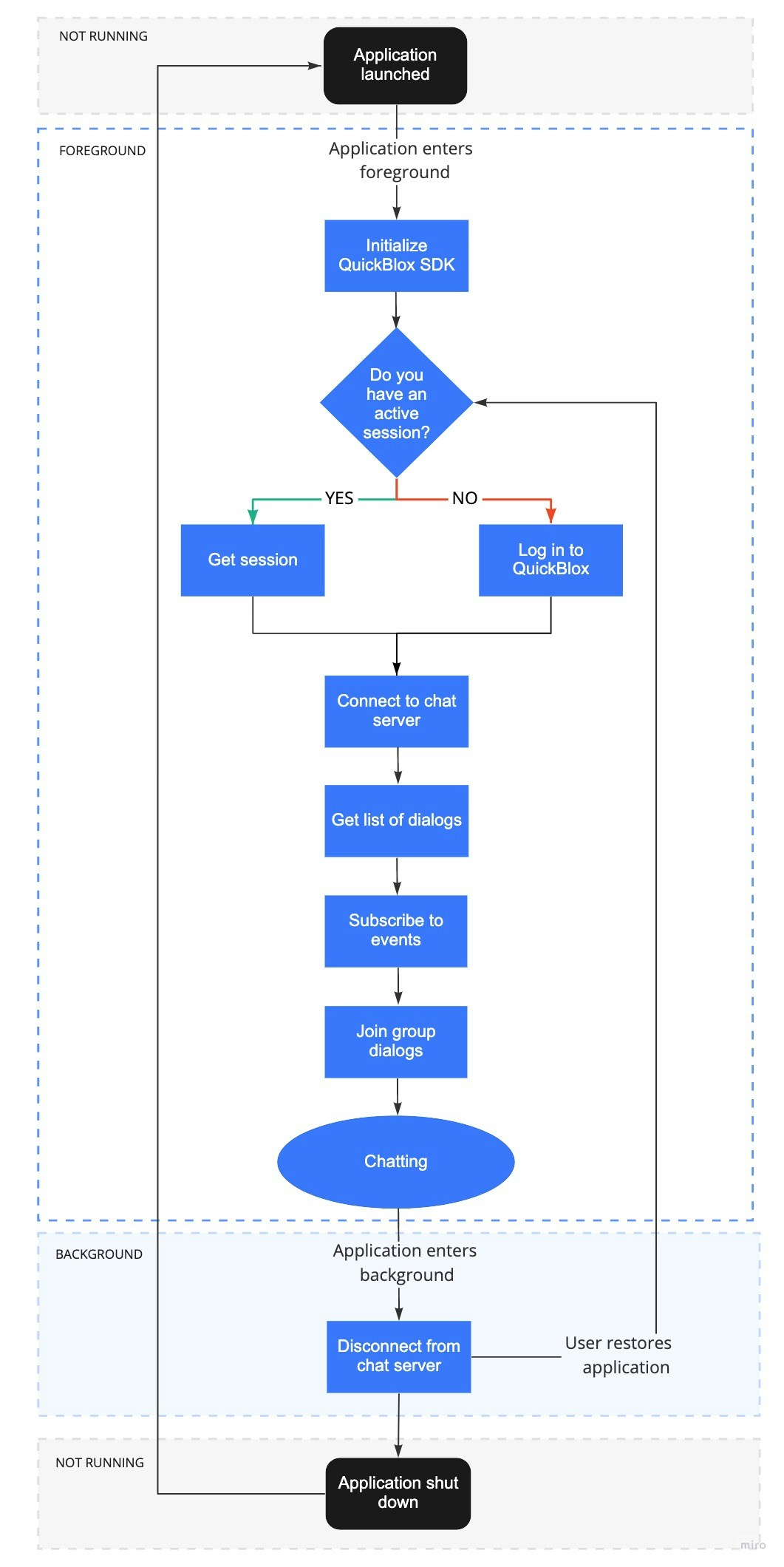
A sequence of steps a user takes to start a dialog by moving through the application lifecycle.