> ## Documentation Index
> Fetch the complete documentation index at: https://docs.quickblox.com/llms.txt
> Use this file to discover all available pages before exploring further.
# Custom Objects
> Learn how to store and sync data with QuickBlox key-value storage.
Custom Objects module provides flexibility to define any data structure (schema) you need, build one-to-many relations between schemas and control permissions for all operations made on data. Schema is defined in QuickBlox Dashboard.
There are two key concepts in Custom Objects:
* **Class** represents your schema and contains field names and types.
* **Record** represents the data you put into your schema.
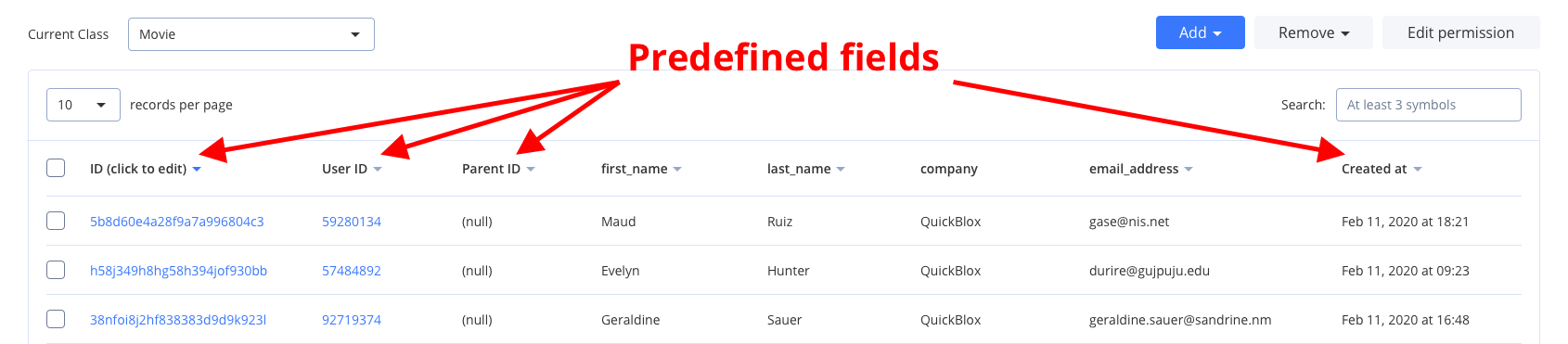
**Class** and **Record** are similar to table and row in relational database. Every class in Custom Object module comes with five mandatory predefined fields: `_id`, `user_id`, `parent_id`, `created_at`, and `updated_at`.
Allowed data types: **Integer** (or Array of Integer); **String** (or Array of String); **Float** (or Array of Float); **Boolean** (or Array of Boolean); **Location** (Array of \[\< longitude >, \< latitude >]); **File**; **Date**.
Visit [Key Concepts](/docs/key-concepts) page to learn the most important QuickBlox concepts.
## Before you begin
1. Register a [QuickBlox account](https://admin.quickblox.com/signin). This is a matter of a few minutes and you will be able to use this account to build your apps.
2. Configure QuickBlox SDK for your app. Check out [Setup](/sdks/android-setup) page for more details.
3. Create a user session to be able to use QuickBlox functionality. See [Authentication](/sdks/android-authentication) page to learn how to do it.
## Create class
Make sure that you have already added the appropriate dependency to your **app-level build.gradle file**. Review [this section](/sdks/android-setup#section-install-quick-blox-sdk-into-your-app) for more details.
To start using Custom Objects module, create a class:
1. Go to [QuickBlox Dashboard](https://admin.quickblox.com).
2. Follow **Custom => Add => Add new class** direction. As a result, **Add new class** popup will appear.
3. Enter a class name, add any fields you want.
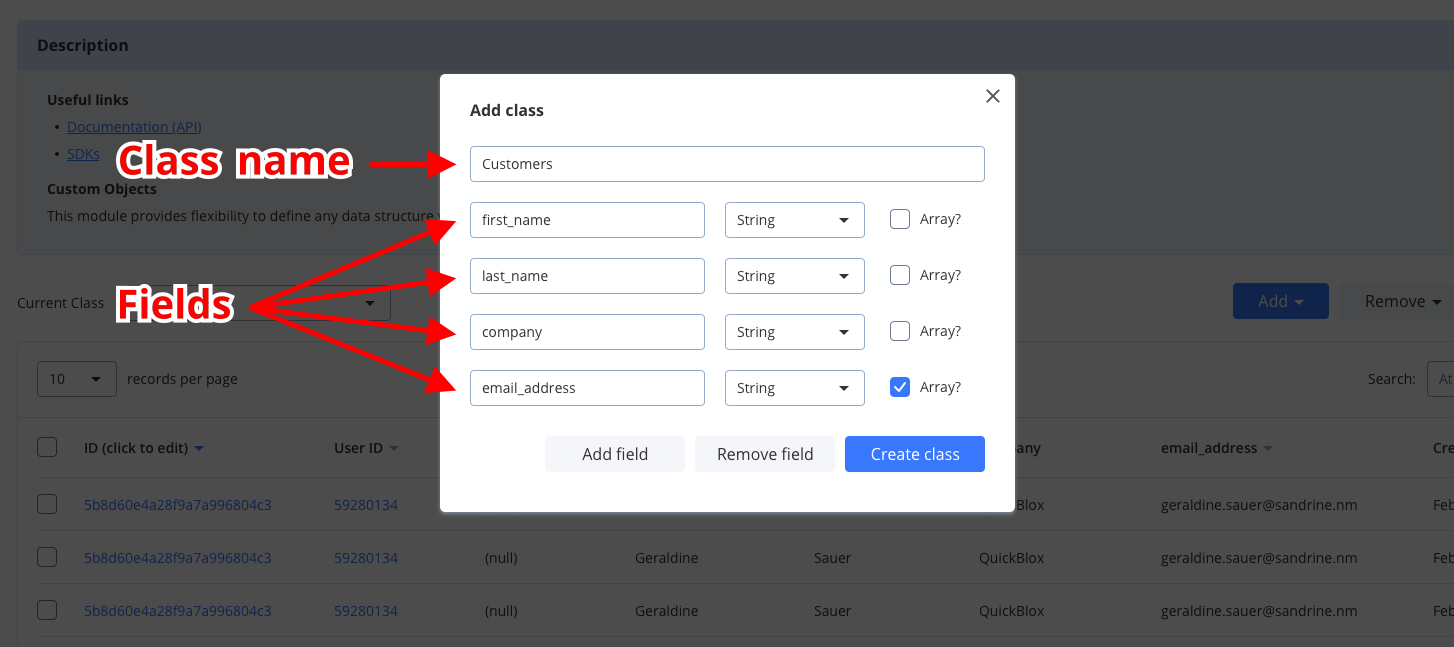 4. Click **Create class button** to create a new class.
 ## Create records
The easiest way to create a new record from the [QuickBlox Dashboard](https://admin.quickblox.com/signin), do the following:
1. Follow **Custom => Current class => Your Class** direction.
2. Click **Add => Add record** button and **Add new record** popup will appear.
3. Fill in any fields you want.
4. Click **Add record button** and a new record will be added and shown in the table.
To create a single object, use the code snippet below.
```Java theme={null}
QBCustomObject customObject = new QBCustomObject();
// put fields
customObject.putString("text", "Lorem ipsum dolor sit amen");
customObject.putInteger("version", 7);
customObject.putArray("tags", Arrays.asList("#test", "#customobjects", "#quickblox-android-sdk"));
customObject.putArray("friendsIds", Arrays.asList(12345, 12346, 12347));
// set the class name
customObject.setClassName("CustomObject2");
QBCustomObjects.createObject(customObject).performAsync(new QBEntityCallback() {
@Override
public void onSuccess(QBCustomObject createdObject, Bundle params) {
// object created successfully
}
@Override
public void onError(QBResponseException exception) {
// error occurred
}
});
```
```Kotlin theme={null}
val customObject = QBCustomObject()
// put fields
customObject.putString("text", "Lorem ipsum dolor sit amen")
customObject.putInteger("version", 7)
customObject.putArray("tags", arrayListOf("#test", "#customobjects", "#quickblox-android-sdk"))
customObject.putArray("friendsIds", arrayListOf(12345, 12346, 12347))
// set the class name
customObject.className = "CustomObject2"
QBCustomObjects.createObject(customObject).performAsync(object : QBEntityCallback {
override fun onSuccess(createdObject: QBCustomObject, params: Bundle) {
// object created successfully
}
override fun onError(exception: QBResponseException) {
// error occured
}
})
```
To create multiple objects, use the code snippet below.
```Java theme={null}
QBCustomObject customObject1 = new QBCustomObject();
customObject1.putString("text", "Lorem ipsum dolor sit amen");
customObject1.putInteger("version", 1000);
customObject1.putArray("tags", Arrays.asList("#test", "#customobjects", "#quickblox-android-sdk"));
customObject1.putArray("friendsIds", Arrays.asList(12345, 12346, 12347));
customObject1.setClassName("CustomObject2");
QBCustomObject customObject2 = new QBCustomObject();
customObject2.putString("text", "Lorem ipsum dolor sit amen");
customObject2.putInteger("version", 1001);
customObject2.putArray("tags", Arrays.asList("#test", "#customobjects", "#quickblox-android-sdk"));
customObject2.setClassName("CustomObject2");
List customObjects = new ArrayList<>();
customObjects.add(customObject1);
customObjects.add(customObject2);
QBCustomObjects.createObjects(customObjects).performAsync(new QBEntityCallback>() {
@Override
public void onSuccess(ArrayList customObjects, Bundle bundle) {
// new records created
}
@Override
public void onError(QBResponseException exception) {
// handle error
}
});
```
```Kotlin theme={null}
val customObject1 = QBCustomObject()
customObject1.putString("text", "Lorem ipsum dolor sit amen")
customObject1.putInteger("version", 1000)
customObject1.putArray("tags", Arrays.asList("#test", "#customobjects", "#quickblox-android-sdk"))
customObject1.putArray("friendsIds", Arrays.asList(12345, 12346, 12347))
customObject1.className = "CustomObject2"
val customObject2 = QBCustomObject()
customObject2.putString("text", "Lorem ipsum dolor sit amen")
customObject2.putInteger("version", 1001)
customObject2.putArray("tags", Arrays.asList("#test", "#customobjects", "#quickblox-android-sdk"))
customObject2.className = "CustomObject2"
val customObjects = ArrayList()
customObjects.add(customObject1)
customObjects.add(customObject2)
QBCustomObjects.createObjects(customObjects).performAsync(object : QBEntityCallback> {
override fun onSuccess(customObjects: ArrayList, bundle: Bundle) {
// new records created
}
override fun onError(exception: QBResponseException) {
// handle error
}
})
```
Make sure that `className` is the same in all objects.
The current Class should be created in the Admin Panel previously.
You can create multiple items for a **single** custom class. The name will be taken from the first item in the list.
## Retrieve records by IDs
To get records with a particular record ID, use the `getObjectsByIds()` method. Set the record ID using the ` coIDs` object. Go over [Sort operators](/sdks/android-custom-objects#sort-operators) and [Search operators](/sdks/android-custom-objects#search-operators) sections to learn about filters and search operators you can use to retrieve records.
```Java theme={null}
StringifyArrayList coIds = new StringifyArrayList();
coIds.add("50e67e6e535c121c66004c74");
coIds.add("50e67e6d535c127f66004f47");
coIds.add("50e67e6b535c121c66004c72");
coIds.add("50e59f81535c121c660015fd");
QBCustomObjects.getObjectsByIds("Note", coIds).performAsync(new QBEntityCallback>() {
@Override
public void onSuccess(ArrayList customObjects, Bundle bundle) {
// records retrieved
}
@Override
public void onError(QBResponseException exception) {
// handle error
}
});
```
```Kotlin theme={null}
val coIds = StringifyArrayList()
coIds.add("50e67e6e535c121c66004c74")
coIds.add("50e67e6d535c127f66004f47")
coIds.add("50e67e6b535c121c66004c72")
coIds.add("50e59f81535c121c660015fd")
QBCustomObjects.getObjectsByIds("Note", coIds).performAsync(object : QBEntityCallback> {
override fun onSuccess(customObjects: ArrayList, bundle: Bundle) {
// records retrieved
}
override fun onError(exception: QBResponseException) {
// handle error
}
})
```
```JavaScript theme={null}
var
className = "Note",
filter = {
'_id': {
'in' ['5f59b10fa0eb4772bd5e9976','5f59a76ca28f9a28032944d3']
}
};
QB.data.list(className, filter, function(err, result) {
if (err) {
} else {
}
});
```
## Retrieve records
You can search for records of a particular class. The request below will return all records of the `Movie` class with the `rating` value greater than `5.5`, sorted in ascending order, and limited to 5 records on the page.
```Java theme={null}
String className = "Movie";
QBRequestGetBuilder requestBuilder = new QBRequestGetBuilder();
requestBuilder.gt("rating", "5.5");
requestBuilder.setLimit(5);
requestBuilder.sortAsc("rating");
QBCustomObjects.getObjects(className, requestBuilder).performAsync(new QBEntityCallback>() {
@Override
public void onSuccess(ArrayList customObjects, Bundle bundle) {
// objects Successfully Loaded
}
@Override
public void onError(QBResponseException exception) {
// handle error
}
});
```
```Kotlin theme={null}
val className = "Movie"
val requestBuilder = QBRequestGetBuilder()
requestBuilder.gt("rating", "5.5")
requestBuilder.limit = 5
requestBuilder.sortAsc("rating")
QBCustomObjects.getObjects(className, requestBuilder).performAsync(object : QBEntityCallback> {
override fun onSuccess(customObjects: ArrayList, bundle: Bundle) {
// objects Successfully Loaded
}
override fun onError(exception: QBResponseException) {
// handle error
}
})
```
| Argument | Required | Description |
| -------------- | -------- | ----------------------------------------- |
| className | yes | Name of a custom object class. |
| requestBuilder | yes | Allows to set parameters for the request. |
If you want to retrieve only records updated after some specific date time and order the search results, you can apply operators. Thus, you can apply [search](/sdks/android-custom-objects#search-operators) and [sort](/sdks/android-custom-objects#sort-operators) operators to the list of records on the page so that it is easier to view specific records. The operators are set in the `QBRequestGetBuilder` class.
If you want to get a paginated list of users from the server, you can set the following pagination parameters in the `QBRequestGetBuilder` class.
| Pagination parameter | Required | Description |
| -------------------- | -------- | ------------------------------------------------------------------------------------------- |
| skip | no | Skip N records in search results. Useful for pagination. Default (if not specified): **0**. |
| limit | no | Limit search results to N records. Useful for pagination. Default value: **100**. |
### Search operators
You can use search operators to get more specific search results. The request below will return records of the `Movie` class with the `rating` value greater than `5.5`.
```Java theme={null}
String className = "Movie";
QBRequestGetBuilder requestBuilder = new QBRequestGetBuilder();
requestBuilder.gt("rating", "5.5");
QBCustomObjects.getObjects(className, requestBuilder).performAsync(new QBEntityCallback>() {
@Override
public void onSuccess(ArrayList customObjects, Bundle bundle) {
// objects successfully loaded
}
@Override
public void onError(QBResponseException exception) {
// handle error
}
});
```
```Kotlin theme={null}
val className = "Movie"
val requestBuilder = QBRequestGetBuilder()
requestBuilder.gt("rating", "5.5")
QBCustomObjects.getObjects(className, requestBuilder).performAsync(object : QBEntityCallback> {
override fun onSuccess(customObjects: ArrayList, bundle: Bundle) {
// objects Successfully Loaded
}
override fun onError(exception: QBResponseException) {
// handle error
}
})
```
Here are the search operators that you can use to search for the exact data that you need.
| Search operators | Applicable to types | Description |
| ---------------- | ------------------------------- | ---------------------------------------------------- |
| `lt` | integer, float | **Less Than** operator. |
| `lte` | integer, float | **Less Than** or **Equal** to operator. |
| `gt` | integer, float | **Greater Than** operator. |
| `gte` | integer, float | **Greater Than** or **Equal** to operator. |
| `ne` | integer, float, string, boolean | **Not Equal** to operator. |
| `in` | integer, float, string | **IN** array operator. |
| `nin` | integer, float, string | Not **IN** array operator. |
| `all` | array | **ALL** are contained in array. |
| `or` | integer, float, string | All records that contain a value 1 **or** value 2. |
| `ctn` | string | All records that **contain** a particular substring. |
### Sort operators
You can use sort operators to order the search results. The request below will return records of the `Movie` class by the `rating` sorted in ascending order.
```Java theme={null}
String className = "Movie";
QBRequestGetBuilder requestBuilder = new QBRequestGetBuilder();
requestBuilder.sortAsc("rating");
QBCustomObjects.getObjects(className, requestBuilder).performAsync(new QBEntityCallback>() {
@Override
public void onSuccess(ArrayList customObjects, Bundle bundle) {
// objects successfully loaded
}
@Override
public void onError(QBResponseException exception) {
// handle error
}
});
```
```Kotlin theme={null}
val className = "Movie"
val requestBuilder = QBRequestGetBuilder()
requestBuilder.sortAsc("rating")
QBCustomObjects.getObjects(className, requestBuilder).performAsync(object : QBEntityCallback> {
override fun onSuccess(customObjects: ArrayList, bundle: Bundle) {
// objects Successfully Loaded
}
override fun onError(exception: QBResponseException) {
// handle error
}
})
```
Here are the operators that you can use to order the search results.
| Sort operator | Applicable to types | Description |
| ------------- | ------------------- | ------------------------------------------------------------------------- |
| sortAsc | All types | Search results will be sorted in ascending order by the specified field. |
| sortDesc | All types | Search results will be sorted in descending order by the specified field. |
## Get a number of records
You can get a number of records using the `countObjects()` method. The request below will return a count of records of the `Movie` class with the `rating` value greater than `5.5`.
```Java theme={null}
String className = "Movie";
QBRequestGetBuilder requestBuilder = new QBRequestGetBuilder();
requestBuilder.gt("rating", "5.5");
QBCustomObjects.countObjects(className, requestBuilder).performAsync(new QBEntityCallback() {
@Override
public void onSuccess(Integer count, Bundle bundle) {
// objects successfully loaded
}
@Override
public void onError(QBResponseException exception) {
// handle error
}
});
```
```Kotlin theme={null}
val className = "Movie"
val requestBuilder = QBRequestGetBuilder()
requestBuilder.gt("rating", "5.5")
QBCustomObjects.countObjects(className, requestBuilder).performAsync(object : QBEntityCallback {
override fun onSuccess(count: Int, bundle: Bundle) {
// objects Successfully Loaded
}
override fun onError(exception: QBResponseException) {
// handle error
}
})
```
| Argument | Required | Description |
| -------------- | -------- | ----------------------------------------- |
| className | yes | Name of a custom object class. |
| requestBuilder | yes | Allows to set parameters for the request. |
## Update records
You can update a single record. You should have the name of the class and the `CustomObjectId` to update the object. To update your Custom Objects, use the code snippet below.
```Java theme={null}
QBCustomObject record = new QBCustomObject();
record.setClassName("Movie");
HashMap fields = new HashMap<>();
fields.put("rating", "7.88");
record.setFields(fields);
record.setCustomObjectId("502f7c4036c9ae2163000002");
QBCustomObjects.updateObject(record).performAsync(new QBEntityCallback() {
@Override
public void onSuccess(QBCustomObject customObject, Bundle bundle) {
// record updated
}
@Override
public void onError(QBResponseException exception) {
// handle error
}
});
```
```Kotlin theme={null}
val record = QBCustomObject()
record.className = "Movie"
val fields = HashMap()
fields.put("rating", "7.88")
record.fields = fields
record.customObjectId = "502f7c4036c9ae2163000002"
QBCustomObjects.updateObject(record).performAsync(object : QBEntityCallback {
override fun onSuccess(customObject: QBCustomObject, bundle: Bundle) {
// record updated
}
override fun onError(exception: QBResponseException) {
// handle error
}
})
```
You can update multiple records using the code snippet below.
```Java theme={null}
QBCustomObject customObject1 = new QBCustomObject("Note");
customObject1.putInteger("rating", 10);
customObject1.setCustomObjectId("50e3f85f535c123376000d32");
QBCustomObject customObject2 = new QBCustomObject("Note");
customObject2.putInteger("rating", 8);
customObject2.setCustomObjectId("50e3f85f535c123376000d31");
QBCustomObject customObject3 = new QBCustomObject("Note");
customObject3.putInteger("rating", 12);
customObject3.setCustomObjectId("50e3f85f535c123376000d30");
List customObjectList = new LinkedList<>();
customObjectList.add(customObject1);
customObjectList.add(customObject2);
customObjectList.add(customObject3);
QBCustomObjects.updateObjects(customObjectList).performAsync(new QBEntityCallback>() {
@Override
public void onSuccess(ArrayList objects, Bundle bundle) {
// records updated
}
@Override
public void onError(QBResponseException exception) {
// handle error
}
});
```
```Kotlin theme={null}
val customObject1 = QBCustomObject("Note")
customObject1.putInteger("rating", 10)
customObject1.customObjectId = "50e3f85f535c123376000d32"
val customObject2 = QBCustomObject("Note")
customObject2.putInteger("rating", 8)
customObject2.customObjectId = "50e3f85f535c123376000d31"
val customObject3 = QBCustomObject("Note")
customObject3.putInteger("rating", 12)
customObject3.customObjectId = "50e3f85f535c123376000d30"
val customObjectList = LinkedList()
customObjectList.add(customObject1)
customObjectList.add(customObject2)
customObjectList.add(customObject3)
QBCustomObjects.updateObjects(customObjectList).performAsync(object : QBEntityCallback> {
override fun onSuccess(objects: ArrayList, bundle: Bundle) {
// records updated
}
override fun onError(exception: QBResponseException) {
// handle error
}
})
```
## Delete records
To delete a single record, use the code snippet below. You should know the name of the class and the `CustomObjectId`.
```Java theme={null}
QBCustomObject customObject = new QBCustomObject("Movie", "502f83ed36c9aefa62000002");
QBCustomObjects.deleteObject(customObject).performAsync(new QBEntityCallback() {
@Override
public void onSuccess(Void aVoid, Bundle bundle) {
// record deleted
}
@Override
public void onError(QBResponseException exception) {
// handle error
}
});
```
```Kotlin theme={null}
val customObject = QBCustomObject("Movie", "502f83ed36c9aefa62000002")
QBCustomObjects.deleteObject(customObject).performAsync(object : QBEntityCallback {
override fun onSuccess(aVoid: Void, bundle: Bundle) {
// record deleted
}
override fun onError(exception: QBResponseException) {
// handle error
}
})
```
To delete multiple records, use the code snippet below.
```Java theme={null}
StringifyArrayList deleteIds = new StringifyArrayList<>();
deleteIds.add("50e3f85f535c123376000d31");
deleteIds.add("50e3f85f535c123376000d32");
QBCustomObjects.deleteObjects("Note", deleteIds).performAsync(new QBEntityCallback>() {
@Override
public void onSuccess(ArrayList strings, Bundle bundle) {
// records deleted
}
@Override
public void onError(QBResponseException exception) {
// handle error
}
});
```
```Kotlin theme={null}
val deleteIds = StringifyArrayList()
deleteIds.add("50e3f85f535c123376000d31")
deleteIds.add("50e3f85f535c123376000d32")
QBCustomObjects.deleteObjects("Note", deleteIds).performAsync(object : QBEntityCallback> {
override fun onSuccess(strings: ArrayList, bundle: Bundle) {
// Records deleted
}
override fun onError(errors: QBResponseException) {
// Handle error
}
})
```
## Relations
It is possible to create a relation between objects **of two different classes** via `_parent_id` field.
For example, we have the class **Rating** that contains `score`, `review`, and `comment` fields. We also have a **Movie** class. So we can create a record of class **Rating** that will point to the record of the class **Movie** via its `_parent_id` field, so the `_parent_id` field will contain the ID of record from class **Movie**.
This is not a simple soft link. This is actually a **hard link**. When you delete the **Movie** class record then all its children (records of class **Rating** with `_parent_id` field set to the **Movie** class record ID) will be automatically **deleted** as well.
If you need to retrieve all children, you can retrieve records with the filter `_parent_id=`.
## Permissions
Access Control List (ACL) is a list of permissions attached to some object. An ACL specifies which users have access to objects as well as what operations are allowed on given objects. Each entry in a typical ACL specifies a subject and an operation. ACL models may be applied to collections of objects as well as to individual entities within the system hierarchy.
Access Control List available **only** for Custom Objects module.
### Permission schema
QuickBlox Permission schema contains **five** permissions levels:
* **Open (open)**
Such permission schema means that any user within the application can access the record/records in the class and is allowed to perform an action with the current permission level.
* **Owner (owner)**
Owner permission level means that only Owner (a user who created a record) is allowed to perform action with the current permission level.
* **Not allowed (not\_allowed)**
No one (except for the Account Administrator) can make a chosen action.
* **Open for groups (open\_for\_groups)**
Users having a specified tag/tags (see more info about how to set tags for the user in [Users](/sdks/android-users) section) will be included in the group that is allowed to perform an action with the current permission level. The current permission level can consist of one or several groups (number of groups is **not** limited). Tags can be added/deleted in the user’s profile.
* **Open for user ids (open\_for\_users\_ids)**
Only users that are specified in the permission level can make a required action with a record. One or several users can be specified (the number of users is **not** limited).
### Actions available for the entity
* **Create**
Create a record.
* **Read**
Retrieve and read the info about the chosen record.
* **Update**
Update any parameter for the chosen record (only those parameters that can be set by the user can be updated).
* **Delete**
Delete a record.
### Permission levels
There are two access levels in the Permissions schema: **Class** and **Record**.
#### Class entity
Only the Account Administrator can create a class in the Custom object module and make all possible actions with it. Operations with **Class** entity are not allowed in API.
All actions (Create, Read, Update, and Delete) are available for the class entity and are applicable for all records in the class. Every action has a separate permission level available. The exception is a Create action that is not available for the **Owner** permission level.
To set a permission schema for the Class, do the following:
1. Go to the **Custom Objects** tab.
2. Open a required class.
3. Click **Edit permissions** button to open a class and edit it.
## Create records
The easiest way to create a new record from the [QuickBlox Dashboard](https://admin.quickblox.com/signin), do the following:
1. Follow **Custom => Current class => Your Class** direction.
2. Click **Add => Add record** button and **Add new record** popup will appear.
3. Fill in any fields you want.
4. Click **Add record button** and a new record will be added and shown in the table.
To create a single object, use the code snippet below.
```Java theme={null}
QBCustomObject customObject = new QBCustomObject();
// put fields
customObject.putString("text", "Lorem ipsum dolor sit amen");
customObject.putInteger("version", 7);
customObject.putArray("tags", Arrays.asList("#test", "#customobjects", "#quickblox-android-sdk"));
customObject.putArray("friendsIds", Arrays.asList(12345, 12346, 12347));
// set the class name
customObject.setClassName("CustomObject2");
QBCustomObjects.createObject(customObject).performAsync(new QBEntityCallback() {
@Override
public void onSuccess(QBCustomObject createdObject, Bundle params) {
// object created successfully
}
@Override
public void onError(QBResponseException exception) {
// error occurred
}
});
```
```Kotlin theme={null}
val customObject = QBCustomObject()
// put fields
customObject.putString("text", "Lorem ipsum dolor sit amen")
customObject.putInteger("version", 7)
customObject.putArray("tags", arrayListOf("#test", "#customobjects", "#quickblox-android-sdk"))
customObject.putArray("friendsIds", arrayListOf(12345, 12346, 12347))
// set the class name
customObject.className = "CustomObject2"
QBCustomObjects.createObject(customObject).performAsync(object : QBEntityCallback {
override fun onSuccess(createdObject: QBCustomObject, params: Bundle) {
// object created successfully
}
override fun onError(exception: QBResponseException) {
// error occured
}
})
```
To create multiple objects, use the code snippet below.
```Java theme={null}
QBCustomObject customObject1 = new QBCustomObject();
customObject1.putString("text", "Lorem ipsum dolor sit amen");
customObject1.putInteger("version", 1000);
customObject1.putArray("tags", Arrays.asList("#test", "#customobjects", "#quickblox-android-sdk"));
customObject1.putArray("friendsIds", Arrays.asList(12345, 12346, 12347));
customObject1.setClassName("CustomObject2");
QBCustomObject customObject2 = new QBCustomObject();
customObject2.putString("text", "Lorem ipsum dolor sit amen");
customObject2.putInteger("version", 1001);
customObject2.putArray("tags", Arrays.asList("#test", "#customobjects", "#quickblox-android-sdk"));
customObject2.setClassName("CustomObject2");
List customObjects = new ArrayList<>();
customObjects.add(customObject1);
customObjects.add(customObject2);
QBCustomObjects.createObjects(customObjects).performAsync(new QBEntityCallback>() {
@Override
public void onSuccess(ArrayList customObjects, Bundle bundle) {
// new records created
}
@Override
public void onError(QBResponseException exception) {
// handle error
}
});
```
```Kotlin theme={null}
val customObject1 = QBCustomObject()
customObject1.putString("text", "Lorem ipsum dolor sit amen")
customObject1.putInteger("version", 1000)
customObject1.putArray("tags", Arrays.asList("#test", "#customobjects", "#quickblox-android-sdk"))
customObject1.putArray("friendsIds", Arrays.asList(12345, 12346, 12347))
customObject1.className = "CustomObject2"
val customObject2 = QBCustomObject()
customObject2.putString("text", "Lorem ipsum dolor sit amen")
customObject2.putInteger("version", 1001)
customObject2.putArray("tags", Arrays.asList("#test", "#customobjects", "#quickblox-android-sdk"))
customObject2.className = "CustomObject2"
val customObjects = ArrayList()
customObjects.add(customObject1)
customObjects.add(customObject2)
QBCustomObjects.createObjects(customObjects).performAsync(object : QBEntityCallback> {
override fun onSuccess(customObjects: ArrayList, bundle: Bundle) {
// new records created
}
override fun onError(exception: QBResponseException) {
// handle error
}
})
```
Make sure that `className` is the same in all objects.
The current Class should be created in the Admin Panel previously.
You can create multiple items for a **single** custom class. The name will be taken from the first item in the list.
## Retrieve records by IDs
To get records with a particular record ID, use the `getObjectsByIds()` method. Set the record ID using the ` coIDs` object. Go over [Sort operators](/sdks/android-custom-objects#sort-operators) and [Search operators](/sdks/android-custom-objects#search-operators) sections to learn about filters and search operators you can use to retrieve records.
```Java theme={null}
StringifyArrayList coIds = new StringifyArrayList();
coIds.add("50e67e6e535c121c66004c74");
coIds.add("50e67e6d535c127f66004f47");
coIds.add("50e67e6b535c121c66004c72");
coIds.add("50e59f81535c121c660015fd");
QBCustomObjects.getObjectsByIds("Note", coIds).performAsync(new QBEntityCallback>() {
@Override
public void onSuccess(ArrayList customObjects, Bundle bundle) {
// records retrieved
}
@Override
public void onError(QBResponseException exception) {
// handle error
}
});
```
```Kotlin theme={null}
val coIds = StringifyArrayList()
coIds.add("50e67e6e535c121c66004c74")
coIds.add("50e67e6d535c127f66004f47")
coIds.add("50e67e6b535c121c66004c72")
coIds.add("50e59f81535c121c660015fd")
QBCustomObjects.getObjectsByIds("Note", coIds).performAsync(object : QBEntityCallback> {
override fun onSuccess(customObjects: ArrayList, bundle: Bundle) {
// records retrieved
}
override fun onError(exception: QBResponseException) {
// handle error
}
})
```
```JavaScript theme={null}
var
className = "Note",
filter = {
'_id': {
'in' ['5f59b10fa0eb4772bd5e9976','5f59a76ca28f9a28032944d3']
}
};
QB.data.list(className, filter, function(err, result) {
if (err) {
} else {
}
});
```
## Retrieve records
You can search for records of a particular class. The request below will return all records of the `Movie` class with the `rating` value greater than `5.5`, sorted in ascending order, and limited to 5 records on the page.
```Java theme={null}
String className = "Movie";
QBRequestGetBuilder requestBuilder = new QBRequestGetBuilder();
requestBuilder.gt("rating", "5.5");
requestBuilder.setLimit(5);
requestBuilder.sortAsc("rating");
QBCustomObjects.getObjects(className, requestBuilder).performAsync(new QBEntityCallback>() {
@Override
public void onSuccess(ArrayList customObjects, Bundle bundle) {
// objects Successfully Loaded
}
@Override
public void onError(QBResponseException exception) {
// handle error
}
});
```
```Kotlin theme={null}
val className = "Movie"
val requestBuilder = QBRequestGetBuilder()
requestBuilder.gt("rating", "5.5")
requestBuilder.limit = 5
requestBuilder.sortAsc("rating")
QBCustomObjects.getObjects(className, requestBuilder).performAsync(object : QBEntityCallback> {
override fun onSuccess(customObjects: ArrayList, bundle: Bundle) {
// objects Successfully Loaded
}
override fun onError(exception: QBResponseException) {
// handle error
}
})
```
| Argument | Required | Description |
| -------------- | -------- | ----------------------------------------- |
| className | yes | Name of a custom object class. |
| requestBuilder | yes | Allows to set parameters for the request. |
If you want to retrieve only records updated after some specific date time and order the search results, you can apply operators. Thus, you can apply [search](/sdks/android-custom-objects#search-operators) and [sort](/sdks/android-custom-objects#sort-operators) operators to the list of records on the page so that it is easier to view specific records. The operators are set in the `QBRequestGetBuilder` class.
If you want to get a paginated list of users from the server, you can set the following pagination parameters in the `QBRequestGetBuilder` class.
| Pagination parameter | Required | Description |
| -------------------- | -------- | ------------------------------------------------------------------------------------------- |
| skip | no | Skip N records in search results. Useful for pagination. Default (if not specified): **0**. |
| limit | no | Limit search results to N records. Useful for pagination. Default value: **100**. |
### Search operators
You can use search operators to get more specific search results. The request below will return records of the `Movie` class with the `rating` value greater than `5.5`.
```Java theme={null}
String className = "Movie";
QBRequestGetBuilder requestBuilder = new QBRequestGetBuilder();
requestBuilder.gt("rating", "5.5");
QBCustomObjects.getObjects(className, requestBuilder).performAsync(new QBEntityCallback>() {
@Override
public void onSuccess(ArrayList customObjects, Bundle bundle) {
// objects successfully loaded
}
@Override
public void onError(QBResponseException exception) {
// handle error
}
});
```
```Kotlin theme={null}
val className = "Movie"
val requestBuilder = QBRequestGetBuilder()
requestBuilder.gt("rating", "5.5")
QBCustomObjects.getObjects(className, requestBuilder).performAsync(object : QBEntityCallback> {
override fun onSuccess(customObjects: ArrayList, bundle: Bundle) {
// objects Successfully Loaded
}
override fun onError(exception: QBResponseException) {
// handle error
}
})
```
Here are the search operators that you can use to search for the exact data that you need.
| Search operators | Applicable to types | Description |
| ---------------- | ------------------------------- | ---------------------------------------------------- |
| `lt` | integer, float | **Less Than** operator. |
| `lte` | integer, float | **Less Than** or **Equal** to operator. |
| `gt` | integer, float | **Greater Than** operator. |
| `gte` | integer, float | **Greater Than** or **Equal** to operator. |
| `ne` | integer, float, string, boolean | **Not Equal** to operator. |
| `in` | integer, float, string | **IN** array operator. |
| `nin` | integer, float, string | Not **IN** array operator. |
| `all` | array | **ALL** are contained in array. |
| `or` | integer, float, string | All records that contain a value 1 **or** value 2. |
| `ctn` | string | All records that **contain** a particular substring. |
### Sort operators
You can use sort operators to order the search results. The request below will return records of the `Movie` class by the `rating` sorted in ascending order.
```Java theme={null}
String className = "Movie";
QBRequestGetBuilder requestBuilder = new QBRequestGetBuilder();
requestBuilder.sortAsc("rating");
QBCustomObjects.getObjects(className, requestBuilder).performAsync(new QBEntityCallback>() {
@Override
public void onSuccess(ArrayList customObjects, Bundle bundle) {
// objects successfully loaded
}
@Override
public void onError(QBResponseException exception) {
// handle error
}
});
```
```Kotlin theme={null}
val className = "Movie"
val requestBuilder = QBRequestGetBuilder()
requestBuilder.sortAsc("rating")
QBCustomObjects.getObjects(className, requestBuilder).performAsync(object : QBEntityCallback> {
override fun onSuccess(customObjects: ArrayList, bundle: Bundle) {
// objects Successfully Loaded
}
override fun onError(exception: QBResponseException) {
// handle error
}
})
```
Here are the operators that you can use to order the search results.
| Sort operator | Applicable to types | Description |
| ------------- | ------------------- | ------------------------------------------------------------------------- |
| sortAsc | All types | Search results will be sorted in ascending order by the specified field. |
| sortDesc | All types | Search results will be sorted in descending order by the specified field. |
## Get a number of records
You can get a number of records using the `countObjects()` method. The request below will return a count of records of the `Movie` class with the `rating` value greater than `5.5`.
```Java theme={null}
String className = "Movie";
QBRequestGetBuilder requestBuilder = new QBRequestGetBuilder();
requestBuilder.gt("rating", "5.5");
QBCustomObjects.countObjects(className, requestBuilder).performAsync(new QBEntityCallback() {
@Override
public void onSuccess(Integer count, Bundle bundle) {
// objects successfully loaded
}
@Override
public void onError(QBResponseException exception) {
// handle error
}
});
```
```Kotlin theme={null}
val className = "Movie"
val requestBuilder = QBRequestGetBuilder()
requestBuilder.gt("rating", "5.5")
QBCustomObjects.countObjects(className, requestBuilder).performAsync(object : QBEntityCallback {
override fun onSuccess(count: Int, bundle: Bundle) {
// objects Successfully Loaded
}
override fun onError(exception: QBResponseException) {
// handle error
}
})
```
| Argument | Required | Description |
| -------------- | -------- | ----------------------------------------- |
| className | yes | Name of a custom object class. |
| requestBuilder | yes | Allows to set parameters for the request. |
## Update records
You can update a single record. You should have the name of the class and the `CustomObjectId` to update the object. To update your Custom Objects, use the code snippet below.
```Java theme={null}
QBCustomObject record = new QBCustomObject();
record.setClassName("Movie");
HashMap fields = new HashMap<>();
fields.put("rating", "7.88");
record.setFields(fields);
record.setCustomObjectId("502f7c4036c9ae2163000002");
QBCustomObjects.updateObject(record).performAsync(new QBEntityCallback() {
@Override
public void onSuccess(QBCustomObject customObject, Bundle bundle) {
// record updated
}
@Override
public void onError(QBResponseException exception) {
// handle error
}
});
```
```Kotlin theme={null}
val record = QBCustomObject()
record.className = "Movie"
val fields = HashMap()
fields.put("rating", "7.88")
record.fields = fields
record.customObjectId = "502f7c4036c9ae2163000002"
QBCustomObjects.updateObject(record).performAsync(object : QBEntityCallback {
override fun onSuccess(customObject: QBCustomObject, bundle: Bundle) {
// record updated
}
override fun onError(exception: QBResponseException) {
// handle error
}
})
```
You can update multiple records using the code snippet below.
```Java theme={null}
QBCustomObject customObject1 = new QBCustomObject("Note");
customObject1.putInteger("rating", 10);
customObject1.setCustomObjectId("50e3f85f535c123376000d32");
QBCustomObject customObject2 = new QBCustomObject("Note");
customObject2.putInteger("rating", 8);
customObject2.setCustomObjectId("50e3f85f535c123376000d31");
QBCustomObject customObject3 = new QBCustomObject("Note");
customObject3.putInteger("rating", 12);
customObject3.setCustomObjectId("50e3f85f535c123376000d30");
List customObjectList = new LinkedList<>();
customObjectList.add(customObject1);
customObjectList.add(customObject2);
customObjectList.add(customObject3);
QBCustomObjects.updateObjects(customObjectList).performAsync(new QBEntityCallback>() {
@Override
public void onSuccess(ArrayList objects, Bundle bundle) {
// records updated
}
@Override
public void onError(QBResponseException exception) {
// handle error
}
});
```
```Kotlin theme={null}
val customObject1 = QBCustomObject("Note")
customObject1.putInteger("rating", 10)
customObject1.customObjectId = "50e3f85f535c123376000d32"
val customObject2 = QBCustomObject("Note")
customObject2.putInteger("rating", 8)
customObject2.customObjectId = "50e3f85f535c123376000d31"
val customObject3 = QBCustomObject("Note")
customObject3.putInteger("rating", 12)
customObject3.customObjectId = "50e3f85f535c123376000d30"
val customObjectList = LinkedList()
customObjectList.add(customObject1)
customObjectList.add(customObject2)
customObjectList.add(customObject3)
QBCustomObjects.updateObjects(customObjectList).performAsync(object : QBEntityCallback> {
override fun onSuccess(objects: ArrayList, bundle: Bundle) {
// records updated
}
override fun onError(exception: QBResponseException) {
// handle error
}
})
```
## Delete records
To delete a single record, use the code snippet below. You should know the name of the class and the `CustomObjectId`.
```Java theme={null}
QBCustomObject customObject = new QBCustomObject("Movie", "502f83ed36c9aefa62000002");
QBCustomObjects.deleteObject(customObject).performAsync(new QBEntityCallback() {
@Override
public void onSuccess(Void aVoid, Bundle bundle) {
// record deleted
}
@Override
public void onError(QBResponseException exception) {
// handle error
}
});
```
```Kotlin theme={null}
val customObject = QBCustomObject("Movie", "502f83ed36c9aefa62000002")
QBCustomObjects.deleteObject(customObject).performAsync(object : QBEntityCallback {
override fun onSuccess(aVoid: Void, bundle: Bundle) {
// record deleted
}
override fun onError(exception: QBResponseException) {
// handle error
}
})
```
To delete multiple records, use the code snippet below.
```Java theme={null}
StringifyArrayList deleteIds = new StringifyArrayList<>();
deleteIds.add("50e3f85f535c123376000d31");
deleteIds.add("50e3f85f535c123376000d32");
QBCustomObjects.deleteObjects("Note", deleteIds).performAsync(new QBEntityCallback>() {
@Override
public void onSuccess(ArrayList strings, Bundle bundle) {
// records deleted
}
@Override
public void onError(QBResponseException exception) {
// handle error
}
});
```
```Kotlin theme={null}
val deleteIds = StringifyArrayList()
deleteIds.add("50e3f85f535c123376000d31")
deleteIds.add("50e3f85f535c123376000d32")
QBCustomObjects.deleteObjects("Note", deleteIds).performAsync(object : QBEntityCallback> {
override fun onSuccess(strings: ArrayList, bundle: Bundle) {
// Records deleted
}
override fun onError(errors: QBResponseException) {
// Handle error
}
})
```
## Relations
It is possible to create a relation between objects **of two different classes** via `_parent_id` field.
For example, we have the class **Rating** that contains `score`, `review`, and `comment` fields. We also have a **Movie** class. So we can create a record of class **Rating** that will point to the record of the class **Movie** via its `_parent_id` field, so the `_parent_id` field will contain the ID of record from class **Movie**.
This is not a simple soft link. This is actually a **hard link**. When you delete the **Movie** class record then all its children (records of class **Rating** with `_parent_id` field set to the **Movie** class record ID) will be automatically **deleted** as well.
If you need to retrieve all children, you can retrieve records with the filter `_parent_id=`.
## Permissions
Access Control List (ACL) is a list of permissions attached to some object. An ACL specifies which users have access to objects as well as what operations are allowed on given objects. Each entry in a typical ACL specifies a subject and an operation. ACL models may be applied to collections of objects as well as to individual entities within the system hierarchy.
Access Control List available **only** for Custom Objects module.
### Permission schema
QuickBlox Permission schema contains **five** permissions levels:
* **Open (open)**
Such permission schema means that any user within the application can access the record/records in the class and is allowed to perform an action with the current permission level.
* **Owner (owner)**
Owner permission level means that only Owner (a user who created a record) is allowed to perform action with the current permission level.
* **Not allowed (not\_allowed)**
No one (except for the Account Administrator) can make a chosen action.
* **Open for groups (open\_for\_groups)**
Users having a specified tag/tags (see more info about how to set tags for the user in [Users](/sdks/android-users) section) will be included in the group that is allowed to perform an action with the current permission level. The current permission level can consist of one or several groups (number of groups is **not** limited). Tags can be added/deleted in the user’s profile.
* **Open for user ids (open\_for\_users\_ids)**
Only users that are specified in the permission level can make a required action with a record. One or several users can be specified (the number of users is **not** limited).
### Actions available for the entity
* **Create**
Create a record.
* **Read**
Retrieve and read the info about the chosen record.
* **Update**
Update any parameter for the chosen record (only those parameters that can be set by the user can be updated).
* **Delete**
Delete a record.
### Permission levels
There are two access levels in the Permissions schema: **Class** and **Record**.
#### Class entity
Only the Account Administrator can create a class in the Custom object module and make all possible actions with it. Operations with **Class** entity are not allowed in API.
All actions (Create, Read, Update, and Delete) are available for the class entity and are applicable for all records in the class. Every action has a separate permission level available. The exception is a Create action that is not available for the **Owner** permission level.
To set a permission schema for the Class, do the following:
1. Go to the **Custom Objects** tab.
2. Open a required class.
3. Click **Edit permissions** button to open a class and edit it.
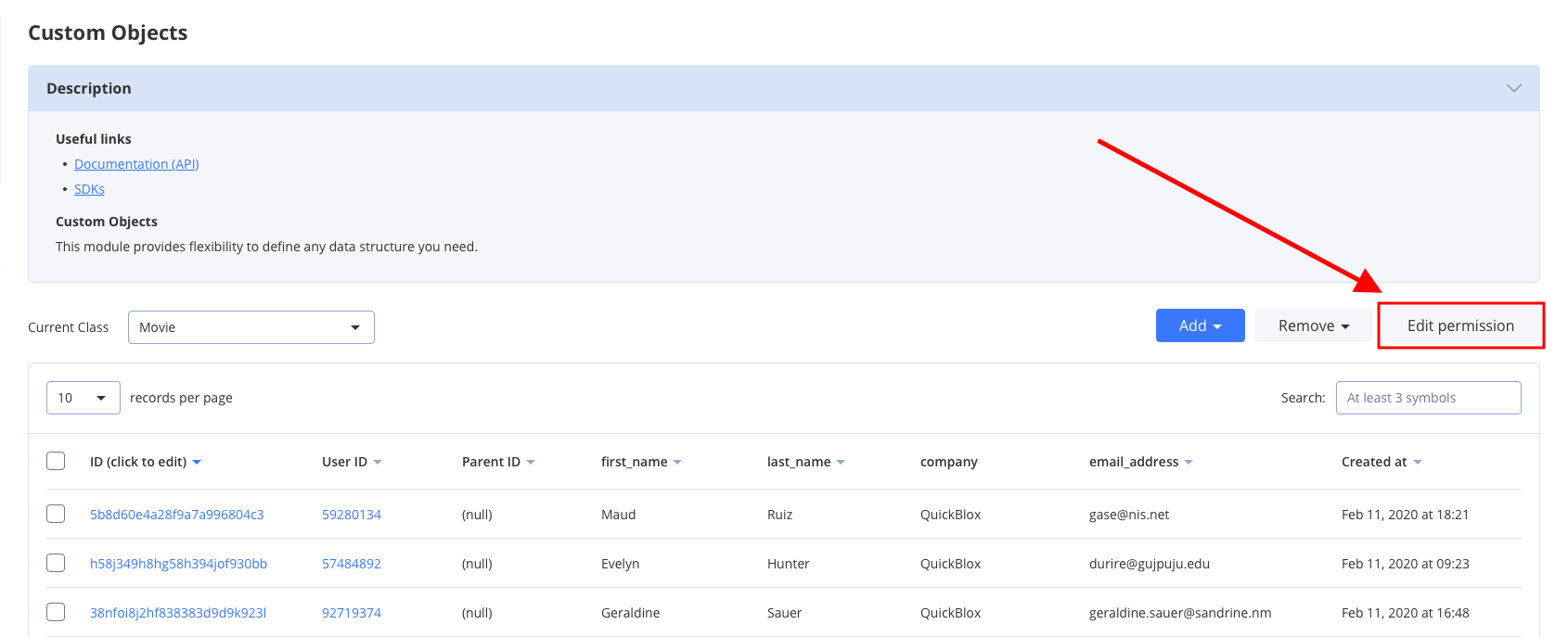 Default Class permission schema is used while creating a class:
* **Create**: Open
* **Read**: Open
* **Update**: Owner
* **Delete**: Owner
Mark checkboxes to **enable** class permissions.
#### Record entity
A record is an entity within the class in the Custom Objects module that has its own permission levels. You can create a record in the Dashboard and API (see [Create Record](#section-create-records) request for more details). All permission levels except for the **Not Allowed** are available for the record and there are only three actions available and applicable for the record: Read, Update, and Delete.
Default Record permission schema is used while creating a class:
* **Read**: Open
* **Update**: Owner
* **Delete**: Owner
To set a permission level open the required Class and click the record to edit it.
Default Class permission schema is used while creating a class:
* **Create**: Open
* **Read**: Open
* **Update**: Owner
* **Delete**: Owner
Mark checkboxes to **enable** class permissions.
#### Record entity
A record is an entity within the class in the Custom Objects module that has its own permission levels. You can create a record in the Dashboard and API (see [Create Record](#section-create-records) request for more details). All permission levels except for the **Not Allowed** are available for the record and there are only three actions available and applicable for the record: Read, Update, and Delete.
Default Record permission schema is used while creating a class:
* **Read**: Open
* **Update**: Owner
* **Delete**: Owner
To set a permission level open the required Class and click the record to edit it.
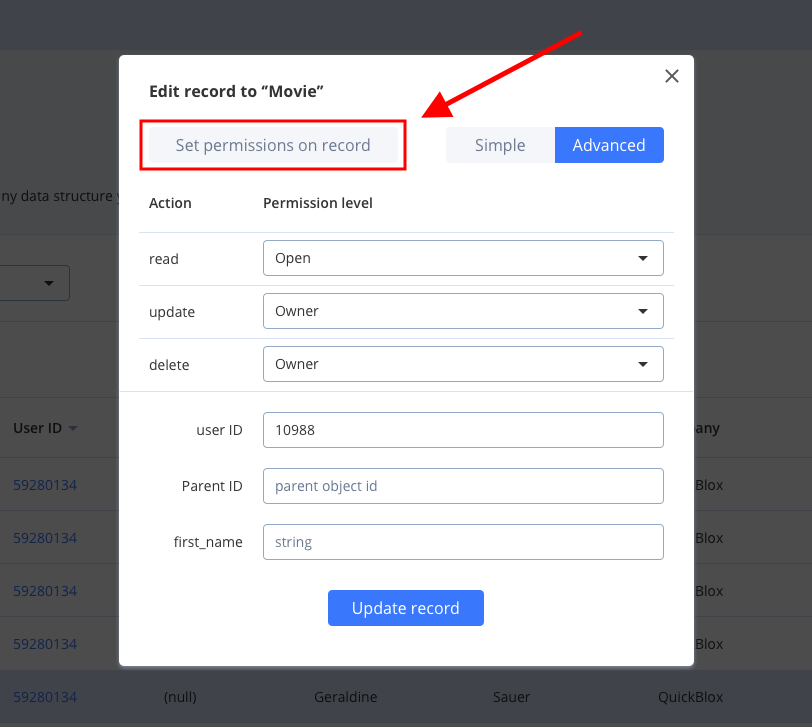 ### Choosing a permission schema
Only **one** permission level can be applicable to the record: class permission schema or record permission schema. To apply class permission levels to **all** records in the class tick the checkbox in the **Use Class permissions** column near the required Action in the Dashboard.
### Choosing a permission schema
Only **one** permission level can be applicable to the record: class permission schema or record permission schema. To apply class permission levels to **all** records in the class tick the checkbox in the **Use Class permissions** column near the required Action in the Dashboard.
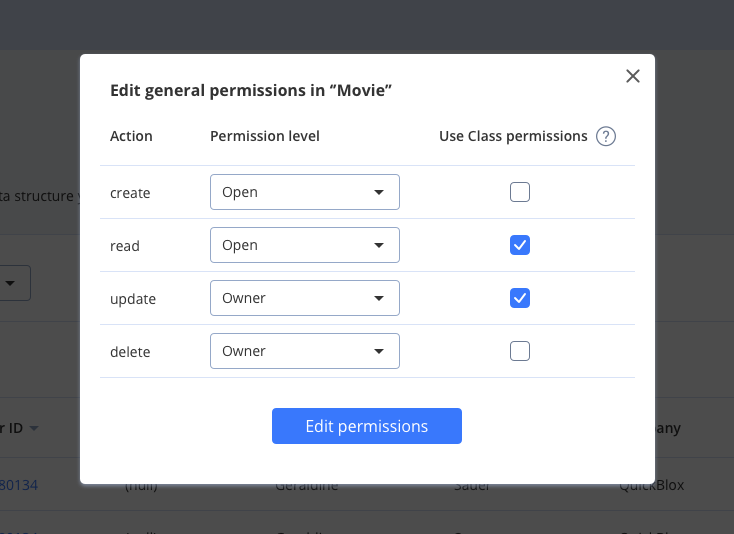 Using a class permission schema means that a record permission schema will **not** affect a reсord.
In case, the Admin **does not** tick the checkbox in the Dashboard a user **has** a possibility to change permission levels for every separate record in the table or create a new one with the ACL that a user requires.
### Create record with permissions
Let's create a record with the next permissions:
* READ: Open.
* UPDATE: Users in groups **golf**, **man**.
* DELETE: Users with IDs **3060**, **63635**.
```Java theme={null}
QBCustomObject newRecord = new QBCustomObject("Note");
newRecord.put("rating", 99);
newRecord.put("description", "Hello world");
//
// set permissions:
// READ
QBPermissions permissions = new QBPermissions();
permissions.setReadPermission(QBPermissionsLevel.OPEN);
//
// UPDATE
ArrayList usersTags = new ArrayList();
usersTags.add("golf");
usersTags.add("man");
permissions.setDeletePermission(QBPermissionsLevel.OPEN_FOR_GROUPS, usersTags);
//
// DELETE
ArrayList usersIdS = new ArrayList();
usersIdS.add("0602");
usersIdS.add("1986");
permissions.setDeletePermission(QBPermissionsLevel.OPEN_FOR_USER_IDS, usersIdS);
newRecord.setPermission(permissions);
QBCustomObjects.createObject(newRecord).performAsync(new QBEntityCallback() {
@Override
public void onSuccess(QBCustomObject customObject, Bundle bundle) {
}
@Override
public void onError(QBResponseException exception) {
}
});
```
```Kotlin theme={null}
val newRecord = QBCustomObject("Note")
newRecord.put("rating", 99)
newRecord.put("description", "Hello world")
//
// set permissions:
// READ
val permissions = QBPermissions()
permissions.setReadPermission(QBPermissionsLevel.OPEN)
//
// UPDATE
val usersTags = ArrayList()
usersTags.add("golf")
usersTags.add("man")
permissions.setDeletePermission(QBPermissionsLevel.OPEN_FOR_GROUPS, usersTags)
//
// DELETE
val usersIdS = ArrayList()
usersIdS.add("0602")
usersIdS.add("1986")
permissions.setDeletePermission(QBPermissionsLevel.OPEN_FOR_USER_IDS, usersIdS)
newRecord.permission = permissions
QBCustomObjects.createObject(newRecord).performAsync(object : QBEntityCallback {
override fun onSuccess(customObject: QBCustomObject?, bundle: Bundle?) {
}
override fun onError(exception: QBResponseException?) {
}
})
```
### Retrieve record permissions
You can obtain info about record permissions by its ID.
```Java theme={null}
QBCustomObjects.getObjectPermissions("Note", "53f44e7befa3573473000002").performAsync(new QBEntityCallback() {
@Override
public void onSuccess(QBPermissions permissions, Bundle bundle) {
}
@Override
public void onError(QBResponseException exception) {
}
});
```
```Kotlin theme={null}
QBCustomObjects.getObjectPermissions("Note", "53f44e7befa3573473000002").performAsync(object : QBEntityCallback {
override fun onSuccess(permissions: QBPermissions?, bundle: Bundle?) {
}
override fun onError(exception: QBResponseException?) {
}
})
```
**Only** info about the user's own records is available.
### Update record permissions
Let's update record's permissions to next:
* READ: Users in groups **car, developers**.
* UPDATE: Owner.
* DELETE: Owner.
```Java theme={null}
QBCustomObject record = new QBCustomObject();
record.setClassName("Note");
record.setCustomObjectId("52b30274535c12fbf80121bd");
//
// update permissions:
// READ
QBPermissions permissions = new QBPermissions();
ArrayList usersTags = new ArrayList();
usersTags.add("car");
usersTags.add("developers");
permissions.setDeletePermission(QBPermissionsLevel.OPEN_FOR_GROUPS, usersTags);
//
// UPDATE
permissions.setUpdatePermission(QBPermissionsLevel.OWNER);
//
// DELETE
permissions.setDeletePermission(QBPermissionsLevel.OWNER);
record.setPermission(permissions);
QBCustomObjects.updateObject(record).performAsync(new QBEntityCallback() {
@Override
public void onSuccess(QBCustomObject customObject, Bundle bundle) {
}
@Override
public void onError(QBResponseException exception) {
}
});
```
```Kotlin theme={null}
val record = QBCustomObject()
record.className = "Note"
record.customObjectId = "52b30274535c12fbf80121bd"
//
// update permissions:
// READ
val permissions = QBPermissions()
val usersTags = ArrayList()
usersTags.add("car")
usersTags.add("developers")
permissions.setDeletePermission(QBPermissionsLevel.OPEN_FOR_GROUPS, usersTags)
//
// UPDATE
permissions.setUpdatePermission(QBPermissionsLevel.OWNER)
//
// DELETE
permissions.setDeletePermission(QBPermissionsLevel.OWNER)
record.permission = permissions
QBCustomObjects.updateObject(record).performAsync(object : QBEntityCallback {
override fun onSuccess(customObject: QBCustomObject?, bundle: Bundle?) {
}
override fun onError(exception: QBResponseException) {
}
})
```
## Files
Custom Objects module supports the `File` field type. It is created to work easily with content from the Custom Objects module. There is an ability to upload, download, update, and delete the content of file fields.
## Upload/Update file
Use the code lines below to upload/update a file.
```Java theme={null}
// get file
File file = new File();
QBCustomObject customObject = new QBCustomObject("Note", "p38a06v6l123o50v66");
QBCustomObjectsFiles.uploadFile(file, customObject, "avatar", new QBProgressCallback() {
@Override
public void onProgressUpdate(int progress) {
}
}).performAsync(new QBEntityCallback() {
@Override
public void onSuccess(QBCustomObjectFileField customObjectFileField, Bundle bundle) {
}
@Override
public void onError(QBResponseException exception) {
}
});
```
```Kotlin theme={null}
// get file
val file = ...
val customObject = QBCustomObject("Note", "p38a06v6l123o50v66")
QBCustomObjectsFiles.uploadFile(file, customObject, "avatar", object : QBProgressCallback {
override fun onProgressUpdate(progress: Int) {
}
}).performAsync(object : QBEntityCallback {
override fun onSuccess(customObjectFileField: QBCustomObjectFileField?, bundle: Bundle?) {
}
override fun onError(exception: QBResponseException?) {
}
})
```
## Download file
To download a file, use the code snippet below.
```Java theme={null}
QBCustomObject customObject = new QBCustomObject("Note", "p38a06v6l123o50v66");
QBCustomObjectsFiles.downloadFile(customObject, "avatar", new QBProgressCallback() {
@Override
public void onProgressUpdate(int progress) {
}
}).performAsync(new QBEntityCallback() {
@Override
public void onSuccess(InputStream inputStream, Bundle bundle) {
}
@Override
public void onError(QBResponseException exception) {
}
});
```
```Kotlin theme={null}
val customObject = QBCustomObject("Note", "p38a06v6l123o50v66")
QBCustomObjectsFiles.downloadFile(customObject, "avatar", object : QBProgressCallback {
override fun onProgressUpdate(progress: Int) {
}
}).performAsync(object : QBEntityCallback {
override fun onSuccess(inputStream: InputStream?, bundle: Bundle?) {
}
override fun onError(exception: QBResponseException?) {
}
})
```
## Delete file
To delete a file, use the code snippet below.
```Java theme={null}
QBCustomObject customObject = new QBCustomObject("Note", "p38a06v6l123o50v66");
QBCustomObjectsFiles.deleteFile(customObject, "avatar").performAsync(new QBEntityCallback() {
@Override
public void onSuccess(Void aVoid, Bundle bundle) {
}
@Override
public void onError(QBResponseException exception) {
}
});
```
```Kotlin theme={null}
val customObject = QBCustomObject("Note", "p38a06v6l123o50v66")
QBCustomObjectsFiles.deleteFile(customObject, "avatar").performAsync(object : QBEntityCallback {
override fun onSuccess(void: Void?, bundle: Bundle?) {
}
override fun onError(exception: QBResponseException?) {
}
})
```
Using a class permission schema means that a record permission schema will **not** affect a reсord.
In case, the Admin **does not** tick the checkbox in the Dashboard a user **has** a possibility to change permission levels for every separate record in the table or create a new one with the ACL that a user requires.
### Create record with permissions
Let's create a record with the next permissions:
* READ: Open.
* UPDATE: Users in groups **golf**, **man**.
* DELETE: Users with IDs **3060**, **63635**.
```Java theme={null}
QBCustomObject newRecord = new QBCustomObject("Note");
newRecord.put("rating", 99);
newRecord.put("description", "Hello world");
//
// set permissions:
// READ
QBPermissions permissions = new QBPermissions();
permissions.setReadPermission(QBPermissionsLevel.OPEN);
//
// UPDATE
ArrayList usersTags = new ArrayList();
usersTags.add("golf");
usersTags.add("man");
permissions.setDeletePermission(QBPermissionsLevel.OPEN_FOR_GROUPS, usersTags);
//
// DELETE
ArrayList usersIdS = new ArrayList();
usersIdS.add("0602");
usersIdS.add("1986");
permissions.setDeletePermission(QBPermissionsLevel.OPEN_FOR_USER_IDS, usersIdS);
newRecord.setPermission(permissions);
QBCustomObjects.createObject(newRecord).performAsync(new QBEntityCallback() {
@Override
public void onSuccess(QBCustomObject customObject, Bundle bundle) {
}
@Override
public void onError(QBResponseException exception) {
}
});
```
```Kotlin theme={null}
val newRecord = QBCustomObject("Note")
newRecord.put("rating", 99)
newRecord.put("description", "Hello world")
//
// set permissions:
// READ
val permissions = QBPermissions()
permissions.setReadPermission(QBPermissionsLevel.OPEN)
//
// UPDATE
val usersTags = ArrayList()
usersTags.add("golf")
usersTags.add("man")
permissions.setDeletePermission(QBPermissionsLevel.OPEN_FOR_GROUPS, usersTags)
//
// DELETE
val usersIdS = ArrayList()
usersIdS.add("0602")
usersIdS.add("1986")
permissions.setDeletePermission(QBPermissionsLevel.OPEN_FOR_USER_IDS, usersIdS)
newRecord.permission = permissions
QBCustomObjects.createObject(newRecord).performAsync(object : QBEntityCallback {
override fun onSuccess(customObject: QBCustomObject?, bundle: Bundle?) {
}
override fun onError(exception: QBResponseException?) {
}
})
```
### Retrieve record permissions
You can obtain info about record permissions by its ID.
```Java theme={null}
QBCustomObjects.getObjectPermissions("Note", "53f44e7befa3573473000002").performAsync(new QBEntityCallback() {
@Override
public void onSuccess(QBPermissions permissions, Bundle bundle) {
}
@Override
public void onError(QBResponseException exception) {
}
});
```
```Kotlin theme={null}
QBCustomObjects.getObjectPermissions("Note", "53f44e7befa3573473000002").performAsync(object : QBEntityCallback {
override fun onSuccess(permissions: QBPermissions?, bundle: Bundle?) {
}
override fun onError(exception: QBResponseException?) {
}
})
```
**Only** info about the user's own records is available.
### Update record permissions
Let's update record's permissions to next:
* READ: Users in groups **car, developers**.
* UPDATE: Owner.
* DELETE: Owner.
```Java theme={null}
QBCustomObject record = new QBCustomObject();
record.setClassName("Note");
record.setCustomObjectId("52b30274535c12fbf80121bd");
//
// update permissions:
// READ
QBPermissions permissions = new QBPermissions();
ArrayList usersTags = new ArrayList();
usersTags.add("car");
usersTags.add("developers");
permissions.setDeletePermission(QBPermissionsLevel.OPEN_FOR_GROUPS, usersTags);
//
// UPDATE
permissions.setUpdatePermission(QBPermissionsLevel.OWNER);
//
// DELETE
permissions.setDeletePermission(QBPermissionsLevel.OWNER);
record.setPermission(permissions);
QBCustomObjects.updateObject(record).performAsync(new QBEntityCallback() {
@Override
public void onSuccess(QBCustomObject customObject, Bundle bundle) {
}
@Override
public void onError(QBResponseException exception) {
}
});
```
```Kotlin theme={null}
val record = QBCustomObject()
record.className = "Note"
record.customObjectId = "52b30274535c12fbf80121bd"
//
// update permissions:
// READ
val permissions = QBPermissions()
val usersTags = ArrayList()
usersTags.add("car")
usersTags.add("developers")
permissions.setDeletePermission(QBPermissionsLevel.OPEN_FOR_GROUPS, usersTags)
//
// UPDATE
permissions.setUpdatePermission(QBPermissionsLevel.OWNER)
//
// DELETE
permissions.setDeletePermission(QBPermissionsLevel.OWNER)
record.permission = permissions
QBCustomObjects.updateObject(record).performAsync(object : QBEntityCallback {
override fun onSuccess(customObject: QBCustomObject?, bundle: Bundle?) {
}
override fun onError(exception: QBResponseException) {
}
})
```
## Files
Custom Objects module supports the `File` field type. It is created to work easily with content from the Custom Objects module. There is an ability to upload, download, update, and delete the content of file fields.
## Upload/Update file
Use the code lines below to upload/update a file.
```Java theme={null}
// get file
File file = new File();
QBCustomObject customObject = new QBCustomObject("Note", "p38a06v6l123o50v66");
QBCustomObjectsFiles.uploadFile(file, customObject, "avatar", new QBProgressCallback() {
@Override
public void onProgressUpdate(int progress) {
}
}).performAsync(new QBEntityCallback() {
@Override
public void onSuccess(QBCustomObjectFileField customObjectFileField, Bundle bundle) {
}
@Override
public void onError(QBResponseException exception) {
}
});
```
```Kotlin theme={null}
// get file
val file = ...
val customObject = QBCustomObject("Note", "p38a06v6l123o50v66")
QBCustomObjectsFiles.uploadFile(file, customObject, "avatar", object : QBProgressCallback {
override fun onProgressUpdate(progress: Int) {
}
}).performAsync(object : QBEntityCallback {
override fun onSuccess(customObjectFileField: QBCustomObjectFileField?, bundle: Bundle?) {
}
override fun onError(exception: QBResponseException?) {
}
})
```
## Download file
To download a file, use the code snippet below.
```Java theme={null}
QBCustomObject customObject = new QBCustomObject("Note", "p38a06v6l123o50v66");
QBCustomObjectsFiles.downloadFile(customObject, "avatar", new QBProgressCallback() {
@Override
public void onProgressUpdate(int progress) {
}
}).performAsync(new QBEntityCallback() {
@Override
public void onSuccess(InputStream inputStream, Bundle bundle) {
}
@Override
public void onError(QBResponseException exception) {
}
});
```
```Kotlin theme={null}
val customObject = QBCustomObject("Note", "p38a06v6l123o50v66")
QBCustomObjectsFiles.downloadFile(customObject, "avatar", object : QBProgressCallback {
override fun onProgressUpdate(progress: Int) {
}
}).performAsync(object : QBEntityCallback {
override fun onSuccess(inputStream: InputStream?, bundle: Bundle?) {
}
override fun onError(exception: QBResponseException?) {
}
})
```
## Delete file
To delete a file, use the code snippet below.
```Java theme={null}
QBCustomObject customObject = new QBCustomObject("Note", "p38a06v6l123o50v66");
QBCustomObjectsFiles.deleteFile(customObject, "avatar").performAsync(new QBEntityCallback() {
@Override
public void onSuccess(Void aVoid, Bundle bundle) {
}
@Override
public void onError(QBResponseException exception) {
}
});
```
```Kotlin theme={null}
val customObject = QBCustomObject("Note", "p38a06v6l123o50v66")
QBCustomObjectsFiles.deleteFile(customObject, "avatar").performAsync(object : QBEntityCallback {
override fun onSuccess(void: Void?, bundle: Bundle?) {
}
override fun onError(exception: QBResponseException?) {
}
})
```