> ## Documentation Index
> Fetch the complete documentation index at: https://docs.quickblox.com/llms.txt
> Use this file to discover all available pages before exploring further.
# AI Features
> AI Features base on SmartChat Assistants
## Overview
Starting from version 4.2.0 of QuickBlox Android SDK, the AI functionality is enabled and based on SmartChat Assistants. The QuickBlox Android SDK provides a range of features to enhance the chat experience. With essential messaging functionalities such as answer assistant, users can engage in more interactive conversations.
**Supported features**
| Name | Description |
| :---------------- | :------------------------------------------------------------------------- |
| AI Answers Assist | Generates a draft response based on chat history for the selected message. |
| AI Translate | Provides translation based on chat history to selected incoming message. |
## Requirements
The minimum requirements for using AI features are:
* QuickBlox Android SDK v4.2.0
* QuickBlox account with activated SmartChat Assistants
Visit [Key Concepts](/docs/key-concepts) page to learn the most important QuickBlox concepts.
Visit [Smart Chat Assistant overview](smartchat-assistant/smartchat-assistant-overview) page to learn the most important SmartChat Assistants concepts.
## Before you begin
1. Register a [QuickBlox account](https://admin.quickblox.com/signin). This is a matter of a few minutes and you will be able to use this account to build your apps.
2. Configure QuickBlox SDK for your app. Check out [Setup](https://docs.quickblox.com/docs/android-setup) page for more details.
3. Create a user session to be able to use QuickBlox functionality. See [Authentication](https://docs.quickblox.com/docs/android-authentication) page to learn how to do it.
4. Create or update your SmartChat Assistant. See [Smart Chat Assistant](smartchat-assistant/smartchat-assistant-overview#create-smartchat-assistant) documentation to learn how to do it.
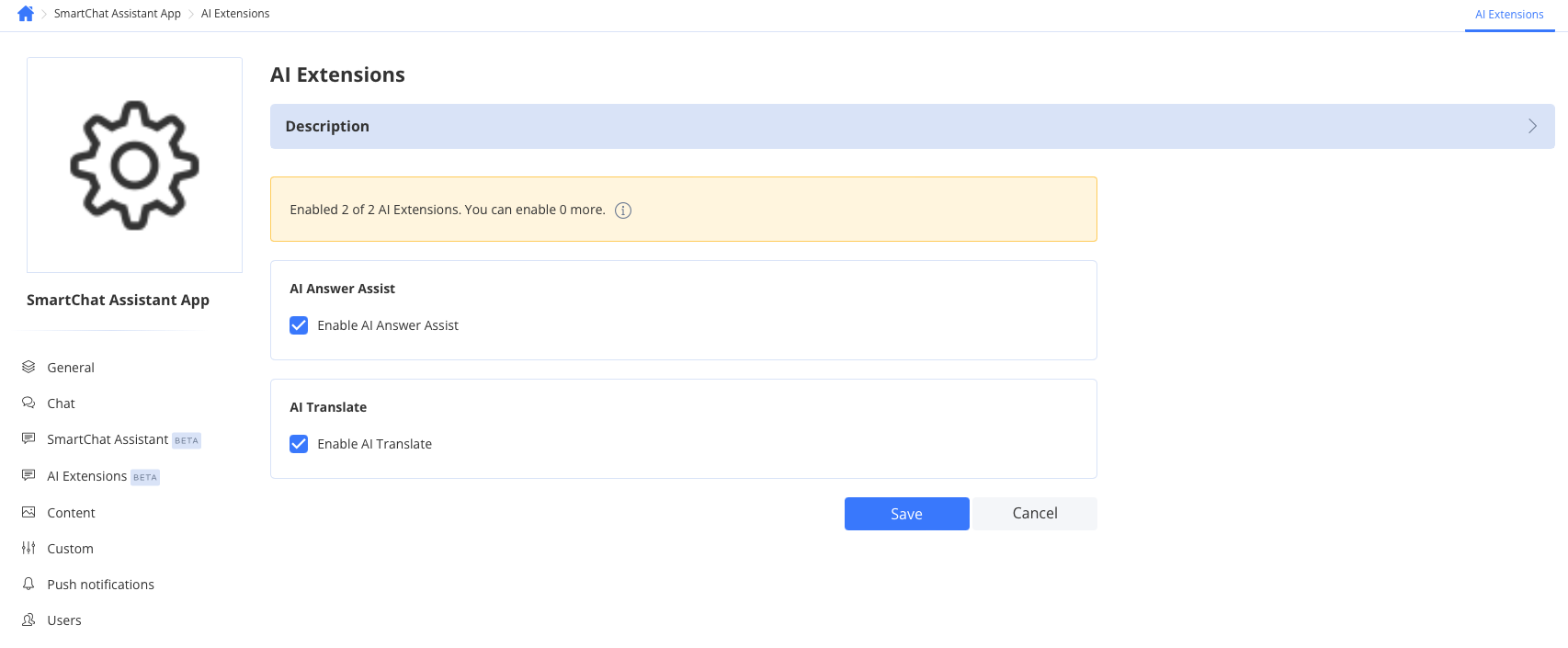
### Enable AI Extensions
1. Navigate to the **Dashboard => *YOUR\_APP* => AI Extensions** page
2. Select the checkboxes for the features you want to enable.
3. Click the Save button to save changes.
 ### Review your SmartChat Assistant
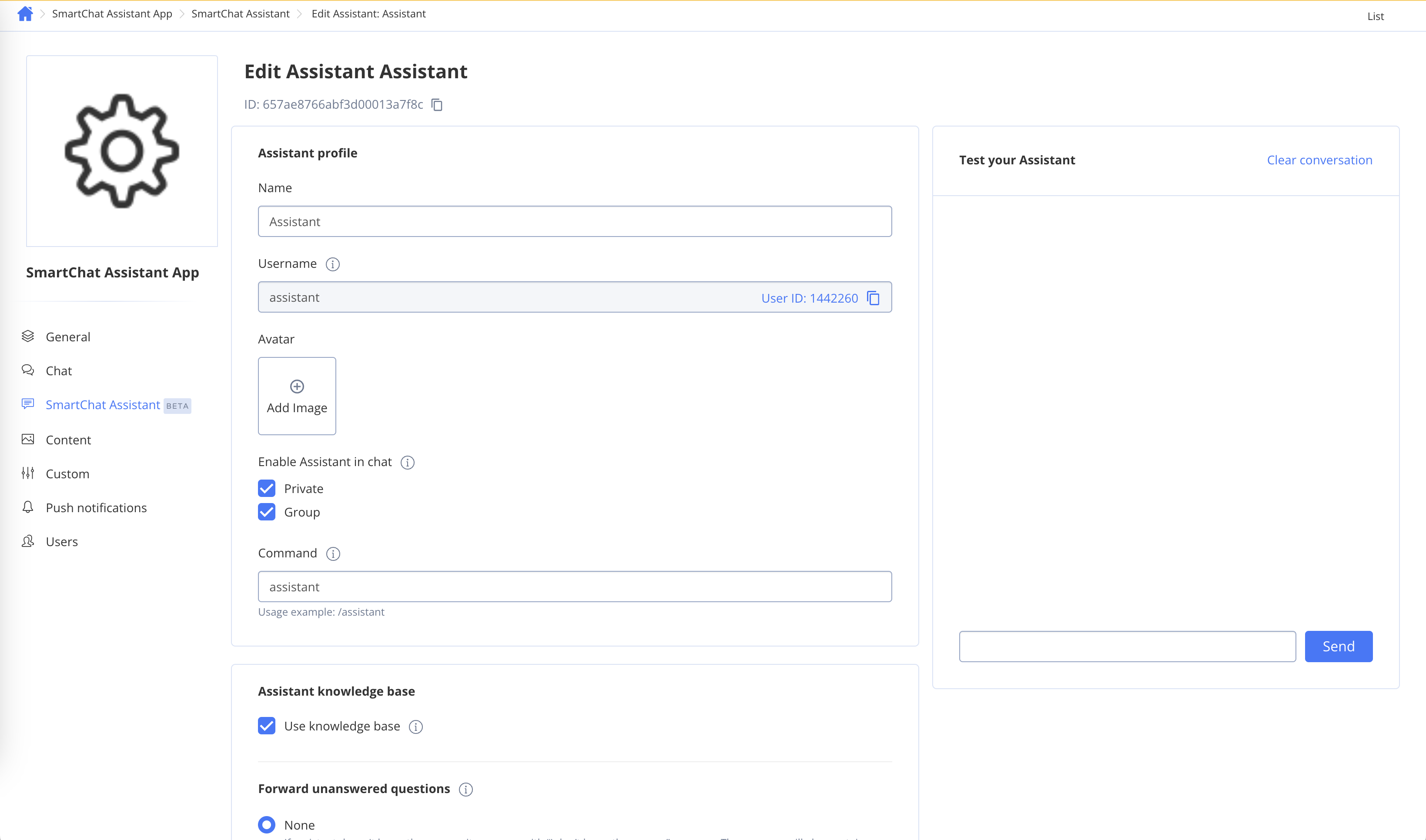
To get **ID** of SmartChat Assistant to use it as `smartChatAssistantId` param follow the steps below:
1. Navigate to the **Dashboard => *YOUR\_APP* => SmartChat Assistant** page
2. Choose the ID of the SmartChat Assistant you want to update and click on it.
3. Edit the SmartChat Assistant settings.
4. Click the Save button to save changes.
### Review your SmartChat Assistant
To get **ID** of SmartChat Assistant to use it as `smartChatAssistantId` param follow the steps below:
1. Navigate to the **Dashboard => *YOUR\_APP* => SmartChat Assistant** page
2. Choose the ID of the SmartChat Assistant you want to update and click on it.
3. Edit the SmartChat Assistant settings.
4. Click the Save button to save changes.
 ## AI Answer Assist
QuickBlox AI Answer Assist generates a contextually relevant draft response based on the chat history. Use it to suggest replies that match the conversation context.
### How to use Answer Assist
```java theme={null}
String smartChatAssistantId = "XXXXXXXXXXXXXXXXXXXXXXXX";
String messageToAssist = "What is Quickblox?";
List history = new ArrayList<>();
history.add(new QBAIAnswerAssistHistoryMessageImpl(Role.USER, "Hi"));
history.add(new QBAIAnswerAssistHistoryMessageImpl(Role.ASSISTANT, "Hello! How can I assist you today?"));
QB.ai.answerAssist(smartChatAssistantId, messageToAssist, history).performAsync(new QBEntityCallback() {
@Override
public void onSuccess(QBAIAnswerAssistResult qbaiAnswerAssistResult, Bundle bundle) {
String answer = qbaiAnswerAssistResult.getMessage();
// handle answer
}
@Override
public void onError(QBResponseException exception) {
// handle error
}
});
```
```kotlin theme={null}
val smartChatAssistantId = "XXXXXXXXXXXXXXXXXXXXXXXX"
val messageToAssist = "What is Quickblox?"
val history: MutableList = ArrayList()
history.add(QBAIAnswerAssistHistoryMessageImpl(Role.USER, "Hi"))
history.add(QBAIAnswerAssistHistoryMessageImpl(Role.ASSISTANT, "Hello! How can I assist you today?"))
QB.ai.answerAssist(smartChatAssistantId, messageToAssist, history)
.performAsync(object : QBEntityCallback {
override fun onSuccess(qbaiAnswerAssistResult: QBAIAnswerAssistResult?, bundle: Bundle) {
val answer = qbaiAnswerAssistResult?.message
// handle answer
}
override fun onError(exception: QBResponseException) {
// handle error
}
})
```
| Parameter name | Type | Description |
| :------------------- | :-------------- | :------------------------------------------------------------------------------------------------------------------------------------------------------------------------------------------------------------------------------------------------------------------ |
| smartChatAssistantId | String | This field should hold your actual Smart Chat Assistant ID that you'll receive from the QuickBlox account. This ID is used to authenticate your requests to the AI service. |
| messageToAssist | String | The message you want to get an answer for. |
| history | Array of Object | Conversation history. Used to add context. Each object of the array should have two fields: 'role' and 'message'. The field role should contain one of the next values: `Role.USER` or `Role.ASSISTANT`. The field message should be a String with a chat message. |
## AI Translate
QuickBlox offers translation functionality that helps users easily translate text messages in chat, taking into account the context of the chat history.
### How to use AI Translate
```java theme={null}
String smartChatAssistantId = "XXXXXXXXXXXXXXXXXXXXXXXX";
String textToTranslate = "Hola!";
String languageCode = "en";
QB.ai.translate(smartChatAssistantId, textToTranslate, languageCode).performAsync(new QBEntityCallback() {
@Override
public void onSuccess(QBAITranslateResult qbaiTranslateResult, Bundle bundle) {
String translation = qbaiTranslateResult.getMessage();
// handle translation
}
@Override
public void onError(QBResponseException e) {
// handle error
}
});
```
```kotlin theme={null}
val smartChatAssistantId = "XXXXXXXXXXXXXXXXXXXXXXXX"
val textToTranslate = "Hola!"
val languageCode = "en"
QB.ai.translate(smartChatAssistantId, textToTranslate, languageCode)
.performAsync(object : QBEntityCallback {
override fun onSuccess(qbaiTranslateResult: QBAITranslateResult, bundle: Bundle) {
val translation = qbaiTranslateResult.message
// handle translation
}
override fun onError(e: QBResponseException) {
// handle error
}
})
```
| Parameter name | Type | Description |
| :------------------- | :----- | :-------------------------------------------------------------------------------------------------------------------------------------------------------------------------- |
| smartChatAssistantId | String | This field should hold your actual Smart Chat Assistant ID that you'll receive from the QuickBlox account. This ID is used to authenticate your requests to the AI service. |
| textToTranslate | String | Text to translate. |
| languageCode | String | Translation language code. |
## AI Answer Assist
QuickBlox AI Answer Assist generates a contextually relevant draft response based on the chat history. Use it to suggest replies that match the conversation context.
### How to use Answer Assist
```java theme={null}
String smartChatAssistantId = "XXXXXXXXXXXXXXXXXXXXXXXX";
String messageToAssist = "What is Quickblox?";
List history = new ArrayList<>();
history.add(new QBAIAnswerAssistHistoryMessageImpl(Role.USER, "Hi"));
history.add(new QBAIAnswerAssistHistoryMessageImpl(Role.ASSISTANT, "Hello! How can I assist you today?"));
QB.ai.answerAssist(smartChatAssistantId, messageToAssist, history).performAsync(new QBEntityCallback() {
@Override
public void onSuccess(QBAIAnswerAssistResult qbaiAnswerAssistResult, Bundle bundle) {
String answer = qbaiAnswerAssistResult.getMessage();
// handle answer
}
@Override
public void onError(QBResponseException exception) {
// handle error
}
});
```
```kotlin theme={null}
val smartChatAssistantId = "XXXXXXXXXXXXXXXXXXXXXXXX"
val messageToAssist = "What is Quickblox?"
val history: MutableList = ArrayList()
history.add(QBAIAnswerAssistHistoryMessageImpl(Role.USER, "Hi"))
history.add(QBAIAnswerAssistHistoryMessageImpl(Role.ASSISTANT, "Hello! How can I assist you today?"))
QB.ai.answerAssist(smartChatAssistantId, messageToAssist, history)
.performAsync(object : QBEntityCallback {
override fun onSuccess(qbaiAnswerAssistResult: QBAIAnswerAssistResult?, bundle: Bundle) {
val answer = qbaiAnswerAssistResult?.message
// handle answer
}
override fun onError(exception: QBResponseException) {
// handle error
}
})
```
| Parameter name | Type | Description |
| :------------------- | :-------------- | :------------------------------------------------------------------------------------------------------------------------------------------------------------------------------------------------------------------------------------------------------------------ |
| smartChatAssistantId | String | This field should hold your actual Smart Chat Assistant ID that you'll receive from the QuickBlox account. This ID is used to authenticate your requests to the AI service. |
| messageToAssist | String | The message you want to get an answer for. |
| history | Array of Object | Conversation history. Used to add context. Each object of the array should have two fields: 'role' and 'message'. The field role should contain one of the next values: `Role.USER` or `Role.ASSISTANT`. The field message should be a String with a chat message. |
## AI Translate
QuickBlox offers translation functionality that helps users easily translate text messages in chat, taking into account the context of the chat history.
### How to use AI Translate
```java theme={null}
String smartChatAssistantId = "XXXXXXXXXXXXXXXXXXXXXXXX";
String textToTranslate = "Hola!";
String languageCode = "en";
QB.ai.translate(smartChatAssistantId, textToTranslate, languageCode).performAsync(new QBEntityCallback() {
@Override
public void onSuccess(QBAITranslateResult qbaiTranslateResult, Bundle bundle) {
String translation = qbaiTranslateResult.getMessage();
// handle translation
}
@Override
public void onError(QBResponseException e) {
// handle error
}
});
```
```kotlin theme={null}
val smartChatAssistantId = "XXXXXXXXXXXXXXXXXXXXXXXX"
val textToTranslate = "Hola!"
val languageCode = "en"
QB.ai.translate(smartChatAssistantId, textToTranslate, languageCode)
.performAsync(object : QBEntityCallback {
override fun onSuccess(qbaiTranslateResult: QBAITranslateResult, bundle: Bundle) {
val translation = qbaiTranslateResult.message
// handle translation
}
override fun onError(e: QBResponseException) {
// handle error
}
})
```
| Parameter name | Type | Description |
| :------------------- | :----- | :-------------------------------------------------------------------------------------------------------------------------------------------------------------------------- |
| smartChatAssistantId | String | This field should hold your actual Smart Chat Assistant ID that you'll receive from the QuickBlox account. This ID is used to authenticate your requests to the AI service. |
| textToTranslate | String | Text to translate. |
| languageCode | String | Translation language code. |