> ## Documentation Index
> Fetch the complete documentation index at: https://docs.quickblox.com/llms.txt
> Use this file to discover all available pages before exploring further.
# Basic
> Learn how to add peer-to-peer video calls to your app.
QuickBlox Video Calling API is built on top of [WebRTC](https://webrtc.org/). It allows adding real-time video communication features into your app similar to Skype using API easily. The communication is happening between peers representing camera devices. There are two **peer types**:
* **Local peer** is a device running the app right now.
* **Remote peer** is an opponent device.
Establishing real-time video communication between two peers involves 3 phases:
1. **Signaling**. At this phase, the peers’ local IPs and ports where they can be reached (ICE candidates) are exchanged as well as their media capabilities and call session control messages.
2. **Discovery**. At this phase, the public IPs and ports at which endpoints can be reached are discovered by STUN/TURN server.
3. **Establishing a connection**. At this phase, the data are sent directly to each party of the communication process.
In order to start using Video Calling Module, you need to **connect to QuickBlox Chat first**. The signaling in the QuickBox WebRTC module is implemented over the XMPP protocol using QuickBlox Chat module. It acts as a signaling transport for Video Calling API.
Please use this WebRTC Video Calling to make the Group Calls with **4 or fewer users**. Because of [Mesh architecture](https://webrtcglossary.com/mesh/) we use for multi-point where every participant sends and receives its media to all other participants, the current solution supports group calls with up to 4 people.
Visit [Key Concepts](/docs/key-concepts) page to learn the most important QuickBlox concepts.
## Before you begin
1. Register a [QuickBlox account](https://admin.quickblox.com/signin). This is a matter of a few minutes and you will be able to use this account to build your apps.
2. Configure QuickBlox SDK for your app. Check out [Setup](/sdks/android-setup) page for more details.
3. Create a user session to be able to use QuickBlox functionality. See [Authentication](/sdks/android-authentication) page to learn how to do it.
4. Connect to the Chat server to provide a signaling mechanism for Video Calling API. Follow our [Chat](/sdks/android-chat) page to learn about chat connection settings and configuration.
## Initialize WebRTC
To be able to receive incoming video chat calls, you should initialize `QBRTCClient` and add WebRTC signaling to it.
```Java theme={null}
// add signalling manager
chatService.getVideoChatWebRTCSignalingManager().addSignalingManagerListener(new QBVideoChatSignalingManagerListener() {
@Override
public void signalingCreated(QBSignaling signaling, boolean createdLocally) {
if (!createdLocally) {
rtcClient.addSignaling(signaling);
}
}
});
```
```Kotlin theme={null}
// add signalling manager
chatService.videoChatWebRTCSignalingManager.addSignalingManagerListener { signaling, createdLocally ->
if (!createdLocally) {
rtcClient.addSignaling(signaling)
}
}
// configure
QBRTCConfig.setDebugEnabled(true)
QBRTCConfig.setAnswerTimeInterval(answerTimeInterval)
QBRTCConfig.setDisconnectTime(disconnectTimeInterval)
QBRTCConfig.setDialingTimeInterval(dialingTimeInterval)
```
If you forget to set the Signaling Manager, you will not be able to process calls.
## Manage calls
Add `SessionCallbacksListener` to your `QBRTCClient` to define session states. Learn more details about the event listener configuration in the [Event listener](#event-listener) section.
```Java theme={null}
QBRTCClient.getInstance(getApplicationContext()).addSessionCallbacksListener(new QBRTCClientSessionCallbacks() {
@Override
public void onReceiveNewSession(QBRTCSession session) {
}
@Override
public void onUserNoActions(QBRTCSession session, Integer integer) {
}
@Override
public void onSessionStartClose(QBRTCSession session) {
}
@Override
public void onUserNotAnswer(QBRTCSession session, Integer integer) {
}
@Override
public void onCallRejectByUser(QBRTCSession session, Integer integer, Map map) {
}
@Override
public void onCallAcceptByUser(QBRTCSession session, Integer integer, Map map) {
}
@Override
public void onReceiveHangUpFromUser(QBRTCSession session, Integer integer, Map map) {
}
@Override
public void onSessionClosed(QBRTCSession session) {
}
});
```
```Kotlin theme={null}
QBRTCClient.getInstance(applicationContext).addSessionCallbacksListener(object : QBRTCClientSessionCallbacks {
override fun onReceiveNewSession(session: QBRTCSession?) {
}
override fun onUserNoActions(session: QBRTCSession?, integer: Int?) {
}
override fun onSessionStartClose(session: QBRTCSession?) {
}
override fun onUserNotAnswer(session: QBRTCSession?, integer: Int?) {
}
override fun onCallRejectByUser(session: QBRTCSession?, integer: Int?, map: Map?) {
}
override fun onCallAcceptByUser(session: QBRTCSession?, integer: Int?, map: Map?) {
}
override fun onReceiveHangUpFromUser(session: QBRTCSession?, integer: Int?, map: Map?) {
}
override fun onSessionClosed(session: QBRTCSession?) {
}
})
```
You can use two another сallbacks to add to `QBRTCClient`:
* `QBRTCSessionEventsCallback` (with overriding methods) to handle session main events.
* `QBRTCClientSessionCallbacksImpl` to make your own Session Callback Manager.
You should allow `QBRTCClient` to process calls. To be sure that your app is ready for calls processing and `Activity` exists, use the following snippet in the `Activity` class.
```Java theme={null}
rtcClient.prepareToProcessCalls();
```
```Kotlin theme={null}
rtcClient.prepareToProcessCalls()
```
Now the application is ready for processing calls.
## Local/remote video view
Set up two video chat layouts for remote and local video tracks to be able to show the video.
* A **remote video track** represents a remote peer video stream from a remote camera app. Specify `userId` for the remote camera app of the remote peer.
* A **local video track** represents a local peer video stream from a local camera app. Specify `userId` for the local camera app of the local peer.
```XML XML theme={null}
```
`QBRTCSurfaceView` allows using several views on the screen layout and overlapping each other. This is a good feature for group video calls.
`QBRTCSurfaceView` is a surface view (it extends `org.webrtc.SurfaceViewRenderer` class) that renders video track. It has its own lifecycle for rendering. It uses `init()` method for preparing to render and `release()` to release resources when the video track does not exist anymore.
`QBRTCSurfaceView` is **automatically initialized** after the surface is created (in `surfaceCreated()` method callback). You can manually initialize `QBRTCSurfaceView` using `EGLContext` getting from `QBRTCClient`. Use this only when `Activity` is alive and GL resources exist.
```Java theme={null}
QBRTCSurfaceView surfaceView = (QBRTCSurfaceView) findViewById(R.id.remote_video_view);
EglBase eglContext = QBRTCClient.getInstance(getContext()).getEglContext();
surfaceView.init(eglContext.getEglBaseContext(), null);
```
```Kotlin theme={null}
val surfaceView: QBRTCSurfaceView = findViewById(R.id.remote_video_view) as QBRTCSurfaceView
val eglContext = QBRTCClient.getInstance(applicationContext).eglContext
surfaceView.init(eglContext.eglBaseContext, null)
```
It is allowed to call `init()` to reinitialize the view only after a previous `init()`/`release()` cycle.
Method `release()` should be called when video track is no more valid, for example, when you receive `onConnectionClosedForUser()` callback from `QBRTCSession` or when `QBRTCSession` is going to close. But you should call `release()` method before `Activity` is destroyed and while `EGLContext` is still valid. If you don't call this method, the GL resources might leak.
Here are the few methods of the `QBRTCSurfaceView`:
```Java theme={null}
// set if the video stream should be mirrored or not
surfaceView.setMirror(true);
// set how the video will fill the allowed layout area
surfaceView.setScalingType(RendererCommon.ScalingType.SCALE_ASPECT_FIT);
// request to invalidate view when something has changed
surfaceView.requestLayout();
// releases all related GL resources
surfaceView.release();
```
```Kotlin theme={null}
// set if the video stream should be mirrored or not
surfaceView.setMirror(true)
// set how the video will fill the allowed layout area
surfaceView.setScalingType(RendererCommon.ScalingType.SCALE_ASPECT_FIT)
// request to invalidate view when something has changed
surfaceView.requestLayout()
// releases all related GL resources
surfaceView.release()
```
To render received video track from an opponent, you should have `QBRTCSurfaceView`, `QBRTCVideoTrack` and use:
```Java theme={null}
videoTrack.addRenderer(videoView);
```
```Kotlin theme={null}
videoTrack.addRenderer(videoView)
```
To stop rendering video track, you should simply use:
```Java theme={null}
videoTrack.removeRenderer(videoTrack.getRenderer());
```
```Kotlin theme={null}
videoTrack.removeRenderer(videoTrack.renderer)
```
## Initiate a call
To call other users, you should create a call session with the user first using `createNewSessionWithOpponents()` method. After that, you can start calling using `startCall()` method.
```Java theme={null}
// create collection of opponents ID
List opponents = new ArrayList<>();
for (QBUser user : users) {
opponents.add(user.getId());
}
// you can set any string key and value in user info
// then retrieve this data from sessions which is returned in callbacks
// and parse them as you wish
Map userInfo = new HashMap<>();
userInfo.put("key", "value");
// there are two call types: Audio or Video Call
QBRTCTypes.QBConferenceType conferenceType = QBRTCTypes.QBConferenceType.QB_CONFERENCE_TYPE_AUDIO;
// or
QBRTCTypes.QBConferenceType conferenceType = QBRTCTypes.QBConferenceType.QB_CONFERENCE_TYPE_VIDEO;
// init session
QBRTCSession session = QBRTCClient.getInstance(this).createNewSessionWithOpponents(opponents, conferenceType);
// start call
session.startCall(userInfo);
```
```Kotlin theme={null}
// create collection of opponents ID
val opponents = ArrayList()
for (user in users) {
opponents.add(user.id)
}
// you can set any string key and value in user info
// then retrieve this data from sessions which is returned in callbacks
// and parse them as you wish
val userInfo = HashMap()
userInfo["key"] = "value"
// there are two call types: Audio or Video Call
val conferenceType = QBRTCTypes.QBConferenceType.QB_CONFERENCE_TYPE_AUDIO
// or
val conferenceType = QBRTCTypes.QBConferenceType.QB_CONFERENCE_TYPE_VIDEO
// init session
val session = QBRTCClient.getInstance(this).createNewSessionWithOpponents(opponents, conferenceType)
// start call
session.startCall(userInfo)
```
Now, your opponents will receive a call request callback `onReceiveNewSession()` via `QBRTCClientSessionCallbacks` (read above).
```Java theme={null}
@Override
public void onReceiveNewSession(QBRTCSession session) {
Map userInfo = new HashMap<>();
userInfo.put("key", "value");
session.acceptCall(userInfo);
session.rejectCall(userInfo);
}
```
```Kotlin theme={null}
override fun onReceiveNewSession(session: QBRTCSession?) {
val userInfo = HashMap()
userInfo["key"] = "value"
session.acceptCall(userInfo)
session.rejectCall(userInfo)
}
```
## Accept a call
If you accept an incoming call, your opponent receives an `onCallAcceptByUser()` callback.
```Java theme={null}
@Override
public void onCallAcceptByUser(QBRTCSession session, Integer userId, Map userInfo) {
}
```
```Kotlin theme={null}
override fun onCallAcceptByUser(session: QBRTCSession?, userId: Int?, userInfo: Map?) {
}
```
## Reject a call
If you reject an incoming call, your opponent receives an `onCallRejectByUser()` callback.
```Java theme={null}
@Override
public void onCallRejectByUser(QBRTCSession session, Integer userId, Map userInfo) {
}
```
```Kotlin theme={null}
override fun onCallRejectByUser(session: QBRTCSession?, userId: Int?, userInfo: Map?) {
}
```
## Ignore a call
If you neither **accept** nor **reject** an incoming call, the caller will receive an appropriate callback after a specific period of time. You can set interval using `QBRTCConfig.setAnswerTimeInterval()` method.
```Java theme={null}
@Override
public void onUserNotAnswer(QBRTCSession session, Integer userId) {
}
```
```Kotlin theme={null}
override fun onUserNotAnswer(session: QBRTCSession?, userId: Int?) {
}
```
**Note**
If you are already in the call, you still can receive other incoming requests. You can handle a **current call session** and use any logic you like to notify the user about incoming call attempts.
## Render video stream to view
For managing video tracks, you should use the `QBRTCClientVideoTracksCallbacks` interface.
```Java theme={null}
session.addVideoTrackCallbacksListener(this);
session.removeVideoTrackCallbacksListener(this);
```
```Kotlin theme={null}
session.addVideoTrackCallbacksListener(this)
session.removeVideoTrackCallbacksListener(this)
```
```Java theme={null}
new QBRTCClientVideoTracksCallbacks() {
@Override
public void onLocalVideoTrackReceive(BaseSession session, QBRTCVideoTrack videoTrack) {
}
@Override
public void onRemoteVideoTrackReceive(BaseSession session, QBRTCVideoTrack videoTrack, Integer userId) {
}
}
```
```Kotlin theme={null}
object : QBRTCClientVideoTracksCallbacks {
override fun onLocalVideoTrackReceive(session: QBRTCSession?, videoTrack: QBRTCVideoTrack?) {
}
override fun onRemoteVideoTrackReceive(session: QBRTCSession?, videoTrack: QBRTCVideoTrack?, userId: Int?) {
}
}
```
Once you've got an access to video track, you can render them to some view in your app UI.
```Java theme={null}
private void fillVideoView(QBRTCSurfaceView videoView, QBRTCVideoTrack videoTrack) {
// to remove renderer if Video Track already has another one
videoTrack.cleanUp();
if (videoView != null) {
videoTrack.addRenderer(videoView);
updateVideoView(videoView);
}
}
private void updateVideoView(SurfaceViewRenderer videoView) {
RendererCommon.ScalingType scalingType = RendererCommon.ScalingType.SCALE_ASPECT_FILL;
videoView.setScalingType(scalingType);
videoView.setMirror(false);
videoView.requestLayout();
}
```
```Kotlin theme={null}
private fun fillVideoView(videoView: QBRTCSurfaceView?, videoTrack: QBRTCVideoTrack) {
// To remove renderer if Video Track already has another one
videoTrack.cleanUp()
if (videoView != null) {
videoTrack.addRenderer(videoView)
updateVideoView(videoView)
}
}
private fun updateVideoView(videoView: SurfaceViewRenderer) {
val scalingType = RendererCommon.ScalingType.SCALE_ASPECT_FILL
videoView.setScalingType(scalingType)
videoView.setMirror(false)
videoView.requestLayout()
}}
```
## Obtain audio tracks
For managing audio tracks, you should use the `QBRTCClientAudioTracksCallback` interface.
```Java theme={null}
session.addAudioTrackCallbacksListener(this);
session.removeAudioTrackCallbacksListener(this);
```
```Kotlin theme={null}
session.addAudioTrackCallbacksListener(this)
session.removeAudioTrackCallbacksListener(this)
```
```Java theme={null}
new QBRTCClientAudioTracksCallback() {
@Override
public void onLocalAudioTrackReceive(BaseSession session, QBRTCAudioTrack audioTrack) {
}
@Override
public void onRemoteAudioTrackReceive(BaseSession session, QBRTCAudioTrack audioTrack, Integer userId) {
}
}
```
```Kotlin theme={null}
object : QBRTCClientAudioTracksCallback{
override fun onLocalAudioTrackReceive(session: QBRTCSession?, audioTrack: QBRTCAudioTrack?) {
}
override fun onRemoteAudioTrackReceive(session: QBRTCSession?, audioTrack: QBRTCAudioTrack?, userId: Int?) {
}
}
```
Then you can use these audio tracks to mute/unmute audio.
## End a call
To end a call, use the`hangUp()`method.
```Java theme={null}
Map userInfo = new HashMap<>();
userInfo.put("key", "value");
session.hangUp(userInfo);
```
```Kotlin theme={null}
val userInfo = HashMap()
userInfo["key"] = "value"
session.hangUp(userInfo)
```
After this, the call session is going to close and your opponent will receive an `onReceiveHangUpFromUser()` callback.
```Java theme={null}
@Override
public void onReceiveHangUpFromUser(QBRTCSession session, Integer userId, Map userInfo) {
}
```
```Kotlin theme={null}
override fun onReceiveHangUpFromUser(session: QBRTCSession?, userId: Int?, userInfo: Map?) {
}
```
## Release resource
When you don't want to receive and process video calls, for example, when a user is logged out, you have to destroy `QBRTCClient`. Call the `destroy()` method to unregister from receiving any video chat events and close existing signaling channels.
```Java theme={null}
QBRTCClient.getInstance(this).destroy();
```
```Kotlin theme={null}
QBRTCClient.getInstance(this).destroy()
```
## Event listener
To process events such as incoming call, call reject, hang up, etc. you need to set up the event listener. The event listener processes various events that happen with **call session** or **peer connection** in your app.
Using the callbacks provided by the event listener, you can implement and execute the event-related processing code. For example, the `onCallAcceptByUser ` callback of `QBRTCClient` is received when a call has been accepted. This callback receives information about the call session, user ID who accepted the call, and additional key-value data about the user.
QuickBlox Android SDK persistently interacts with the server via **XMPP** connection that works as a **signaling** transport for establishing a call between two or more peers. It receives the callbacks of the asynchronous events which happen with the call and peer connection. This allows you to track these events and build your own video calling features around them.
To track call session events, you should use `SessionCallbacksListener`. The inherited event listeners for a call session are `QBRTCClientSessionCallback` and `QBRTCSessionConnectionCallbacks`.
**QBRTCClientSessionCallback**
The supported call session event callbacks of `QBRTCClientSessionCallback` along with their parameters as well as shows how to add the listener.
| Method | Invoked when |
| ------------------------- | ----------------------------------------------------------------------------------- |
| onReceiveNewSession() | A new call session has been received. |
| onCallAcceptByUser() | A call session has been accepted. |
| onCallRejectByUser() | A call session has been rejected. |
| onReceiveHangUpFromUser() | An accepted call session has been ended by the peer by pressing the hang-up button. |
| onUserNotAnswer() | A remote peer did not respond to your call within the timeout period. |
| onUserNoActions() | A user didn't take any actions on the received call session. |
| onSessionStartClose() | A call session is going to be closed. |
| onSessionClosed() | A call session has been closed. |
The following code lists all supported event callbacks for a call session along with their parameters as well as shows how to add the listener.
```Java theme={null}
QBRTCClient.getInstance(this).addSessionCallbacksListener(new QBRTCClientSessionCallbacks() {
@Override
public void onReceiveNewSession(QBRTCSession session) {
}
@Override
public void onUserNoActions(QBRTCSession session, Integer userId) {
}
@Override
public void onSessionStartClose(QBRTCSession session) {
}
@Override
public void onUserNotAnswer(QBRTCSession session, Integer userId) {
}
@Override
public void onCallRejectByUser(QBRTCSession session, Integer userID, Map userInfo) {
}
@Override
public void onCallAcceptByUser(QBRTCSession session, Integer userID, Map userInfo) {
}
@Override
public void onReceiveHangUpFromUser(QBRTCSession session, Integer userID, Map userInfo) {
}
@Override
public void onSessionClosed(QBRTCSession session) {
}
});
```
```Kotlin theme={null}
QBRTCClient.getInstance(this).addSessionCallbacksListener(object : QBRTCClientSessionCallbacks {
override fun onReceiveNewSession(session: QBRTCSession?) {
}
override fun onUserNoActions(session: QBRTCSession?, userId: Int?) {
}
override fun onSessionStartClose(session: QBRTCSession?) {
}
override fun onUserNotAnswer(session: QBRTCSession?, userId: Int?) {
}
override fun onCallRejectByUser(session: QBRTCSession?, userId: Int?, userInfo: MutableMap?) {
}
override fun onCallAcceptByUser(session: QBRTCSession?, userId: Int?, userInfo: MutableMap?) {
}
override fun onReceiveHangUpFromUser(session: QBRTCSession?, userId: Int?, userInfo: MutableMap?) {
}
override fun onSessionClosed(session: QBRTCSession?) {
}
})
```
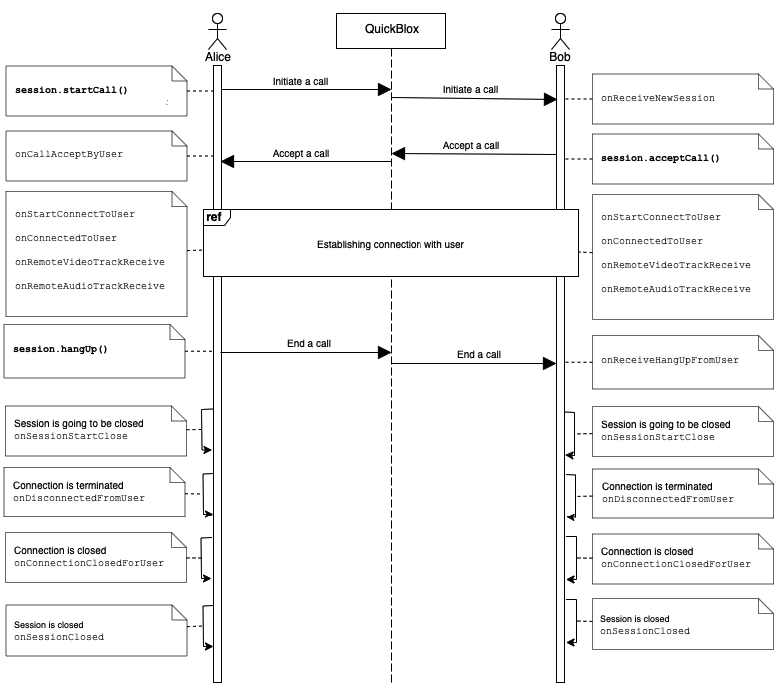
Go to the [Resources](#resources) section to see a sequence diagram for a regular call workflow.
**QBRTCSessionConnectionCallbacks**
The supported call session event callbacks of `QBRTCSessionConnectionCallbacks` listener are listed in the table below.
| Method | Invoked when |
| ----------------------------- | ----------------------------------------------------------------------------------------------------------------------------------------------------------------- |
| onStateChanged | A call session connection state has been changed in real-time. View all available call session states in the [Call session states](#call-session-states) section. |
| onStartConnectToUser | A connection establishment process has been started. |
| onConnectedToUser | A peer connection has been established. |
| onConnectionFailedWithUser | A peer connection has failed. |
| onDisconnectedFromUser | A connection was terminated. |
| onDisconnectedTimeoutFromUser | An opponent has been disconnected by timeout. |
| onConnectionClosedForUser | A connection has been closed for the user. |
The following code lists all supported event callbacks for a call session along with their parameters as well as shows how to add the listener.
```Java theme={null}
session.addSessionCallbacksListener(new QBRTCSessionConnectionCallbacks() {
@Override
public void onStartConnectToUser(QBRTCSession session, Integer userId) {
}
@Override
public void onDisconnectedTimeoutFromUser(QBRTCSession session, Integer userId) {
}
@Override
public void onConnectionFailedWithUser(QBRTCSession session, Integer userId) {
}
@Override
public void onStateChanged(QBRTCSession session, BaseSession.QBRTCSessionState sessionState) {
}
@Override
public void onConnectedToUser(QBRTCSession session, Integer userId) {
}
@Override
public void onDisconnectedFromUser(QBRTCSession session, Integer userId) {
}
@Override
public void onConnectionClosedForUser(QBRTCSession session, Integer userId) {
}
});
```
```Kotlin theme={null}
session.addSessionCallbacksListener(object : QBRTCSessionConnectionCallbacks {
override fun onStartConnectToUser(session: QBRTCSession?, userId: Int?) {
}
override fun onDisconnectedTimeoutFromUser(session: QBRTCSession?, userId: Int?) {
}
override fun onConnectionFailedWithUser(session: QBRTCSession?, userId: Int?) {
}
override fun onStateChanged(session: QBRTCSession?, sessionState: BaseSession.QBRTCSessionState?) {
}
override fun onConnectedToUser(session: QBRTCSession?, userId: Int?) {
}
override fun onDisconnectedFromUser(session: QBRTCSession?, userId: Int?) {
}
override fun onConnectionClosedForUser(session: QBRTCSession?, userId: Int?) {
}
})
```
Go to the [Resources](#resources) section to see a sequence diagram for a regular call workflow.
### Call session states
The following table lists all supported call session connection states.
| State | Description |
| ---------------------------------- | -------------------------------------------------------------------- |
| QB\_RTC\_SESSION\_NEW | A call session was successfully created and ready for the next step. |
| QB\_RTC\_SESSION\_PENDING | A call session is in a pending state for other actions to occur. |
| QB\_RTC\_SESSION\_CONNECTING | The call session is in the progress of establishing a connection. |
| QB\_RTC\_SESSION\_GOING\_TO\_CLOSE | A call session is going to be closed. |
| QB\_RTC\_SESSION\_CLOSED | A call session has been closed. |
### Peer connection states
To get peer connection state for a particular peer, use the code snippet below.
```Java theme={null}
QBRTCSession session = WebRtcSessionManager.getInstance(getApplicationContext()).getCurrentSession();
QBRTCTypes.QBRTCConnectionState peerConnectionState = session.getPeerConnection(userId).getState();
```
```Kotlin theme={null}
val session = WebRtcSessionManager.getInstance(applicationContext).currentSession
val peerConnectionState = session.getPeerConnection(userId).state
```
The following table lists all supported peer connection states.
| State | Description |
| ---------------------------------------- | ---------------------------------------------------------------------------------------------------------------------------------------------------------------------------------------------------------------------------------------------------------------------------------------------------------------------------- |
| QB\_RTC\_CONNECTION\_UNKNOWN | A peer connection state is unknown. This can occur when none of the other states are fit for the current situation. |
| QB\_RTC\_CONNECTION\_NEW | A peer connection has been created and has not done any networking yet. |
| QB\_RTC\_CONNECTION\_WAIT | A peer connection is in a waiting state. |
| QB\_RTC\_CONNECTION\_PENDING | A peer connection is in a pending state for other actions to occur. |
| QB\_RTC\_CONNECTION\_CONNECTING | One or more of the ICE transports are currently in the process of establishing a connection. |
| QB\_RTC\_CONNECTION\_CHECKING | The ICE agent has been given one or more remote candidates and is checking pairs of local and remote candidates against one another to try to find a compatible match, but has not yet found a pair which will allow the peer connection to be made. It is possible that the gathering of candidates is also still underway. |
| QB\_RTC\_CONNECTION\_CONNECTED | A usable pairing of local and remote candidates has been found for all components of the connection, and the connection has been established. |
| QB\_RTC\_CONNECTION\_DISCONNECTED | A peer has been disconnected from the call session. But the call session is still open and the peer can be reconnected to the call session. |
| QB\_RTC\_CONNECTION\_DISCONNECT\_TIMEOUT | The peer connection was disconnected by the timeout. |
| QB\_RTC\_CONNECTION\_CLOSED | A peer connection was closed. But the call session can still be open because there can several peer connections in a single call session. The ICE agent for this peer connection has shut down and is no longer handling requests. |
| QB\_RTC\_CONNECTION\_NOT\_ANSWER | No answer received from the remote peer. |
| QB\_RTC\_CONNECTION\_REJECT | An incoming call has been rejected by the remote peer without accepting the call. |
| QB\_RTC\_CONNECTION\_HANG\_UP | The connection was hung up by the remote peer. |
| QB\_RTC\_CONNECTION\_FAILED | One or more of the ICE transports on the connection is in the failed state. This can occur in different circumstances, for example, bad network, etc. |
| QB\_RTC\_CONNECTION\_ERROR | A peer connection has an error. |
## Resources
A regular call workflow.