> ## Documentation Index
> Fetch the complete documentation index at: https://docs.quickblox.com/llms.txt
> Use this file to discover all available pages before exploring further.
# Basic
> Learn how to add peer-to-peer video calls to your app.
QuickBlox Video Calling API is built on top of [WebRTC](https://webrtc.org/). It allows adding real-time video communication features into your app similar to Skype using API easily. The communication is happening between peers representing camera devices. There are two **peer types**:
\- **Local peer** is a device running the app right now.
\- **Remote peer** is an opponent device.
Establishing real-time video communication between two peers involves 3 phases:
\- **Signaling**. At this phase, the peers’ local IPs and ports where they can be reached (ICE candidates) are exchanged as well as their media capabilities and session control messages.
\- **Discovery**. At this phase, the public IPs and ports at which endpoints can be reached are discovered by STUN/TURN server.
\- **Establishing a connection**. At this phase, the data are sent directly to each party of the communication process.
In order to start using Video Calling Module, you need to **connect to QuickBlox Chat first**. The signaling in the QuickBox WebRTC module is implemented over the XMPP protocol using QuickBlox Chat Module. It acts as a signaling transport for Video Calling API.
Please use this WebRTC Video Calling to make the Group Calls with **4 or fewer users**. Because of [Mesh architecture](https://webrtcglossary.com/mesh/) we use for multi-point where every participant sends and receives its media to all other participants, the current solution supports group calls with up to 4 people.
Visit [Key Concepts](/docs/key-concepts) page to learn the most important QuickBlox concepts.
## Before you begin
1. Register a [QuickBlox account](https://admin.quickblox.com/signin). This is a matter of a few minutes and you will be able to use this account to build your apps.
2. Configure QuickBlox SDK for your app. Check out [Setup](/sdks/ios-setup) page for more details.
3. Create a user session to be able to use QuickBlox functionality. See [Authentication](/sdks/ios-authentication) page to learn how to do it.
4. Connect to the Chat server to provide a signaling mechanism for Video Calling API. Follow our [Chat](/sdks/ios-chat) page to learn about chat connection settings and configuration.
## Initialize WebRTC
Before any interaction with QuickbloxWebRTC, you need to initialize it using the method below.
```Swift theme={null}
QBRTCClient.initializeRTC();
```
```Objective-C theme={null}
[QBRTCClient initializeRTC];
```
### Logging
Logging is a powerful tool to see the exact flow of the QuickbloxWebRTC framework and analyze its decisions. By enabling logs you will be able to debug most issues, or perhaps help us analyze your problems. Check [Enable logging](/sdks/ios-setup#enable-logging) section to learn how to enable logging.
### Background mode
You can use our SDK in the background mode as well, however, this requires you to add a specific app **permissions**. Under the **app build settings**, open the **Capabilities tab**. In this tab, turn on **Background Modes** and set the **Audio, AirPlay and Picture in Picture** checkbox to set the audio background mode.
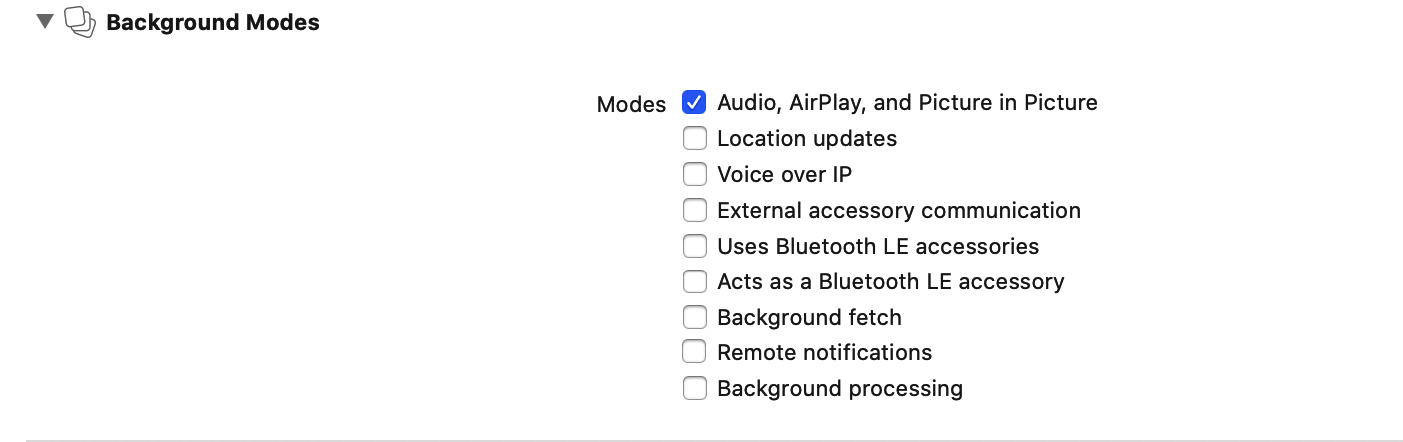 If everything is correctly configured, iOS provides an indicator that your app is running in the background with an active audio session. This is seen as a red background of the status bar, as well as an additional bar indicating the name of the app holding the active audio session, in this case - your app.
## Manage calls
In order to operate and receive calls you need to setup a client delegate. Your class must conform to the `QBRTCClientDelegate` protocol. Use the method below to subscribe. Learn more details about the event delegate configuration in the [Event delegate](#event-delegate) section.
```Swift theme={null}
QBRTCClient.instance().add(self)
```
```Objective-C theme={null}
[QBRTCClient.instance addDelegate:self];
```
## Initiate a call
To call other users, use `QBRTCClient` and `QBRTCSession` methods below.
```Swift theme={null}
// 2123, 2123, 3122 - opponent's
let opponentsIDs = [3245, 2123, 3122]
let newSession = QBRTCClient.instance().createNewSession(withOpponents: ids! as [NSNumber], with: .video)
// userInfo - the custom user information dictionary for the call. May be nil.
let userInfo = ["key":"value"] // optional
newSession.startCall(userInfo)
```
```Objective-C theme={null}
// 2123, 2123, 3122 - opponent's
NSArray *opponentsIDs = @[@3245, @2123, @3122];
QBRTCSession *newSession = [QBRTCClient.instance createNewSessionWithOpponents:opponentsIDs withConferenceType:QBRTCConferenceTypeVideo];
// userInfo - the custom user information dictionary for the call. May be nil.
NSDictionary *userInfo = @{ @"key" : @"value" }; // optional
[newSession startCall:userInfo];
```
After this, your opponents will receive **one** call request per **five** seconds for a duration of **45** seconds (you can configure these settings with `QBRTCConfig`).
```Swift theme={null}
func didReceiveNewSession(_ session: QBRTCSession, userInfo: [String : String]? = nil) {
if self.session != nil {
// we already have a video/audio call session, so we reject another one
// userInfo - the custom user information dictionary for the call from caller. May be nil.
let userInfo = ["key":"value"] // optional
session.rejectCall(userInfo)
return
}
// saving session instance here
self.session = session
}
```
```Objective-C theme={null}
- (void)didReceiveNewSession:(QBRTCSession *)session userInfo:(NSDictionary *)userInfo {
if (self.session) {
// we already have a video/audio call session, so we reject another one
// userInfo - the custom user information dictionary for the call from caller. May be nil.
NSDictionary *userInfo = @{ @"key" : @"value" }; // optional
[session rejectCall:userInfo];
return;
}
// saving session instance here
self.session = session;
}
```
The `self.session` refers to the current call session. Each particular audio/video call has a unique `sessionID`. This allows you to have **more than one** independent audio/video conference calls. If you want to increase the call timeout, you can increase it up to **60** seconds **at maximum**.
```Swift theme={null}
QBRTCConfig.setAnswerTimeInterval(60)
```
```Objective-C theme={null}
[QBRTCConfig setAnswerTimeInterval:60];
```
**Note**
**By default**, `setAnswerTimeInterval` value is 45 seconds.
In case the opponent did not respond to your call within a specific timeout time, the method listed below will be called.
```Swift theme={null}
func session(_ session: QBRTCSession, userDidNotRespond userID: NSNumber) {
}
```
```Objective-C theme={null}
- (void)session:(QBRTCSession *)session userDidNotRespond:(NSNumber *)userID {
}
```
## Accept a call
In order to accept a call, use the `acceptCall()` method below.
```Swift theme={null}
// userInfo - the custom user information dictionary for the accept call. May be nil.
let userInfo = ["key":"value"] // optional
self.session?.acceptCall(userInfo)
```
```Objective-C theme={null}
// userInfo - the custom user information dictionary for the accept call. May be nil.
NSDictionary *userInfo = @{ @"key" : @"value" }; // optional
[self.session acceptCall:userInfo];
```
After this your opponent will receive an **accept** signal:
```Swift theme={null}
func session(_ session: QBRTCSession, acceptedByUser userID: NSNumber, userInfo: [String : String]? = nil) {
}
```
```Objective-C theme={null}
- (void)session:(QBRTCSession *)session acceptedByUser:(NSNumber *)userID userInfo:(NSDictionary *)userInfo {
}
```
## Reject a call
In order to reject a call, use the `rejectCall()` method below.
```Swift theme={null}
// userInfo - the custom user information dictionary for the reject call. May be nil.
let userInfo = ["key":"value"] // optional
self.session?.rejectCall(userInfo)
// and release session instance
self.session = nil
```
```Objective-C theme={null}
// userInfo - the custom user information dictionary for the reject call. May be nil.
NSDictionary *userInfo = @{ @"key" : @"value" }; // optional
[self.session rejectCall:userInfo];
// and release session instance
self.session = nil;
```
After this, your opponent will receive a **reject** signal.
```Swift theme={null}
func session(_ session: QBRTCSession, rejectedByUser userID: NSNumber, userInfo: [String : String]? = nil) {
print("Rejected by user \(userID)")
}
```
```Objective-C theme={null}
- (void)session:(QBRTCSession *)session rejectedByUser:(NSNumber *)userID userInfo:(NSDictionary *)userInfo {
NSLog(@"Rejected by user %@", userID);
}
```
## End a call
To end a call, use the `hangUp()` method below.
```Swift theme={null}
// userInfo - the custom user information dictionary for the reject call. May be nil.
let userInfo = ["key":"value"] // optional
self.session?.hangUp(userInfo)
// and release session instance
self.session = nil
```
```Objective-C theme={null}
// userInfo - the custom user information dictionary for the reject call. May be nil.
NSDictionary *userInfo = @{ @"key" : @"value" }; // optional
[self.session hangUp:userInfo];
// and release session instance
self.session = nil;
```
After this, your opponent will receive a **hangup** signal.
```Swift theme={null}
func session(_ session: QBRTCSession, hungUpByUser userID: NSNumber, userInfo: [String : String]? = nil) {
}
```
```Objective-C theme={null}
- (void)session:(QBRTCSession *)session hungUpByUser:(NSNumber *)userID userInfo:(NSDictionary *)userInfo {
}
```
## Local video view
To show your **local video track** from a camera, you should create `UIView` on the storyboard and then use the following code.
```Swift theme={null}
// your view controller interface code
import Foundation
class CallController: UIViewController, QBRTCClientDelegate {
@IBOutlet weak var localVideoView : UIView! // your video view to render local camera video stream
var videoCapture: QBRTCCameraCapture?
var session: QBRTCSession?
override func viewDidLoad() {
QBRTCClient.instance().add(self as QBRTCClientDelegate)
let videoFormat = QBRTCVideoFormat()
videoFormat.frameRate = 30
videoFormat.pixelFormat = .format420f
videoFormat.width = 640
videoFormat.height = 480
// QBRTCCameraCapture class used to capture frames using AVFoundation APIs
self.videoCapture = QBRTCCameraCapture(videoFormat: videoFormat, position: .front)
// add video capture to session's local media stream
self.session?.localMediaStream.videoTrack.videoCapture = self.videoCapture
self.videoCapture?.previewLayer.frame = self.localVideoView.bounds
self.videoCapture?.startSession()
self.localVideoView.layer.insertSublayer(self.videoCapture!.previewLayer, atIndex: 0)
// start call
}
//...
}
```
```Objective-C theme={null}
// your view controller interface code
@interface CallController()
@property (weak, nonatomic) IBOutlet UIView *localVideoView; // your video view to render local camera video stream
@property (strong, nonatomic) QBRTCCameraCapture *videoCapture;
@property (strong, nonatomic) QBRTCSession *session;
@end
@implementation CallController
- (void)viewDidLoad {
[super viewDidLoad];
[[QBRTCClient instance] addDelegate:self];
QBRTCVideoFormat *videoFormat = [[QBRTCVideoFormat alloc] init];
videoFormat.frameRate = 30;
videoFormat.pixelFormat = QBRTCPixelFormat420f;
videoFormat.width = 640;
videoFormat.height = 480;
// QBRTCCameraCapture class used to capture frames using AVFoundation APIs
self.videoCapture = [[QBRTCCameraCapture alloc] initWithVideoFormat:videoFormat position:AVCaptureDevicePositionFront]; // or AVCaptureDevicePositionBack
// add video capture to session's local media stream
self.session.localMediaStream.videoTrack.videoCapture = self.videoCapture;
self.videoCapture.previewLayer.frame = self.localVideoView.bounds;
[self.videoCapture startSession];
[self.localVideoView.layer insertSublayer:self.videoCapture.previewLayer atIndex:0];
// start call
}
// ...
```
## Remote video view
To show video views with streams that you have received from your opponents, you should create `QBRTCRemoteVideoView` views on the storyboard and then use the following code.
```Swift theme={null}
func session(_ session: QBRTCBaseSession, receivedRemoteVideoTrack videoTrack: QBRTCVideoTrack, fromUser userID: NSNumber) {
// we suppose you have created UIView and set it's class to RemoteVideoView class
// also we suggest you to set view mode to UIViewContentModeScaleAspectFit or
// UIViewContentModeScaleAspectFill
self.opponentVideoView.setVideoTrack(videoTrack)
}
```
```Objective-C theme={null}
- (void)session:(QBRTCBaseSession *)session receivedRemoteVideoTrack:(QBRTCVideoTrack *)videoTrack fromUser:(NSNumber *)userID {
// we suppose you have created UIView and set it's class to QBCallRemoteVideoView class
// also we suggest you to set view mode to UIViewContentModeScaleAspectFit or
// UIViewContentModeScaleAspectFill
[self.opponentVideoView setVideoTrack:videoTrack];
}
```
You can always get **remote video tracks** for a specific user ID in the call using the below-specified `QBCallSession` methods (assuming that they are existent).
```Swift theme={null}
let remoteVideoTrack = self.session?.remoteVideoTrack(withUserID: 24450) // video track for user 24450
```
```Objective-C theme={null}
QBRTCVideoTrack *remoteVideoTrack = [self.session remoteVideoTrackWithUserID:@(24450)]; // video track for user 24450
```
## Event delegate
To process events such as incoming call, call reject, hang up, etc. you need to set up the event listener. The event listener processes various events that happen with the **call session** or **peer connection** in your app.
Using the callbacks provided by the event delegate, you can implement and execute the event-related processing code. For example, the `session(_:acceptedByUser:userInfo:)` method of the `QBRTCClientDelegate` is called when your call has been accepted by the user. This callback receives information about the call session, user ID who accepted the call and additional key-value data about the user.
QuickBlox iOS SDK persistently interacts with the server via **XMPP** connection that works as a **signaling** transport for establishing a call between two or more peers. It receives the callbacks of the asynchronous events which happen with the call and peer connection. This allows you to track these events and build your own video calling features around them.
To track call session events, you should use `QBRTCSessionEventsCallback` listener. The supported event callbacks for a call session and peer connection are listed in the table below.
| Method | Invoked when |
| ----------------------------------------------- | -------------------------------------------------------------------------------------------------------------------------------------------------------------------------- |
| didReceiveNewSession(\_:userInfo:) | A new call session has been received. |
| session(\_:acceptedByUser:userInfo:) | A call session has been accepted. |
| session(\_:rejectedByUser:userInfo:) | A call session has been rejected. |
| session(\_:hungUpByUser:userInfo:) | An accepted call has been ended by the peer by pressing the hang-up button. |
| session(\_:userDidNotRespond:) | A remote peer did not respond to your call within the timeout period. |
| session(\_:sessionDidClose:) | A call session has been closed. |
| session(\_:updatedStatsReport:forUserID:) | An updated stats report, which is called by timeout, has been received for the user ID. |
| session(\_:didChangeState:) | A call session state has been changed in real-time. View all available call session states in the [Call session states](#call-session-states) section. |
| session(\_:receivedRemoteAudioTrack:fromUser:) | A remote **audio** track has been received from the peer. |
| session(\_: receivedRemoteVideoTrack:fromUser:) | A remote **video** track has been received from the peer. |
| session(\_:startedConnectingToUser:) | A peer connection has been initiated. |
| session(\_:connectedToUser:) | A peer connection has been established. |
| session(\_:connectionFailedForUser:) | A peer connection has failed. |
| session(\_:disconnectedFromUser:) | A connection was terminated. |
| session(\_:didChange:forUser:) | A peer connection state has been changed. View all available peer connection states in the [Peer connection states](#peer-connection-states) section. |
| session(\_:connectionClosedForUser:) | A peer connection has been closed. |
| session(\_:didChangeRconnectionState:forUser:) | A call reconnection state has been changed in real-time. View all available call reconnection states in the [Call reconnection states](#call-reconnection-states) section. |
The following code lists all supported event callbacks for the call session and peer connection along with their parameters as well as shows how to add the listener.
```Swift theme={null}
//CallViewController.swift
class CallViewController: UIViewController {
//MARK: - Life Cycle
override func viewDidLoad() {
super.viewDidLoad()
QBRTCClient.instance().add(self as QBRTCClientDelegate)
}
extension CallViewController: QBRTCClientDelegate {
// MARK: QBRTCClientDelegate
func didReceiveNewSession(_ session: QBRTCSession, userInfo: [String : String]? = nil) {
}
func session(_ session: QBRTCSession, userDidNotRespond userID: NSNumber) {
}
func session(_ session: QBRTCSession, rejectedByUser userID: NSNumber, userInfo: [String : String]? = nil) {
}
func session(_ session: QBRTCSession, acceptedByUser userID: NSNumber, userInfo: [String : String]? = nil) {
}
func session(_ session: QBRTCSession, hungUpByUser userID: NSNumber, userInfo: [String : String]? = nil) {
}
func sessionDidClose(_ session: QBRTCSession) {
}
// MARK: QBRTCBaseClientDelegate
func session(_ session: QBRTCBaseSession, didChange state: QBRTCSessionState) {
}
func session(_ session: QBRTCBaseSession, updatedStatsReport report: QBRTCStatsReport, forUserID userID: NSNumber) {
}
func session(_ session: QBRTCBaseSession, receivedRemoteAudioTrack audioTrack: QBRTCAudioTrack, fromUser userID: NSNumber) {
}
func session(_ session: QBRTCBaseSession, receivedRemoteVideoTrack videoTrack: QBRTCVideoTrack, fromUser userID: NSNumber) {
}
func session(_ session: QBRTCBaseSession, connectionClosedForUser userID: NSNumber) {
}
func session(_ session: QBRTCBaseSession, startedConnectingToUser userID: NSNumber) {
}
func session(_ session: QBRTCBaseSession, connectedToUser userID: NSNumber) {
}
func session(_ session: QBRTCBaseSession, disconnectedFromUser userID: NSNumber) {
}
func session(_ session: QBRTCBaseSession, connectionFailedForUser userID: NSNumber) {
}
func session(_ session: QBRTCBaseSession, didChange state: QBRTCConnectionState, forUser userID: NSNumber) {
}
func session(_ session: QBRTCBaseSession, didChangeRconnectionState state: QBRTCReconnectionState, forUser userID: NSNumber) {
}
}
```
```Objective-C theme={null}
// CallViewController.m
@interface CallViewController: UIViewController
@end
@implementation CallViewController
// MARK: - Life cycle
- (void)viewDidLoad {
[super viewDidLoad];
[[QBRTCClient instance] addDelegate:self];
}
// MARK: - QBRTCClientDelegate
- (void)didReceiveNewSession:(QBRTCSession *)session userInfo:(NSDictionary *)userInfo {
}
- (void)session:(QBRTCSession *)session userDidNotRespond:(NSNumber *)userID {
}
- (void)session:(QBRTCSession *)session rejectedByUser:(NSNumber *)userID userInfo:(nullable NSDictionary *)userInfo {
}
- (void)session:(QBRTCSession *)session acceptedByUser:(NSNumber *)userID userInfo:(nullable NSDictionary *)userInfo {
}
- (void)session:(QBRTCSession *)session hungUpByUser:(NSNumber *)userID userInfo:(NSDictionary *)userInfo {
}
- (void)sessionDidClose:(QBRTCSession *)session {
}
// MARK: - QBRTCBaseClientDelegate
- (void)session:(__kindof QBRTCBaseSession *)session updatedStatsReport:(QBRTCStatsReport *)report forUserID:(NSNumber *)userID {
}
- (void)session:(__kindof QBRTCBaseSession *)session didChangeState:(QBRTCSessionState)state {
}
- (void)session:(__kindof QBRTCBaseSession *)session receivedRemoteAudioTrack:(QBRTCAudioTrack *)audioTrack fromUser:(NSNumber *)userID {
}
- (void)session:(__kindof QBRTCBaseSession *)session receivedRemoteVideoTrack:(QBRTCVideoTrack *)videoTrack fromUser:(NSNumber *)userID {
}
- (void)session:(__kindof QBRTCBaseSession *)session connectionClosedForUser:(NSNumber *)userID {
}
- (void)session:(__kindof QBRTCBaseSession *)session startedConnectingToUser:(NSNumber *)userID {
}
- (void)session:(__kindof QBRTCBaseSession *)session connectedToUser:(NSNumber *)userID {
}
- (void)session:(__kindof QBRTCBaseSession *)session disconnectedFromUser:(NSNumber *)userID {
}
- (void)session:(__kindof QBRTCBaseSession *)session connectionFailedForUser:(NSNumber *)userID {
}
- (void)session:(__kindof QBRTCBaseSession *)session didChangeConnectionState:(QBRTCConnectionState)state forUser:(nonnull NSNumber *)userID {
}
- (void)session:(__kindof QBRTCBaseSession *)session didChangeRconnectionState:(QBRTCReconnectionState)state forUser:(NSNumber *)userID {
}
```
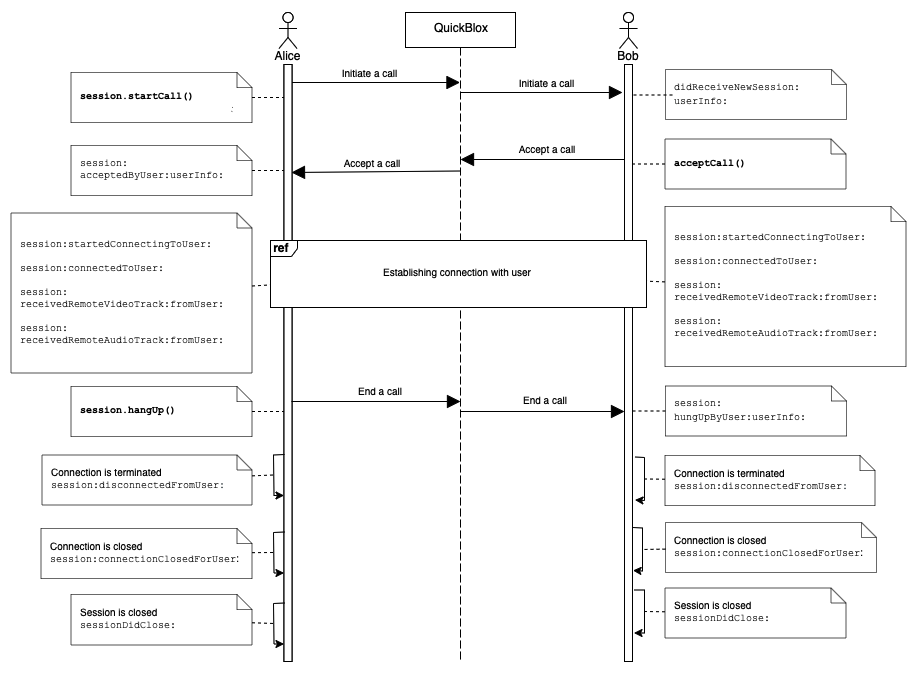
Go to the [Resources](#resources) section to see a sequence diagram for a regular call workflow.
### Call session states
Each call session has its own state. You can always access the current state by simply using the `QBRTCSession` property.
```Swift theme={null}
let sessionState = self.session.state
```
```Objective-C theme={null}
QBRTCSessionState sessionState = self.session.state;
```
You can also receive a live-time call session state.
```Swift theme={null}
func session(_ session: QBRTCBaseSession, didChange state: QBRTCConnectionState) {
}
```
```Objective-C theme={null}
- (void)session:(QBRTCBaseSession *)session didChangeState:(QBRTCConnectionState)state {
}
```
The following table lists all supported call session states:
| State | Description |
| --------------------------- | -------------------------------------------------------------------- |
| QBRTCSessionStateNew | A call session was successfully created and ready for the next step. |
| QBRTCSessionStatePending | A call session is in a pending state for other actions to occur. |
| QBRTCSessionStateConnecting | A call session is in the progress of establishing a connection. |
| QBRTCSessionStateConnected | A call session was successfully established. |
| QBRTCSessionStateClosed | A call session has been closed. |
### Call reconnection states
**Note**
Since version 2.8.0 Quickblox-WebRTC SDK supports reconnection functional.
You can receive a live-time call reconnection state.
```Swift theme={null}
func session(_ session: QBRTCBaseSession, didChangeRconnectionState state: QBRTCReconnectionState, forUser userID: NSNumber) {
}
```
```Objective-C theme={null}
- (void)session:(__kindof QBRTCBaseSession *)session didChangeRconnectionState:(QBRTCReconnectionState)state forUser:(NSNumber *)userID {
}
```
Doesn’t invoke in conference.
The following table lists all supported call reconnection states:
| State | Description |
| ---------------------------------- | -------------------------------------------------------------------------------- |
| QBRTCReconnectionStateReconnecting | A connection with opponent in reconnection progress after ICE connection failed. |
| QBRTCReconnectionStateReconnected | A connection with opponent was successfully established. |
| QBRTCReconnectionStateFailed | A connection with opponent isn’t restored by disconnect time interval. |
You can also increase disconnect timeout. By default the time is set to 30 seconds. Minimal time is 10 seconds. It’s time while users can have availability to reconnect.
```Swift theme={null}
QBRTCConfig.setDisconnectTimeInterval(20)
```
```Objective-C theme={null}
[QBRTCConfig setDisconnectTimeInterval:20];
```
### Peer connection states
Each peer connection has its own state. By default, you can access that state by calling this method from `QBRTCSession`.
```Swift theme={null}
let userID = 20450 as NSNumber // user with ID 20450
let connectionState = self.session.connectionState(forUser: userID)
```
```Objective-C theme={null}
NSNumber *userID = @(20450); // user with ID 20450
QBRTCConnectionState connectionState = [self.session connectionStateForUser:userID];
```
You can also receive a real-time connection state.
```Swift theme={null}
func session(_ session: QBRTCSession, didChange state: QBRTCConnectionState, forUser userID: NSNumber) {
}
```
```Objective-C theme={null}
- (void)session:(QBRTCSession *)session didChangeConnectionState:(QBRTCConnectionState)state forUser:(NSNumber *)userID {
}
```
The following table lists all supported peer connection states:
| State | Description |
| ------------------------------------- | ------------------------------------------------------------------------------------------------------------------------------------------------------------------------------------------------------------------------------------------------------------------------------------------------------------------------ |
| QBRTCConnectionUnknown | A connection state is unknown; this can occur when none of the other states are fit for the current situation. |
| QBRTCConnectionStateNew | A peer connection has been created and hasn't done any networking yet. |
| QBRTCConnectionStatePending | A connection is in a pending state for other actions to occur. |
| QBRTCConnectionStateConnecting | One or more of the ICE transports are currently in the process of establishing a connection. |
| QBRTCConnectionStateChecking | The ICE agent has been given one or more remote candidates and is checking pairs of local and remote candidates against one another to try to find a compatible match, but has not yet found a pair which will allow the peer connection to be made. It is possible that gathering of candidates is also still underway. |
| QBRTCConnectionStateConnected | A usable pairing of local and remote candidates has been found for all components of the connection, and the connection has been established. |
| QBRTCConnectionStateDisconnected | A peer has been disconnected from the call session. But the call session is still open and the peer can be reconnected to the session. |
| QBRTCConnectionStateDisconnectTimeout | The peer connection was disconnected by the timeout. |
| QBRTCConnectionStateClosed | A peer connection was closed. But the call session can still be open because there can several peer connections in a single call session. The ICE agent for this peer connection has shut down and is no longer handling requests. |
| QBRTCConnectionStateCount | The ICE connection reached max numbers. |
| QBRTCConnectionStateNoAnswer | The connection did not receive an answer from the remote peer. |
| QBRTCConnectionStateRejected | The connection was rejected by the remote peer. |
| QBRTCConnectionStateHangUp | The connection was hung up by the remote peer. |
| QBRTCConnectionStateFailed | One or more of the ICE transports on the connection is in the failed state. This can occur in different circumstances, for example, bad network, etc. |
## Resources
A regular call workflow.
If everything is correctly configured, iOS provides an indicator that your app is running in the background with an active audio session. This is seen as a red background of the status bar, as well as an additional bar indicating the name of the app holding the active audio session, in this case - your app.
## Manage calls
In order to operate and receive calls you need to setup a client delegate. Your class must conform to the `QBRTCClientDelegate` protocol. Use the method below to subscribe. Learn more details about the event delegate configuration in the [Event delegate](#event-delegate) section.
```Swift theme={null}
QBRTCClient.instance().add(self)
```
```Objective-C theme={null}
[QBRTCClient.instance addDelegate:self];
```
## Initiate a call
To call other users, use `QBRTCClient` and `QBRTCSession` methods below.
```Swift theme={null}
// 2123, 2123, 3122 - opponent's
let opponentsIDs = [3245, 2123, 3122]
let newSession = QBRTCClient.instance().createNewSession(withOpponents: ids! as [NSNumber], with: .video)
// userInfo - the custom user information dictionary for the call. May be nil.
let userInfo = ["key":"value"] // optional
newSession.startCall(userInfo)
```
```Objective-C theme={null}
// 2123, 2123, 3122 - opponent's
NSArray *opponentsIDs = @[@3245, @2123, @3122];
QBRTCSession *newSession = [QBRTCClient.instance createNewSessionWithOpponents:opponentsIDs withConferenceType:QBRTCConferenceTypeVideo];
// userInfo - the custom user information dictionary for the call. May be nil.
NSDictionary *userInfo = @{ @"key" : @"value" }; // optional
[newSession startCall:userInfo];
```
After this, your opponents will receive **one** call request per **five** seconds for a duration of **45** seconds (you can configure these settings with `QBRTCConfig`).
```Swift theme={null}
func didReceiveNewSession(_ session: QBRTCSession, userInfo: [String : String]? = nil) {
if self.session != nil {
// we already have a video/audio call session, so we reject another one
// userInfo - the custom user information dictionary for the call from caller. May be nil.
let userInfo = ["key":"value"] // optional
session.rejectCall(userInfo)
return
}
// saving session instance here
self.session = session
}
```
```Objective-C theme={null}
- (void)didReceiveNewSession:(QBRTCSession *)session userInfo:(NSDictionary *)userInfo {
if (self.session) {
// we already have a video/audio call session, so we reject another one
// userInfo - the custom user information dictionary for the call from caller. May be nil.
NSDictionary *userInfo = @{ @"key" : @"value" }; // optional
[session rejectCall:userInfo];
return;
}
// saving session instance here
self.session = session;
}
```
The `self.session` refers to the current call session. Each particular audio/video call has a unique `sessionID`. This allows you to have **more than one** independent audio/video conference calls. If you want to increase the call timeout, you can increase it up to **60** seconds **at maximum**.
```Swift theme={null}
QBRTCConfig.setAnswerTimeInterval(60)
```
```Objective-C theme={null}
[QBRTCConfig setAnswerTimeInterval:60];
```
**Note**
**By default**, `setAnswerTimeInterval` value is 45 seconds.
In case the opponent did not respond to your call within a specific timeout time, the method listed below will be called.
```Swift theme={null}
func session(_ session: QBRTCSession, userDidNotRespond userID: NSNumber) {
}
```
```Objective-C theme={null}
- (void)session:(QBRTCSession *)session userDidNotRespond:(NSNumber *)userID {
}
```
## Accept a call
In order to accept a call, use the `acceptCall()` method below.
```Swift theme={null}
// userInfo - the custom user information dictionary for the accept call. May be nil.
let userInfo = ["key":"value"] // optional
self.session?.acceptCall(userInfo)
```
```Objective-C theme={null}
// userInfo - the custom user information dictionary for the accept call. May be nil.
NSDictionary *userInfo = @{ @"key" : @"value" }; // optional
[self.session acceptCall:userInfo];
```
After this your opponent will receive an **accept** signal:
```Swift theme={null}
func session(_ session: QBRTCSession, acceptedByUser userID: NSNumber, userInfo: [String : String]? = nil) {
}
```
```Objective-C theme={null}
- (void)session:(QBRTCSession *)session acceptedByUser:(NSNumber *)userID userInfo:(NSDictionary *)userInfo {
}
```
## Reject a call
In order to reject a call, use the `rejectCall()` method below.
```Swift theme={null}
// userInfo - the custom user information dictionary for the reject call. May be nil.
let userInfo = ["key":"value"] // optional
self.session?.rejectCall(userInfo)
// and release session instance
self.session = nil
```
```Objective-C theme={null}
// userInfo - the custom user information dictionary for the reject call. May be nil.
NSDictionary *userInfo = @{ @"key" : @"value" }; // optional
[self.session rejectCall:userInfo];
// and release session instance
self.session = nil;
```
After this, your opponent will receive a **reject** signal.
```Swift theme={null}
func session(_ session: QBRTCSession, rejectedByUser userID: NSNumber, userInfo: [String : String]? = nil) {
print("Rejected by user \(userID)")
}
```
```Objective-C theme={null}
- (void)session:(QBRTCSession *)session rejectedByUser:(NSNumber *)userID userInfo:(NSDictionary *)userInfo {
NSLog(@"Rejected by user %@", userID);
}
```
## End a call
To end a call, use the `hangUp()` method below.
```Swift theme={null}
// userInfo - the custom user information dictionary for the reject call. May be nil.
let userInfo = ["key":"value"] // optional
self.session?.hangUp(userInfo)
// and release session instance
self.session = nil
```
```Objective-C theme={null}
// userInfo - the custom user information dictionary for the reject call. May be nil.
NSDictionary *userInfo = @{ @"key" : @"value" }; // optional
[self.session hangUp:userInfo];
// and release session instance
self.session = nil;
```
After this, your opponent will receive a **hangup** signal.
```Swift theme={null}
func session(_ session: QBRTCSession, hungUpByUser userID: NSNumber, userInfo: [String : String]? = nil) {
}
```
```Objective-C theme={null}
- (void)session:(QBRTCSession *)session hungUpByUser:(NSNumber *)userID userInfo:(NSDictionary *)userInfo {
}
```
## Local video view
To show your **local video track** from a camera, you should create `UIView` on the storyboard and then use the following code.
```Swift theme={null}
// your view controller interface code
import Foundation
class CallController: UIViewController, QBRTCClientDelegate {
@IBOutlet weak var localVideoView : UIView! // your video view to render local camera video stream
var videoCapture: QBRTCCameraCapture?
var session: QBRTCSession?
override func viewDidLoad() {
QBRTCClient.instance().add(self as QBRTCClientDelegate)
let videoFormat = QBRTCVideoFormat()
videoFormat.frameRate = 30
videoFormat.pixelFormat = .format420f
videoFormat.width = 640
videoFormat.height = 480
// QBRTCCameraCapture class used to capture frames using AVFoundation APIs
self.videoCapture = QBRTCCameraCapture(videoFormat: videoFormat, position: .front)
// add video capture to session's local media stream
self.session?.localMediaStream.videoTrack.videoCapture = self.videoCapture
self.videoCapture?.previewLayer.frame = self.localVideoView.bounds
self.videoCapture?.startSession()
self.localVideoView.layer.insertSublayer(self.videoCapture!.previewLayer, atIndex: 0)
// start call
}
//...
}
```
```Objective-C theme={null}
// your view controller interface code
@interface CallController()
@property (weak, nonatomic) IBOutlet UIView *localVideoView; // your video view to render local camera video stream
@property (strong, nonatomic) QBRTCCameraCapture *videoCapture;
@property (strong, nonatomic) QBRTCSession *session;
@end
@implementation CallController
- (void)viewDidLoad {
[super viewDidLoad];
[[QBRTCClient instance] addDelegate:self];
QBRTCVideoFormat *videoFormat = [[QBRTCVideoFormat alloc] init];
videoFormat.frameRate = 30;
videoFormat.pixelFormat = QBRTCPixelFormat420f;
videoFormat.width = 640;
videoFormat.height = 480;
// QBRTCCameraCapture class used to capture frames using AVFoundation APIs
self.videoCapture = [[QBRTCCameraCapture alloc] initWithVideoFormat:videoFormat position:AVCaptureDevicePositionFront]; // or AVCaptureDevicePositionBack
// add video capture to session's local media stream
self.session.localMediaStream.videoTrack.videoCapture = self.videoCapture;
self.videoCapture.previewLayer.frame = self.localVideoView.bounds;
[self.videoCapture startSession];
[self.localVideoView.layer insertSublayer:self.videoCapture.previewLayer atIndex:0];
// start call
}
// ...
```
## Remote video view
To show video views with streams that you have received from your opponents, you should create `QBRTCRemoteVideoView` views on the storyboard and then use the following code.
```Swift theme={null}
func session(_ session: QBRTCBaseSession, receivedRemoteVideoTrack videoTrack: QBRTCVideoTrack, fromUser userID: NSNumber) {
// we suppose you have created UIView and set it's class to RemoteVideoView class
// also we suggest you to set view mode to UIViewContentModeScaleAspectFit or
// UIViewContentModeScaleAspectFill
self.opponentVideoView.setVideoTrack(videoTrack)
}
```
```Objective-C theme={null}
- (void)session:(QBRTCBaseSession *)session receivedRemoteVideoTrack:(QBRTCVideoTrack *)videoTrack fromUser:(NSNumber *)userID {
// we suppose you have created UIView and set it's class to QBCallRemoteVideoView class
// also we suggest you to set view mode to UIViewContentModeScaleAspectFit or
// UIViewContentModeScaleAspectFill
[self.opponentVideoView setVideoTrack:videoTrack];
}
```
You can always get **remote video tracks** for a specific user ID in the call using the below-specified `QBCallSession` methods (assuming that they are existent).
```Swift theme={null}
let remoteVideoTrack = self.session?.remoteVideoTrack(withUserID: 24450) // video track for user 24450
```
```Objective-C theme={null}
QBRTCVideoTrack *remoteVideoTrack = [self.session remoteVideoTrackWithUserID:@(24450)]; // video track for user 24450
```
## Event delegate
To process events such as incoming call, call reject, hang up, etc. you need to set up the event listener. The event listener processes various events that happen with the **call session** or **peer connection** in your app.
Using the callbacks provided by the event delegate, you can implement and execute the event-related processing code. For example, the `session(_:acceptedByUser:userInfo:)` method of the `QBRTCClientDelegate` is called when your call has been accepted by the user. This callback receives information about the call session, user ID who accepted the call and additional key-value data about the user.
QuickBlox iOS SDK persistently interacts with the server via **XMPP** connection that works as a **signaling** transport for establishing a call between two or more peers. It receives the callbacks of the asynchronous events which happen with the call and peer connection. This allows you to track these events and build your own video calling features around them.
To track call session events, you should use `QBRTCSessionEventsCallback` listener. The supported event callbacks for a call session and peer connection are listed in the table below.
| Method | Invoked when |
| ----------------------------------------------- | -------------------------------------------------------------------------------------------------------------------------------------------------------------------------- |
| didReceiveNewSession(\_:userInfo:) | A new call session has been received. |
| session(\_:acceptedByUser:userInfo:) | A call session has been accepted. |
| session(\_:rejectedByUser:userInfo:) | A call session has been rejected. |
| session(\_:hungUpByUser:userInfo:) | An accepted call has been ended by the peer by pressing the hang-up button. |
| session(\_:userDidNotRespond:) | A remote peer did not respond to your call within the timeout period. |
| session(\_:sessionDidClose:) | A call session has been closed. |
| session(\_:updatedStatsReport:forUserID:) | An updated stats report, which is called by timeout, has been received for the user ID. |
| session(\_:didChangeState:) | A call session state has been changed in real-time. View all available call session states in the [Call session states](#call-session-states) section. |
| session(\_:receivedRemoteAudioTrack:fromUser:) | A remote **audio** track has been received from the peer. |
| session(\_: receivedRemoteVideoTrack:fromUser:) | A remote **video** track has been received from the peer. |
| session(\_:startedConnectingToUser:) | A peer connection has been initiated. |
| session(\_:connectedToUser:) | A peer connection has been established. |
| session(\_:connectionFailedForUser:) | A peer connection has failed. |
| session(\_:disconnectedFromUser:) | A connection was terminated. |
| session(\_:didChange:forUser:) | A peer connection state has been changed. View all available peer connection states in the [Peer connection states](#peer-connection-states) section. |
| session(\_:connectionClosedForUser:) | A peer connection has been closed. |
| session(\_:didChangeRconnectionState:forUser:) | A call reconnection state has been changed in real-time. View all available call reconnection states in the [Call reconnection states](#call-reconnection-states) section. |
The following code lists all supported event callbacks for the call session and peer connection along with their parameters as well as shows how to add the listener.
```Swift theme={null}
//CallViewController.swift
class CallViewController: UIViewController {
//MARK: - Life Cycle
override func viewDidLoad() {
super.viewDidLoad()
QBRTCClient.instance().add(self as QBRTCClientDelegate)
}
extension CallViewController: QBRTCClientDelegate {
// MARK: QBRTCClientDelegate
func didReceiveNewSession(_ session: QBRTCSession, userInfo: [String : String]? = nil) {
}
func session(_ session: QBRTCSession, userDidNotRespond userID: NSNumber) {
}
func session(_ session: QBRTCSession, rejectedByUser userID: NSNumber, userInfo: [String : String]? = nil) {
}
func session(_ session: QBRTCSession, acceptedByUser userID: NSNumber, userInfo: [String : String]? = nil) {
}
func session(_ session: QBRTCSession, hungUpByUser userID: NSNumber, userInfo: [String : String]? = nil) {
}
func sessionDidClose(_ session: QBRTCSession) {
}
// MARK: QBRTCBaseClientDelegate
func session(_ session: QBRTCBaseSession, didChange state: QBRTCSessionState) {
}
func session(_ session: QBRTCBaseSession, updatedStatsReport report: QBRTCStatsReport, forUserID userID: NSNumber) {
}
func session(_ session: QBRTCBaseSession, receivedRemoteAudioTrack audioTrack: QBRTCAudioTrack, fromUser userID: NSNumber) {
}
func session(_ session: QBRTCBaseSession, receivedRemoteVideoTrack videoTrack: QBRTCVideoTrack, fromUser userID: NSNumber) {
}
func session(_ session: QBRTCBaseSession, connectionClosedForUser userID: NSNumber) {
}
func session(_ session: QBRTCBaseSession, startedConnectingToUser userID: NSNumber) {
}
func session(_ session: QBRTCBaseSession, connectedToUser userID: NSNumber) {
}
func session(_ session: QBRTCBaseSession, disconnectedFromUser userID: NSNumber) {
}
func session(_ session: QBRTCBaseSession, connectionFailedForUser userID: NSNumber) {
}
func session(_ session: QBRTCBaseSession, didChange state: QBRTCConnectionState, forUser userID: NSNumber) {
}
func session(_ session: QBRTCBaseSession, didChangeRconnectionState state: QBRTCReconnectionState, forUser userID: NSNumber) {
}
}
```
```Objective-C theme={null}
// CallViewController.m
@interface CallViewController: UIViewController
@end
@implementation CallViewController
// MARK: - Life cycle
- (void)viewDidLoad {
[super viewDidLoad];
[[QBRTCClient instance] addDelegate:self];
}
// MARK: - QBRTCClientDelegate
- (void)didReceiveNewSession:(QBRTCSession *)session userInfo:(NSDictionary *)userInfo {
}
- (void)session:(QBRTCSession *)session userDidNotRespond:(NSNumber *)userID {
}
- (void)session:(QBRTCSession *)session rejectedByUser:(NSNumber *)userID userInfo:(nullable NSDictionary *)userInfo {
}
- (void)session:(QBRTCSession *)session acceptedByUser:(NSNumber *)userID userInfo:(nullable NSDictionary *)userInfo {
}
- (void)session:(QBRTCSession *)session hungUpByUser:(NSNumber *)userID userInfo:(NSDictionary *)userInfo {
}
- (void)sessionDidClose:(QBRTCSession *)session {
}
// MARK: - QBRTCBaseClientDelegate
- (void)session:(__kindof QBRTCBaseSession *)session updatedStatsReport:(QBRTCStatsReport *)report forUserID:(NSNumber *)userID {
}
- (void)session:(__kindof QBRTCBaseSession *)session didChangeState:(QBRTCSessionState)state {
}
- (void)session:(__kindof QBRTCBaseSession *)session receivedRemoteAudioTrack:(QBRTCAudioTrack *)audioTrack fromUser:(NSNumber *)userID {
}
- (void)session:(__kindof QBRTCBaseSession *)session receivedRemoteVideoTrack:(QBRTCVideoTrack *)videoTrack fromUser:(NSNumber *)userID {
}
- (void)session:(__kindof QBRTCBaseSession *)session connectionClosedForUser:(NSNumber *)userID {
}
- (void)session:(__kindof QBRTCBaseSession *)session startedConnectingToUser:(NSNumber *)userID {
}
- (void)session:(__kindof QBRTCBaseSession *)session connectedToUser:(NSNumber *)userID {
}
- (void)session:(__kindof QBRTCBaseSession *)session disconnectedFromUser:(NSNumber *)userID {
}
- (void)session:(__kindof QBRTCBaseSession *)session connectionFailedForUser:(NSNumber *)userID {
}
- (void)session:(__kindof QBRTCBaseSession *)session didChangeConnectionState:(QBRTCConnectionState)state forUser:(nonnull NSNumber *)userID {
}
- (void)session:(__kindof QBRTCBaseSession *)session didChangeRconnectionState:(QBRTCReconnectionState)state forUser:(NSNumber *)userID {
}
```
Go to the [Resources](#resources) section to see a sequence diagram for a regular call workflow.
### Call session states
Each call session has its own state. You can always access the current state by simply using the `QBRTCSession` property.
```Swift theme={null}
let sessionState = self.session.state
```
```Objective-C theme={null}
QBRTCSessionState sessionState = self.session.state;
```
You can also receive a live-time call session state.
```Swift theme={null}
func session(_ session: QBRTCBaseSession, didChange state: QBRTCConnectionState) {
}
```
```Objective-C theme={null}
- (void)session:(QBRTCBaseSession *)session didChangeState:(QBRTCConnectionState)state {
}
```
The following table lists all supported call session states:
| State | Description |
| --------------------------- | -------------------------------------------------------------------- |
| QBRTCSessionStateNew | A call session was successfully created and ready for the next step. |
| QBRTCSessionStatePending | A call session is in a pending state for other actions to occur. |
| QBRTCSessionStateConnecting | A call session is in the progress of establishing a connection. |
| QBRTCSessionStateConnected | A call session was successfully established. |
| QBRTCSessionStateClosed | A call session has been closed. |
### Call reconnection states
**Note**
Since version 2.8.0 Quickblox-WebRTC SDK supports reconnection functional.
You can receive a live-time call reconnection state.
```Swift theme={null}
func session(_ session: QBRTCBaseSession, didChangeRconnectionState state: QBRTCReconnectionState, forUser userID: NSNumber) {
}
```
```Objective-C theme={null}
- (void)session:(__kindof QBRTCBaseSession *)session didChangeRconnectionState:(QBRTCReconnectionState)state forUser:(NSNumber *)userID {
}
```
Doesn’t invoke in conference.
The following table lists all supported call reconnection states:
| State | Description |
| ---------------------------------- | -------------------------------------------------------------------------------- |
| QBRTCReconnectionStateReconnecting | A connection with opponent in reconnection progress after ICE connection failed. |
| QBRTCReconnectionStateReconnected | A connection with opponent was successfully established. |
| QBRTCReconnectionStateFailed | A connection with opponent isn’t restored by disconnect time interval. |
You can also increase disconnect timeout. By default the time is set to 30 seconds. Minimal time is 10 seconds. It’s time while users can have availability to reconnect.
```Swift theme={null}
QBRTCConfig.setDisconnectTimeInterval(20)
```
```Objective-C theme={null}
[QBRTCConfig setDisconnectTimeInterval:20];
```
### Peer connection states
Each peer connection has its own state. By default, you can access that state by calling this method from `QBRTCSession`.
```Swift theme={null}
let userID = 20450 as NSNumber // user with ID 20450
let connectionState = self.session.connectionState(forUser: userID)
```
```Objective-C theme={null}
NSNumber *userID = @(20450); // user with ID 20450
QBRTCConnectionState connectionState = [self.session connectionStateForUser:userID];
```
You can also receive a real-time connection state.
```Swift theme={null}
func session(_ session: QBRTCSession, didChange state: QBRTCConnectionState, forUser userID: NSNumber) {
}
```
```Objective-C theme={null}
- (void)session:(QBRTCSession *)session didChangeConnectionState:(QBRTCConnectionState)state forUser:(NSNumber *)userID {
}
```
The following table lists all supported peer connection states:
| State | Description |
| ------------------------------------- | ------------------------------------------------------------------------------------------------------------------------------------------------------------------------------------------------------------------------------------------------------------------------------------------------------------------------ |
| QBRTCConnectionUnknown | A connection state is unknown; this can occur when none of the other states are fit for the current situation. |
| QBRTCConnectionStateNew | A peer connection has been created and hasn't done any networking yet. |
| QBRTCConnectionStatePending | A connection is in a pending state for other actions to occur. |
| QBRTCConnectionStateConnecting | One or more of the ICE transports are currently in the process of establishing a connection. |
| QBRTCConnectionStateChecking | The ICE agent has been given one or more remote candidates and is checking pairs of local and remote candidates against one another to try to find a compatible match, but has not yet found a pair which will allow the peer connection to be made. It is possible that gathering of candidates is also still underway. |
| QBRTCConnectionStateConnected | A usable pairing of local and remote candidates has been found for all components of the connection, and the connection has been established. |
| QBRTCConnectionStateDisconnected | A peer has been disconnected from the call session. But the call session is still open and the peer can be reconnected to the session. |
| QBRTCConnectionStateDisconnectTimeout | The peer connection was disconnected by the timeout. |
| QBRTCConnectionStateClosed | A peer connection was closed. But the call session can still be open because there can several peer connections in a single call session. The ICE agent for this peer connection has shut down and is no longer handling requests. |
| QBRTCConnectionStateCount | The ICE connection reached max numbers. |
| QBRTCConnectionStateNoAnswer | The connection did not receive an answer from the remote peer. |
| QBRTCConnectionStateRejected | The connection was rejected by the remote peer. |
| QBRTCConnectionStateHangUp | The connection was hung up by the remote peer. |
| QBRTCConnectionStateFailed | One or more of the ICE transports on the connection is in the failed state. This can occur in different circumstances, for example, bad network, etc. |
## Resources
A regular call workflow.