> ## Documentation Index
> Fetch the complete documentation index at: https://docs.quickblox.com/llms.txt
> Use this file to discover all available pages before exploring further.
# AI Features
> AI Features base on AI Agents
## Overview
Starting from version 2.17.0 of JavaScript SDK, the AI functionality is enabled and based on AI Agents. The QuickBlox JavaScript SDK provides a range of features to enhance the chat experience. With essential messaging functionalities such as answer assistant, users can engage in more interactive conversations.
**Supported features**
| Name | Description | Min SDK Version |
| ---------------- | -------------------------------------------------------------------------- | --------------- |
| AI Answer Assist | Generates a draft response based on chat history for the selected message. | 2.17.0 |
| AI Translate | Provides translation based on chat history to selected incoming message. | 2.17.0 |
| AI Gateway | Multimodal AI with text and images support (OpenAI-compatible format). | 2.21.5 |
| AI Summarize | Generates a summary of dialog messages (up to 1000 recent messages). | 2.21.5 |
## Requirements
The minimum requirements for using AI features are:
* JS QuickBlox SDK v2.17.0 (for AI Answer Assist and AI Translate)
* JS QuickBlox SDK v2.21.5 (for AI Gateway and AI Summarize)
* QuickBlox account with activated AI Agents
Visit [Key Concepts](/docs/key-concepts) page to learn the most important QuickBlox concepts.
Visit [AI Agent overview](/ai-agent/overview) page to learn the most important AI Agents concepts.
## Before you begin
1. Register a [QuickBlox account](https://admin.quickblox.com/signin). This is a matter of a few minutes and you will be able to use this account to build your apps.
2. Configure QuickBlox SDK for your app. Check out [Setup](/sdks/js-setup) page for more details.
3. Create a user session to be able to use QuickBlox functionality. See [Authentication](/sdks/js-authentication) page to learn how to do it.
4. Create or update your AI Agent. See [AI Agent](/ai-agent/manage-agents#create-ai-agent) documentation to learn how to do it.
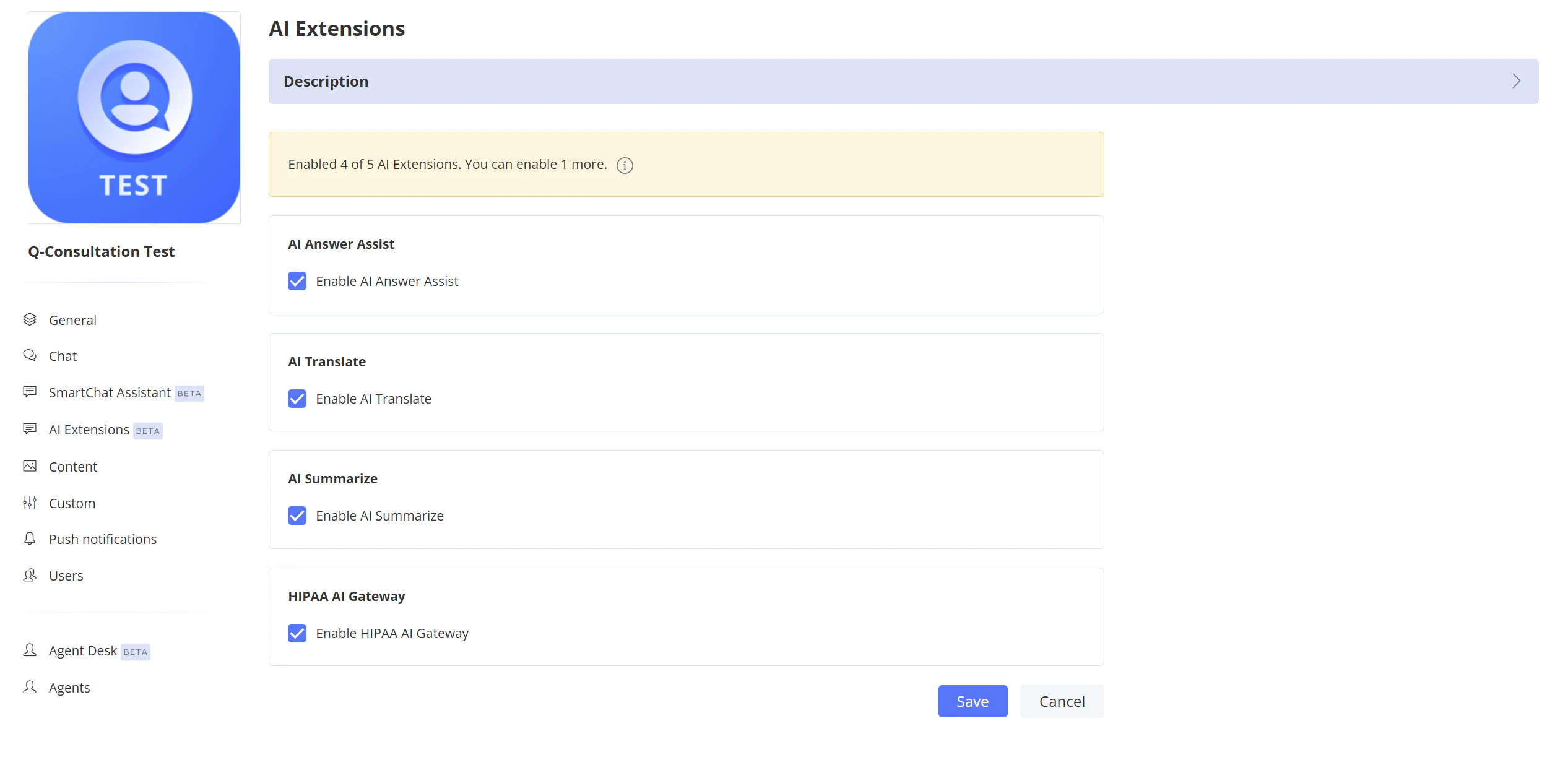
### Enable AI Extensions
1. Navigate to the **Dashboard => *YOUR\_APP* => AI Extensions** page.
2. Select the checkboxes for the features you want to enable.
3. Click the **Save** button to save changes.
 ### Get AI Agent ID
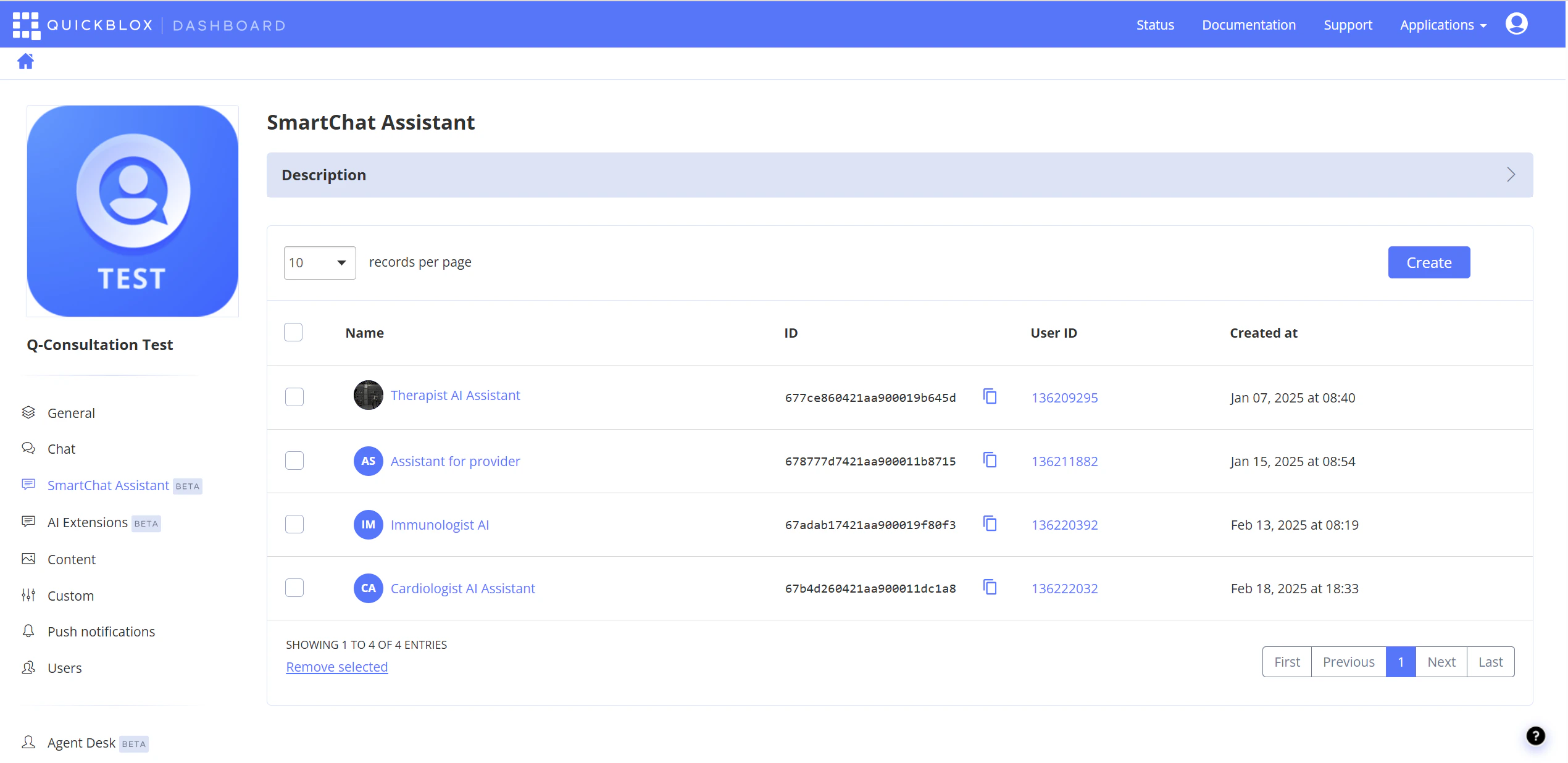
To get the **AI Agent ID**, navigate to the **Dashboard => *YOUR\_APP* => AI Agent** page. The ID is displayed in the list of assistants.
### Get AI Agent ID
To get the **AI Agent ID**, navigate to the **Dashboard => *YOUR\_APP* => AI Agent** page. The ID is displayed in the list of assistants.
 ## AI Answer Assist
QuickBlox AI Answer Assist generates a contextually relevant draft response based on the chat history. Use it to suggest replies that match the conversation context.
```JavaScript JavaScript theme={null}
var smartChatAssistantId = '6633a1300fea600001bd6e71';
var messageToAssist = 'Where is my order?';
var history = [
{role: "user", message: "Hello"},
{role: "assistant", message: "Hi"}
];
QB.ai.answerAssist(smartChatAssistantId,
messageToAssist,
history,
function (error, response) {
if (error) {
console.error('QB.ai.answerAssist: Error:', error);
} else {
console.log('QB.ai.answerAssist: Response:', response.answer);
}
});
```
| Argument | Type | Description |
| -------------------- | --------------- | --------------------------------------------------------------------------------------------------------------------------------------------------------------------------------------------------------------------------------------------------- |
| smartChatAssistantId | String | This field should hold your actual Smart Chat Assistant ID that you'll receive from the QuickBlox account. This ID is used to authenticate your requests to the AI service. |
| messageToAssist | String | Message you want to get answer for. |
| history | Array of Object | Conversation history. Used to add context. Each object of array should have the two fields: 'role' and 'message'. The field role should contains one of next values: 'user' or 'assistant'. The field message should be a string with chat message. |
| callback | function | The callback function. |
## AI Translate
QuickBlox offers translation functionality that helps users easily translate text messages in chat, taking into account the context of the chat history.
```TypeScript TypeScript theme={null}
var smartChatAssistantId = '6633a1300fea600001bd6e71';
var textToTranslate = 'Hola!';
var languageCode = 'en';
QB.ai.translate(smartChatAssistantId,
textToTranslate,
languageCode,
function (error, response) {
if (error) {
console.error('QB.ai.translate: Error:', error);
} else {
console.log('QB.ai.translate: Response:', response.answer);
}
});
```
| Argument | Type | Description |
| -------------------- | -------- | ------------------------------------------------------------------------------------------------------------------------------------------------------------------------------------------------------------------------------------ |
| smartChatAssistantId | String | This field should hold your actual Smart Chat Assistant ID that you'll receive from the QuickBlox account. This ID is used to authenticate your requests to the AI service. |
| textToTranslate | String | Text to translate. |
| languageCode | String | Target language code in [ISO 639-1](https://en.wikipedia.org/wiki/List_of_ISO_639-1_codes) format (e.g., `en`, `es`, `fr`, `de`). See [AI Translate API](/reference/ai-extensions-ai-translate) for the list of supported languages. |
| callback | function | The callback function. |
## AI Gateway
**Available starting from SDK version 2.21.5**
QuickBlox AI Gateway provides multimodal AI capabilities with support for text and images using OpenAI-compatible message format. This feature allows you to send complex requests including image recognition, multi-turn conversations, and system prompts.
**Basic text message:**
```JavaScript JavaScript theme={null}
var smartChatAssistantId = '6633a1300fea600001bd6e71';
var messages = [
{
role: 'user',
content: [
{ type: 'text', text: 'Hello, what can you do?' }
]
}
];
QB.ai.gateway(smartChatAssistantId, messages, function (error, response) {
if (error) {
console.error('QB.ai.gateway: Error:', error);
} else {
console.log('QB.ai.gateway: Response:', response.answer);
}
});
```
**Image recognition:**
```JavaScript JavaScript theme={null}
var smartChatAssistantId = '6633a1300fea600001bd6e71';
var messages = [
{
role: 'user',
content: [
{ type: 'text', text: "What's in this image?" },
{
type: 'image_url',
image_url: {
url: 'https://example.com/image.jpg'
}
}
]
}
];
QB.ai.gateway(smartChatAssistantId, messages, function (error, response) {
if (error) {
console.error('QB.ai.gateway: Error:', error);
} else {
console.log('QB.ai.gateway: Response:', response.answer);
}
});
```
**Multi-turn conversation with system prompt:**
```JavaScript JavaScript theme={null}
var smartChatAssistantId = '6633a1300fea600001bd6e71';
var messages = [
{
role: 'developer',
content: [{ type: 'text', text: 'You are a helpful math tutor.' }]
},
{
role: 'user',
content: [{ type: 'text', text: 'What is 2+2?' }]
},
{
role: 'assistant',
content: [{ type: 'text', text: '2+2 equals 4.' }]
},
{
role: 'user',
content: [{ type: 'text', text: 'And what is that multiplied by 3?' }]
}
];
QB.ai.gateway(smartChatAssistantId, messages, function (error, response) {
if (error) {
console.error('QB.ai.gateway: Error:', error);
} else {
console.log('QB.ai.gateway: Response:', response.answer);
}
});
```
**Arguments**
| Argument | Type | Description |
| -------------------- | --------------- | --------------------------------------------------------------------------------------------------------------------------------------------------------------------------- |
| smartChatAssistantId | String | This field should hold your actual Smart Chat Assistant ID that you'll receive from the QuickBlox account. This ID is used to authenticate your requests to the AI service. |
| messages | Array of Object | Array of message objects in OpenAI-compatible format. See message structure below. |
| callback | function | The callback function. |
**Message structure**
Each message in the `messages` array should have the following structure:
| Field | Type | Description |
| ------- | --------------- | ----------------------------------------------------------------------- |
| role | String | One of: `'user'`, `'assistant'`, or `'developer'` (for system prompts). |
| content | Array of Object | Array of content items. Each item can be text or image\_url type. |
**Content item types:**
Text content:
```JavaScript theme={null}
{ type: 'text', text: 'Your message text' }
```
Image content:
```JavaScript theme={null}
{ type: 'image_url', image_url: { url: 'https://example.com/image.jpg' } }
```
Images can be provided as URLs or base64 data URIs (e.g., `data:image/jpeg;base64,...`).
## AI Summarize
**Available starting from SDK version 2.21.5**
QuickBlox AI Summarize generates a summary of dialog messages. This feature is useful for quickly understanding the context of a conversation without reading all messages.
```JavaScript JavaScript theme={null}
var smartChatAssistantId = '6633a1300fea600001bd6e71';
var dialogId = '5f3e7a8b9c1d2e3f4a5b6c7d';
QB.ai.summarize(smartChatAssistantId, dialogId, function (error, response) {
if (error) {
console.error('QB.ai.summarize: Error:', error);
} else {
console.log('QB.ai.summarize: Summary:', response.summary);
}
});
```
**Arguments**
| Argument | Type | Description |
| -------------------- | -------- | --------------------------------------------------------------------------------------------------------------------------------------------------------------------------- |
| smartChatAssistantId | String | This field should hold your actual Smart Chat Assistant ID that you'll receive from the QuickBlox account. This ID is used to authenticate your requests to the AI service. |
| dialogId | String | The ID of the dialog to summarize. |
| callback | function | The callback function. |
**Response**
The response object contains a `summary` field with the generated summary text:
```JavaScript theme={null}
{
summary: "The conversation discussed project deadlines and task assignments..."
}
```
* AI Summarize processes up to **1,000 most recent messages** in the dialog.
* For empty dialogs, the response will be `{ summary: "Chat is empty." }`.
* The user must have access to the dialog to summarize it.
## AI Answer Assist
QuickBlox AI Answer Assist generates a contextually relevant draft response based on the chat history. Use it to suggest replies that match the conversation context.
```JavaScript JavaScript theme={null}
var smartChatAssistantId = '6633a1300fea600001bd6e71';
var messageToAssist = 'Where is my order?';
var history = [
{role: "user", message: "Hello"},
{role: "assistant", message: "Hi"}
];
QB.ai.answerAssist(smartChatAssistantId,
messageToAssist,
history,
function (error, response) {
if (error) {
console.error('QB.ai.answerAssist: Error:', error);
} else {
console.log('QB.ai.answerAssist: Response:', response.answer);
}
});
```
| Argument | Type | Description |
| -------------------- | --------------- | --------------------------------------------------------------------------------------------------------------------------------------------------------------------------------------------------------------------------------------------------- |
| smartChatAssistantId | String | This field should hold your actual Smart Chat Assistant ID that you'll receive from the QuickBlox account. This ID is used to authenticate your requests to the AI service. |
| messageToAssist | String | Message you want to get answer for. |
| history | Array of Object | Conversation history. Used to add context. Each object of array should have the two fields: 'role' and 'message'. The field role should contains one of next values: 'user' or 'assistant'. The field message should be a string with chat message. |
| callback | function | The callback function. |
## AI Translate
QuickBlox offers translation functionality that helps users easily translate text messages in chat, taking into account the context of the chat history.
```TypeScript TypeScript theme={null}
var smartChatAssistantId = '6633a1300fea600001bd6e71';
var textToTranslate = 'Hola!';
var languageCode = 'en';
QB.ai.translate(smartChatAssistantId,
textToTranslate,
languageCode,
function (error, response) {
if (error) {
console.error('QB.ai.translate: Error:', error);
} else {
console.log('QB.ai.translate: Response:', response.answer);
}
});
```
| Argument | Type | Description |
| -------------------- | -------- | ------------------------------------------------------------------------------------------------------------------------------------------------------------------------------------------------------------------------------------ |
| smartChatAssistantId | String | This field should hold your actual Smart Chat Assistant ID that you'll receive from the QuickBlox account. This ID is used to authenticate your requests to the AI service. |
| textToTranslate | String | Text to translate. |
| languageCode | String | Target language code in [ISO 639-1](https://en.wikipedia.org/wiki/List_of_ISO_639-1_codes) format (e.g., `en`, `es`, `fr`, `de`). See [AI Translate API](/reference/ai-extensions-ai-translate) for the list of supported languages. |
| callback | function | The callback function. |
## AI Gateway
**Available starting from SDK version 2.21.5**
QuickBlox AI Gateway provides multimodal AI capabilities with support for text and images using OpenAI-compatible message format. This feature allows you to send complex requests including image recognition, multi-turn conversations, and system prompts.
**Basic text message:**
```JavaScript JavaScript theme={null}
var smartChatAssistantId = '6633a1300fea600001bd6e71';
var messages = [
{
role: 'user',
content: [
{ type: 'text', text: 'Hello, what can you do?' }
]
}
];
QB.ai.gateway(smartChatAssistantId, messages, function (error, response) {
if (error) {
console.error('QB.ai.gateway: Error:', error);
} else {
console.log('QB.ai.gateway: Response:', response.answer);
}
});
```
**Image recognition:**
```JavaScript JavaScript theme={null}
var smartChatAssistantId = '6633a1300fea600001bd6e71';
var messages = [
{
role: 'user',
content: [
{ type: 'text', text: "What's in this image?" },
{
type: 'image_url',
image_url: {
url: 'https://example.com/image.jpg'
}
}
]
}
];
QB.ai.gateway(smartChatAssistantId, messages, function (error, response) {
if (error) {
console.error('QB.ai.gateway: Error:', error);
} else {
console.log('QB.ai.gateway: Response:', response.answer);
}
});
```
**Multi-turn conversation with system prompt:**
```JavaScript JavaScript theme={null}
var smartChatAssistantId = '6633a1300fea600001bd6e71';
var messages = [
{
role: 'developer',
content: [{ type: 'text', text: 'You are a helpful math tutor.' }]
},
{
role: 'user',
content: [{ type: 'text', text: 'What is 2+2?' }]
},
{
role: 'assistant',
content: [{ type: 'text', text: '2+2 equals 4.' }]
},
{
role: 'user',
content: [{ type: 'text', text: 'And what is that multiplied by 3?' }]
}
];
QB.ai.gateway(smartChatAssistantId, messages, function (error, response) {
if (error) {
console.error('QB.ai.gateway: Error:', error);
} else {
console.log('QB.ai.gateway: Response:', response.answer);
}
});
```
**Arguments**
| Argument | Type | Description |
| -------------------- | --------------- | --------------------------------------------------------------------------------------------------------------------------------------------------------------------------- |
| smartChatAssistantId | String | This field should hold your actual Smart Chat Assistant ID that you'll receive from the QuickBlox account. This ID is used to authenticate your requests to the AI service. |
| messages | Array of Object | Array of message objects in OpenAI-compatible format. See message structure below. |
| callback | function | The callback function. |
**Message structure**
Each message in the `messages` array should have the following structure:
| Field | Type | Description |
| ------- | --------------- | ----------------------------------------------------------------------- |
| role | String | One of: `'user'`, `'assistant'`, or `'developer'` (for system prompts). |
| content | Array of Object | Array of content items. Each item can be text or image\_url type. |
**Content item types:**
Text content:
```JavaScript theme={null}
{ type: 'text', text: 'Your message text' }
```
Image content:
```JavaScript theme={null}
{ type: 'image_url', image_url: { url: 'https://example.com/image.jpg' } }
```
Images can be provided as URLs or base64 data URIs (e.g., `data:image/jpeg;base64,...`).
## AI Summarize
**Available starting from SDK version 2.21.5**
QuickBlox AI Summarize generates a summary of dialog messages. This feature is useful for quickly understanding the context of a conversation without reading all messages.
```JavaScript JavaScript theme={null}
var smartChatAssistantId = '6633a1300fea600001bd6e71';
var dialogId = '5f3e7a8b9c1d2e3f4a5b6c7d';
QB.ai.summarize(smartChatAssistantId, dialogId, function (error, response) {
if (error) {
console.error('QB.ai.summarize: Error:', error);
} else {
console.log('QB.ai.summarize: Summary:', response.summary);
}
});
```
**Arguments**
| Argument | Type | Description |
| -------------------- | -------- | --------------------------------------------------------------------------------------------------------------------------------------------------------------------------- |
| smartChatAssistantId | String | This field should hold your actual Smart Chat Assistant ID that you'll receive from the QuickBlox account. This ID is used to authenticate your requests to the AI service. |
| dialogId | String | The ID of the dialog to summarize. |
| callback | function | The callback function. |
**Response**
The response object contains a `summary` field with the generated summary text:
```JavaScript theme={null}
{
summary: "The conversation discussed project deadlines and task assignments..."
}
```
* AI Summarize processes up to **1,000 most recent messages** in the dialog.
* For empty dialogs, the response will be `{ summary: "Chat is empty." }`.
* The user must have access to the dialog to summarize it.