> ## Documentation Index
> Fetch the complete documentation index at: https://docs.quickblox.com/llms.txt
> Use this file to discover all available pages before exploring further.
# Basic
> Learn how to add peer-to-peer video calls to your app.
QuickBlox Video Calling API is built on top of [WebRTC](https://webrtc.org/). It allows adding real-time video communication features into your app similar to Skype using API easily. The communication is happening between peers representing camera devices. There are two **peer types**:
* **Local peer** is a device running the app right now.
* **Remote peer** is an opponent device.
Establishing real-time video communication between two peers involves 3 phases:
1. **Signaling**. At this phase, the peers’ local IPs and ports where they can be reached (ICE candidates) are exchanged as well as their media capabilities and call session control messages.
2. **Discovery**. At this phase, the public IPs and ports at which endpoints can be reached are discovered by STUN/TURN server.
3. **Establishing a connection**. At this phase, the data are sent directly to each party of the communication process.
In order to start using Video Calling Module, you need to **connect to QuickBlox Chat first**. The signaling in the QuickBox WebRTC module is implemented over the XMPP protocol using QuickBlox Chat Module. It acts as a signaling transport for Video Calling API.
Please use this WebRTC Video Calling to make the Group Calls with **4 or fewer users**. Because of [Mesh architecture](https://webrtcglossary.com/mesh/) we use for multi-point where every participant sends and receives its media to all other participants, the current solution supports group calls with up to 4 people.
Visit [Key Concepts](/docs/key-concepts) page to learn the most important QuickBlox concepts.
## Before you begin
1. Register a [QuickBlox account](https://admin.quickblox.com/signin). This is a matter of a few minutes and you will be able to use this account to build your apps.
2. Configure QuickBlox SDK for your app. Check out [Setup](/sdks/react-native-setup) page for more details.
3. Create a user session to be able to use QuickBlox functionality. See [Authentication](/sdks/react-native-authentication) page to learn how to do it.
4. Connect to the Chat server to provide a signaling mechanism for Video Calling API. Follow our [Chat](/sdks/react-native-chat) page to learn about chat connection settings and configuration.
## Initialize WebRTC
WebRTC module allows to process calls. When a call is initiated or received, a call session is created. If the module is not initialized, it will not be able to create the call session and process calls consequently. To initialize WebRTC module call `init()` method.
```JavaScript JavaScript theme={null}
QB.webrtc
.init()
.then(function () { /* module is ready for calls processing */ })
.catch(function (e) { /* handle error */ })
```
If you miss calling `init()` method, a `Promise.reject(error)` is returned: `The call service is not connected`.
## Manage calls
Each WebRTC session is assigned a unique session identifier (`sessionId`). You can get the `sessionId` from the `session` value returned from `call()`, `accept()`, `reject()`, `hangUp()` methods or from any event emitted by `QB.webrtc` module. See a full list of events [here](/sdks/react-native-video-calling#event-handler).
To process events such as **incoming call**, you need to add an event handler. Learn more details about the event handler configuration in the [Event handler](#event-handler) section.
```JavaScript JavaScript theme={null}
import { NativeEventEmitter } from 'react-native'
import QB from 'quickblox-react-native-sdk'
function eventHandler (event) {
const {
type, // type of the event (i.e. `@QB/CALL` or `@QB/REJECT`)
payload
} = event
const {
userId, // id of QuickBlox user who initiated this event (if any)
session // current or new session
} = payload
// handle as necessary
}
const emitter = new NativeEventEmitter(QB.webrtc)
Object.keys(QB.webrtc.EVENT_TYPE).forEach(key => {
emitter.addListener(QB.webrtc.EVENT_TYPE[key], eventHandler)
})
```
The example above shows assigning one handler for all module events but you can assign separate handlers for each event.
## Initiate a call
To call users, you should create a call session and start calling using `call()` method.
```JavaScript JavaScript theme={null}
import QB from 'quickblox-react-native-sdk'
//...
const params = {
opponentsIds: [12345, 12346],
type: QB.webrtc.RTC_SESSION_TYPE.VIDEO
}
QB.webrtc
.call(params)
.then(function (session) { /* session created */ })
.catch(function (e) { /* handle error */ })
```
The `call()` method accepts one argument of the object type that has the following fields:
| Field | Required | Description |
| ------------ | -------- | ---------------------------------------------------------------------------------- |
| opponentsIds | yes | IDs of the opponents. |
| type | yes | Call type: QB.webrtc.RTC\_SESSION\_TYPE.VIDEO, QB.webrtc.RTC\_SESSION\_TYPE.AUDIO. |
**Note**
After this, your opponents will receive the `QB.webrtc.EVENT_TYPE.CALL` event.
## Accept a call
To accept a call request, call `accept()` method and pass `sessionId` to tell SDK which call session to accept.
```JavaScript JavaScript theme={null}
const acceptParams = {
sessionId,
userInfo: {
// custom data can be passed using this object
// only [string]: string type supported
}
};
QB.webrtc
.accept(acceptParams)
.then(function (session) { /* handle session */ })
.catch(function (e) { /* handle error */ })
```
The `accept()` method accepts one argument of the object type that has the following fields:
| Field | Required | Description |
| --------- | -------- | ------------------------ |
| sessionId | yes | Call session identifier. |
| userInfo | no | Custom user data. |
## Reject a call
To reject a call request, use `reject()` method and pass `sessionId` parameter to tell SDK which call session to reject.
```JavaScript JavaScript theme={null}
const rejectParams = {
sessionId,
userInfo: {
// custom data can be passed using this object
// only [string]: string type supported
}
};
QB.webrtc
.reject(rejectParams)
.then(function (session) { /* handle session */ })
.catch(function (e) { /* handle error */ })
```
The `reject()` method accepts one argument of the object type that has the following fields:
| Field | Required | Description |
| --------- | -------- | ------------------------ |
| sessionId | yes | Call session identifier. |
| userInfo | no | Custom user data. |
## End a call
To end a call, use `hangUp()` method and pass `sessionId` parameter to tell SDK which call session to end.
```JavaScript JavaScript theme={null}
const hangUpParams = {
sessionId,
userInfo: {
// custom data can be passed using this object
// only [string]: string type supported
}
};
QB.webrtc
.hangUp(hangUpParams)
.then(function (session) { /* handle session */ })
.catch(function (e) { /* handle error */ })
```
The `hangUp()` method accepts one argument of the object type that has the following fields:
| Field | Required | Description |
| --------- | -------- | ------------------------ |
| sessionId | yes | Call session identifier. |
| userInfo | no | Custom user data. |
## Release resource
When you do not want to receive and process video calls, for example, when a user is logged out, you have to release `QB.webrtc` module. Call `release()` method that allows to unregister `QB.webrtc` module from receiving any video chat events and closes existing signaling channels.
```JavaScript JavaScript theme={null}
QB.webrtc
.release()
.then(() => { /* released successfully */ })
.catch(e => { /* handle error */ })
```
`release()` method should be called when a video track is no more valid. If you do not call this method, you will get a memory leak.
## Local/remote video view
Set up two video chat layouts for remote and local video tracks to be able to show the video.
* A **remote video track** represents a remote peer video stream from a remote camera app. Specify `userId` for the remote camera app of the remote peer.
* A **local video track** represents a local peer video stream from a local camera app. Specify `userId` for the local camera app of the local peer.
`WebRTCView` subscribes to `QB.webrtc.EVENT_TYPE.RECEIVED_VIDEO_TRACK` event under the hood so you do not need to subscribe to it manually. Thus, once the SDK receives data that a remote video track was received, it creates the event of `RECEIVED_VIDEO_TRACK` type with `userId` and `sessionId` properties. If `userId` matches with the one in properties, the video starts playing.
```JavaScript JavaScript theme={null}
import WebRTCView from 'quickblox-react-native-sdk/RTCView'
//...
render() {
return (
//...
)
}
```
| Parameters | Description |
| ---------- | ------------------------ |
| sessionId | Call session identifier. |
| style | View styles. |
| userId | User identifier. |
Once `WebRTCView` is mounted, it is ready to play the video. Thus:
* You can subscribe to event `QB.webrtc.EVENT_TYPE.RECEIVED_VIDEO_TRACK` and then add WebRTCViews.
or
* You can add WebRTCViews immediately and wait for the event of type `RECEIVED_VIDEO_TRACK` to come in and trigger playback.
## Event handler
To process events such as incoming call, call reject, hang up, etc. you need to set up the event handler. The event handler processes various events that happen with the **call session** or **peer connection** in your app. The events are emitted by the WebRTC module of QuickBlox React Native SDK.
Once the WebRTC module is initialized, it can start emitting events, so you can assign event handler even before module initialization.
Using the callbacks provided by the event handler, you can implement and execute the event-related processing code. For example, the `accept()` method is called when you accept an incoming call from the opponent. This method receives information about the call session and additional key-value data about the user.
QuickBlox React Native SDK persistently interacts with the server via **XMPP** connection that works as a **signaling** transport for establishing a call between two or more peers. It receives the callbacks of the asynchronous events which happen with the call and peer connection. This allows you to track these events and build your own video calling features around them.
### Call session events
The table below lists all supported call session event types.
| Event type | Description |
| ------------------------------------------------------ | ---------------------------------------------------------------------------------------------------------------------------------------------------- |
| QB.webrtc.EVENT\_TYPE.CALL | An incoming call event has been received by the peer after the call session has been initiated. |
| QB.webrtc.EVENT\_TYPE.AССEPT | An incoming call has been accepted by the peer. |
| QB.webrtc.EVENT\_TYPE.REJECT | An incoming call has been rejected by the remote peer without accepting the call. |
| QB.webrtc.EVENT\_TYPE.HANG\_UP | An accepted call has been ended by the peer by pressing the hang-up button. |
| QB.webrtc.EVENT\_TYPE.RECEIVED\_VIDEO\_TRACK | A remote video track has been received by the remote peer. |
| QB.webrtc.EVENT\_TYPE.PEER\_CONNECTION\_STATE\_CHANGED | A peer connection state has been changed. View all available peer connection states in the [Peer connection states section](#peer-connection-state). |
| QB.webrtc.EVENT\_TYPE.NOT\_ANSWER | No answer received from the remote peer within the timer expiration period. |
| QB.webrtc.EVENT\_TYPE.CALL\_END | An accepted call has been ended. A call session was closed. |
To track call session events, you should add the event handler.
```JavaScript JavaScript theme={null}
import { NativeEventEmitter } from 'react-native'
import QB from 'quickblox-react-native-sdk'
const emitter = new NativeEventEmitter(QB.webrtc)
function onCall (event) {
const {
type, // "@QB/CALL"
payload
} = event
const {
userId, // id of QuickBlox user
session, // incoming (new) session
userInfo // custom data (object)
} = payload
// handle as necessary
}
function onCallAccept (event) {
const {
type, // "@QB/ACCEPT"
payload
} = event
const {
userId, // id of QuickBlox user
session, // session
userInfo // custom data (object)
} = payload
// handle as necessary
}
function onHangUp (event) {
const {
type, // "@QB/HANG_UP"
payload
} = event
const {
userId, // id of QuickBlox user
session, // session
userInfo // custom data (object)
} = payload
// handle as necessary
}
function onNotAnswer (event) {
const {
type, // "@QB/NOT_ANSWER"
payload
} = event
const {
userId, // id of QuickBlox user
session // session
} = payload
// handle as necessary
}
function onReject (event) {
const {
type, // "@QB/REJECT"
payload
} = event
const {
userId, // id of QuickBlox user
session, // session
userInfo // custom data (object)
} = payload
// handle as necessary
}
function onCallEnd (event) {
const {
type, // "@QB/CALL_END"
payload
} = event
const {
session // session
} = payload
// handle as necessary
}
function onVideoTrackReceived (event) {
const {
type, // "@QB/RECEIVED_VIDEO_TRACK"
payload
} = event
const {
userId, // id of QuickBlox user
sessionId // id of QuickBlox WebRTC session
} = payload
// handle as necessary
}
function onPeerStateChanged (event) {
const {
type, // "@QB/PEER_CONNECTION_STATE_CHANGED"
payload
} = event
const {
userId, // id of QuickBlox user
session, // session
state // new peerconnection state (one of QB.webrtc.RTC_PEER_CONNECTION_STATE)
} = payload
// handle as necessary
}
emitter.addListener(QB.webrtc.EVENT_TYPE.CALL, onCall)
emitter.addListener(QB.webrtc.EVENT_TYPE.ACCEPT, onCallAccept)
emitter.addListener(QB.webrtc.EVENT_TYPE.HANG_UP, onHangUp)
emitter.addListener(QB.webrtc.EVENT_TYPE.NOT_ANSWER, onNotAnswer)
emitter.addListener(QB.webrtc.EVENT_TYPE.REJECT, onReject)
emitter.addListener(QB.webrtc.EVENT_TYPE.CALL_END, onCallEnd)
emitter.addListener(QB.webrtc.EVENT_TYPE.RECEIVED_VIDEO_TRACK, onVideoTrackReceived)
emitter.addListener(QB.webrtc.EVENT_TYPE.PEER_CONNECTION_STATE_CHANGED, onPeerStateChanged)
```
Each event emitted by WebRTC is an object type having the following fields:
| Field | Description |
| ------- | ------------------------------------------------------------------------------------------------------------------------------------------------------------------------------------------------------- |
| type | The name of the event you have subscribed to (for example, QB.webrtc.EVENT\_TYPE.CALL, QB.webrtc.EVENT\_TYPE.REJECT, etc). |
| payload | Available if the event transmits the data. Almost all events contain the **session** (to identify in which session this event occurred) and **userId** (to indicate initiator of the event) properties. |
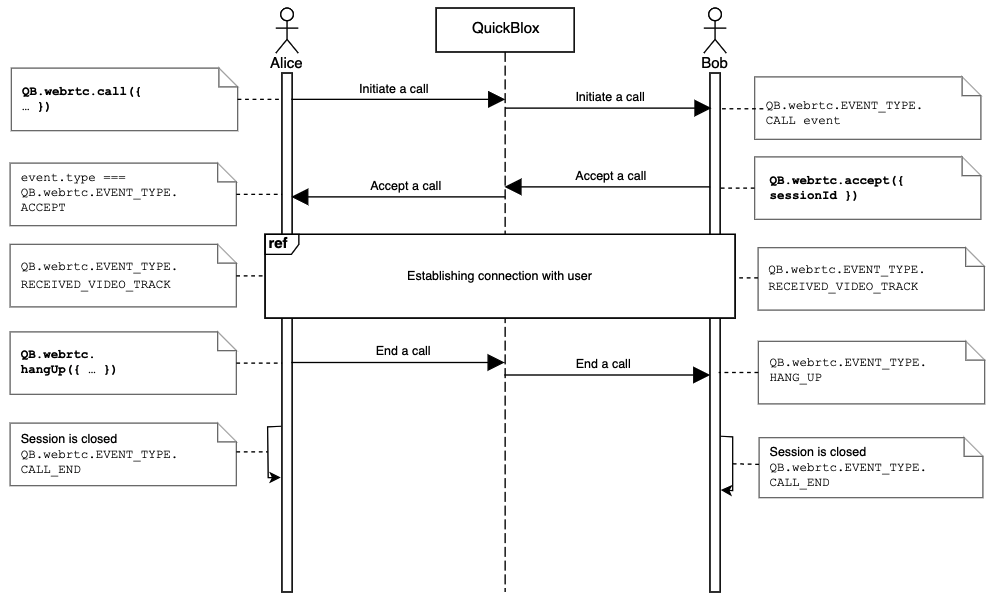
Go to the [Resources](#resources) section to see a sequence diagram for a regular call workflow.
### Peer connection state
The peer connection state can change. To monitor the states of your peer connections (users), you need to add the event handler for `QB.webrtc.EVENT\_TYPE.PEER\_CONNECTION\_STATE\_CHANGED` event type.
```JavaScript JavaScript theme={null}
function onPeerStateChanged (event) {
const {
type, // "@QB/PEER_CONNECTION_STATE_CHANGED"
payload
} = event
const {
userId, // id of QuickBlox user
session, // session
state // new peerconnection state (one of QB.webrtc.RTC_PEER_CONNECTION_STATE)
} = payload
// handle as necessary
}
emitter.addListener(
QB.webrtc.EVENT_TYPE.PEER_CONNECTION_STATE_CHANGED,
onPeerStateChanged
);
```
The following table lists all supported peer connection states.
| Connection state | Description |
| --------------------------------------------------- | ---------------------------------------------- |
| QB.webrtc.RTC\_PEER\_CONNECTION\_STATE.NEW | Gathering information to establish connection. |
| QB.webrtc.RTC\_PEER\_CONNECTION\_STATE.CONNECTED | A peer is connected to a call session. |
| QB.webrtc.RTC\_PEER\_CONNECTION\_STATE.FAILED | A peer failed to join a call session. |
| QB.webrtc.RTC\_PEER\_CONNECTION\_STATE.DISCONNECTED | A peer is disconnected from a call session. |
| QB.webrtc.RTC\_PEER\_CONNECTION\_STATE.CLOSED | A call session is closed by the peer. |
## Resources
A regular call workflow.