It provides developers with a convenient way to integrate chat functionality into their projects, enabling them to quickly create interactive and responsive chat interfaces.Some key features and capabilities of QuickBlox React Chat UIKit include:Ready-made components for Chat: UIKit offers pre-built components for displaying and managing various aspects of a chat, such as contact lists, headers, messages, user profile information, and more. These components can be easily customized and adapted to meet the project’s requirements.Customization: Developers can customize the appearance and styling of the chat using various parameters and styles. This allows for creating unique and visually consistent chat interfaces that align with the application’s design.Sending and receiving messages: UIKit provides an easy way to send and receive messages between users. Developers can use ready-made methods and events to handle real-time message sending and receiving.Contact management: The library allows for managing the contact list, adding and removing users from the contact list, as well as viewing user profile information.Various functional capabilities: UIKit offers additional functional capabilities such as file sharing, group chats, message history viewing, and more, making the chat interface more comprehensive and feature-rich.QuickBlox React Chat UIKit provides a convenient and efficient way to integrate chat into React applications, reducing development time and simplifying tasks related to chat functionality implementation. It can be a useful tool for developers who want to quickly add chat to their projects without the need to build everything from scratch.Supported features by dialog types
Group dialog
Private dialog
File sharing
✓
✓
Voice message
✓
✓
Typing indicator
✓
✓
Delivery receipt
✓
✓
Read receipt
✓
✓
Unread message count
✓
✓
Highlight URLs
✓
✓
Adding a Public dialog is planned in the next releases.
QuickBlox UIKit provides support for three types of dialogs: public dialog, group dialog, and private dialog.Public dialogA public dialog is an open chat that is shown to everyone in the app and anyone can join it. Public dialogs can host more participants compared to group dialogs, but does not have a list of participants and their online statuses within dialog.Group dialogA group dialog is a chat between closed group of people. New participant can be added either by dialog owner or any other participant of the group dialog.Private dialogA private dialog is a direct chat between two people, it can’t be extended to host more people.
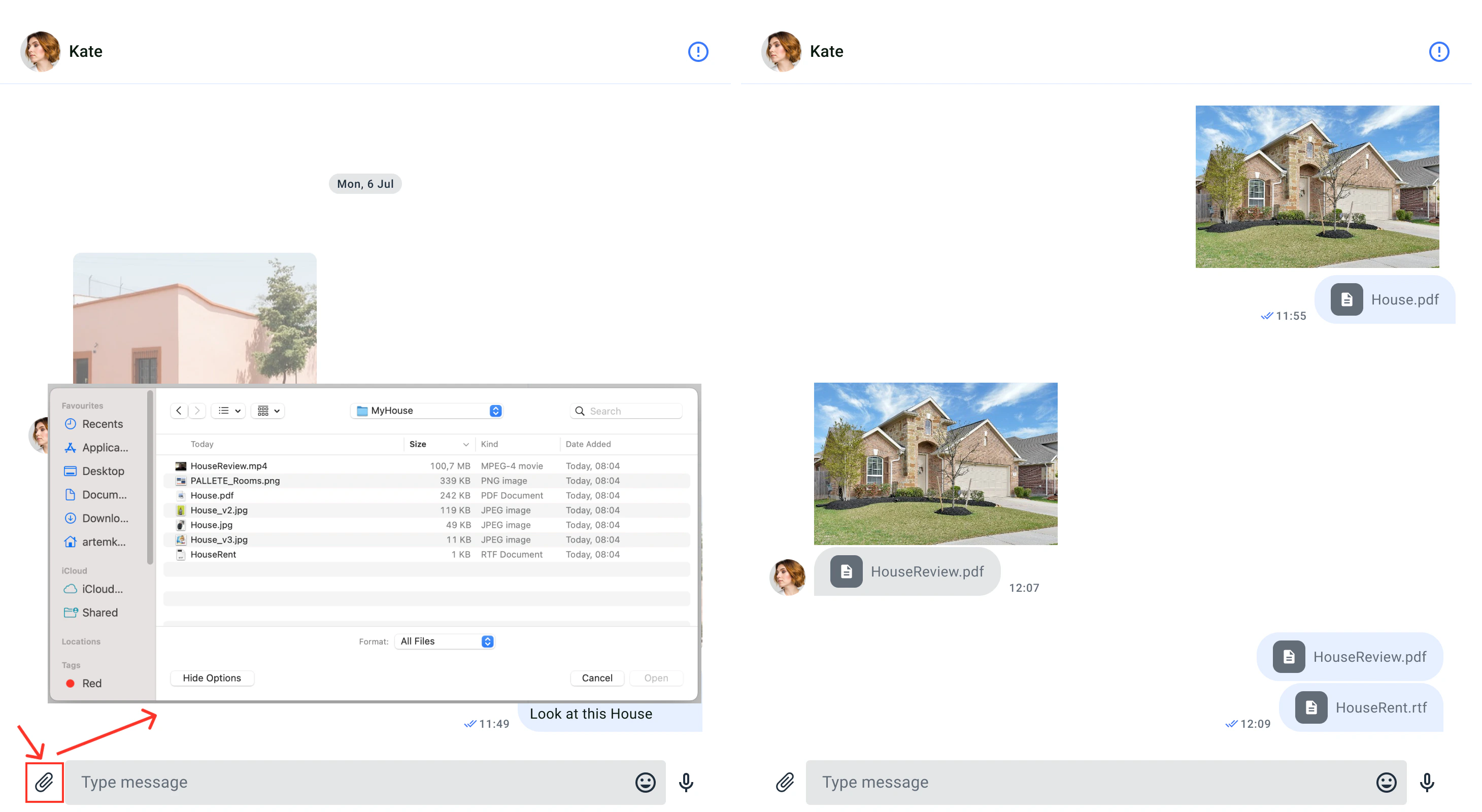
QuickBlox allows users to easily send different types of files, like images, audio files, or videos, during a chat session with the help of the file sharing feature. The file sharing icon appears on the UI element for typing messages.
You can customize the UI for file sharing using icon resource.Icon resourceIcon resources are stored in src/Presentation/components/UI/svgs directory, all icons are vectors (svg). The following table shows customizable file sharing icon.
The default icon color uses sharing icons (like others). It can be changed in the IconTheme property. To set the icon color, you should use the methods ‘inputElements()’ or ‘mainElements()’ from the UiKitTheme interface or configure it in the Theme colors (see Theme colors).
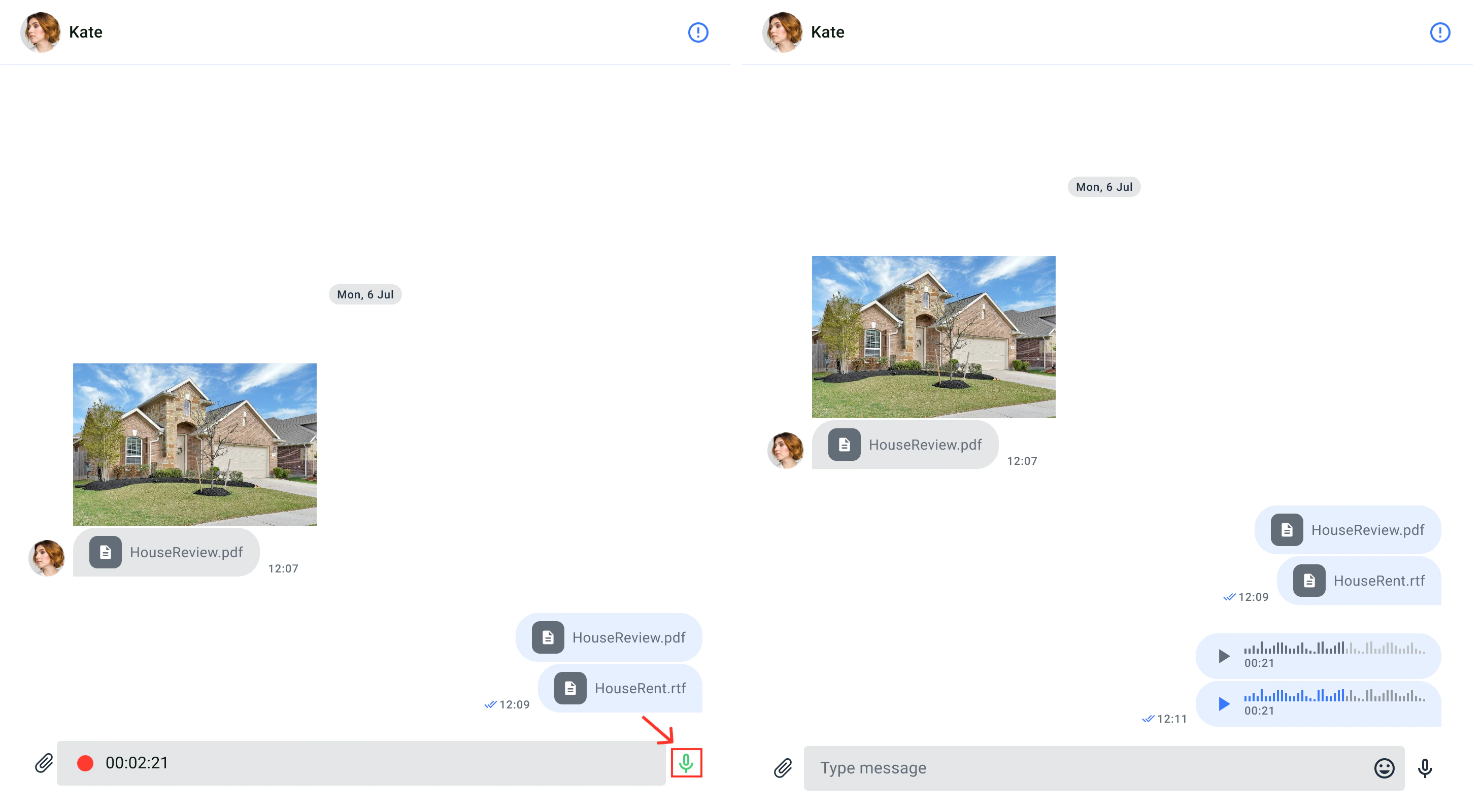
Voice messages are another way for people to communicate without typing text. Through voice messages, you can express yourself better, using tone and intention. Additionally, recording a voice message is quicker than writing a long text, making it more efficient for the sender. The recipient can listen to the message at their convenience, even while doing other tasks. To send a voice message in a chat, you simply need to press and hold the microphone icon. Then, the message will appear in the chat, and the recipient can play it back.
To send a voice message, users need to record the message first. By default, the voice message icon is visible to the right of the input field. While the icon is pressed, the microphone appears and records the sound from the microphone. The voice message icon only appears when the text input field is empty. When the icon is not pressed, the voice message is sent automatically.
You can customize the user interface for the voice message recording device using the icon resource.Icon resourceThe icon resources are stored in the src/Presentation/components/UI/svgs folder, and all icons are in vector format (svg). The following table shows the customizable icon for file access.
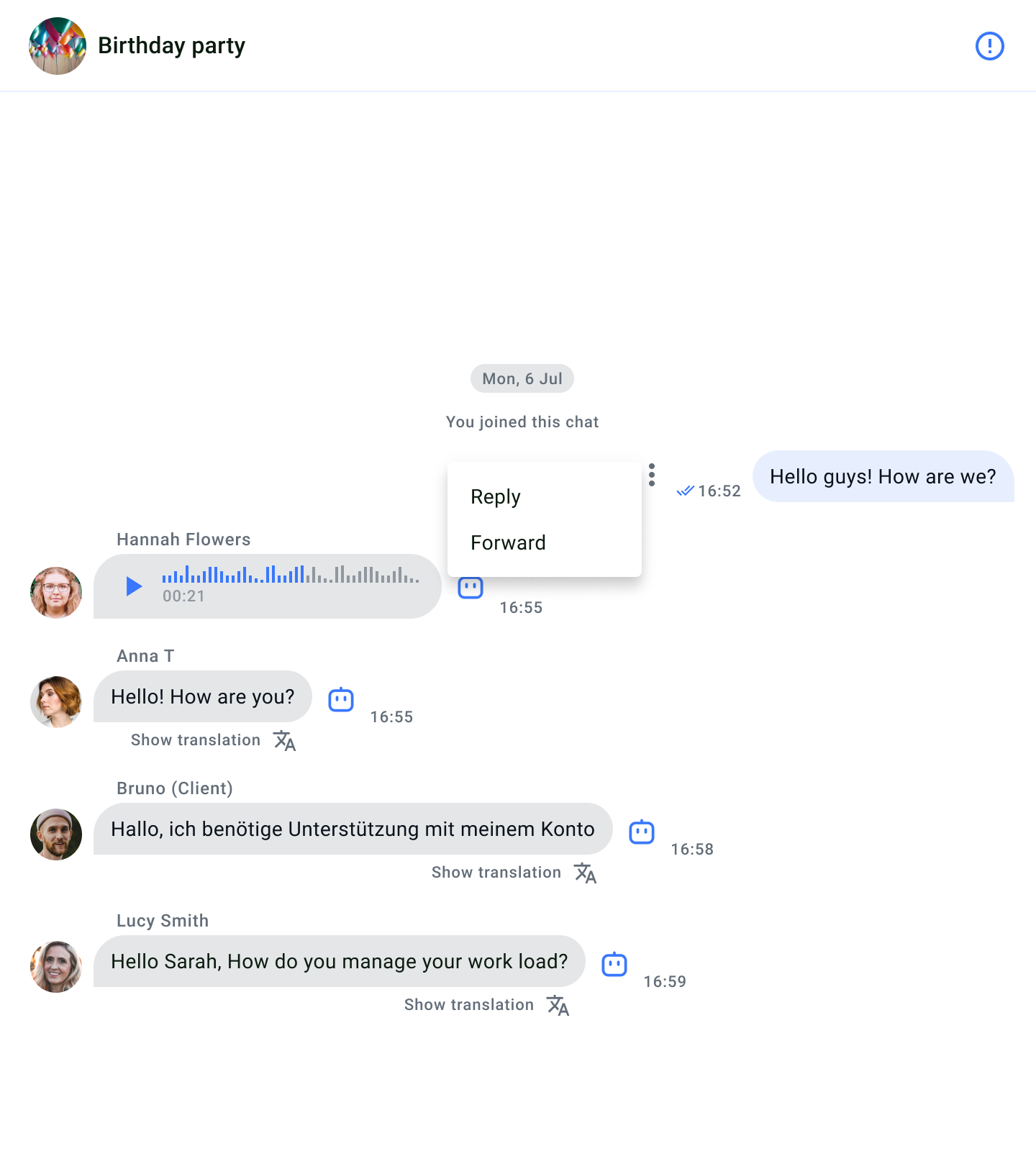
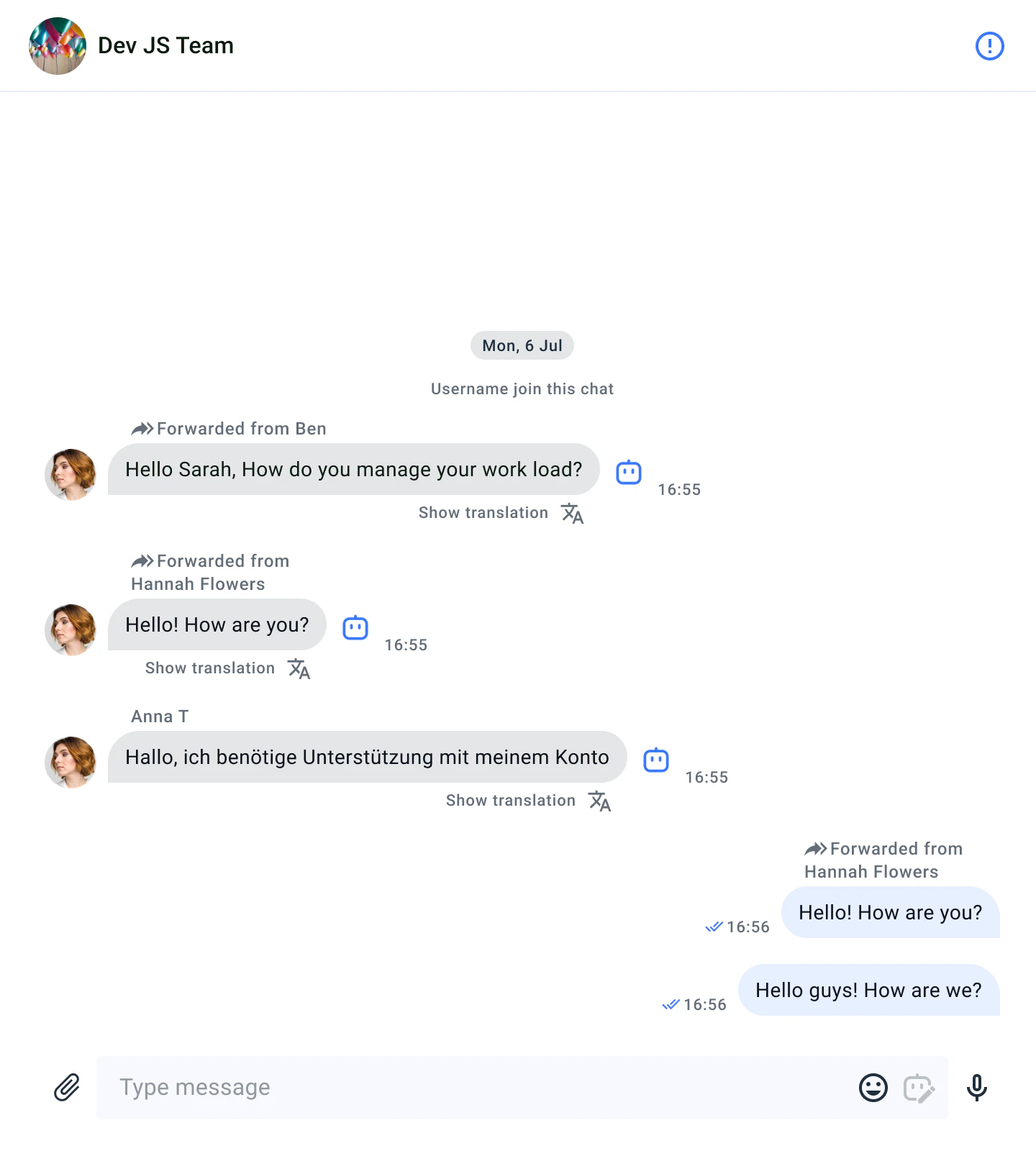
Modern messengers and chat platforms offer various functional features, among the most useful of which are message forwarding and reply options. Let’s take a closer look at them.
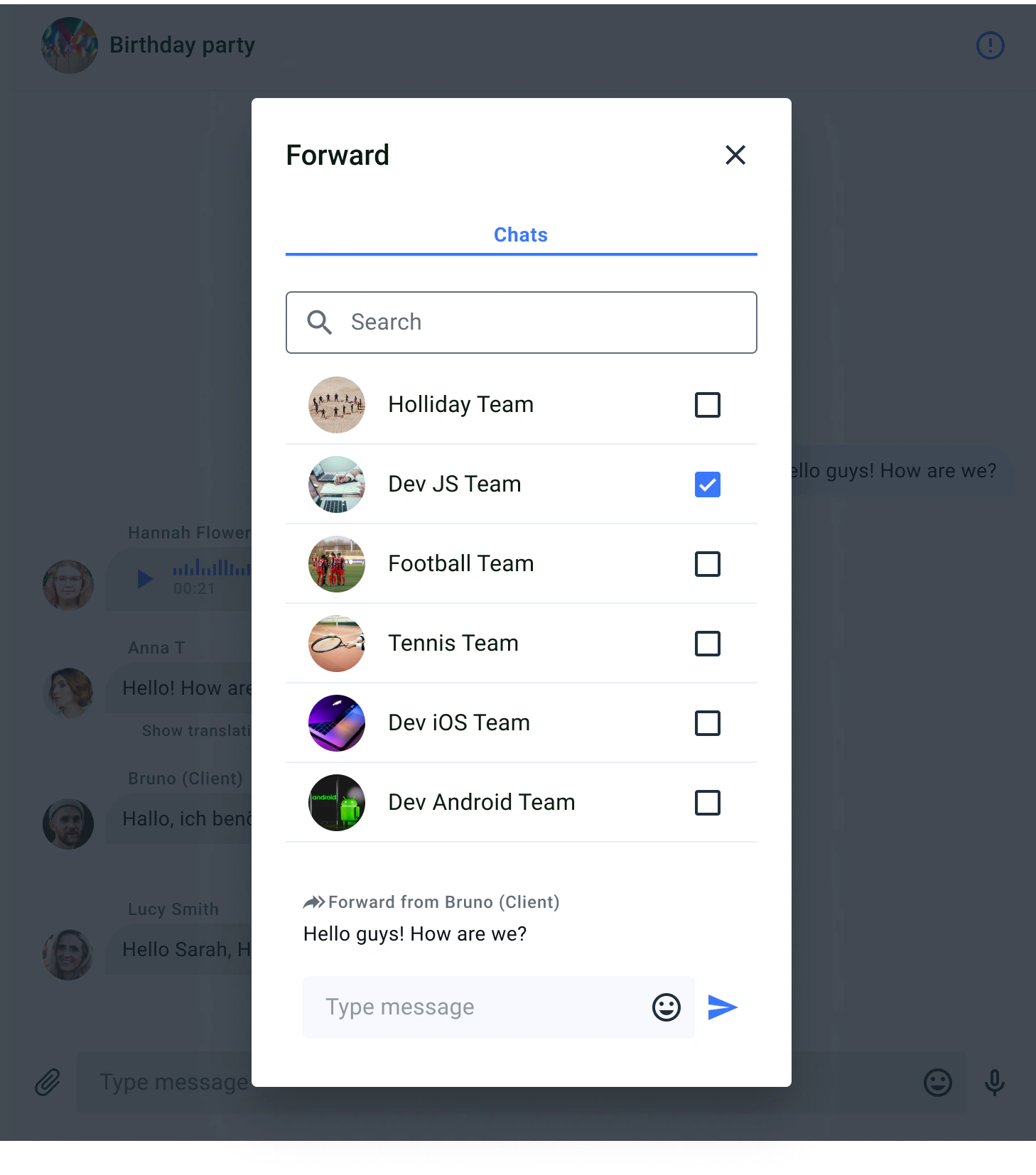
Forwarding is the capability to transfer messages from one chat participant to another, similar to email forwarding. It enables efficient exchange and discussion of information within the context of chats and messengers.
Once you’ve selected the dialogue to which you want to forward the message, the forwarded message will be displayed in the selected dialogue like this.
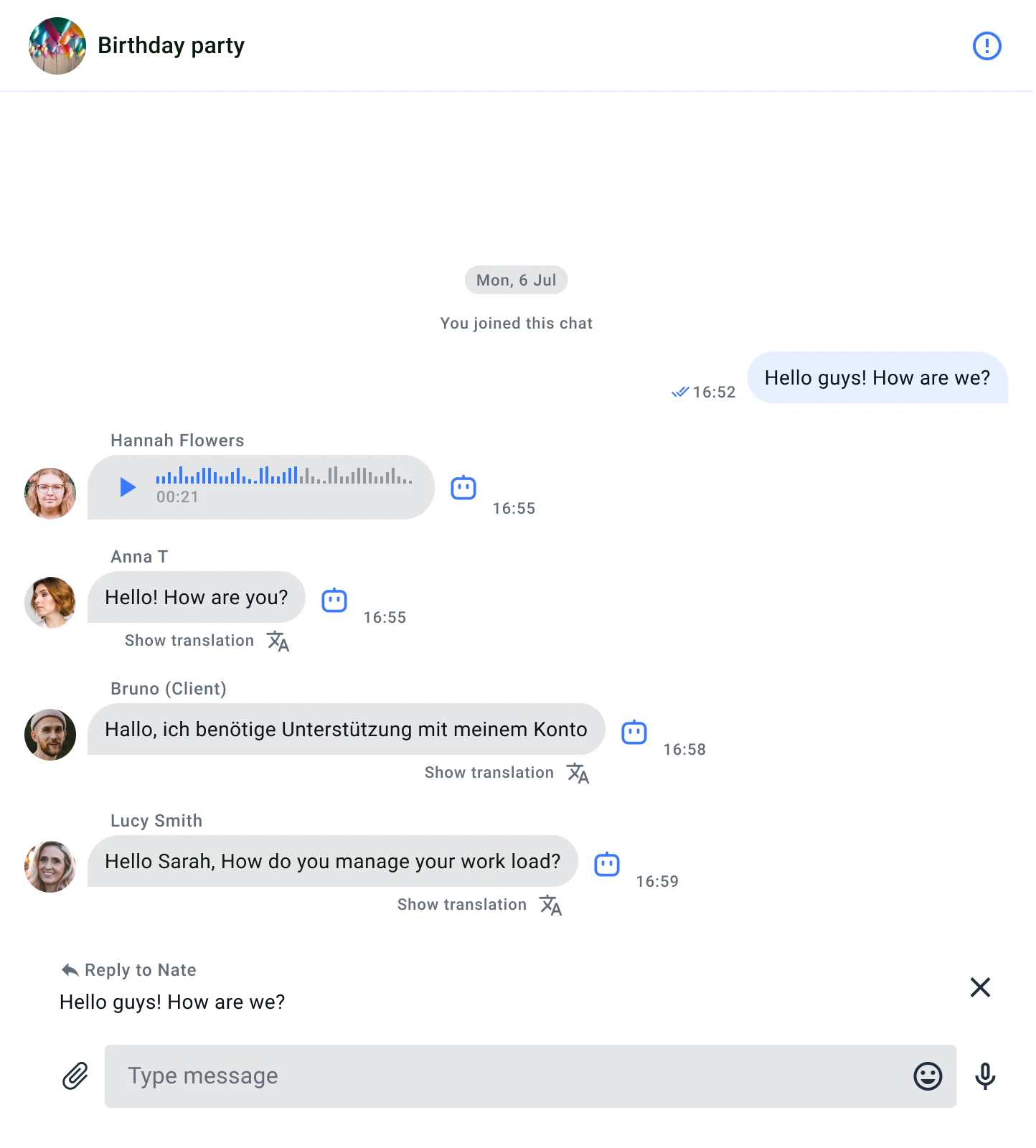
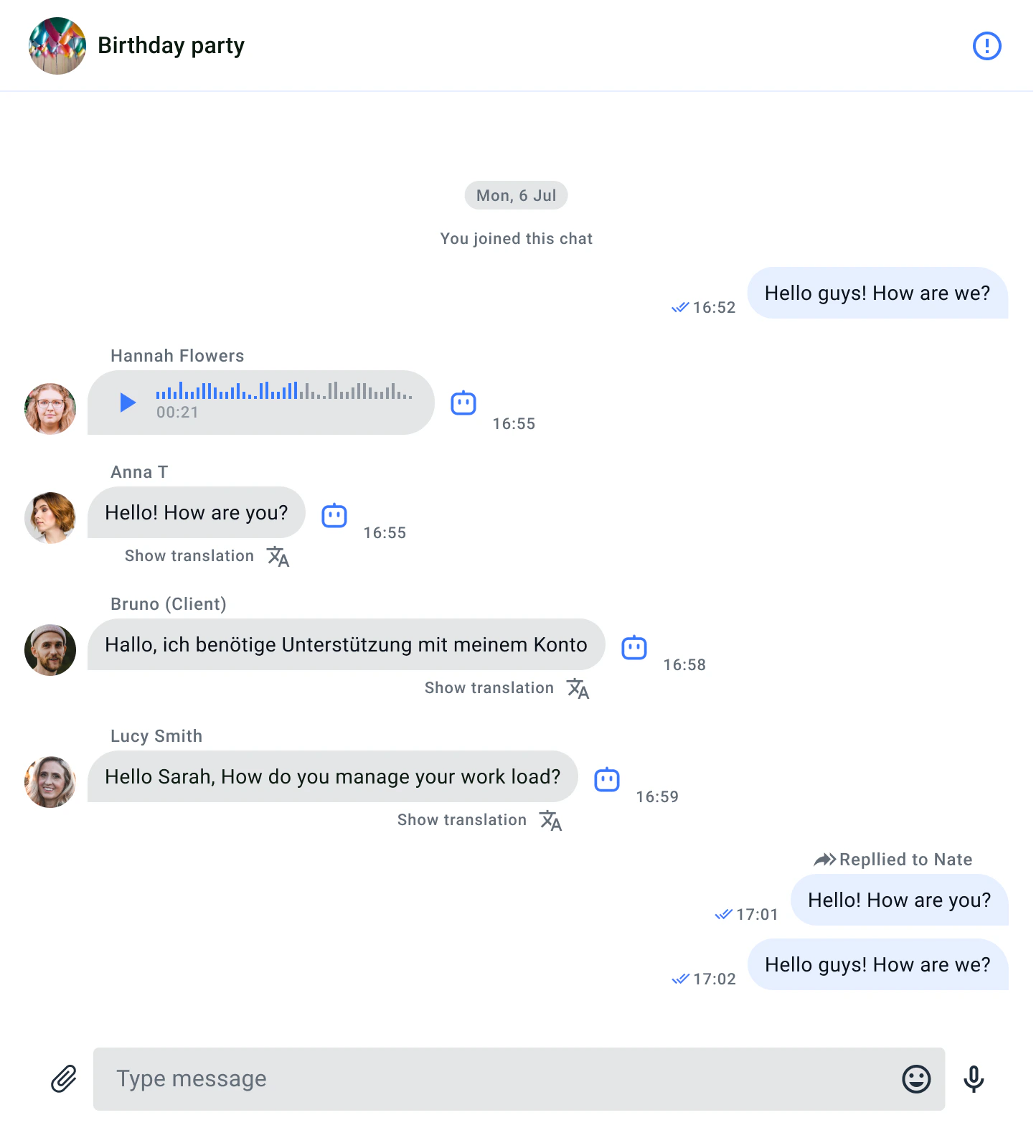
Replying is the ability to respond to a specific message, establishing a connection between the reply and the original message. It enhances the structure of communication in a chat, making conversations more clear and organized.
After choosing the message to which you’ve decided to reply, your response to the message will be displayed like this.
You can customize the interface elements related to forwarding and sending, just like individual components are customized, such as message sending elements and dialogue selection elements. You can customize the “Forward message dialog” pop-up window in the ForwardMessageFlow.scss file to modify various aspects of the screen. The ForwardMessagePreview.scss file with classes allows you to customize the forward/reply preview components.
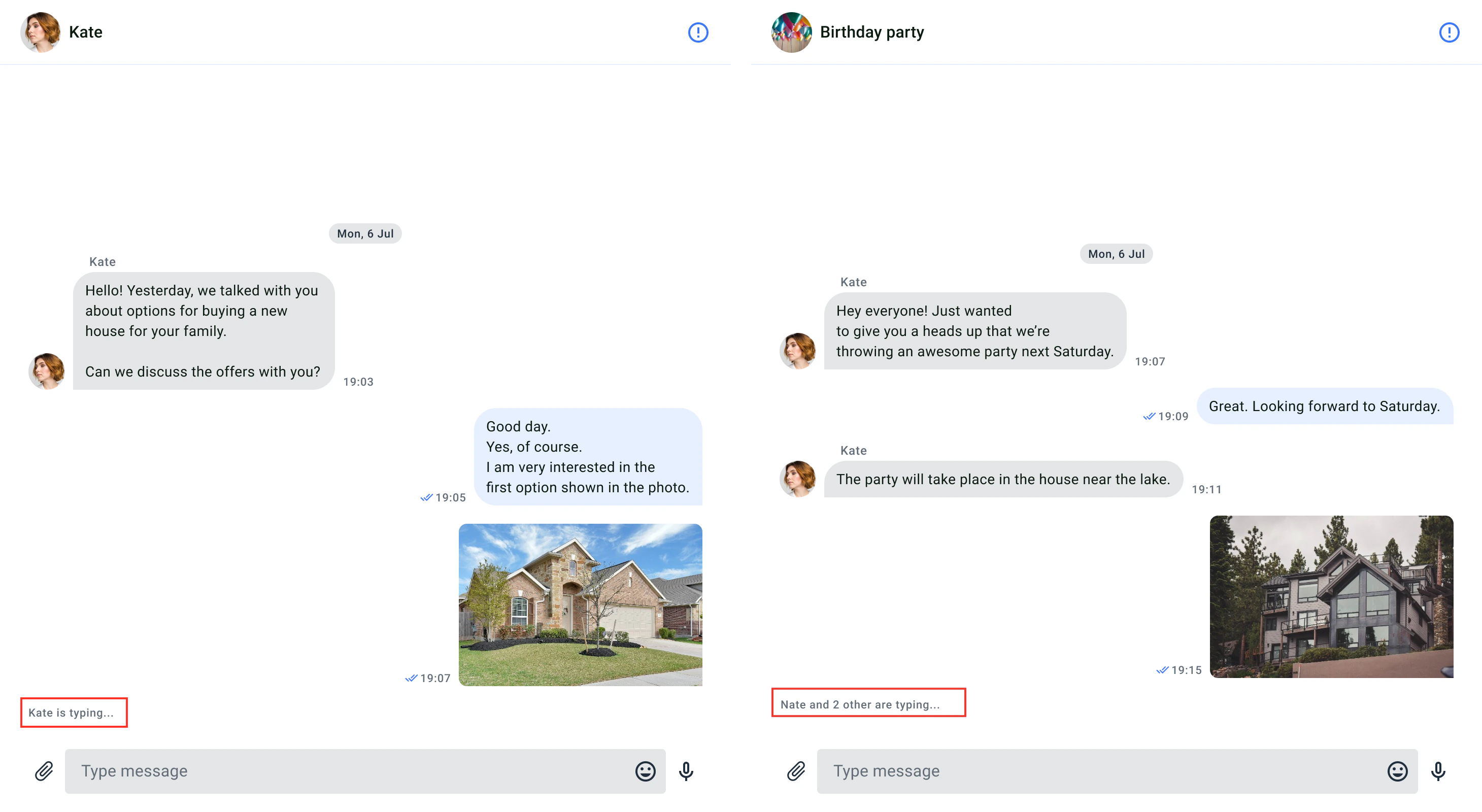
The typing indicator is a useful feature that provides users with a visual signal when someone else is typing a message in the chat window. The indicator remains visible until the user sends a message or clears the text. If the user stops typing for more than 10 seconds, the indicator also disappears.
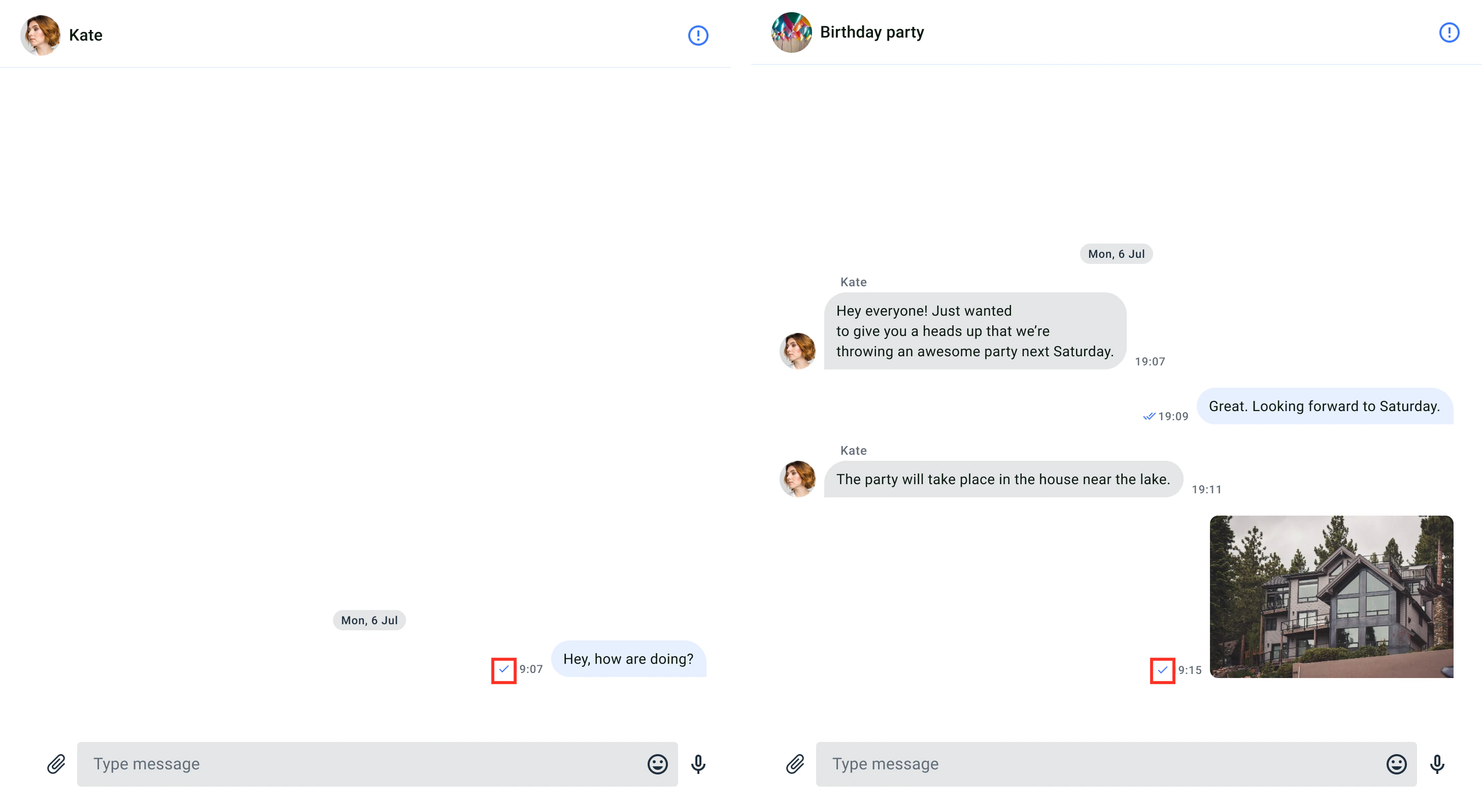
The delivery notification is a feature that informs the user about the successful delivery of their messages to other users in the chat window. When a message reaches the server, it is marked as sent, and a single checkmark icon appears next to the message’s timestamp. Once the message reaches the recipient’s device, it is marked as delivered. If the sender’s message has been delivered to any recipient in the chat, a double checkmark icon appears next to the message’s timestamp. The delivery notification is only visible to the message sender.
You can customize the user interface for delivery notifications using the icon resource.Icon resourceThe icon resources are stored in the src/Presentation/components/UI/svgs folder, and all icons are in vector format (svg). The following table shows the customizable icon for file access.
Id
Component Name
Image
Description
Sent
Status/Sent
An icon for sent status.
ViewedDelivered
Status/ViewedDelivered
An icon for delivered status.
The default delivery receipt color uses the tertiary elements color, it can be changed in the theme with setTertiaryElementsColor() (see Theme colors)
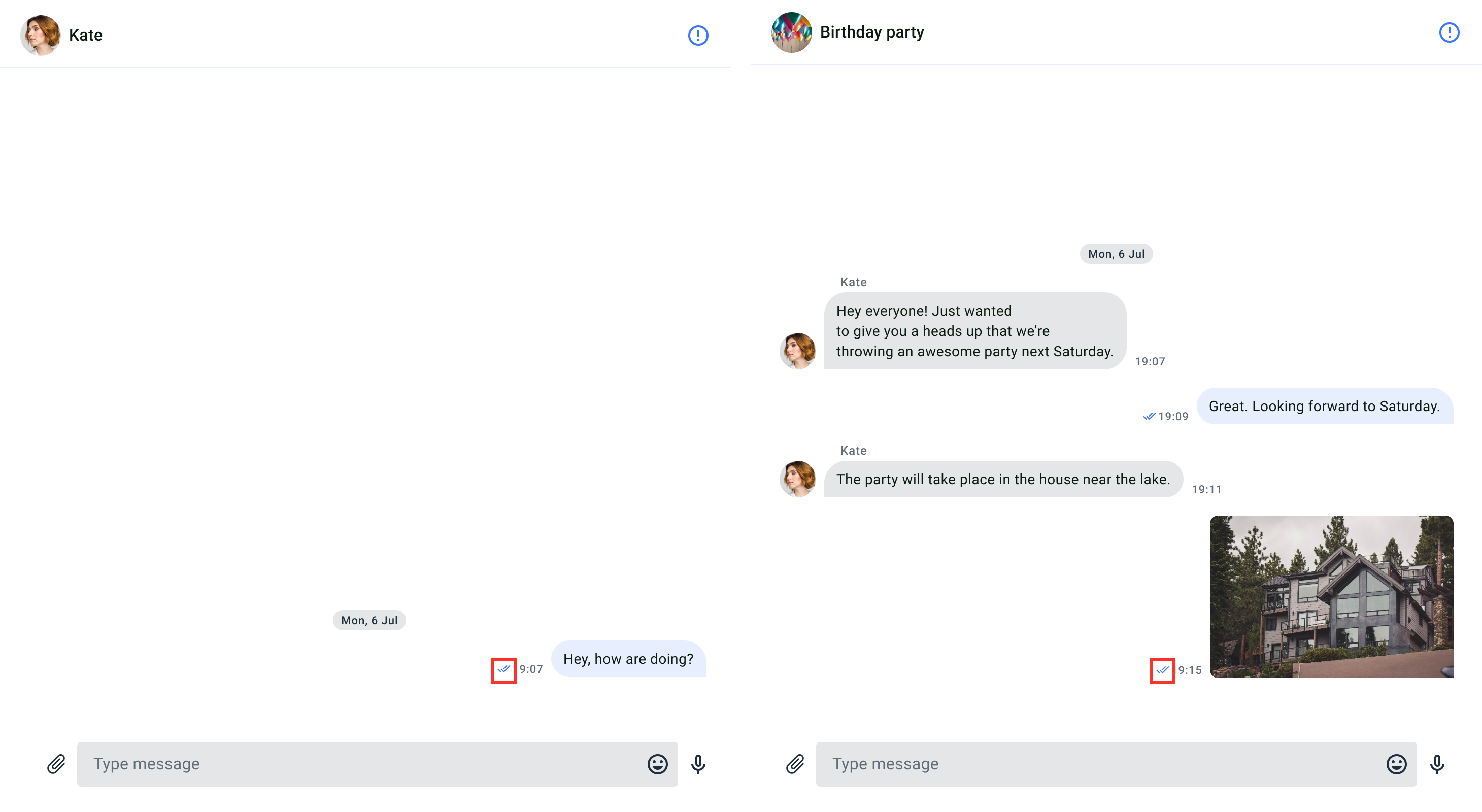
The read receipt feature allows users to determine whether their messages have been read by others in the dialog. When any recipient in the dialog have read the sender’s message, a colored double-tick icon is displayed next to the message’s timestamp. The read receipts are only visible to the sender of the message. It appears on the MessagesComponent.
You can customize the UI for read receipt using icon resource.Icon resourceIcon resources are stored in drawable directory, all icons are vectors (xml). The following table shows customizable file sharing icon.
Id
Component Name
Image
Description
ViewedDelivered
Status/ViewedDelivered
An icon for read status.
The default read receipt color uses the main elements color, it can be changed in the theme with setMainElementsColor() (see Theme colors)
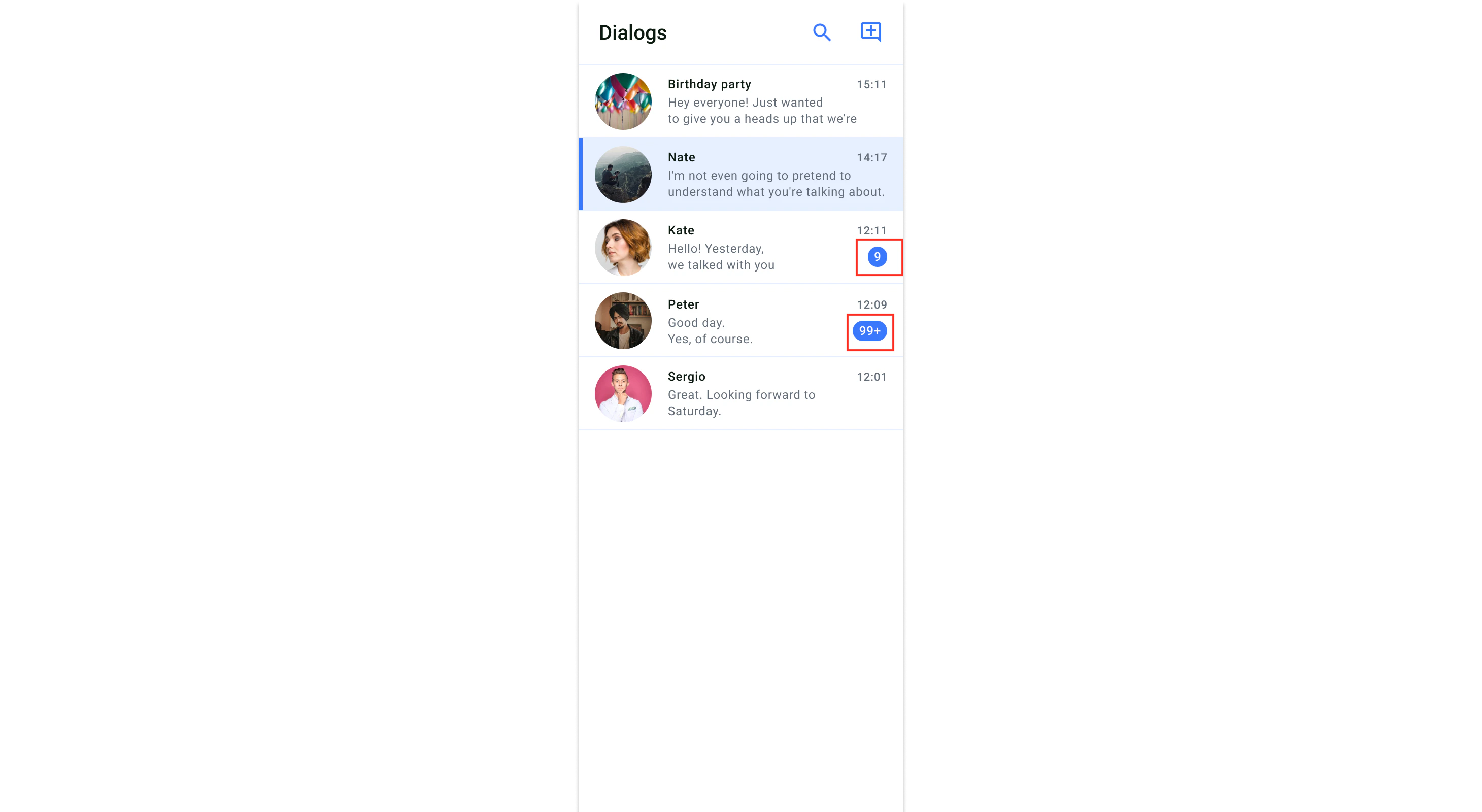
Unread message count is a feature that informs users of the number of messages they haven’t read in each dialog. The number of unread messages per dialog is displayed below the timestamp. If the number of messages is more than 100, it will be displayed as 99+. The unread message count appears on the DialogsComponent.
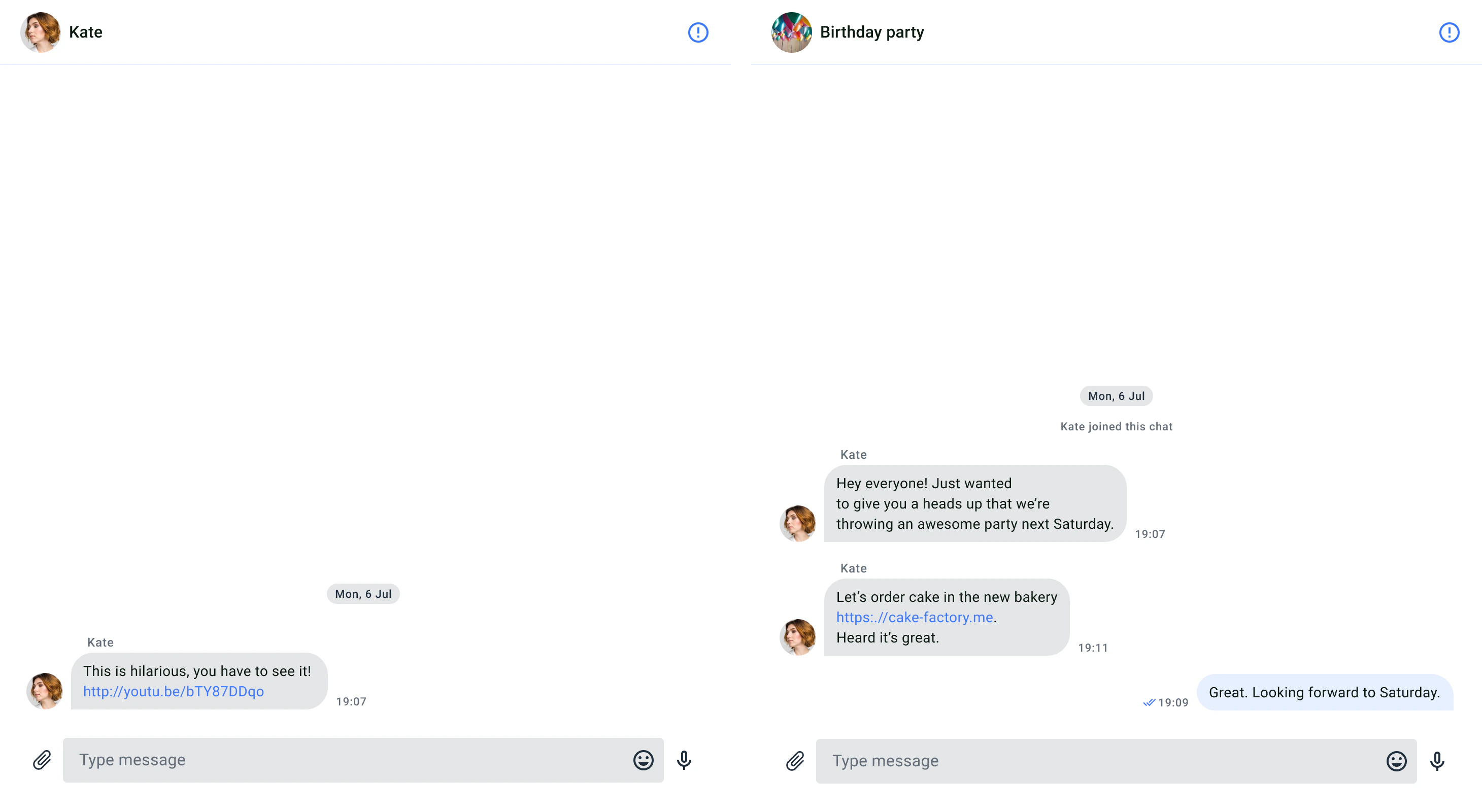
The highlighting URLs is a feature that refers to displaying clickable links in a chat message, where the URL is visually distinguished and can be interacted with the user.
{"docsConfig":{"theme":"mint","$schema":"https://mintlify.com/docs.json","name":"QuickBlox","colors":{"primary":"#3978fc","light":"#3978fc","dark":"#3978fc"},"logo":{"light":"https://mintcdn.com/quickblox/ZK0J4-dDJuuhpUQu/logo/light.svg?fit=max\u0026auto=format\u0026n=ZK0J4-dDJuuhpUQu\u0026q=85\u0026s=2ca77d61090cf3e9a7512358a3ad30b1","dark":"https://mintcdn.com/quickblox/ZK0J4-dDJuuhpUQu/logo/dark.svg?fit=max\u0026auto=format\u0026n=ZK0J4-dDJuuhpUQu\u0026q=85\u0026s=a8aaf148bf91f6898d03d0d3184114a9"},"favicon":"https://mintcdn.com/quickblox/blsYQNp-sI61UYaV/favicon.png?fit=max\u0026auto=format\u0026n=blsYQNp-sI61UYaV\u0026q=85\u0026s=62ec978bc2dc633ef042e7636c089254","navbar":{"links":[{"href":"https://quickblox.github.io/q-consultation/","label":"Q-Consultation"},{"href":"https://help.quickblox.com/","label":"Support"},{"href":"https://quickblox.com/","label":"quickblox.com"}],"primary":{"type":"button","label":"Dashboard","href":"https://admin.quickblox.com/"}},"footer":{"socials":{"x":"https://x.com/QuickBlox","facebook":"https://www.facebook.com/quickblox","linkedin":"https://www.linkedin.com/company/quickblox","instagram":"https://www.instagram.com/quickblox_official_","medium":"https://medium.com/quickblox-engineering","github":"https://github.com/QuickBlox","discord":"https://bit.ly/quickblox-dev-community"}},"integrations":{"ga4":{"measurementId":"G-CJ7RE2GB2V"}},"contextual":{"options":["chatgpt","claude","copy"],"display":"header"},"styling":{"latex":false},"navigation":{"global":{"anchors":[{"anchor":"SDK Downloads","icon":"webhook","href":"https://github.com/QuickBlox"},{"anchor":"Community","icon":"discord","href":"https://discord.com/invite/ZWZ3WpYZ9q"},{"anchor":"Blog","icon":"newspaper","href":"https://quickblox.com/blog/"}]},"pages":[]}},"deployment":{"deploymentMetadataValue":{"subdomain":"quickblox","hasAudioNarration":false,"actualSubdomain":"quickblox","customDomains":["docs.quickblox.com"],"gitSource":{"type":"github","owner":"quickblox","repo":"docs","deployBranch":"main","contentDirectory":"","isPrivate":false,"mountPath":"","label":""},"chroma":{"liveDeploymentHistoryId":"6a8dc27ca93e48aebcc61c6f","collectionId":"6f899a07-3988-43cd-ac6e-7ba934508cca","schemaVersion":"v3","latestBuiltDeploymentHistoryId":"6a8dc27ca93e48aebcc61c6f"},"feedback":{"issues":true,"edits":false,"thumbs":true},"entitlements":{"AI_CHAT":{"status":"ENABLED"},"WEB_MCP":{"status":"ENABLED"},"NARRATION":{"status":"ENABLED"}},"buildId":"6a8dc27ca93e48aebcc61c6f","clientVersion":"0.0.4044","searchFilterCounts":[{"language":"default","tag":"Server API","count":105},{"language":"default","tag":"REST API","count":105},{"language":"default","tag":"SDKs","count":98},{"language":"default","tag":"Chat","count":57},{"language":"default","tag":"Android","count":26},{"language":"default","tag":"iOS","count":25},{"language":"default","tag":"UIKits","count":23},{"language":"default","tag":"Custom Objects","count":22},{"language":"default","tag":"AI Agent","count":21},{"language":"default","tag":"Flutter","count":20}]},"assistantConfig":{},"basePath":"","hasChatPermissions":true,"hasWebMcpPermissions":true,"toggles":[{"name":"kill-isr","enabled":true,"variant":{"name":"disabled","enabled":false,"feature_enabled":true},"impressionData":false},{"name":"agent-mintlify-slack","enabled":true,"variant":{"name":"disabled","enabled":false,"feature_enabled":true},"impressionData":false},{"name":"agent-integrations-settings","enabled":true,"variant":{"name":"disabled","enabled":false,"feature_enabled":true},"impressionData":false},{"name":"automations-pr-grouping","enabled":true,"variant":{"name":"disabled","enabled":false,"feature_enabled":true},"impressionData":false},{"name":"custom-prefix","enabled":true,"variant":{"name":"disabled","enabled":false,"feature_enabled":true},"impressionData":false},{"name":"analytics-v7","enabled":true,"variant":{"name":"disabled","enabled":false,"feature_enabled":true},"impressionData":false},{"name":"user-flows-analytics","enabled":true,"variant":{"name":"disabled","enabled":false,"feature_enabled":true},"impressionData":false},{"name":"no-publish-flow","enabled":true,"variant":{"name":"disabled","enabled":false,"feature_enabled":true},"impressionData":false},{"name":"workos-onboarding","enabled":true,"variant":{"name":"disabled","enabled":false,"feature_enabled":true},"impressionData":false},{"name":"llms-txt-v2","enabled":true,"variant":{"name":"disabled","enabled":false,"feature_enabled":true},"impressionData":false},{"name":"snapshot-serving-live","enabled":true,"variant":{"name":"disabled","enabled":false,"feature_enabled":true},"impressionData":false},{"name":"stripTemperatureMiddleware","enabled":true,"variant":{"name":"disabled","enabled":false,"feature_enabled":true},"impressionData":false},{"name":"support-platform-pylon-zendesk","enabled":true,"variant":{"name":"disabled","enabled":false,"feature_enabled":true},"impressionData":false},{"name":"snapshot-serving","enabled":true,"variant":{"name":"disabled","enabled":false,"feature_enabled":true},"impressionData":false},{"name":"instant-rollback","enabled":true,"variant":{"name":"disabled","enabled":false,"feature_enabled":true},"impressionData":false},{"name":"granular-notifications-server","enabled":true,"variant":{"name":"disabled","enabled":false,"feature_enabled":true},"impressionData":false},{"name":"granular-notifications","enabled":true,"variant":{"name":"disabled","enabled":false,"feature_enabled":true},"impressionData":false},{"name":"automations-fable","enabled":true,"variant":{"name":"disabled","enabled":false,"feature_enabled":true},"impressionData":false},{"name":"fixed-ai-action-pricing","enabled":true,"variant":{"name":"disabled","enabled":false,"feature_enabled":true},"impressionData":false},{"name":"automation-resolve-merge-conflict","enabled":true,"variant":{"name":"disabled","enabled":false,"feature_enabled":true},"impressionData":false},{"name":"scoped-publishing","enabled":true,"variant":{"name":"disabled","enabled":false,"feature_enabled":true},"impressionData":false},{"name":"mintql","enabled":true,"variant":{"name":"disabled","enabled":false,"feature_enabled":true},"impressionData":false},{"name":"page-level-analytics","enabled":true,"variant":{"name":"disabled","enabled":false,"feature_enabled":true},"impressionData":false},{"name":"editor-version-history-v2","enabled":true,"variant":{"name":"disabled","enabled":false,"feature_enabled":true},"impressionData":false},{"name":"billing-page-v2","enabled":true,"variant":{"name":"disabled","enabled":false,"feature_enabled":true},"impressionData":false},{"name":"full-page-search","enabled":true,"variant":{"name":"disabled","enabled":false,"feature_enabled":true},"impressionData":false},{"name":"workspace-projects","enabled":true,"variant":{"name":"disabled","enabled":false,"feature_enabled":true},"impressionData":false},{"name":"assistant-v5","enabled":true,"variant":{"name":"disabled","enabled":false,"feature_enabled":true},"impressionData":false},{"name":"byok-sep-25","enabled":true,"variant":{"name":"disabled","enabled":false,"feature_enabled":true},"impressionData":false},{"name":"fork-pr-previews","enabled":true,"variant":{"name":"disabled","enabled":false,"feature_enabled":true},"impressionData":false},{"name":"revalidation-jwt","enabled":true,"variant":{"name":"disabled","enabled":false,"feature_enabled":true},"impressionData":false},{"name":"vite-origin","enabled":true,"variant":{"name":"disabled","enabled":false,"feature_enabled":true},"impressionData":false},{"name":"billing-updated-9-15","enabled":true,"variant":{"name":"disabled","enabled":false,"feature_enabled":true},"impressionData":false},{"name":"workos-sso-scim","enabled":true,"variant":{"name":"disabled","enabled":false,"feature_enabled":true},"impressionData":false},{"name":"hobby-abuse-scan","enabled":true,"variant":{"name":"disabled","enabled":false,"feature_enabled":true},"impressionData":false},{"name":"dashboard-inbox","enabled":true,"variant":{"name":"disabled","enabled":false,"feature_enabled":true},"impressionData":false},{"name":"workos-signup","enabled":true,"variant":{"name":"disabled","enabled":false,"feature_enabled":true},"impressionData":false},{"name":"turbopuffer-dual-write","enabled":true,"variant":{"name":"disabled","enabled":false,"feature_enabled":true},"impressionData":false},{"name":"workos-enabled","enabled":true,"variant":{"name":"disabled","enabled":false,"feature_enabled":true},"impressionData":false},{"name":"approve-review-flow","enabled":true,"variant":{"name":"disabled","enabled":false,"feature_enabled":true},"impressionData":false},{"name":"sso-setup-deadline-banner","enabled":true,"variant":{"name":"disabled","enabled":false,"feature_enabled":true},"impressionData":false}],"googleFontsInlined":false},"customCss":[{"filePath":"styles.css","content":".icon-group{display:flex;gap:10px;flex-wrap:wrap}.custom-icon{width:24px;height:24px}.inline-link{display:inline-flex;align-items:center;color:#007bff;margin-top:10px;text-decoration:none;transition:color .3s ease,text-decoration .3s ease}.inline-link:hover{color:#030f1c}.centered-image,.centered-video{display:block;margin-left:auto;margin-right:auto}.centered-image{width:500px;height:auto}.centered-video{max-width:100%}.inline-link Icon{margin-right:5px}.icon-group .icon{width:20px;height:20px;vertical-align:middle}.icon-group .icon,.icon-group a{display:inline-block}.icon-group img,.icon-group svg{width:20px;height:20px;cursor:pointer;pointer-events:none}.card{box-shadow:0 4px 6px rgba(0,0,0,.1);transition:transform .3s ease,box-shadow .3s ease;background-color:#fff;border-radius:8px;padding:16px}.card:hover{transform:translateY(-5px);box-shadow:0 8px 16px rgba(0,0,0,.4)}.button{display:inline-block;padding:10px 20px;text-align:center;background-color:#007bff;color:#fff;border-radius:5px;text-decoration:none;white-space:nowrap}.button:hover{background-color:#0056b3}.warning{background-color:red!important}"}],"page":{"pagePath":"ui-kits/react-uikit-features","slug":"/ui-kits/react-uikit-features","pageMetadata":{"title":"Features","icon":"list","description":"The **QuickBlox React Chat UIKit** is a set of ready-made components and tools for developing functional and powerful chat features in React applications.","href":"/ui-kits/react-uikit-features"},"description":{"compiledSource":"\"use strict\";\nconst {jsx: _jsx, jsxs: _jsxs} = arguments[0];\nconst {useMDXComponents: _provideComponents} = arguments[0];\nfunction _createMdxContent(props) {\n const _components = {\n p: \"p\",\n strong: \"strong\",\n ..._provideComponents(),\n ...props.components\n };\n return _jsxs(_components.p, {\n children: [\"The \", _jsx(_components.strong, {\n children: \"QuickBlox React Chat UIKit\"\n }), \" is a set of ready-made components and tools for developing functional and powerful chat features in React applications.\"]\n });\n}\nfunction MDXContent(props = {}) {\n const {wrapper: MDXLayout} = {\n ..._provideComponents(),\n ...props.components\n };\n return MDXLayout ? _jsx(MDXLayout, {\n ...props,\n children: _jsx(_createMdxContent, {\n ...props\n })\n }) : _createMdxContent(props);\n}\nreturn {\n default: MDXContent\n};\n","frontmatter":{},"scope":{}},"pageType":"default","mdx":{"mdxSource":{"compiledSource":"\"use strict\";const{Fragment:_Fragment,jsx:_jsx,jsxs:_jsxs}=arguments[0];const{useMDXComponents:_provideComponents}=arguments[0];function _createMdxContent(props){const _components={a:`a`,code:`code`,p:`p`,strong:`strong`,tbody:`tbody`,td:`td`,th:`th`,thead:`thead`,tr:`tr`,..._provideComponents(),...props.components},{Frame,Heading,Note,OptimizedImage,Table}=_components;if(!Frame)_missingMdxReference(`Frame`,true);if(!Heading)_missingMdxReference(`Heading`,true);if(!Note)_missingMdxReference(`Note`,true);if(!OptimizedImage)_missingMdxReference(`OptimizedImage`,true);if(!Table)_missingMdxReference(`Table`,true);return _jsxs(_Fragment,{children:[_jsx(Heading,{level:`2`,id:`overview`,children:`Overview`}),`\n`,_jsx(_components.p,{children:`It provides developers with a convenient way to integrate chat functionality into their projects, enabling them to quickly create interactive and responsive chat interfaces.`}),`\n`,_jsxs(_components.p,{children:[`Some `,_jsx(_components.strong,{children:`key features and capabilities`}),` of QuickBlox React Chat UIKit include:`]}),`\n`,_jsxs(_components.p,{children:[_jsx(_components.strong,{children:`Ready-made components for Chat`}),`: UIKit offers pre-built components for displaying and managing various aspects of a chat, such as contact lists, headers, messages, user profile information, and more. These components can be easily customized and adapted to meet the project’s requirements.`]}),`\n`,_jsxs(_components.p,{children:[_jsx(_components.strong,{children:`Customization`}),`: Developers can customize the appearance and styling of the chat using various parameters and styles. This allows for creating unique and visually consistent chat interfaces that align with the application’s design.`]}),`\n`,_jsxs(_components.p,{children:[_jsx(_components.strong,{children:`Sending and receiving messages`}),`: UIKit provides an easy way to send and receive messages between users. Developers can use ready-made methods and events to handle real-time message sending and receiving.`]}),`\n`,_jsxs(_components.p,{children:[_jsx(_components.strong,{children:`Contact management`}),`: The library allows for managing the contact list, adding and removing users from the contact list, as well as viewing user profile information.`]}),`\n`,_jsxs(_components.p,{children:[_jsx(_components.strong,{children:`Various functional capabilities`}),`: UIKit offers additional functional capabilities such as file sharing, group chats, message history viewing, and more, making the chat interface more comprehensive and feature-rich.`]}),`\n`,_jsx(_components.p,{children:`QuickBlox React Chat UIKit provides a convenient and efficient way to integrate chat into React applications, reducing development time and simplifying tasks related to chat functionality implementation. It can be a useful tool for developers who want to quickly add chat to their projects without the need to build everything from scratch.`}),`\n`,_jsx(_components.p,{children:_jsx(_components.strong,{children:`Supported features by dialog types`})}),`\n`,_jsxs(Table,{children:[_jsx(_components.thead,{children:_jsxs(_components.tr,{children:[_jsx(_components.th,{children:`Group dialog`}),_jsx(_components.th,{children:`Private dialog`}),_jsx(_components.th,{})]})}),_jsxs(_components.tbody,{children:[_jsxs(_components.tr,{children:[_jsx(_components.td,{children:_jsx(_components.code,{children:`File sharing`})}),_jsx(_components.td,{children:`✓`}),_jsx(_components.td,{children:`✓`})]}),_jsxs(_components.tr,{children:[_jsx(_components.td,{children:_jsx(_components.code,{children:`Voice message`})}),_jsx(_components.td,{children:`✓`}),_jsx(_components.td,{children:`✓`})]}),_jsxs(_components.tr,{children:[_jsx(_components.td,{children:_jsx(_components.code,{children:`Typing indicator`})}),_jsx(_components.td,{children:`✓`}),_jsx(_components.td,{children:`✓`})]}),_jsxs(_components.tr,{children:[_jsx(_components.td,{children:_jsx(_components.code,{children:`Delivery receipt`})}),_jsx(_components.td,{children:`✓`}),_jsx(_components.td,{children:`✓`})]}),_jsxs(_components.tr,{children:[_jsx(_components.td,{children:_jsx(_components.code,{children:`Read receipt`})}),_jsx(_components.td,{children:`✓`}),_jsx(_components.td,{children:`✓`})]}),_jsxs(_components.tr,{children:[_jsx(_components.td,{children:_jsx(_components.code,{children:`Unread message count`})}),_jsx(_components.td,{children:`✓`}),_jsx(_components.td,{children:`✓`})]}),_jsxs(_components.tr,{children:[_jsx(_components.td,{children:_jsx(_components.code,{children:`Highlight URLs`})}),_jsx(_components.td,{children:`✓`}),_jsx(_components.td,{children:`✓`})]})]})]}),`\n`,_jsx(Note,{children:_jsx(_components.p,{children:`Adding a Public dialog is planned in the next releases.`})}),`\n`,_jsx(Heading,{level:`3`,id:`dialog-types`,children:`Dialog types`}),`\n`,_jsx(_components.p,{children:`QuickBlox UIKit provides support for three types of dialogs: public dialog, group dialog, and private dialog.`}),`\n`,_jsx(_components.p,{children:_jsx(_components.strong,{children:`Public dialog`})}),`\n`,_jsx(_components.p,{children:`A public dialog is an open chat that is shown to everyone in the app and anyone can join it. Public dialogs can host more participants compared to group dialogs, but does not have a list of participants and their online statuses within dialog.`}),`\n`,_jsx(_components.p,{children:_jsx(_components.strong,{children:`Group dialog`})}),`\n`,_jsx(_components.p,{children:`A group dialog is a chat between closed group of people. New participant can be added either by dialog owner or any other participant of the group dialog.`}),`\n`,_jsx(_components.p,{children:_jsx(_components.strong,{children:`Private dialog`})}),`\n`,_jsx(_components.p,{children:`A private dialog is a direct chat between two people, it can’t be extended to host more people.`}),`\n`,_jsx(Heading,{level:`2`,id:`file-sharing`,children:`File sharing`}),`\n`,_jsx(_components.p,{children:`QuickBlox allows users to easily send different types of files, like images, audio files, or videos, during a chat session with the help of the file sharing feature. The file sharing icon appears on the UI element for typing messages.`}),`\n`,_jsx(Frame,{children:_jsx(OptimizedImage,{src:`https://mintcdn.com/quickblox/e8BObhqG0WJty0gE/images/412c264-FileSharing.png?fit=max\u0026auto=format\u0026n=e8BObhqG0WJty0gE\u0026q=85\u0026s=b8bd9beb2f873b645f2565b32fae5cc9`,alt:`File Sharing`,\"data-og-width\":`2920`,width:`2920`,\"data-og-height\":`1600`,height:`1600`,\"data-path\":`images/412c264-FileSharing.png`,\"data-optimize\":`true`,\"data-opv\":`3`,srcset:`https://mintcdn.com/quickblox/e8BObhqG0WJty0gE/images/412c264-FileSharing.png?w=280\u0026fit=max\u0026auto=format\u0026n=e8BObhqG0WJty0gE\u0026q=85\u0026s=c199888123d2a12b91af47e8483a6414 280w, https://mintcdn.com/quickblox/e8BObhqG0WJty0gE/images/412c264-FileSharing.png?w=560\u0026fit=max\u0026auto=format\u0026n=e8BObhqG0WJty0gE\u0026q=85\u0026s=2e190c954d1ce14735b68392058971bc 560w, https://mintcdn.com/quickblox/e8BObhqG0WJty0gE/images/412c264-FileSharing.png?w=840\u0026fit=max\u0026auto=format\u0026n=e8BObhqG0WJty0gE\u0026q=85\u0026s=1e1c908743d4144b9acab872b362beee 840w, https://mintcdn.com/quickblox/e8BObhqG0WJty0gE/images/412c264-FileSharing.png?w=1100\u0026fit=max\u0026auto=format\u0026n=e8BObhqG0WJty0gE\u0026q=85\u0026s=d344c1032f1e7fdd661c684f033167e9 1100w, https://mintcdn.com/quickblox/e8BObhqG0WJty0gE/images/412c264-FileSharing.png?w=1650\u0026fit=max\u0026auto=format\u0026n=e8BObhqG0WJty0gE\u0026q=85\u0026s=a5a81bd720ae4906a6312fe1a9ecbc4d 1650w, https://mintcdn.com/quickblox/e8BObhqG0WJty0gE/images/412c264-FileSharing.png?w=2500\u0026fit=max\u0026auto=format\u0026n=e8BObhqG0WJty0gE\u0026q=85\u0026s=01195a46e6b9741a76722cc9cb85c2e8 2500w`})}),`\n`,_jsx(Heading,{level:`3`,id:`customize-the-ui-for-file-sharing`,children:`Customize the UI for file sharing`}),`\n`,_jsx(_components.p,{children:`You can customize the UI for file sharing using icon resource.`}),`\n`,_jsx(_components.p,{children:_jsx(_components.strong,{children:`Icon resource`})}),`\n`,_jsxs(_components.p,{children:[`Icon resources are stored in `,_jsx(_components.strong,{children:`src/Presentation/components/UI/svgs`}),` directory, all icons are vectors (svg). The following table shows customizable file sharing icon.`]}),`\n`,_jsx(Note,{children:_jsxs(_components.p,{children:[`The default icon color uses sharing icons (like others). It can be changed in the IconTheme property. To set the icon color, you should use the methods ‘inputElements()’ or ‘mainElements()’ from the UiKitTheme interface or configure it in the Theme colors (see `,_jsx(_components.a,{href:`/ui-kits/react-uikit-customization#theme-colors`,children:`Theme colors`}),`).`]})}),`\n`,_jsxs(`table`,{style:{width:`100%`,textAlign:`center`},children:[_jsx(`thead`,{children:_jsxs(`tr`,{children:[_jsx(`th`,{style:{width:`25%`},children:`Id`}),_jsx(`th`,{style:{width:`25%`},children:`Component name`}),_jsx(`th`,{style:{width:`25%`},children:`Image`}),_jsx(`th`,{style:{width:`25%`},children:`Description`})]})}),_jsxs(`tbody`,{children:[_jsxs(`tr`,{children:[_jsx(`td`,{children:`Attachment`}),_jsx(`td`,{children:`Media/Attachment`}),_jsx(`td`,{style:{textAlign:`center`},children:_jsx(OptimizedImage,{src:`https://mintcdn.com/quickblox/xkS1X1sSZwktmwsY/images/attachment.png?fit=max\u0026auto=format\u0026n=xkS1X1sSZwktmwsY\u0026q=85\u0026s=7609cea018eeb99d16163b56c6d39a36`,alt:`attachment`,style:{width:`30px`,height:`30px`,display:`block`,margin:`0 auto`},\"data-og-width\":`1080`,width:`1080`,\"data-og-height\":`1080`,height:`1080`,\"data-path\":`images/attachment.png`,\"data-optimize\":`true`,\"data-opv\":`3`,srcset:`https://mintcdn.com/quickblox/xkS1X1sSZwktmwsY/images/attachment.png?w=280\u0026fit=max\u0026auto=format\u0026n=xkS1X1sSZwktmwsY\u0026q=85\u0026s=fe336533e1016157ffcd1ced4f2f3664 280w, https://mintcdn.com/quickblox/xkS1X1sSZwktmwsY/images/attachment.png?w=560\u0026fit=max\u0026auto=format\u0026n=xkS1X1sSZwktmwsY\u0026q=85\u0026s=e410b621a579d34755a9a335ff09fe79 560w, https://mintcdn.com/quickblox/xkS1X1sSZwktmwsY/images/attachment.png?w=840\u0026fit=max\u0026auto=format\u0026n=xkS1X1sSZwktmwsY\u0026q=85\u0026s=d0343c975c00aaad09ebbc729d12ab2a 840w, https://mintcdn.com/quickblox/xkS1X1sSZwktmwsY/images/attachment.png?w=1100\u0026fit=max\u0026auto=format\u0026n=xkS1X1sSZwktmwsY\u0026q=85\u0026s=f683185ae264158b824a4d260558e781 1100w, https://mintcdn.com/quickblox/xkS1X1sSZwktmwsY/images/attachment.png?w=1650\u0026fit=max\u0026auto=format\u0026n=xkS1X1sSZwktmwsY\u0026q=85\u0026s=0c75af18f5cb0dc28875935caba26dad 1650w, https://mintcdn.com/quickblox/xkS1X1sSZwktmwsY/images/attachment.png?w=2500\u0026fit=max\u0026auto=format\u0026n=xkS1X1sSZwktmwsY\u0026q=85\u0026s=d7e0b146f9fdf3327fba269159b2fbef 2500w`})}),_jsx(`td`,{children:`An icon used to select and add files.`})]}),_jsxs(`tr`,{children:[_jsx(`td`,{children:`Play`}),_jsx(`td`,{children:`Toogle/ImagePlay`}),_jsx(`td`,{style:{textAlign:`center`},children:_jsx(OptimizedImage,{src:`https://mintcdn.com/quickblox/e8BObhqG0WJty0gE/images/64f4702-play.png?fit=max\u0026auto=format\u0026n=e8BObhqG0WJty0gE\u0026q=85\u0026s=6d13d9e52f1fdce93e2aeb26c2da90c4`,alt:`video placeholder`,style:{width:`30px`,height:`30px`,display:`block`,margin:`0 auto`},\"data-og-width\":`66`,width:`66`,\"data-og-height\":`68`,height:`68`,\"data-path\":`images/64f4702-play.png`,\"data-optimize\":`true`,\"data-opv\":`3`,srcset:`https://mintcdn.com/quickblox/e8BObhqG0WJty0gE/images/64f4702-play.png?w=280\u0026fit=max\u0026auto=format\u0026n=e8BObhqG0WJty0gE\u0026q=85\u0026s=f4fe9243904fed5a625408dc16b61d36 280w, https://mintcdn.com/quickblox/e8BObhqG0WJty0gE/images/64f4702-play.png?w=560\u0026fit=max\u0026auto=format\u0026n=e8BObhqG0WJty0gE\u0026q=85\u0026s=c8958f5a69610918266d1d5264b3e8c0 560w, https://mintcdn.com/quickblox/e8BObhqG0WJty0gE/images/64f4702-play.png?w=840\u0026fit=max\u0026auto=format\u0026n=e8BObhqG0WJty0gE\u0026q=85\u0026s=1ac0622ca2bde33cf6c713f7f270064f 840w, https://mintcdn.com/quickblox/e8BObhqG0WJty0gE/images/64f4702-play.png?w=1100\u0026fit=max\u0026auto=format\u0026n=e8BObhqG0WJty0gE\u0026q=85\u0026s=6545ce8d366a58ffbfe22deebbffd784 1100w, https://mintcdn.com/quickblox/e8BObhqG0WJty0gE/images/64f4702-play.png?w=1650\u0026fit=max\u0026auto=format\u0026n=e8BObhqG0WJty0gE\u0026q=85\u0026s=41477af40159ea6c2aa323a3b6b6d4e7 1650w, https://mintcdn.com/quickblox/e8BObhqG0WJty0gE/images/64f4702-play.png?w=2500\u0026fit=max\u0026auto=format\u0026n=e8BObhqG0WJty0gE\u0026q=85\u0026s=fa78f1b918e25df3d4cfb8fb51683858 2500w`})}),_jsx(`td`,{children:`An icon for video placeholder.`})]}),_jsxs(`tr`,{children:[_jsx(`td`,{children:`GifFile`}),_jsx(`td`,{children:`Media/GifFile`}),_jsx(`td`,{style:{textAlign:`center`},children:_jsx(OptimizedImage,{src:`https://mintcdn.com/quickblox/4gw4x-2IrfN_sgat/images/302ef7e-gif.png?fit=max\u0026auto=format\u0026n=4gw4x-2IrfN_sgat\u0026q=85\u0026s=eb0cb7fd82051c2665fec7dbec9e536e`,alt:`gif placeholder`,style:{width:`30px`,height:`30px`,display:`block`,margin:`0 auto`},\"data-og-width\":`105`,width:`105`,\"data-og-height\":`59`,height:`59`,\"data-path\":`images/302ef7e-gif.png`,\"data-optimize\":`true`,\"data-opv\":`3`,srcset:`https://mintcdn.com/quickblox/4gw4x-2IrfN_sgat/images/302ef7e-gif.png?w=280\u0026fit=max\u0026auto=format\u0026n=4gw4x-2IrfN_sgat\u0026q=85\u0026s=e05fbe17743fe8e6213bdfb6c9260340 280w, https://mintcdn.com/quickblox/4gw4x-2IrfN_sgat/images/302ef7e-gif.png?w=560\u0026fit=max\u0026auto=format\u0026n=4gw4x-2IrfN_sgat\u0026q=85\u0026s=ee571782197841ad8005912101986116 560w, https://mintcdn.com/quickblox/4gw4x-2IrfN_sgat/images/302ef7e-gif.png?w=840\u0026fit=max\u0026auto=format\u0026n=4gw4x-2IrfN_sgat\u0026q=85\u0026s=34e5a0ee3c6347ed78fbd6fcec0eaf3f 840w, https://mintcdn.com/quickblox/4gw4x-2IrfN_sgat/images/302ef7e-gif.png?w=1100\u0026fit=max\u0026auto=format\u0026n=4gw4x-2IrfN_sgat\u0026q=85\u0026s=942ae2876cbeb5266838ff57fe9dfc44 1100w, https://mintcdn.com/quickblox/4gw4x-2IrfN_sgat/images/302ef7e-gif.png?w=1650\u0026fit=max\u0026auto=format\u0026n=4gw4x-2IrfN_sgat\u0026q=85\u0026s=09b1fc683be73106a3d7a27eaddadade 1650w, https://mintcdn.com/quickblox/4gw4x-2IrfN_sgat/images/302ef7e-gif.png?w=2500\u0026fit=max\u0026auto=format\u0026n=4gw4x-2IrfN_sgat\u0026q=85\u0026s=fbb54ee49c696c13a0ff63f70208e202 2500w`})}),_jsx(`td`,{children:`An icon for gif placeholder.`})]}),_jsxs(`tr`,{children:[_jsx(`td`,{children:`Image`}),_jsx(`td`,{children:`Media/ImageEmpty`}),_jsx(`td`,{style:{textAlign:`center`},children:_jsx(OptimizedImage,{src:`https://mintcdn.com/quickblox/Ue7oFsbTxPKULNVC/images/e34dcb4-photo.png?fit=max\u0026auto=format\u0026n=Ue7oFsbTxPKULNVC\u0026q=85\u0026s=1d62f7cf837ed40f4185bd985124152f`,alt:`image placeholder`,style:{width:`30px`,height:`30px`,display:`block`,margin:`0 auto`},\"data-og-width\":`89`,width:`89`,\"data-og-height\":`73`,height:`73`,\"data-path\":`images/e34dcb4-photo.png`,\"data-optimize\":`true`,\"data-opv\":`3`,srcset:`https://mintcdn.com/quickblox/Ue7oFsbTxPKULNVC/images/e34dcb4-photo.png?w=280\u0026fit=max\u0026auto=format\u0026n=Ue7oFsbTxPKULNVC\u0026q=85\u0026s=45abc16c86a24dedc86d2d2a55d19c93 280w, https://mintcdn.com/quickblox/Ue7oFsbTxPKULNVC/images/e34dcb4-photo.png?w=560\u0026fit=max\u0026auto=format\u0026n=Ue7oFsbTxPKULNVC\u0026q=85\u0026s=bed1437e2b02a92f577fa9619c7b2091 560w, https://mintcdn.com/quickblox/Ue7oFsbTxPKULNVC/images/e34dcb4-photo.png?w=840\u0026fit=max\u0026auto=format\u0026n=Ue7oFsbTxPKULNVC\u0026q=85\u0026s=4daf493785b1562c21436fa184b97611 840w, https://mintcdn.com/quickblox/Ue7oFsbTxPKULNVC/images/e34dcb4-photo.png?w=1100\u0026fit=max\u0026auto=format\u0026n=Ue7oFsbTxPKULNVC\u0026q=85\u0026s=c5172b46f5a29c72049a0ed12201f59d 1100w, https://mintcdn.com/quickblox/Ue7oFsbTxPKULNVC/images/e34dcb4-photo.png?w=1650\u0026fit=max\u0026auto=format\u0026n=Ue7oFsbTxPKULNVC\u0026q=85\u0026s=cfcd2939b4136cfcd0271ac3c2a6095e 1650w, https://mintcdn.com/quickblox/Ue7oFsbTxPKULNVC/images/e34dcb4-photo.png?w=2500\u0026fit=max\u0026auto=format\u0026n=Ue7oFsbTxPKULNVC\u0026q=85\u0026s=3dde675b42e4315572ccc7c043d5f45d 2500w`})}),_jsx(`td`,{children:`An icon for image placeholder.`})]}),_jsxs(`tr`,{children:[_jsx(`td`,{children:`File`}),_jsx(`td`,{children:`Media/ImageFile`}),_jsx(`td`,{style:{textAlign:`center`},children:_jsx(OptimizedImage,{src:`https://mintcdn.com/quickblox/4gw4x-2IrfN_sgat/images/100502d-doctext.png?fit=max\u0026auto=format\u0026n=4gw4x-2IrfN_sgat\u0026q=85\u0026s=e76b8dfd76eb1f1811786921cca459e1`,alt:`file`,style:{width:`30px`,height:`30px`,display:`block`,margin:`0 auto`},\"data-og-width\":`65`,width:`65`,\"data-og-height\":`79`,height:`79`,\"data-path\":`images/100502d-doctext.png`,\"data-optimize\":`true`,\"data-opv\":`3`,srcset:`https://mintcdn.com/quickblox/4gw4x-2IrfN_sgat/images/100502d-doctext.png?w=280\u0026fit=max\u0026auto=format\u0026n=4gw4x-2IrfN_sgat\u0026q=85\u0026s=941041ea8a61b4882c739bb3959382b7 280w, https://mintcdn.com/quickblox/4gw4x-2IrfN_sgat/images/100502d-doctext.png?w=560\u0026fit=max\u0026auto=format\u0026n=4gw4x-2IrfN_sgat\u0026q=85\u0026s=d6d7b2da7804cf9a938ad7dc36a416e3 560w, https://mintcdn.com/quickblox/4gw4x-2IrfN_sgat/images/100502d-doctext.png?w=840\u0026fit=max\u0026auto=format\u0026n=4gw4x-2IrfN_sgat\u0026q=85\u0026s=dc9301cc7ad91aa6165e6ee2ab35bf37 840w, https://mintcdn.com/quickblox/4gw4x-2IrfN_sgat/images/100502d-doctext.png?w=1100\u0026fit=max\u0026auto=format\u0026n=4gw4x-2IrfN_sgat\u0026q=85\u0026s=f49a1a6d332412fa57e48cdc35057cfd 1100w, https://mintcdn.com/quickblox/4gw4x-2IrfN_sgat/images/100502d-doctext.png?w=1650\u0026fit=max\u0026auto=format\u0026n=4gw4x-2IrfN_sgat\u0026q=85\u0026s=ee2218e21be47e4de7e1f1e850394c70 1650w, https://mintcdn.com/quickblox/4gw4x-2IrfN_sgat/images/100502d-doctext.png?w=2500\u0026fit=max\u0026auto=format\u0026n=4gw4x-2IrfN_sgat\u0026q=85\u0026s=21286a02b3f7d46384ee7a1b623ebf29 2500w`})}),_jsx(`td`,{children:`An icon for file.`})]})]})]}),`\n`,_jsx(Heading,{level:`2`,id:`voice-message`,children:`Voice message`}),`\n`,_jsx(_components.p,{children:`Voice messages are another way for people to communicate without typing text. Through voice messages, you can express yourself better, using tone and intention. Additionally, recording a voice message is quicker than writing a long text, making it more efficient for the sender. The recipient can listen to the message at their convenience, even while doing other tasks. To send a voice message in a chat, you simply need to press and hold the microphone icon. Then, the message will appear in the chat, and the recipient can play it back.`}),`\n`,_jsx(Frame,{children:_jsx(OptimizedImage,{src:`https://mintcdn.com/quickblox/4gw4x-2IrfN_sgat/images/125b662-VoiceMesage.png?fit=max\u0026auto=format\u0026n=4gw4x-2IrfN_sgat\u0026q=85\u0026s=f07853641d8fb25d94f4d9e19feebc23`,alt:`Voice Message`,\"data-og-width\":`2920`,width:`2920`,\"data-og-height\":`1600`,height:`1600`,\"data-path\":`images/125b662-VoiceMesage.png`,\"data-optimize\":`true`,\"data-opv\":`3`,srcset:`https://mintcdn.com/quickblox/4gw4x-2IrfN_sgat/images/125b662-VoiceMesage.png?w=280\u0026fit=max\u0026auto=format\u0026n=4gw4x-2IrfN_sgat\u0026q=85\u0026s=b60954a7fcb4b006618748912a9b0e2c 280w, https://mintcdn.com/quickblox/4gw4x-2IrfN_sgat/images/125b662-VoiceMesage.png?w=560\u0026fit=max\u0026auto=format\u0026n=4gw4x-2IrfN_sgat\u0026q=85\u0026s=03707b7a0bf786c6acc4227630f8f27b 560w, https://mintcdn.com/quickblox/4gw4x-2IrfN_sgat/images/125b662-VoiceMesage.png?w=840\u0026fit=max\u0026auto=format\u0026n=4gw4x-2IrfN_sgat\u0026q=85\u0026s=036ab75ab23af51f2a38f8d870584722 840w, https://mintcdn.com/quickblox/4gw4x-2IrfN_sgat/images/125b662-VoiceMesage.png?w=1100\u0026fit=max\u0026auto=format\u0026n=4gw4x-2IrfN_sgat\u0026q=85\u0026s=b85408ef698906d5e41e6455b74c0dee 1100w, https://mintcdn.com/quickblox/4gw4x-2IrfN_sgat/images/125b662-VoiceMesage.png?w=1650\u0026fit=max\u0026auto=format\u0026n=4gw4x-2IrfN_sgat\u0026q=85\u0026s=a77aab076a33b5fc26ade2c6f523df93 1650w, https://mintcdn.com/quickblox/4gw4x-2IrfN_sgat/images/125b662-VoiceMesage.png?w=2500\u0026fit=max\u0026auto=format\u0026n=4gw4x-2IrfN_sgat\u0026q=85\u0026s=c1af96c04c5393e7ca9db4c90053b130 2500w`})}),`\n`,_jsx(Heading,{level:`3`,id:`send-a-voice-message`,children:`Send a voice message`}),`\n`,_jsx(_components.p,{children:`To send a voice message, users need to record the message first. By default, the voice message icon is visible to the right of the input field. While the icon is pressed, the microphone appears and records the sound from the microphone. The voice message icon only appears when the text input field is empty. When the icon is not pressed, the voice message is sent automatically.`}),`\n`,_jsx(Heading,{level:`3`,id:`customize-the-ui-for-voice-message-recorder`,children:`Customize the UI for voice message recorder`}),`\n`,_jsx(_components.p,{children:`You can customize the user interface for the voice message recording device using the icon resource.`}),`\n`,_jsx(_components.p,{children:_jsx(_components.strong,{children:`Icon resource`})}),`\n`,_jsxs(_components.p,{children:[`The icon resources are stored in the `,_jsx(_components.strong,{children:`src/Presentation/components/UI/svgs`}),` folder, and all icons are in vector format (svg). The following table shows the customizable icon for file access.`]}),`\n`,_jsxs(`table`,{style:{width:`100%`,textAlign:`center`},children:[_jsx(`thead`,{children:_jsxs(`tr`,{children:[_jsx(`th`,{style:{width:`25%`},children:`Id`}),_jsx(`th`,{style:{width:`25%`},children:`Component Name`}),_jsx(`th`,{style:{width:`25%`},children:`Image`}),_jsx(`th`,{style:{width:`25%`},children:`Description`})]})}),_jsxs(`tbody`,{children:[_jsxs(`tr`,{children:[_jsx(`td`,{children:`MicOn`}),_jsx(`td`,{children:`Toogle/MicOn`}),_jsx(`td`,{style:{textAlign:`center`},children:_jsx(OptimizedImage,{src:`https://mintcdn.com/quickblox/072Z-VRTn8Ddi0dI/images/6ef4140-Vector.svg?fit=max\u0026auto=format\u0026n=072Z-VRTn8Ddi0dI\u0026q=85\u0026s=e7d035e74a6c4094e94a4a55cddbe399`,alt:`send voice`,style:{width:`30px`,height:`30px`,display:`block`,margin:`0 auto`},\"data-og-width\":`14`,width:`14`,\"data-og-height\":`20`,height:`20`,\"data-path\":`images/6ef4140-Vector.svg`,\"data-optimize\":`true`,\"data-opv\":`3`,srcset:`https://mintcdn.com/quickblox/072Z-VRTn8Ddi0dI/images/6ef4140-Vector.svg?w=280\u0026fit=max\u0026auto=format\u0026n=072Z-VRTn8Ddi0dI\u0026q=85\u0026s=d42ec2d3682a41c50c6f55669007068f 280w, https://mintcdn.com/quickblox/072Z-VRTn8Ddi0dI/images/6ef4140-Vector.svg?w=560\u0026fit=max\u0026auto=format\u0026n=072Z-VRTn8Ddi0dI\u0026q=85\u0026s=1e5b1e9d7776564b4518a05d92016294 560w, https://mintcdn.com/quickblox/072Z-VRTn8Ddi0dI/images/6ef4140-Vector.svg?w=840\u0026fit=max\u0026auto=format\u0026n=072Z-VRTn8Ddi0dI\u0026q=85\u0026s=2d83e2815c747c63e53891b3ebd37926 840w, https://mintcdn.com/quickblox/072Z-VRTn8Ddi0dI/images/6ef4140-Vector.svg?w=1100\u0026fit=max\u0026auto=format\u0026n=072Z-VRTn8Ddi0dI\u0026q=85\u0026s=2379af5e4b0ba4d962489b24d4bd2bb3 1100w, https://mintcdn.com/quickblox/072Z-VRTn8Ddi0dI/images/6ef4140-Vector.svg?w=1650\u0026fit=max\u0026auto=format\u0026n=072Z-VRTn8Ddi0dI\u0026q=85\u0026s=5ebf4022a16f5932ecf0a1e80c085b9d 1650w, https://mintcdn.com/quickblox/072Z-VRTn8Ddi0dI/images/6ef4140-Vector.svg?w=2500\u0026fit=max\u0026auto=format\u0026n=072Z-VRTn8Ddi0dI\u0026q=85\u0026s=9e1c7c9409aae3908e3ef548500a1caf 2500w`})}),_jsx(`td`,{children:`An icon for send voice.`})]}),_jsxs(`tr`,{children:[_jsx(`td`,{children:`Record`}),_jsx(`td`,{children:`Toogle/Record`}),_jsx(`td`,{style:{textAlign:`center`},children:_jsx(OptimizedImage,{src:`https://mintcdn.com/quickblox/57Me92sA6TMzAvXh/images/13edbd7-Vector.svg?fit=max\u0026auto=format\u0026n=57Me92sA6TMzAvXh\u0026q=85\u0026s=1e388fdb1ebcb18a24e0edda939c1a23`,alt:`recorder`,style:{width:`30px`,height:`30px`,display:`block`,margin:`0 auto`},\"data-og-width\":`30`,width:`30`,\"data-og-height\":`30`,height:`30`,\"data-path\":`images/13edbd7-Vector.svg`,\"data-optimize\":`true`,\"data-opv\":`3`,srcset:`https://mintcdn.com/quickblox/57Me92sA6TMzAvXh/images/13edbd7-Vector.svg?w=280\u0026fit=max\u0026auto=format\u0026n=57Me92sA6TMzAvXh\u0026q=85\u0026s=ea5d8aa368346fe5484e614bff3533df 280w, https://mintcdn.com/quickblox/57Me92sA6TMzAvXh/images/13edbd7-Vector.svg?w=560\u0026fit=max\u0026auto=format\u0026n=57Me92sA6TMzAvXh\u0026q=85\u0026s=94d411e683eb0990e8eda10b65ec36ac 560w, https://mintcdn.com/quickblox/57Me92sA6TMzAvXh/images/13edbd7-Vector.svg?w=840\u0026fit=max\u0026auto=format\u0026n=57Me92sA6TMzAvXh\u0026q=85\u0026s=1560c05648976598bca56540ff41cb53 840w, https://mintcdn.com/quickblox/57Me92sA6TMzAvXh/images/13edbd7-Vector.svg?w=1100\u0026fit=max\u0026auto=format\u0026n=57Me92sA6TMzAvXh\u0026q=85\u0026s=9c0904d8a3f994dfb9940ab1738658b1 1100w, https://mintcdn.com/quickblox/57Me92sA6TMzAvXh/images/13edbd7-Vector.svg?w=1650\u0026fit=max\u0026auto=format\u0026n=57Me92sA6TMzAvXh\u0026q=85\u0026s=8fe96192cb6e4c5f440604b216c64a06 1650w, https://mintcdn.com/quickblox/57Me92sA6TMzAvXh/images/13edbd7-Vector.svg?w=2500\u0026fit=max\u0026auto=format\u0026n=57Me92sA6TMzAvXh\u0026q=85\u0026s=0743f5935103c1c5d5e0f31f7ac38f72 2500w`})}),_jsx(`td`,{children:`An icon for recorder.`})]})]})]}),`\n`,_jsx(Heading,{level:`3`,id:`customize-the-ui-for-voice-messages`,children:`Customize the UI for voice messages`}),`\n`,_jsx(_components.p,{children:`Using the icon resource, it is possible to tailor the user interface for voice messages.`}),`\n`,_jsxs(`table`,{style:{width:`100%`,textAlign:`center`},children:[_jsx(`thead`,{children:_jsxs(`tr`,{children:[_jsx(`th`,{style:{width:`25%`},children:`Icon name`}),_jsx(`th`,{style:{width:`25%`},children:`Component Name`}),_jsx(`th`,{style:{width:`25%`},children:`Image`}),_jsx(`th`,{style:{width:`25%`},children:`Description`})]})}),_jsxs(`tbody`,{children:[_jsxs(`tr`,{children:[_jsx(`td`,{children:`Play`}),_jsx(`td`,{children:`Toogle/ImagePlay`}),_jsx(`td`,{style:{textAlign:`center`},children:_jsx(OptimizedImage,{src:`https://mintcdn.com/quickblox/794Ng7QgOqNHzAZw/images/d0f933d-Vector.svg?fit=max\u0026auto=format\u0026n=794Ng7QgOqNHzAZw\u0026q=85\u0026s=44a3084d478c96c679c990460c6e7513`,alt:`audio`,style:{width:`30px`,height:`30px`,display:`block`,margin:`0 auto`},\"data-og-width\":`22`,width:`22`,\"data-og-height\":`26`,height:`26`,\"data-path\":`images/d0f933d-Vector.svg`,\"data-optimize\":`true`,\"data-opv\":`3`,srcset:`https://mintcdn.com/quickblox/794Ng7QgOqNHzAZw/images/d0f933d-Vector.svg?w=280\u0026fit=max\u0026auto=format\u0026n=794Ng7QgOqNHzAZw\u0026q=85\u0026s=c9e31948a37a80674715f24860de3769 280w, https://mintcdn.com/quickblox/794Ng7QgOqNHzAZw/images/d0f933d-Vector.svg?w=560\u0026fit=max\u0026auto=format\u0026n=794Ng7QgOqNHzAZw\u0026q=85\u0026s=614b58a0973bea309caf3d2e82b59251 560w, https://mintcdn.com/quickblox/794Ng7QgOqNHzAZw/images/d0f933d-Vector.svg?w=840\u0026fit=max\u0026auto=format\u0026n=794Ng7QgOqNHzAZw\u0026q=85\u0026s=a4b209e77aa2dff446784e9ea91a789a 840w, https://mintcdn.com/quickblox/794Ng7QgOqNHzAZw/images/d0f933d-Vector.svg?w=1100\u0026fit=max\u0026auto=format\u0026n=794Ng7QgOqNHzAZw\u0026q=85\u0026s=40540d52558c7d91e91ae1323f732a48 1100w, https://mintcdn.com/quickblox/794Ng7QgOqNHzAZw/images/d0f933d-Vector.svg?w=1650\u0026fit=max\u0026auto=format\u0026n=794Ng7QgOqNHzAZw\u0026q=85\u0026s=2691d59d95edda8e0291a1bda0938ec3 1650w, https://mintcdn.com/quickblox/794Ng7QgOqNHzAZw/images/d0f933d-Vector.svg?w=2500\u0026fit=max\u0026auto=format\u0026n=794Ng7QgOqNHzAZw\u0026q=85\u0026s=38fe95cbb6d381ea0f18c658f6b093f7 2500w`})}),_jsx(`td`,{children:`An icon for audio.`})]}),_jsxs(`tr`,{children:[_jsx(`td`,{children:`AudioAttachment`}),_jsx(`td`,{children:`AudioAttachmentComponent`}),_jsx(`td`,{style:{textAlign:`center`},children:_jsx(OptimizedImage,{src:`https://mintcdn.com/quickblox/4gw4x-2IrfN_sgat/images/1944db0-Equalizer.png?fit=max\u0026auto=format\u0026n=4gw4x-2IrfN_sgat\u0026q=85\u0026s=4ea45f9961f2b368dc8509f661b37794`,alt:`audio background`,style:{width:`30px`,height:`30px`,display:`block`,margin:`0 auto`},\"data-og-width\":`178`,width:`178`,\"data-og-height\":`12`,height:`12`,\"data-path\":`images/1944db0-Equalizer.png`,\"data-optimize\":`true`,\"data-opv\":`3`,srcset:`https://mintcdn.com/quickblox/4gw4x-2IrfN_sgat/images/1944db0-Equalizer.png?w=280\u0026fit=max\u0026auto=format\u0026n=4gw4x-2IrfN_sgat\u0026q=85\u0026s=ee19a8d970aa35dc04762fd837e6cdae 280w, https://mintcdn.com/quickblox/4gw4x-2IrfN_sgat/images/1944db0-Equalizer.png?w=560\u0026fit=max\u0026auto=format\u0026n=4gw4x-2IrfN_sgat\u0026q=85\u0026s=0de5d23b64c2b7e4c7a9cd5fbada8640 560w, https://mintcdn.com/quickblox/4gw4x-2IrfN_sgat/images/1944db0-Equalizer.png?w=840\u0026fit=max\u0026auto=format\u0026n=4gw4x-2IrfN_sgat\u0026q=85\u0026s=35440923e0211f2a284d04817acdd117 840w, https://mintcdn.com/quickblox/4gw4x-2IrfN_sgat/images/1944db0-Equalizer.png?w=1100\u0026fit=max\u0026auto=format\u0026n=4gw4x-2IrfN_sgat\u0026q=85\u0026s=8e2b2f7a32271dda28db58ee72e20d9f 1100w, https://mintcdn.com/quickblox/4gw4x-2IrfN_sgat/images/1944db0-Equalizer.png?w=1650\u0026fit=max\u0026auto=format\u0026n=4gw4x-2IrfN_sgat\u0026q=85\u0026s=e23233ae7f18238811c94de300edf55f 1650w, https://mintcdn.com/quickblox/4gw4x-2IrfN_sgat/images/1944db0-Equalizer.png?w=2500\u0026fit=max\u0026auto=format\u0026n=4gw4x-2IrfN_sgat\u0026q=85\u0026s=e757268e757944579f459287f1b1fe59 2500w`})}),_jsx(`td`,{children:`An icon for audio message background.`})]})]})]}),`\n`,_jsx(Heading,{level:`2`,id:`forwarding-messages-and-replying`,children:`Forwarding Messages and Replying`}),`\n`,_jsx(_components.p,{children:`Modern messengers and chat platforms offer various functional features, among the most useful of which are message forwarding and reply options. Let’s take a closer look at them.`}),`\n`,_jsx(OptimizedImage,{src:`https://mintcdn.com/quickblox/-4CiPyZYUlxdCa4v/images/6c1052a-image_forward_reply_menu_start_process.png?fit=max\u0026auto=format\u0026n=-4CiPyZYUlxdCa4v\u0026q=85\u0026s=20726f33e8b4fade23ca06fcaa0f2ee8`,className:`centered-image`,style:{height:`400px`,width:`400px`},\"data-og-width\":`1440`,width:`1440`,\"data-og-height\":`1600`,height:`1600`,\"data-path\":`images/6c1052a-image_forward_reply_menu_start_process.png`,\"data-optimize\":`true`,\"data-opv\":`3`,srcset:`https://mintcdn.com/quickblox/-4CiPyZYUlxdCa4v/images/6c1052a-image_forward_reply_menu_start_process.png?w=280\u0026fit=max\u0026auto=format\u0026n=-4CiPyZYUlxdCa4v\u0026q=85\u0026s=872b2002739767101fdf58a006a5b26e 280w, https://mintcdn.com/quickblox/-4CiPyZYUlxdCa4v/images/6c1052a-image_forward_reply_menu_start_process.png?w=560\u0026fit=max\u0026auto=format\u0026n=-4CiPyZYUlxdCa4v\u0026q=85\u0026s=8aef34fe41ef11641a0e9ecea3e35110 560w, https://mintcdn.com/quickblox/-4CiPyZYUlxdCa4v/images/6c1052a-image_forward_reply_menu_start_process.png?w=840\u0026fit=max\u0026auto=format\u0026n=-4CiPyZYUlxdCa4v\u0026q=85\u0026s=178c145c839220bfaaa2e12741783ff5 840w, https://mintcdn.com/quickblox/-4CiPyZYUlxdCa4v/images/6c1052a-image_forward_reply_menu_start_process.png?w=1100\u0026fit=max\u0026auto=format\u0026n=-4CiPyZYUlxdCa4v\u0026q=85\u0026s=951af461cf0ea0d5913f5718bae0bae9 1100w, https://mintcdn.com/quickblox/-4CiPyZYUlxdCa4v/images/6c1052a-image_forward_reply_menu_start_process.png?w=1650\u0026fit=max\u0026auto=format\u0026n=-4CiPyZYUlxdCa4v\u0026q=85\u0026s=117569f94499925e079d4c1fccc8f4fa 1650w, https://mintcdn.com/quickblox/-4CiPyZYUlxdCa4v/images/6c1052a-image_forward_reply_menu_start_process.png?w=2500\u0026fit=max\u0026auto=format\u0026n=-4CiPyZYUlxdCa4v\u0026q=85\u0026s=8b549b2d669be6ee55419f8bc769ee56 2500w`}),`\n`,_jsx(Heading,{level:`3`,id:`forwarding-messages`,children:`Forwarding Messages:`}),`\n`,_jsx(_components.p,{children:`Forwarding is the capability to transfer messages from one chat participant to another, similar to email forwarding. It enables efficient exchange and discussion of information within the context of chats and messengers.`}),`\n`,_jsx(Frame,{children:_jsx(OptimizedImage,{src:`https://mintcdn.com/quickblox/4gw4x-2IrfN_sgat/images/11e0eef-image_forward_select_item.png?fit=max\u0026auto=format\u0026n=4gw4x-2IrfN_sgat\u0026q=85\u0026s=a701773b5e299d6e98a5f1c38c79d06c`,alt:`Forward dialog: select dialogs`,\"data-og-width\":`1458`,width:`1458`,\"data-og-height\":`1654`,height:`1654`,\"data-path\":`images/11e0eef-image_forward_select_item.png`,\"data-optimize\":`true`,\"data-opv\":`3`,srcset:`https://mintcdn.com/quickblox/4gw4x-2IrfN_sgat/images/11e0eef-image_forward_select_item.png?w=280\u0026fit=max\u0026auto=format\u0026n=4gw4x-2IrfN_sgat\u0026q=85\u0026s=a402a246d48758ee5853a3b125c46f9c 280w, https://mintcdn.com/quickblox/4gw4x-2IrfN_sgat/images/11e0eef-image_forward_select_item.png?w=560\u0026fit=max\u0026auto=format\u0026n=4gw4x-2IrfN_sgat\u0026q=85\u0026s=cd8b7c2ca1a49e4a8e97c42610b9f9d4 560w, https://mintcdn.com/quickblox/4gw4x-2IrfN_sgat/images/11e0eef-image_forward_select_item.png?w=840\u0026fit=max\u0026auto=format\u0026n=4gw4x-2IrfN_sgat\u0026q=85\u0026s=0aa85c865f0b5929a07506b12562f091 840w, https://mintcdn.com/quickblox/4gw4x-2IrfN_sgat/images/11e0eef-image_forward_select_item.png?w=1100\u0026fit=max\u0026auto=format\u0026n=4gw4x-2IrfN_sgat\u0026q=85\u0026s=d0d5156a4186364bb835e38374fce97b 1100w, https://mintcdn.com/quickblox/4gw4x-2IrfN_sgat/images/11e0eef-image_forward_select_item.png?w=1650\u0026fit=max\u0026auto=format\u0026n=4gw4x-2IrfN_sgat\u0026q=85\u0026s=ff69f7743676f47892518af67e70d147 1650w, https://mintcdn.com/quickblox/4gw4x-2IrfN_sgat/images/11e0eef-image_forward_select_item.png?w=2500\u0026fit=max\u0026auto=format\u0026n=4gw4x-2IrfN_sgat\u0026q=85\u0026s=663c965237abb307803e86e36194b0ed 2500w`})}),`\n`,_jsx(_components.p,{children:`Once you’ve selected the dialogue to which you want to forward the message, the forwarded message will be displayed in the selected dialogue like this.`}),`\n`,_jsx(Frame,{children:_jsx(OptimizedImage,{src:`https://mintcdn.com/quickblox/4gw4x-2IrfN_sgat/images/21cda95-image_forwarded_result.png?fit=max\u0026auto=format\u0026n=4gw4x-2IrfN_sgat\u0026q=85\u0026s=faf40238d9cdb55c3920517596da3765`,alt:`Forwarded messages in dialog`,\"data-og-width\":`1440`,width:`1440`,\"data-og-height\":`1600`,height:`1600`,\"data-path\":`images/21cda95-image_forwarded_result.png`,\"data-optimize\":`true`,\"data-opv\":`3`,srcset:`https://mintcdn.com/quickblox/4gw4x-2IrfN_sgat/images/21cda95-image_forwarded_result.png?w=280\u0026fit=max\u0026auto=format\u0026n=4gw4x-2IrfN_sgat\u0026q=85\u0026s=298c35e13e78ff7ba497cb2a0c98e276 280w, https://mintcdn.com/quickblox/4gw4x-2IrfN_sgat/images/21cda95-image_forwarded_result.png?w=560\u0026fit=max\u0026auto=format\u0026n=4gw4x-2IrfN_sgat\u0026q=85\u0026s=99949169a60a453d9affeaddb4791427 560w, https://mintcdn.com/quickblox/4gw4x-2IrfN_sgat/images/21cda95-image_forwarded_result.png?w=840\u0026fit=max\u0026auto=format\u0026n=4gw4x-2IrfN_sgat\u0026q=85\u0026s=c50ad0efe162fe679e7ad0a3e8e4088f 840w, https://mintcdn.com/quickblox/4gw4x-2IrfN_sgat/images/21cda95-image_forwarded_result.png?w=1100\u0026fit=max\u0026auto=format\u0026n=4gw4x-2IrfN_sgat\u0026q=85\u0026s=65fb53e8156eded519a8291eadb3ca96 1100w, https://mintcdn.com/quickblox/4gw4x-2IrfN_sgat/images/21cda95-image_forwarded_result.png?w=1650\u0026fit=max\u0026auto=format\u0026n=4gw4x-2IrfN_sgat\u0026q=85\u0026s=5c773db3eaeb08ae2e23eb7512f6da67 1650w, https://mintcdn.com/quickblox/4gw4x-2IrfN_sgat/images/21cda95-image_forwarded_result.png?w=2500\u0026fit=max\u0026auto=format\u0026n=4gw4x-2IrfN_sgat\u0026q=85\u0026s=a77ab590bea2bebf8617722e94d846ef 2500w`})}),`\n`,_jsx(Heading,{level:`3`,id:`replying-to-messages`,children:`Replying to Messages:`}),`\n`,_jsx(_components.p,{children:`Replying is the ability to respond to a specific message, establishing a connection between the reply and the original message. It enhances the structure of communication in a chat, making conversations more clear and organized.`}),`\n`,_jsx(Frame,{children:_jsx(OptimizedImage,{src:`https://mintcdn.com/quickblox/xkS1X1sSZwktmwsY/images/8f420d7-image_reply_start.png?fit=max\u0026auto=format\u0026n=xkS1X1sSZwktmwsY\u0026q=85\u0026s=f3a9804de0b5ec3321f950c730849955`,alt:`Preview message selected to reply`,\"data-og-width\":`1444`,width:`1444`,\"data-og-height\":`1600`,height:`1600`,\"data-path\":`images/8f420d7-image_reply_start.png`,\"data-optimize\":`true`,\"data-opv\":`3`,srcset:`https://mintcdn.com/quickblox/xkS1X1sSZwktmwsY/images/8f420d7-image_reply_start.png?w=280\u0026fit=max\u0026auto=format\u0026n=xkS1X1sSZwktmwsY\u0026q=85\u0026s=8335301cca18d1e99da643d1ba1d7074 280w, https://mintcdn.com/quickblox/xkS1X1sSZwktmwsY/images/8f420d7-image_reply_start.png?w=560\u0026fit=max\u0026auto=format\u0026n=xkS1X1sSZwktmwsY\u0026q=85\u0026s=33398999015268a582f2093f080b96ff 560w, https://mintcdn.com/quickblox/xkS1X1sSZwktmwsY/images/8f420d7-image_reply_start.png?w=840\u0026fit=max\u0026auto=format\u0026n=xkS1X1sSZwktmwsY\u0026q=85\u0026s=d96c3a01ff4609707f09e41215fd8f9a 840w, https://mintcdn.com/quickblox/xkS1X1sSZwktmwsY/images/8f420d7-image_reply_start.png?w=1100\u0026fit=max\u0026auto=format\u0026n=xkS1X1sSZwktmwsY\u0026q=85\u0026s=cd4fb1c6aa37aec5f14c9a36256b79bf 1100w, https://mintcdn.com/quickblox/xkS1X1sSZwktmwsY/images/8f420d7-image_reply_start.png?w=1650\u0026fit=max\u0026auto=format\u0026n=xkS1X1sSZwktmwsY\u0026q=85\u0026s=0f260bc16d9db90b935d3a3be828249c 1650w, https://mintcdn.com/quickblox/xkS1X1sSZwktmwsY/images/8f420d7-image_reply_start.png?w=2500\u0026fit=max\u0026auto=format\u0026n=xkS1X1sSZwktmwsY\u0026q=85\u0026s=7cbe21b87e2bbec2009390aea33ef27c 2500w`})}),`\n`,_jsx(_components.p,{children:`After choosing the message to which you’ve decided to reply, your response to the message will be displayed like this.`}),`\n`,_jsx(Frame,{children:_jsx(OptimizedImage,{src:`https://mintcdn.com/quickblox/4gw4x-2IrfN_sgat/images/211f308-image_reply_finish.png?fit=max\u0026auto=format\u0026n=4gw4x-2IrfN_sgat\u0026q=85\u0026s=7fbf217b7f279b7f19982d39de8c7405`,alt:`Replied message`,\"data-og-width\":`1444`,width:`1444`,\"data-og-height\":`1600`,height:`1600`,\"data-path\":`images/211f308-image_reply_finish.png`,\"data-optimize\":`true`,\"data-opv\":`3`,srcset:`https://mintcdn.com/quickblox/4gw4x-2IrfN_sgat/images/211f308-image_reply_finish.png?w=280\u0026fit=max\u0026auto=format\u0026n=4gw4x-2IrfN_sgat\u0026q=85\u0026s=8189bad0546563b2f7e3d169d640b502 280w, https://mintcdn.com/quickblox/4gw4x-2IrfN_sgat/images/211f308-image_reply_finish.png?w=560\u0026fit=max\u0026auto=format\u0026n=4gw4x-2IrfN_sgat\u0026q=85\u0026s=6f2f87fe9ffb84fbfaa025c0960a4f80 560w, https://mintcdn.com/quickblox/4gw4x-2IrfN_sgat/images/211f308-image_reply_finish.png?w=840\u0026fit=max\u0026auto=format\u0026n=4gw4x-2IrfN_sgat\u0026q=85\u0026s=c69bc91f5288ae8a5770e390f1e3834f 840w, https://mintcdn.com/quickblox/4gw4x-2IrfN_sgat/images/211f308-image_reply_finish.png?w=1100\u0026fit=max\u0026auto=format\u0026n=4gw4x-2IrfN_sgat\u0026q=85\u0026s=43a0ff55d99d6f25c0f3519542d312b9 1100w, https://mintcdn.com/quickblox/4gw4x-2IrfN_sgat/images/211f308-image_reply_finish.png?w=1650\u0026fit=max\u0026auto=format\u0026n=4gw4x-2IrfN_sgat\u0026q=85\u0026s=48bd123f54766738abc918a08418f3bf 1650w, https://mintcdn.com/quickblox/4gw4x-2IrfN_sgat/images/211f308-image_reply_finish.png?w=2500\u0026fit=max\u0026auto=format\u0026n=4gw4x-2IrfN_sgat\u0026q=85\u0026s=344d3336c7077de44913dbee24643aaa 2500w`})}),`\n`,_jsx(Heading,{level:`3`,id:`customize-the-ui-for-forwarding-and-replying`,children:`Customize the UI for forwarding and replying`}),`\n`,_jsxs(_components.p,{children:[`You can customize the interface elements related to forwarding and sending, just like individual components are customized, such as message sending elements and dialogue selection elements. You can customize the “Forward message dialog” pop-up window in the `,_jsx(_components.code,{children:`ForwardMessageFlow.scss`}),` file to modify various aspects of the screen. The `,_jsx(_components.code,{children:`ForwardMessagePreview.scss`}),` file with classes allows you to customize the forward/reply preview components.`]}),`\n`,_jsx(Heading,{level:`2`,id:`typing-indicator`,children:`Typing indicator`}),`\n`,_jsx(_components.p,{children:`The typing indicator is a useful feature that provides users with a visual signal when someone else is typing a message in the chat window. The indicator remains visible until the user sends a message or clears the text. If the user stops typing for more than 10 seconds, the indicator also disappears.`}),`\n`,_jsx(Frame,{children:_jsx(OptimizedImage,{src:`https://mintcdn.com/quickblox/xkS1X1sSZwktmwsY/images/9331320-TypingIndicator.png?fit=max\u0026auto=format\u0026n=xkS1X1sSZwktmwsY\u0026q=85\u0026s=59cd617044f16075af30f0120020688a`,alt:`Typing Indicator`,\"data-og-width\":`2920`,width:`2920`,\"data-og-height\":`1600`,height:`1600`,\"data-path\":`images/9331320-TypingIndicator.png`,\"data-optimize\":`true`,\"data-opv\":`3`,srcset:`https://mintcdn.com/quickblox/xkS1X1sSZwktmwsY/images/9331320-TypingIndicator.png?w=280\u0026fit=max\u0026auto=format\u0026n=xkS1X1sSZwktmwsY\u0026q=85\u0026s=11f1b163925762d2a24800716467f4e6 280w, https://mintcdn.com/quickblox/xkS1X1sSZwktmwsY/images/9331320-TypingIndicator.png?w=560\u0026fit=max\u0026auto=format\u0026n=xkS1X1sSZwktmwsY\u0026q=85\u0026s=b5ffcff735fe2fae5b561ca091af4dab 560w, https://mintcdn.com/quickblox/xkS1X1sSZwktmwsY/images/9331320-TypingIndicator.png?w=840\u0026fit=max\u0026auto=format\u0026n=xkS1X1sSZwktmwsY\u0026q=85\u0026s=4016a578360f84ad5c0400c60ce29fd5 840w, https://mintcdn.com/quickblox/xkS1X1sSZwktmwsY/images/9331320-TypingIndicator.png?w=1100\u0026fit=max\u0026auto=format\u0026n=xkS1X1sSZwktmwsY\u0026q=85\u0026s=bdcf62675a3538f695126c3e441b120b 1100w, https://mintcdn.com/quickblox/xkS1X1sSZwktmwsY/images/9331320-TypingIndicator.png?w=1650\u0026fit=max\u0026auto=format\u0026n=xkS1X1sSZwktmwsY\u0026q=85\u0026s=8e1ef9209df99f70ae7bd86a61181730 1650w, https://mintcdn.com/quickblox/xkS1X1sSZwktmwsY/images/9331320-TypingIndicator.png?w=2500\u0026fit=max\u0026auto=format\u0026n=xkS1X1sSZwktmwsY\u0026q=85\u0026s=b922202825f0d914a315bf309444178b 2500w`})}),`\n`,_jsx(Heading,{level:`2`,id:`delivery-receipt`,children:`Delivery receipt`}),`\n`,_jsx(_components.p,{children:`The delivery notification is a feature that informs the user about the successful delivery of their messages to other users in the chat window. When a message reaches the server, it is marked as sent, and a single checkmark icon appears next to the message’s timestamp. Once the message reaches the recipient’s device, it is marked as delivered. If the sender’s message has been delivered to any recipient in the chat, a double checkmark icon appears next to the message’s timestamp. The delivery notification is only visible to the message sender.`}),`\n`,_jsx(Frame,{children:_jsx(OptimizedImage,{src:`https://mintcdn.com/quickblox/xkS1X1sSZwktmwsY/images/987f9be-DeliveryReceipt.png?fit=max\u0026auto=format\u0026n=xkS1X1sSZwktmwsY\u0026q=85\u0026s=b651181083b6b383a12db3d6162741f1`,alt:`Delivery Receipt`,\"data-og-width\":`2920`,width:`2920`,\"data-og-height\":`1600`,height:`1600`,\"data-path\":`images/987f9be-DeliveryReceipt.png`,\"data-optimize\":`true`,\"data-opv\":`3`,srcset:`https://mintcdn.com/quickblox/xkS1X1sSZwktmwsY/images/987f9be-DeliveryReceipt.png?w=280\u0026fit=max\u0026auto=format\u0026n=xkS1X1sSZwktmwsY\u0026q=85\u0026s=f03b06ead5b59380ed1eb9415e8e58e0 280w, https://mintcdn.com/quickblox/xkS1X1sSZwktmwsY/images/987f9be-DeliveryReceipt.png?w=560\u0026fit=max\u0026auto=format\u0026n=xkS1X1sSZwktmwsY\u0026q=85\u0026s=1758b4c3d53aadd29eaec7502f8475c4 560w, https://mintcdn.com/quickblox/xkS1X1sSZwktmwsY/images/987f9be-DeliveryReceipt.png?w=840\u0026fit=max\u0026auto=format\u0026n=xkS1X1sSZwktmwsY\u0026q=85\u0026s=26a187e4bbaf6f86dc01da635361e8e3 840w, https://mintcdn.com/quickblox/xkS1X1sSZwktmwsY/images/987f9be-DeliveryReceipt.png?w=1100\u0026fit=max\u0026auto=format\u0026n=xkS1X1sSZwktmwsY\u0026q=85\u0026s=933dac17ad5b1444a684a20f43edb420 1100w, https://mintcdn.com/quickblox/xkS1X1sSZwktmwsY/images/987f9be-DeliveryReceipt.png?w=1650\u0026fit=max\u0026auto=format\u0026n=xkS1X1sSZwktmwsY\u0026q=85\u0026s=b869ac79176dcb8099f1208c10fd5cf4 1650w, https://mintcdn.com/quickblox/xkS1X1sSZwktmwsY/images/987f9be-DeliveryReceipt.png?w=2500\u0026fit=max\u0026auto=format\u0026n=xkS1X1sSZwktmwsY\u0026q=85\u0026s=d7b0985941c8c9b367a25a7b55dea646 2500w`})}),`\n`,_jsx(Heading,{level:`3`,id:`customize-the-ui-for-delivery-receipt`,children:`Customize the UI for delivery receipt`}),`\n`,_jsx(_components.p,{children:`You can customize the user interface for delivery notifications using the icon resource.`}),`\n`,_jsx(_components.p,{children:_jsx(_components.strong,{children:`Icon resource`})}),`\n`,_jsxs(_components.p,{children:[`The icon resources are stored in the `,_jsx(_components.strong,{children:`src/Presentation/components/UI/svgs`}),` folder, and all icons are in vector format (svg). The following table shows the customizable icon for file access.`]}),`\n`,_jsxs(`table`,{style:{width:`100%`,textAlign:`center`},children:[_jsx(`thead`,{children:_jsxs(`tr`,{children:[_jsx(`th`,{style:{width:`25%`},children:`Id`}),_jsx(`th`,{style:{width:`25%`},children:`Component Name`}),_jsx(`th`,{style:{width:`25%`},children:`Image`}),_jsx(`th`,{style:{width:`25%`},children:`Description`})]})}),_jsxs(`tbody`,{children:[_jsxs(`tr`,{children:[_jsx(`td`,{children:`Sent`}),_jsx(`td`,{children:`Status/Sent`}),_jsx(`td`,{style:{textAlign:`center`},children:_jsx(OptimizedImage,{src:`https://mintcdn.com/quickblox/57Me92sA6TMzAvXh/images/51b4690-Vector.svg?fit=max\u0026auto=format\u0026n=57Me92sA6TMzAvXh\u0026q=85\u0026s=a76919064541fe870897a38c9e3f003a`,alt:`sent status`,style:{width:`30px`,height:`30px`,display:`block`,margin:`0 auto`},\"data-og-width\":`34`,width:`34`,\"data-og-height\":`26`,height:`26`,\"data-path\":`images/51b4690-Vector.svg`,\"data-optimize\":`true`,\"data-opv\":`3`,srcset:`https://mintcdn.com/quickblox/57Me92sA6TMzAvXh/images/51b4690-Vector.svg?w=280\u0026fit=max\u0026auto=format\u0026n=57Me92sA6TMzAvXh\u0026q=85\u0026s=ed05e7d6bb4cc094afd916f984f53093 280w, https://mintcdn.com/quickblox/57Me92sA6TMzAvXh/images/51b4690-Vector.svg?w=560\u0026fit=max\u0026auto=format\u0026n=57Me92sA6TMzAvXh\u0026q=85\u0026s=6599e0b8bf916ad93ad2e7817e58ff47 560w, https://mintcdn.com/quickblox/57Me92sA6TMzAvXh/images/51b4690-Vector.svg?w=840\u0026fit=max\u0026auto=format\u0026n=57Me92sA6TMzAvXh\u0026q=85\u0026s=8e0dc71424792096def6b429596f5f80 840w, https://mintcdn.com/quickblox/57Me92sA6TMzAvXh/images/51b4690-Vector.svg?w=1100\u0026fit=max\u0026auto=format\u0026n=57Me92sA6TMzAvXh\u0026q=85\u0026s=eaef3d7e7b6bf0d27fe7202905f05b62 1100w, https://mintcdn.com/quickblox/57Me92sA6TMzAvXh/images/51b4690-Vector.svg?w=1650\u0026fit=max\u0026auto=format\u0026n=57Me92sA6TMzAvXh\u0026q=85\u0026s=a46a260aaefcbb2138729a84fdcb9f9b 1650w, https://mintcdn.com/quickblox/57Me92sA6TMzAvXh/images/51b4690-Vector.svg?w=2500\u0026fit=max\u0026auto=format\u0026n=57Me92sA6TMzAvXh\u0026q=85\u0026s=86971b4c75bca759cb3482a080597712 2500w`})}),_jsx(`td`,{children:`An icon for sent status.`})]}),_jsxs(`tr`,{children:[_jsx(`td`,{children:`ViewedDelivered`}),_jsx(`td`,{children:`Status/ViewedDelivered`}),_jsx(`td`,{style:{textAlign:`center`},children:_jsx(OptimizedImage,{src:`https://mintcdn.com/quickblox/072Z-VRTn8Ddi0dI/images/8945fa8-Vector.svg?fit=max\u0026auto=format\u0026n=072Z-VRTn8Ddi0dI\u0026q=85\u0026s=3f1047d80f250d22c3b337c98a316b2d`,alt:`delivered status`,style:{width:`30px`,height:`30px`,display:`block`,margin:`0 auto`},\"data-og-width\":`44`,width:`44`,\"data-og-height\":`26`,height:`26`,\"data-path\":`images/8945fa8-Vector.svg`,\"data-optimize\":`true`,\"data-opv\":`3`,srcset:`https://mintcdn.com/quickblox/072Z-VRTn8Ddi0dI/images/8945fa8-Vector.svg?w=280\u0026fit=max\u0026auto=format\u0026n=072Z-VRTn8Ddi0dI\u0026q=85\u0026s=560a5fd9a8193179c06ae61457af37b2 280w, https://mintcdn.com/quickblox/072Z-VRTn8Ddi0dI/images/8945fa8-Vector.svg?w=560\u0026fit=max\u0026auto=format\u0026n=072Z-VRTn8Ddi0dI\u0026q=85\u0026s=f342456cb6e740ee45ba0e9dcdd106f0 560w, https://mintcdn.com/quickblox/072Z-VRTn8Ddi0dI/images/8945fa8-Vector.svg?w=840\u0026fit=max\u0026auto=format\u0026n=072Z-VRTn8Ddi0dI\u0026q=85\u0026s=598a7fcba1a5c2643aab5e388386a4c6 840w, https://mintcdn.com/quickblox/072Z-VRTn8Ddi0dI/images/8945fa8-Vector.svg?w=1100\u0026fit=max\u0026auto=format\u0026n=072Z-VRTn8Ddi0dI\u0026q=85\u0026s=9b8ef511a43e976bec8221bf124db9cc 1100w, https://mintcdn.com/quickblox/072Z-VRTn8Ddi0dI/images/8945fa8-Vector.svg?w=1650\u0026fit=max\u0026auto=format\u0026n=072Z-VRTn8Ddi0dI\u0026q=85\u0026s=09ca1f63de51c406484d297474e35b5f 1650w, https://mintcdn.com/quickblox/072Z-VRTn8Ddi0dI/images/8945fa8-Vector.svg?w=2500\u0026fit=max\u0026auto=format\u0026n=072Z-VRTn8Ddi0dI\u0026q=85\u0026s=bfb7bcf6e57e820d8af06f9dc2ef8fe8 2500w`})}),_jsx(`td`,{children:`An icon for delivered status.`})]})]})]}),`\n`,_jsx(Note,{children:_jsxs(_components.p,{children:[`The default delivery receipt color uses the `,_jsx(_components.strong,{children:`tertiary elements color`}),`, it can be changed in the theme with `,_jsx(_components.code,{children:`setTertiaryElementsColor()`}),` (see `,_jsx(_components.a,{href:`/ui-kits/android-uikit-customization#theme-colors`,children:`Theme colors`}),`)`]})}),`\n`,_jsx(Heading,{level:`2`,id:`read-receipt`,children:`Read receipt`}),`\n`,_jsxs(_components.p,{children:[`The read receipt feature allows users to determine whether their messages have been read by others in the dialog. When any recipient in the dialog have read the sender’s message, a colored double-tick icon is displayed next to the message’s timestamp. The read receipts are only visible to the sender of the message. It appears on the `,_jsx(_components.code,{children:`MessagesComponent`}),`.`]}),`\n`,_jsx(OptimizedImage,{src:`https://mintcdn.com/quickblox/e8BObhqG0WJty0gE/images/54ee068-ReadReceipt.png?fit=max\u0026auto=format\u0026n=e8BObhqG0WJty0gE\u0026q=85\u0026s=30de9277b36e03e5f980611634caa12e`,alt:``,\"data-og-width\":`2920`,width:`2920`,\"data-og-height\":`1600`,height:`1600`,\"data-path\":`images/54ee068-ReadReceipt.png`,\"data-optimize\":`true`,\"data-opv\":`3`,srcset:`https://mintcdn.com/quickblox/e8BObhqG0WJty0gE/images/54ee068-ReadReceipt.png?w=280\u0026fit=max\u0026auto=format\u0026n=e8BObhqG0WJty0gE\u0026q=85\u0026s=f3147db8e33fe2b8fad8e3ac5389618e 280w, https://mintcdn.com/quickblox/e8BObhqG0WJty0gE/images/54ee068-ReadReceipt.png?w=560\u0026fit=max\u0026auto=format\u0026n=e8BObhqG0WJty0gE\u0026q=85\u0026s=a793fb235c9c5d938442b47d90891218 560w, https://mintcdn.com/quickblox/e8BObhqG0WJty0gE/images/54ee068-ReadReceipt.png?w=840\u0026fit=max\u0026auto=format\u0026n=e8BObhqG0WJty0gE\u0026q=85\u0026s=9b9a5eb306cd80565515405a94901fb4 840w, https://mintcdn.com/quickblox/e8BObhqG0WJty0gE/images/54ee068-ReadReceipt.png?w=1100\u0026fit=max\u0026auto=format\u0026n=e8BObhqG0WJty0gE\u0026q=85\u0026s=3f5d139e6cf27f8b580c9c241f25a440 1100w, https://mintcdn.com/quickblox/e8BObhqG0WJty0gE/images/54ee068-ReadReceipt.png?w=1650\u0026fit=max\u0026auto=format\u0026n=e8BObhqG0WJty0gE\u0026q=85\u0026s=d811099babed63f7c8279500fdefee13 1650w, https://mintcdn.com/quickblox/e8BObhqG0WJty0gE/images/54ee068-ReadReceipt.png?w=2500\u0026fit=max\u0026auto=format\u0026n=e8BObhqG0WJty0gE\u0026q=85\u0026s=0b0c1e9afdde7383a0824b79e599a613 2500w`}),`\n`,_jsx(Heading,{level:`3`,id:`customize-the-ui-for-read-receipt`,children:`Customize the UI for read receipt`}),`\n`,_jsx(_components.p,{children:`You can customize the UI for read receipt using icon resource.`}),`\n`,_jsx(_components.p,{children:_jsx(_components.strong,{children:`Icon resource`})}),`\n`,_jsxs(_components.p,{children:[`Icon resources are stored in `,_jsx(_components.strong,{children:`drawable`}),` directory, all icons are vectors (xml). The following table shows customizable file sharing icon.`]}),`\n`,_jsxs(`table`,{style:{width:`100%`,textAlign:`center`},children:[_jsx(`thead`,{children:_jsxs(`tr`,{children:[_jsx(`th`,{style:{width:`25%`},children:`Id`}),_jsx(`th`,{style:{width:`25%`},children:`Component Name`}),_jsx(`th`,{style:{width:`25%`},children:`Image`}),_jsx(`th`,{style:{width:`25%`},children:`Description`})]})}),_jsx(`tbody`,{children:_jsxs(`tr`,{children:[_jsx(`td`,{children:`ViewedDelivered`}),_jsx(`td`,{children:`Status/ViewedDelivered`}),_jsx(`td`,{style:{textAlign:`center`},children:_jsx(OptimizedImage,{src:`https://mintcdn.com/quickblox/072Z-VRTn8Ddi0dI/images/8945fa8-Vector.svg?fit=max\u0026auto=format\u0026n=072Z-VRTn8Ddi0dI\u0026q=85\u0026s=3f1047d80f250d22c3b337c98a316b2d`,alt:`read status`,style:{width:`30px`,height:`30px`,display:`block`,margin:`0 auto`},\"data-og-width\":`44`,width:`44`,\"data-og-height\":`26`,height:`26`,\"data-path\":`images/8945fa8-Vector.svg`,\"data-optimize\":`true`,\"data-opv\":`3`,srcset:`https://mintcdn.com/quickblox/072Z-VRTn8Ddi0dI/images/8945fa8-Vector.svg?w=280\u0026fit=max\u0026auto=format\u0026n=072Z-VRTn8Ddi0dI\u0026q=85\u0026s=560a5fd9a8193179c06ae61457af37b2 280w, https://mintcdn.com/quickblox/072Z-VRTn8Ddi0dI/images/8945fa8-Vector.svg?w=560\u0026fit=max\u0026auto=format\u0026n=072Z-VRTn8Ddi0dI\u0026q=85\u0026s=f342456cb6e740ee45ba0e9dcdd106f0 560w, https://mintcdn.com/quickblox/072Z-VRTn8Ddi0dI/images/8945fa8-Vector.svg?w=840\u0026fit=max\u0026auto=format\u0026n=072Z-VRTn8Ddi0dI\u0026q=85\u0026s=598a7fcba1a5c2643aab5e388386a4c6 840w, https://mintcdn.com/quickblox/072Z-VRTn8Ddi0dI/images/8945fa8-Vector.svg?w=1100\u0026fit=max\u0026auto=format\u0026n=072Z-VRTn8Ddi0dI\u0026q=85\u0026s=9b8ef511a43e976bec8221bf124db9cc 1100w, https://mintcdn.com/quickblox/072Z-VRTn8Ddi0dI/images/8945fa8-Vector.svg?w=1650\u0026fit=max\u0026auto=format\u0026n=072Z-VRTn8Ddi0dI\u0026q=85\u0026s=09ca1f63de51c406484d297474e35b5f 1650w, https://mintcdn.com/quickblox/072Z-VRTn8Ddi0dI/images/8945fa8-Vector.svg?w=2500\u0026fit=max\u0026auto=format\u0026n=072Z-VRTn8Ddi0dI\u0026q=85\u0026s=bfb7bcf6e57e820d8af06f9dc2ef8fe8 2500w`})}),_jsx(`td`,{children:`An icon for read status.`})]})})]}),`\n`,_jsx(Note,{children:_jsxs(_components.p,{children:[`The default read receipt color uses the `,_jsx(_components.strong,{children:`main elements color`}),`, it can be changed in the theme with `,_jsx(_components.code,{children:`setMainElementsColor()`}),` (see `,_jsx(_components.a,{href:`/ui-kits/android-uikit-customization#theme-colors`,children:`Theme colors`}),`)`]})}),`\n`,_jsx(Heading,{level:`2`,id:`unread-message-count`,children:`Unread message count`}),`\n`,_jsxs(_components.p,{children:[`Unread message count is a feature that informs users of the number of messages they haven’t read in each dialog. The number of unread messages per dialog is displayed below the timestamp. If the number of messages is more than 100, it will be displayed as `,_jsx(_components.code,{children:`99+`}),`. The unread message count appears on the `,_jsx(_components.code,{children:`DialogsComponent`}),`.`]}),`\n`,_jsx(Frame,{children:_jsx(OptimizedImage,{src:`https://mintcdn.com/quickblox/Ue7oFsbTxPKULNVC/images/f9b3a2d-UndreadMessageCount.png?fit=max\u0026auto=format\u0026n=Ue7oFsbTxPKULNVC\u0026q=85\u0026s=c96113b1d830178261bdda124500290a`,alt:`Unread Message Count`,\"data-og-width\":`2920`,width:`2920`,\"data-og-height\":`1600`,height:`1600`,\"data-path\":`images/f9b3a2d-UndreadMessageCount.png`,\"data-optimize\":`true`,\"data-opv\":`3`,srcset:`https://mintcdn.com/quickblox/Ue7oFsbTxPKULNVC/images/f9b3a2d-UndreadMessageCount.png?w=280\u0026fit=max\u0026auto=format\u0026n=Ue7oFsbTxPKULNVC\u0026q=85\u0026s=a9b62db9224d6558d4cb322b3c479ec7 280w, https://mintcdn.com/quickblox/Ue7oFsbTxPKULNVC/images/f9b3a2d-UndreadMessageCount.png?w=560\u0026fit=max\u0026auto=format\u0026n=Ue7oFsbTxPKULNVC\u0026q=85\u0026s=3afabe411027dba84da9a0d3127f4811 560w, https://mintcdn.com/quickblox/Ue7oFsbTxPKULNVC/images/f9b3a2d-UndreadMessageCount.png?w=840\u0026fit=max\u0026auto=format\u0026n=Ue7oFsbTxPKULNVC\u0026q=85\u0026s=3c871b99143133aba84eb9553da27a67 840w, https://mintcdn.com/quickblox/Ue7oFsbTxPKULNVC/images/f9b3a2d-UndreadMessageCount.png?w=1100\u0026fit=max\u0026auto=format\u0026n=Ue7oFsbTxPKULNVC\u0026q=85\u0026s=ddd4a7e7e834ed871ac4219e37543113 1100w, https://mintcdn.com/quickblox/Ue7oFsbTxPKULNVC/images/f9b3a2d-UndreadMessageCount.png?w=1650\u0026fit=max\u0026auto=format\u0026n=Ue7oFsbTxPKULNVC\u0026q=85\u0026s=e9ca29fcf8d33cef299672fd7e48fd99 1650w, https://mintcdn.com/quickblox/Ue7oFsbTxPKULNVC/images/f9b3a2d-UndreadMessageCount.png?w=2500\u0026fit=max\u0026auto=format\u0026n=Ue7oFsbTxPKULNVC\u0026q=85\u0026s=c4dbf0609eb91c230da2d03c35894bf3 2500w`})}),`\n`,_jsx(Heading,{level:`2`,id:`highlight-urls`,children:`Highlight URLs`}),`\n`,_jsx(_components.p,{children:`The highlighting URLs is a feature that refers to displaying clickable links in a chat message, where the URL is visually distinguished and can be interacted with the user.`}),`\n`,_jsx(Frame,{children:_jsx(OptimizedImage,{src:`https://mintcdn.com/quickblox/4gw4x-2IrfN_sgat/images/105dfdb-HighlightURLs.png?fit=max\u0026auto=format\u0026n=4gw4x-2IrfN_sgat\u0026q=85\u0026s=0a3e268475ef8245beef1eb014598bc1`,alt:`Highlight URLs`,\"data-og-width\":`2920`,width:`2920`,\"data-og-height\":`1600`,height:`1600`,\"data-path\":`images/105dfdb-HighlightURLs.png`,\"data-optimize\":`true`,\"data-opv\":`3`,srcset:`https://mintcdn.com/quickblox/4gw4x-2IrfN_sgat/images/105dfdb-HighlightURLs.png?w=280\u0026fit=max\u0026auto=format\u0026n=4gw4x-2IrfN_sgat\u0026q=85\u0026s=01e95cec9dcdea2cd51f1348162f8bbe 280w, https://mintcdn.com/quickblox/4gw4x-2IrfN_sgat/images/105dfdb-HighlightURLs.png?w=560\u0026fit=max\u0026auto=format\u0026n=4gw4x-2IrfN_sgat\u0026q=85\u0026s=fc2e322ba26c63300260afd525edf2f3 560w, https://mintcdn.com/quickblox/4gw4x-2IrfN_sgat/images/105dfdb-HighlightURLs.png?w=840\u0026fit=max\u0026auto=format\u0026n=4gw4x-2IrfN_sgat\u0026q=85\u0026s=68ea59287b346cb05ed2e3b199943b97 840w, https://mintcdn.com/quickblox/4gw4x-2IrfN_sgat/images/105dfdb-HighlightURLs.png?w=1100\u0026fit=max\u0026auto=format\u0026n=4gw4x-2IrfN_sgat\u0026q=85\u0026s=a4967b66a66a0b0dd1e4304f24832b6c 1100w, https://mintcdn.com/quickblox/4gw4x-2IrfN_sgat/images/105dfdb-HighlightURLs.png?w=1650\u0026fit=max\u0026auto=format\u0026n=4gw4x-2IrfN_sgat\u0026q=85\u0026s=8b18c26853b4fb6d5c10ba2567650f87 1650w, https://mintcdn.com/quickblox/4gw4x-2IrfN_sgat/images/105dfdb-HighlightURLs.png?w=2500\u0026fit=max\u0026auto=format\u0026n=4gw4x-2IrfN_sgat\u0026q=85\u0026s=134813e05268fb6f7a8a1f9e8c750a6a 2500w`})})]})}function MDXContent(props={}){const{wrapper:MDXLayout}={..._provideComponents(),...props.components};return MDXLayout?_jsx(MDXLayout,{...props,children:_jsx(_createMdxContent,{...props})}):_createMdxContent(props)}return{default:MDXContent};function _missingMdxReference(id,component){throw new Error(`Expected `+(component?`component`:`object`)+\" `\"+id+\"` to be defined: you likely forgot to import, pass, or provide it.\")}","frontmatter":{},"scope":{"config":{},"pageMetadata":{"title":"Features","icon":"list","description":"The **QuickBlox React Chat UIKit** is a set of ready-made components and tools for developing functional and powerful chat features in React applications.","href":"/ui-kits/react-uikit-features"}}},"mdxSourceWithNoJs":null},"mdxExtracts":{"tableOfContents":[{"title":"Overview","slug":"overview","depth":2,"children":[{"title":"Dialog types","slug":"dialog-types","depth":3,"children":[]}]},{"title":"File sharing","slug":"file-sharing","depth":2,"children":[{"title":"Customize the UI for file sharing","slug":"customize-the-ui-for-file-sharing","depth":3,"children":[]}]},{"title":"Voice message","slug":"voice-message","depth":2,"children":[{"title":"Send a voice message","slug":"send-a-voice-message","depth":3,"children":[]},{"title":"Customize the UI for voice message recorder","slug":"customize-the-ui-for-voice-message-recorder","depth":3,"children":[]},{"title":"Customize the UI for voice messages","slug":"customize-the-ui-for-voice-messages","depth":3,"children":[]}]},{"title":"Forwarding Messages and Replying","slug":"forwarding-messages-and-replying","depth":2,"children":[{"title":"Forwarding Messages:","slug":"forwarding-messages","depth":3,"children":[]},{"title":"Replying to Messages:","slug":"replying-to-messages","depth":3,"children":[]},{"title":"Customize the UI for forwarding and replying","slug":"customize-the-ui-for-forwarding-and-replying","depth":3,"children":[]}]},{"title":"Typing indicator","slug":"typing-indicator","depth":2,"children":[]},{"title":"Delivery receipt","slug":"delivery-receipt","depth":2,"children":[{"title":"Customize the UI for delivery receipt","slug":"customize-the-ui-for-delivery-receipt","depth":3,"children":[]}]},{"title":"Read receipt","slug":"read-receipt","depth":2,"children":[{"title":"Customize the UI for read receipt","slug":"customize-the-ui-for-read-receipt","depth":3,"children":[]}]},{"title":"Unread message count","slug":"unread-message-count","depth":2,"children":[]},{"title":"Highlight URLs","slug":"highlight-urls","depth":2,"children":[]}],"codeExamples":{}},"jsLinks":[],"subdomain":"quickblox","siteName":"QuickBlox","title":"Features - QuickBlox","navMaps":{"firstHrefInVersion":{},"firstHrefInLanguage":{}},"lastModified":"2026-07-03T12:57:58.443Z","originalFileLocation":"ui-kits/react-uikit-features.mdx"},"headHtml":"\u003cscript data-mint-head>(function(){var d=document.documentElement,p=null;if(!p){try{p=localStorage.getItem(\"isDarkMode\")}catch(e){}if(p==='true')p='dark';else if(p==='false')p='light';if(p!=='light'\u0026\u0026p!=='dark'\u0026\u0026p!=='system')p=\"system\"}var r=p==='system'?(matchMedia(\"(prefers-color-scheme: dark)\").matches?'dark':'light'):p;d.classList.remove(r==='dark'?'light':'dark');d.classList.add(r);d.setAttribute(\"data-theme-preference\",p)})();\u003c/script>\u003cmeta data-mint-head name=\"description\" content=\"The QuickBlox React Chat UIKit is a set of ready-made components and tools for developing functional and powerful chat features in React applications.\">\u003cmeta data-mint-head name=\"application-name\" content=\"QuickBlox\">\u003cmeta data-mint-head name=\"generator\" content=\"Mintlify\">\u003clink data-mint-head rel=\"icon\" type=\"image/png\" sizes=\"192x192\" href=\"/mintlify-assets/_mintlify/favicons/quickblox/xsijdUMkGjrzOYFW/_generated/favicon/android-chrome-192x192.png\" media=\"(prefers-color-scheme: light)\">\u003clink data-mint-head rel=\"apple-touch-icon\" type=\"image/png\" sizes=\"180x180\" href=\"/mintlify-assets/_mintlify/favicons/quickblox/xsijdUMkGjrzOYFW/_generated/favicon/apple-touch-icon.png\">\u003clink data-mint-head rel=\"icon\" type=\"image/png\" sizes=\"16x16\" href=\"/mintlify-assets/_mintlify/favicons/quickblox/xsijdUMkGjrzOYFW/_generated/favicon/favicon-16x16.png\" media=\"(prefers-color-scheme: light)\">\u003clink data-mint-head rel=\"icon\" type=\"image/png\" sizes=\"32x32\" href=\"/mintlify-assets/_mintlify/favicons/quickblox/xsijdUMkGjrzOYFW/_generated/favicon/favicon-32x32.png\" media=\"(prefers-color-scheme: light)\">\u003clink data-mint-head rel=\"shortcut icon\" type=\"image/x-icon\" href=\"/mintlify-assets/_mintlify/favicons/quickblox/xsijdUMkGjrzOYFW/_generated/favicon/favicon.ico\" media=\"(prefers-color-scheme: light)\">\u003clink data-mint-head rel=\"icon\" type=\"image/png\" sizes=\"192x192\" href=\"/mintlify-assets/_mintlify/favicons/quickblox/xsijdUMkGjrzOYFW/_generated/favicon-dark/android-chrome-192x192.png\" media=\"(prefers-color-scheme: dark)\">\u003clink data-mint-head rel=\"icon\" type=\"image/png\" sizes=\"16x16\" href=\"/mintlify-assets/_mintlify/favicons/quickblox/xsijdUMkGjrzOYFW/_generated/favicon-dark/favicon-16x16.png\" media=\"(prefers-color-scheme: dark)\">\u003clink data-mint-head rel=\"icon\" type=\"image/png\" sizes=\"32x32\" href=\"/mintlify-assets/_mintlify/favicons/quickblox/xsijdUMkGjrzOYFW/_generated/favicon-dark/favicon-32x32.png\" media=\"(prefers-color-scheme: dark)\">\u003clink data-mint-head rel=\"shortcut icon\" type=\"image/x-icon\" href=\"/mintlify-assets/_mintlify/favicons/quickblox/xsijdUMkGjrzOYFW/_generated/favicon-dark/favicon.ico\" media=\"(prefers-color-scheme: dark)\">\u003cmeta data-mint-head property=\"og:title\" content=\"Features - QuickBlox\">\u003cmeta data-mint-head property=\"og:description\" content=\"The QuickBlox React Chat UIKit is a set of ready-made components and tools for developing functional and powerful chat features in React applications.\">\u003cmeta data-mint-head property=\"og:site_name\" content=\"QuickBlox\">\u003cmeta data-mint-head property=\"og:url\" content=\"https://docs.quickblox.com/ui-kits/react-uikit-features\">\u003cmeta data-mint-head property=\"og:type\" content=\"website\">\u003cmeta data-mint-head property=\"og:image\" content=\"https://quickblox.mintlify.app/_mintlify/api/og/v2?division=React\u0026amp;title=Features\u0026amp;description=The+**QuickBlox+React+Chat+UIKit**+is+a+set+of+ready-made+components+and+tools+for+developing+functional+and+powerful+chat+features+in+React+applications.\u0026amp;theme=5ff450e9301b53695b58d9b0\u0026amp;signature=e2c9e3110b4ec1cdc28631275220d74ad40e594d6eb6d5bdfebd7e6385cc3512\">\u003cmeta data-mint-head property=\"og:image:width\" content=\"1200\">\u003cmeta data-mint-head property=\"og:image:height\" content=\"630\">\u003cmeta data-mint-head name=\"twitter:card\" content=\"summary_large_image\">\u003cmeta data-mint-head name=\"twitter:title\" content=\"Features - QuickBlox\">\u003cmeta data-mint-head name=\"twitter:description\" content=\"The QuickBlox React Chat UIKit is a set of ready-made components and tools for developing functional and powerful chat features in React applications.\">\u003cmeta data-mint-head name=\"twitter:image\" content=\"https://quickblox.mintlify.app/_mintlify/api/og/v2?division=React\u0026amp;title=Features\u0026amp;description=The+**QuickBlox+React+Chat+UIKit**+is+a+set+of+ready-made+components+and+tools+for+developing+functional+and+powerful+chat+features+in+React+applications.\u0026amp;theme=5ff450e9301b53695b58d9b0\u0026amp;signature=e2c9e3110b4ec1cdc28631275220d74ad40e594d6eb6d5bdfebd7e6385cc3512\">\u003cmeta data-mint-head name=\"twitter:image:width\" content=\"1200\">\u003cmeta data-mint-head name=\"twitter:image:height\" content=\"630\">\u003cmeta data-mint-head name=\"msapplication-config\" content=\"/mintlify-assets/_mintlify/favicons/quickblox/xsijdUMkGjrzOYFW/_generated/favicon/browserconfig.xml\">\u003cmeta data-mint-head name=\"apple-mobile-web-app-title\" content=\"QuickBlox\">\u003cmeta data-mint-head name=\"msapplication-TileColor\" content=\"#3978fc\">\u003clink data-mint-head rel=\"canonical\" href=\"https://docs.quickblox.com/ui-kits/react-uikit-features\">\u003clink data-mint-head rel=\"alternate\" type=\"application/xml\" href=\"/sitemap.xml\">\u003clink data-mint-head rel=\"alternate\" type=\"text/markdown\" href=\"/ui-kits/react-uikit-features.md\">\u003cscript data-mint-head type=\"application/ld+json\">{\"@context\":\"https://schema.org\",\"@graph\":[{\"@type\":\"Organization\",\"@id\":\"https://docs.quickblox.com/#organization\",\"name\":\"QuickBlox\",\"url\":\"https://docs.quickblox.com\",\"logo\":{\"@type\":\"ImageObject\",\"url\":\"https://mintcdn.com/quickblox/ZK0J4-dDJuuhpUQu/logo/light.svg?fit=max\u0026auto=format\u0026n=ZK0J4-dDJuuhpUQu\u0026q=85\u0026s=2ca77d61090cf3e9a7512358a3ad30b1\"}},{\"@type\":\"WebSite\",\"@id\":\"https://docs.quickblox.com#website\",\"name\":\"QuickBlox\",\"url\":\"https://docs.quickblox.com\",\"publisher\":{\"@id\":\"https://docs.quickblox.com/#organization\"}},{\"@type\":\"WebPage\",\"@id\":\"https://docs.quickblox.com/ui-kits/react-uikit-features#webpage\",\"url\":\"https://docs.quickblox.com/ui-kits/react-uikit-features\",\"name\":\"Features\",\"description\":\"The QuickBlox React Chat UIKit is a set of ready-made components and tools for developing functional and powerful chat features in React applications.\",\"dateModified\":\"2026-07-03T12:57:58.443Z\",\"isPartOf\":{\"@id\":\"https://docs.quickblox.com#website\"},\"breadcrumb\":{\"@id\":\"https://docs.quickblox.com/ui-kits/react-uikit-features#breadcrumb\"}},{\"@type\":\"BreadcrumbList\",\"@id\":\"https://docs.quickblox.com/ui-kits/react-uikit-features#breadcrumb\",\"itemListElement\":[{\"@type\":\"ListItem\",\"position\":1,\"name\":\"React\",\"item\":\"https://docs.quickblox.com/ui-kits/react-uikit-overview\"},{\"@type\":\"ListItem\",\"position\":2,\"name\":\"Features\",\"item\":\"https://docs.quickblox.com/ui-kits/react-uikit-features\"}]},{\"@type\":[\"Article\",\"TechArticle\"],\"@id\":\"https://docs.quickblox.com/ui-kits/react-uikit-features#article\",\"headline\":\"Features\",\"name\":\"Features\",\"description\":\"The QuickBlox React Chat UIKit is a set of ready-made components and tools for developing functional and powerful chat features in React applications.\",\"url\":\"https://docs.quickblox.com/ui-kits/react-uikit-features\",\"mainEntityOfPage\":{\"@id\":\"https://docs.quickblox.com/ui-kits/react-uikit-features#webpage\"},\"dateModified\":\"2026-07-03T12:57:58.443Z\",\"publisher\":{\"@id\":\"https://docs.quickblox.com/#organization\"},\"isPartOf\":{\"@id\":\"https://docs.quickblox.com#website\"}}]}\u003c/script>\u003cscript data-mint-head type=\"application/ld+json\">{\"@context\":\"https://schema.org\",\"@type\":\"WebSite\",\"name\":\"QuickBlox\",\"creator\":{\"@type\":\"Organization\",\"name\":\"Mintlify\",\"url\":\"https://mintlify.com\"}}\u003c/script>","siteName":"QuickBlox","nav":{"global":{"anchors":[{"anchor":"SDK Downloads","icon":"webhook","href":"https://github.com/QuickBlox"},{"anchor":"Community","icon":"discord","href":"https://discord.com/invite/ZWZ3WpYZ9q"},{"anchor":"Blog","icon":"newspaper","href":"https://quickblox.com/blog/"}]},"tabs":[{"tab":"Documentation","pages":[{"title":"Documentation","href":"/docs/quickstart"}]},{"tab":"Server API","pages":[{"title":"Server API","href":"/reference/overview"}]},{"tab":"UIKits","groups":[{"group":"UIKits","pages":[{"title":"Overview","icon":"circle-info","href":"/ui-kits/overview"}]},{"group":"iOS","pages":[{"title":"Overview","icon":"circle-info","href":"/ui-kits/ios-uikit-overview"},{"title":"Send your first message","icon":"paper-plane","href":"/ui-kits/ios-uikit-send-your-first-message"},{"title":"Features","icon":"list","href":"/ui-kits/ios-uikit-features"},{"title":"AI Features","icon":"robot","href":"/ui-kits/ios-uikit-ai-features"},{"title":"Screens","icon":"desktop","href":"/ui-kits/ios-uikit-screens"},{"title":"Customization","icon":"gear","href":"/ui-kits/ios-uikit-customization"}]},{"group":"Android","pages":[{"title":"Overview","icon":"circle-info","href":"/ui-kits/android-uikit-overview"},{"title":"Send your first message","icon":"paper-plane","href":"/ui-kits/android-uikit-send-your-first-message"},{"title":"Features","icon":"list","href":"/ui-kits/android-uikit-features"},{"title":"AI Features","icon":"robot","href":"/ui-kits/android-uikit-ai-features"},{"title":"Screens","icon":"desktop","href":"/ui-kits/android-uikit-screens"},{"title":"Customization","icon":"gear","href":"/ui-kits/android-uikit-customization"}]},{"group":"React","pages":[{"title":"Overview","icon":"circle-info","href":"/ui-kits/react-uikit-overview"},{"title":"Send your first message","icon":"paper-plane","description":null,"href":"/ui-kits/react-uikit-send-your-first-message"},{"title":"Features","icon":"list","href":"/ui-kits/react-uikit-features"},{"title":"AI Features","icon":"robot","description":"AI Features base on OpenAI GPT and QuickBlox AI Agent","href":"/ui-kits/react-uikit-ai-features"},{"title":"Core components","icon":"cube","href":"/ui-kits/react-uikit-core-components"},{"title":"Screen modules","icon":"desktop","href":"/ui-kits/react-uikit-screen-modules"},{"title":"Customization","icon":"gear","href":"/ui-kits/react-uikit-customization"},{"title":"Storybook","icon":"puzzle-piece","url":"https://quickblox.github.io/react-ui-kit/?path=/docs/%F0%9F%93%95-documentation-introduction--docs","href":"/ui-kits/react-uikit-storybook"}]},{"group":"Flutter","pages":[{"title":"UIKit","icon":"palette","href":"/ui-kits/flutter-uikit"}]}]},{"tab":"SDKs","pages":[{"title":"SDKs","href":"/sdks/sdk-overview"}]},{"tab":"Code Samples","pages":[{"title":"Code Samples","href":"/code-samples/overview"}]},{"tab":"AI Agent","pages":[{"title":"AI Agent","href":"/ai-agent/overview"}]}]},"basePath":"","title":"Features - QuickBlox","buildId":"dpl_DeHjVRGfFnhYQwHnfC2pjeXXv8h9","deploymentId":"dpl_DeHjVRGfFnhYQwHnfC2pjeXXv8h9","dynamics":["07c022d89b","a74be98ba7"],"chunks":["Frame-DXXFP6nH.js","DynamicMarkdown-B54_zNBF.js","zoom-image-lightbox-BG6oD64b.js","lightbox-handle-r17bVUz3.js"]}