

- Class represents your schema and contains field names and types.
- Record represents the data you put into your schema.
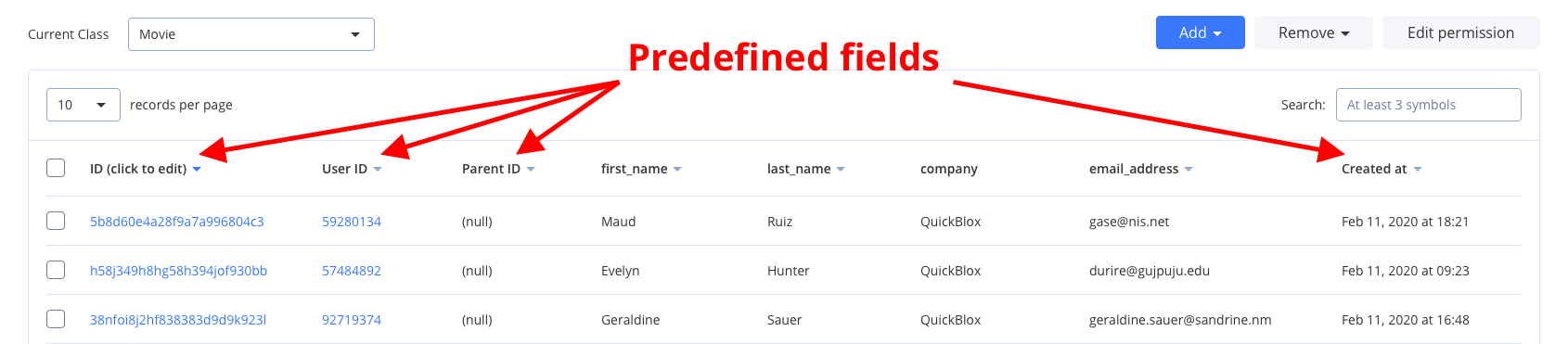
_id, user_id, parent_id, created_at, and updated_at.
Allowed data types: Integer (or Array of Integer); String (or Array of String); Float (or Array of Float); Boolean (or Array of Boolean); Location (Array of [, ]); File; Date.
Visit Key Concepts page to learn the most important QuickBlox concepts.
Before you begin
- Register a QuickBlox account. This is a matter of a few minutes and you will be able to use this account to build your apps.
- Configure QuickBlox SDK for your app. Check out Setup page for more details.
- Create a user session to be able to use QuickBlox functionality. See Authentication page to learn how to do it.
Create class
To start using Custom Objects module, create a class:- Go to QuickBlox Dashboard.
- Follow Custom => Add => Add new class direction. As a result, Add new class popup will appear.
- Enter a class name, add any fields you want.
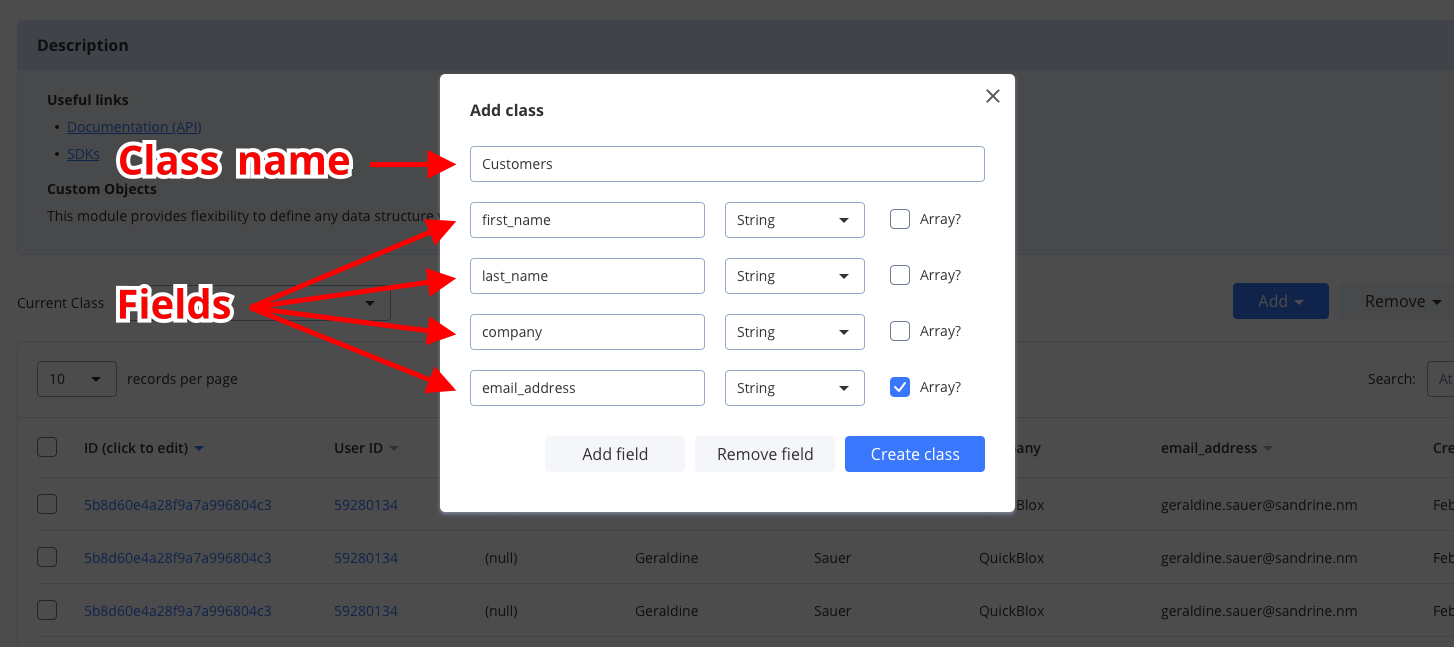
- Click Create class button to create a new class.
Create records
The easiest way to create a new record from the QuickBlox Dashboard, do the following:- Follow Custom => Current class => Your Class direction.
- Click Add => Add record button and Add new record popup will appear.
- Fill in any fields you want.
- Click Add record button and a new record will be added and shown in the table.
Dart
To create a multiple objects, use the code snippet below.
Dart
Retrieve records by IDs
To get records with a particular record ID, use thegetByIds() method. Set the record ID using the ids object. Go over Sort operators and Search operators sections to learn about filters and search operators you can use to retrieve records.
Dart
Retrieve records
You can search for records of a particular class. The request below will return records of theTestFlutterClass class with the version field containing 1000 value, sorted by the created_at field in descending order, limited to 50 records on the page, and with 10 records skipped at the beginning.
Dart
If you want to retrieve only records updated after some specific date time and order the search results, you can apply operators. Thus, you can apply search and sort operators to the list of records on the page so that it is easier to view specific records.
Search operators
You can use search operators to get more specific search results. The request below will return records of theFlutterTestClass class by the flutterTestField field with a value greater than 10.
Dart
Sort operators
You can use sort operators to order the search results. The request below will return records of theFlutterTestClass class sorted by the flutterTestField field in descending order.
Dart
Update records
To update a single record with a particular record ID, use the code snippet below.Dart
You can update multiple records using the code snippet below.
Dart
Delete records
To delete a single record, use the code snippet below.Dart
To delete a multiple records, use the code snippet below.
Dart
Relations
It is possible to create a relation between objects of two different classes via_parent_id field.
For example, we have the class Rating that contains score, review, and comment fields. We also have a Movie class. So we can create a record of class Rating that will point to the record of the class Movie via its _parent_id field, so the _parent_id field will contain the ID of record from class Movie.
If you need to retrieve all children, you can retrieve records with the filter
_parent_id=<id_of_parent_class_record>.