
Overview

Starting from version 2.17.0 of JavaScript SDK, the AI functionality is enabled and based on SmartChat Assistants. The QuickBlox JavaScript SDK provides a range of features to enhance the chat experience. With essential messaging functionalities such as answer assistant, users can engage in more interactive conversations. Supported features
NameDescriptionMin SDK Version
AI Answer AssistGenerates a draft response based on chat history for the selected message.2.17.0
AI TranslateProvides translation based on chat history to selected incoming message.2.17.0
AI GatewayMultimodal AI with text and images support (OpenAI-compatible format).2.21.5
AI SummarizeGenerates a summary of dialog messages (up to 1000 recent messages).2.21.5

Requirements

The minimum requirements for using AI features are:
  • JS QuickBlox SDK v2.17.0 (for AI Answer Assist and AI Translate)
  • JS QuickBlox SDK v2.21.5 (for AI Gateway and AI Summarize)
  • QuickBlox account with activated SmartChat Assistants
Visit Key Concepts page to learn the most important QuickBlox concepts. Visit Smart Chat Assistant overview page to learn the most important SmartChat Assistants concepts.

Before you begin

  1. Register a QuickBlox account. This is a matter of a few minutes and you will be able to use this account to build your apps.
  2. Configure QuickBlox SDK for your app. Check out Setup page for more details.
  3. Create a user session to be able to use QuickBlox functionality. See Authentication page to learn how to do it.
  4. Create or update your SmartChat Assistant. See Smart Chat Assistant documentation to learn how to do it.

Enable AI Extensions

  1. Navigate to the Dashboard => YOUR_APP => AI Extensions page.
  2. Select the checkboxes for the features you want to enable.
  3. Click the Save button to save changes.
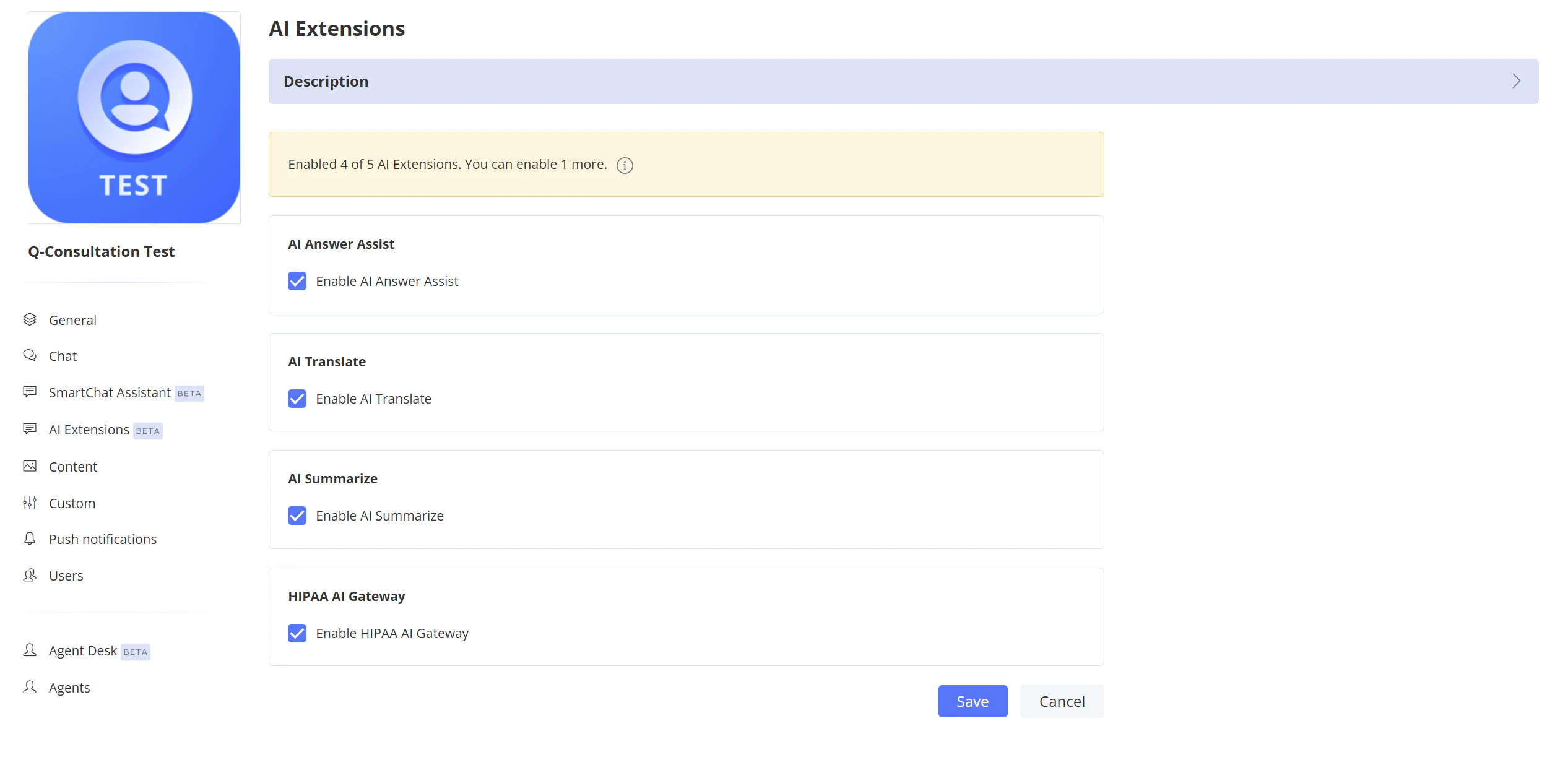
Enable AI Extensions

Get SmartChat Assistant ID

To get the SmartChat Assistant ID, navigate to the Dashboard => YOUR_APP => SmartChat Assistant page. The ID is displayed in the list of assistants.
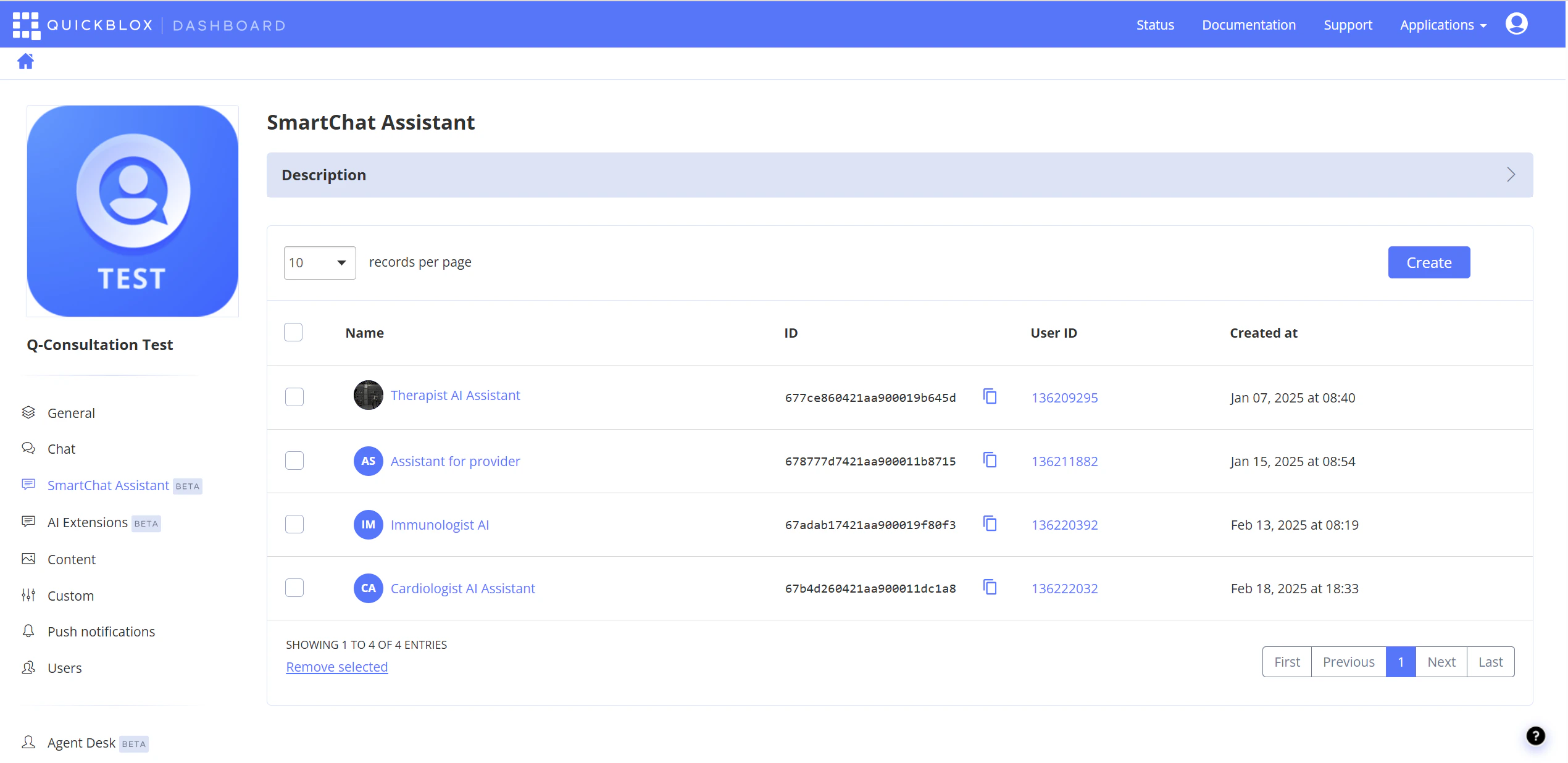
SmartChat Assistant list with IDs

AI Answer Assist

QuickBlox AI Answer Assist generates a contextually relevant draft response based on the chat history. Use it to suggest replies that match the conversation context.
JavaScript
var smartChatAssistantId = '6633a1300fea600001bd6e71';
var messageToAssist = 'Where is my order?';
var history = [
                {role: "user", message: "Hello"},
                {role: "assistant", message: "Hi"}
              ];
 QB.ai.answerAssist(smartChatAssistantId,
                    messageToAssist,
                    history,
                    function (error, response) {
                                if (error) {
                                    console.error('QB.ai.answerAssist: Error:', error);
                                } else {
                                    console.log('QB.ai.answerAssist: Response:', response.answer);
                                }
                    });
ArgumentTypeDescription
smartChatAssistantIdStringThis field should hold your actual Smart Chat Assistant ID that you’ll receive from the QuickBlox account. This ID is used to authenticate your requests to the AI service.
messageToAssistStringMessage you want to get answer for.
historyArray of ObjectConversation history. Used to add context. Each object of array should have the two fields: ‘role’ and ‘message’. The field role should contains one of next values: ‘user’ or ‘assistant’. The field message should be a string with chat message.
callbackfunctionThe callback function.

AI Translate

QuickBlox offers translation functionality that helps users easily translate text messages in chat, taking into account the context of the chat history.
TypeScript
var smartChatAssistantId = '6633a1300fea600001bd6e71';
var textToTranslate = 'Hola!';
var languageCode = 'en';
QB.ai.translate(smartChatAssistantId,
                     textToTranslate,
                     languageCode,
                     function (error, response) {
                                if (error) {
                                    console.error('QB.ai.translate: Error:', error);
                                } else {
                                    console.log('QB.ai.translate: Response:', response.answer);
                                }
                  });

ArgumentTypeDescription
smartChatAssistantIdStringThis field should hold your actual Smart Chat Assistant ID that you’ll receive from the QuickBlox account. This ID is used to authenticate your requests to the AI service.
textToTranslateStringText to translate.
languageCodeStringTarget language code in ISO 639-1 format (e.g., en, es, fr, de). See AI Translate API for the list of supported languages.
callbackfunctionThe callback function.

AI Gateway

Available starting from SDK version 2.21.5
QuickBlox AI Gateway provides multimodal AI capabilities with support for text and images using OpenAI-compatible message format. This feature allows you to send complex requests including image recognition, multi-turn conversations, and system prompts. Basic text message:
JavaScript
var smartChatAssistantId = '6633a1300fea600001bd6e71';
var messages = [
    {
        role: 'user',
        content: [
            { type: 'text', text: 'Hello, what can you do?' }
        ]
    }
];

QB.ai.gateway(smartChatAssistantId, messages, function (error, response) {
    if (error) {
        console.error('QB.ai.gateway: Error:', error);
    } else {
        console.log('QB.ai.gateway: Response:', response.answer);
    }
});
Image recognition:
JavaScript
var smartChatAssistantId = '6633a1300fea600001bd6e71';
var messages = [
    {
        role: 'user',
        content: [
            { type: 'text', text: "What's in this image?" },
            {
                type: 'image_url',
                image_url: {
                    url: 'https://example.com/image.jpg'
                }
            }
        ]
    }
];

QB.ai.gateway(smartChatAssistantId, messages, function (error, response) {
    if (error) {
        console.error('QB.ai.gateway: Error:', error);
    } else {
        console.log('QB.ai.gateway: Response:', response.answer);
    }
});
Multi-turn conversation with system prompt:
JavaScript
var smartChatAssistantId = '6633a1300fea600001bd6e71';
var messages = [
    {
        role: 'developer',
        content: [{ type: 'text', text: 'You are a helpful math tutor.' }]
    },
    {
        role: 'user',
        content: [{ type: 'text', text: 'What is 2+2?' }]
    },
    {
        role: 'assistant',
        content: [{ type: 'text', text: '2+2 equals 4.' }]
    },
    {
        role: 'user',
        content: [{ type: 'text', text: 'And what is that multiplied by 3?' }]
    }
];

QB.ai.gateway(smartChatAssistantId, messages, function (error, response) {
    if (error) {
        console.error('QB.ai.gateway: Error:', error);
    } else {
        console.log('QB.ai.gateway: Response:', response.answer);
    }
});
Arguments
ArgumentTypeDescription
smartChatAssistantIdStringThis field should hold your actual Smart Chat Assistant ID that you’ll receive from the QuickBlox account. This ID is used to authenticate your requests to the AI service.
messagesArray of ObjectArray of message objects in OpenAI-compatible format. See message structure below.
callbackfunctionThe callback function.
Message structure Each message in the messages array should have the following structure:
FieldTypeDescription
roleStringOne of: 'user', 'assistant', or 'developer' (for system prompts).
contentArray of ObjectArray of content items. Each item can be text or image_url type.
Content item types: Text content:
{ type: 'text', text: 'Your message text' }
Image content:
{ type: 'image_url', image_url: { url: 'https://example.com/image.jpg' } }
Images can be provided as URLs or base64 data URIs (e.g., data:image/jpeg;base64,...).

AI Summarize

Available starting from SDK version 2.21.5
QuickBlox AI Summarize generates a summary of dialog messages. This feature is useful for quickly understanding the context of a conversation without reading all messages.
JavaScript
var smartChatAssistantId = '6633a1300fea600001bd6e71';
var dialogId = '5f3e7a8b9c1d2e3f4a5b6c7d';

QB.ai.summarize(smartChatAssistantId, dialogId, function (error, response) {
    if (error) {
        console.error('QB.ai.summarize: Error:', error);
    } else {
        console.log('QB.ai.summarize: Summary:', response.summary);
    }
});
Arguments
ArgumentTypeDescription
smartChatAssistantIdStringThis field should hold your actual Smart Chat Assistant ID that you’ll receive from the QuickBlox account. This ID is used to authenticate your requests to the AI service.
dialogIdStringThe ID of the dialog to summarize.
callbackfunctionThe callback function.
Response The response object contains a summary field with the generated summary text:
{
    summary: "The conversation discussed project deadlines and task assignments..."
}
  • AI Summarize processes up to 1,000 most recent messages in the dialog.
  • For empty dialogs, the response will be { summary: "Chat is empty." }.
  • The user must have access to the dialog to summarize it.