Send nodes
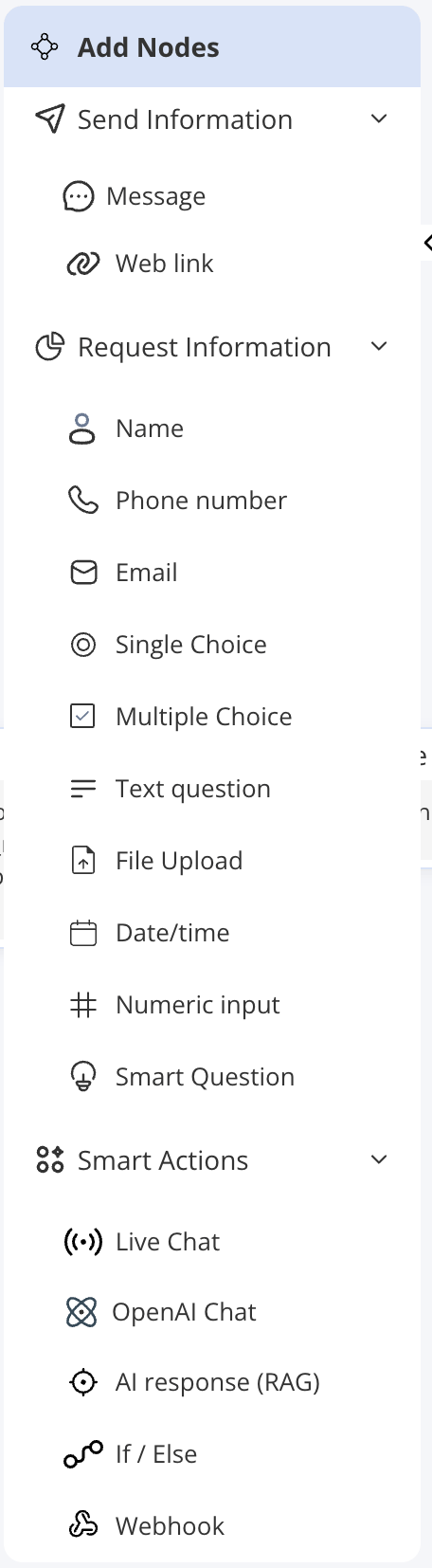
Send nodes deliver content to the user without expecting a reply.| Node | Description | When to use |
|---|---|---|
| Message | Sends a predefined text message to the user. Supports variable substitution so you can personalise the text with previously collected answers. | Greetings, instructions, confirmations, or any static text you want the agent to display. |
| Web link | Sends a clickable link with optional label text. | Directing users to a webpage, documentation, or an external resource. |
Request nodes
Request nodes ask the user for information and wait for a response. Each answer can be saved as a named variable for use later in the flow.| Node | Description | When to use |
|---|---|---|
| Name | Asks for the user’s name. | Personalising the rest of the conversation. |
| Phone number | Asks for a phone number, with optional format validation. | Collecting contact details. |
| Asks for an email address, with optional format validation. | Collecting contact details or account lookup. | |
| Text question | Asks a free-text question and accepts any reply. | Open-ended responses where the exact format does not matter. |
| Numeric input | Asks for a number. | Order quantities, reference numbers, ages, or any numeric value. |
| Date/time | Asks for a date and/or time. | Scheduling, booking, or filtering by date. |
| File Upload | Prompts the user to upload a file. | Support tickets, document submissions, or photo evidence. |
| Single Choice | Presents a set of options and accepts exactly one selection. | Menus, categories, or yes/no questions. |
| Multiple Choice | Presents a set of options and accepts one or more selections. | Preferences, multi-select filters, or feature requests. |
| Smart Question | Matches the user’s free-text reply against keywords you define for each intent (using Contain or Exact matching) and routes to that intent’s path. A fallback path handles replies that match no keyword. | Routing users based on what they type rather than a button tap — for example, detecting “billing”, “technical issue”, or “account” from keywords. |
Smart Actions nodes
Smart Actions perform logic, AI operations, or integrations.| Node | Description | When to use |
|---|---|---|
| OpenAI Chat | Starts a multi-turn AI conversation within the workflow using the instructions you set on the node. The user can chat back and forth with the AI; the flow moves on to the next node once the configured turn limit (Max Turns) is reached. | Conversational sub-flows where you want flexible AI interaction at a specific point in an otherwise structured flow. |
| AI response (RAG) | Answers the user’s question using the agent’s knowledge base. You can optionally enable a fallback — a “don’t know” message and/or a fallback node — for when no relevant answer is found. | Knowledge base look-ups at a specific step in the flow; especially useful when you want AI answers only after collecting required context. |
| If / Else | Evaluates one or more conditions based on variable values or the previous node’s output, then routes the conversation to the matching branch. | Branching the flow based on what the user has already answered — for example, routing VIP customers differently, or skipping steps based on earlier selections. |
| Webhook | Sends an HTTP request to an external URL with a method, headers, and body you define (any of which can include collected variables). You must define a fallback path for when the webhook call fails. | CRM updates, booking confirmations, look-ups in external systems, or any integration requiring a server-side call. |
| Live Chat | Transfers the conversation to a human agent. The workflow pauses while the human handles the conversation. | Escalation scenarios where the issue requires human attention — for example, after a complaint or when the AI cannot resolve the request. |
Start and End nodes
These nodes are fixed anchor points in every workflow.| Node | Description |
|---|---|
| Start | The single entry point of every workflow. Every conversation begins here. It cannot be deleted or duplicated. |
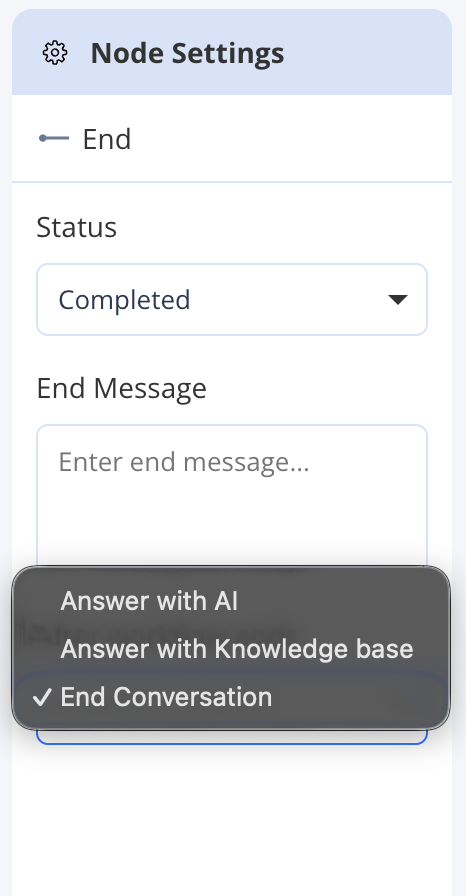
| End | Marks the terminal point of a conversation path. You can have multiple End nodes for different paths. Each End node has an After workflow ends setting (see below) and an optional farewell message. |
After workflow ends
Each End node has an After workflow ends setting that controls what the AI Agent does once a conversation path reaches that End node.| Setting | Behaviour |
|---|---|
| Answer with AI | The agent continues the conversation using its OpenAI instructions — free-form AI answering, as a Knowledge Agent would. |
| Answer with Knowledge base | The agent switches to knowledge base (RAG) answering, responding only from uploaded content. |
| End Conversation | The conversation is closed. No further AI responses are sent. |